
1. Giriş
Thank you for choosing the Podofo 1 Din Android Car Stereo. This device integrates advanced features such as a 7-inch retractable touch screen, Android operating system, Bluetooth, GPS navigation, Wi-Fi connectivity, FM/RDS radio, Mirror Link, AUX-in, and support for a backup camera. This manual provides essential information for installation, operation, maintenance, and troubleshooting to ensure optimal performance and user experience.

Image 1.1: Podofo 1 Din Android Car Stereo with its main components and accessories.
2. Paket İçeriği
Lütfen tüm öğelerin mevcut olduğundan emin olmak için paketi dikkatlice kontrol edin:
- 1 x Single DIN Car Stereo Unit
- 1 x Yedek Kamera
- 1 x GPS Anteni
- 1 x Güç Kablosu Demeti
- 1 x Speaker Cable Harness
- 2 x Sökme Anahtarı
- 1 x Kullanım Kılavuzu
- 1 x Montaj Braketi Seti

Resim 2.1: Paket içeriğinin görsel temsili.
3. Özellikler
| Sistem | Android 10.0 |
| Ekran Boyutu | 7-inch Retractable Touch Screen |
| Çözünürlük | 1024x600 |
| Bluetooth Sürümü | 4.2 |
| FM Radyo Aralığı | 87.5 ~ 108 MHz |
| Çalışma Sıcaklığı | -10℃ ~ +60℃ |
| USB Arayüzü | USB 2.0 |
| Cilttage | 12V |
| Çıkış Gücü | 60W |
| Depolamak | 1GB RAM + 16GB ROM |
| Ses Biçimleri | MP3 / WMA / WA / OGG / FLAC / APE |
| Video Formatları | RM / RMVB / MP4 / FLV / MKV / 3GP / AVIASF / SWFMP1 |
| Resim Biçimi | JPG |
| Bağlantı | Wifi |
| Ürün Boyutları (U x G x Y) | 18.8cm x 5.8cm x 16.5cm |
| Ağırlık | 1660 Gram |

Image 3.1: Product details including dimensions and rear panel connections.
4. Kurulum ve Kurulum
Before installation, ensure your vehicle's power is disconnected. Professional installation is recommended.
4.1 Kablo Bağlantıları
- Güç Bağlantısı: Connect the power cable harness to your vehicle's power supply (ACC, B+, GND). Ensure correct polarity.
- Hoparlör Bağlantısı: Connect the speaker cable harness to your vehicle's speakers. Match positive and negative terminals.
- GPS Anteni: GPS antenini cihazın arkasındaki özel bağlantı noktasına bağlayın ve görüş alanı açık bir yere monte edin. view gökyüzünün.
- Geri Görüş Kamerası: Connect the backup camera's video output to the 'CAMERA IN' port on the stereo. Connect the camera's power to your vehicle's reverse light circuit for automatic activation.
- AUX-in/USB: Connect external devices via the AUX-in port or USB ports as needed.
- Direksiyon Kontrolü (SWC): If your vehicle supports SWC, connect the SWC wires (KEY1, KEY2) to the corresponding wires from your vehicle's harness. Configuration will be done in the settings menu.

Image 4.1: Backup camera wiring diagram.
4.2 Ünitenin Montajı
Insert the single DIN unit into your vehicle's dashboard opening. Secure it using the provided mounting brackets and screws. Ensure the retractable screen mechanism has enough clearance to operate freely.
5. Kullanım Talimatları
5.1 Temel İşlemler
- Güç Açma/Kapatma: Press the power button (usually labeled SRC or PWR) to turn the unit on or off.
- Ses Kontrolü: Use the rotary knob or on-screen controls to adjust the volume.
- Ekran Geri Çekme: Manually adjust the screen's angle or retract it into the unit as desired.
5.2 Bluetooth Connectivity (Bluetooth 4.2)
Pair your mobile phone with the car stereo for hands-free calling and audio streaming.
- Araç müzik sistemindeki Bluetooth menüsüne gidin.
- Cep telefonunuzda Bluetooth'u etkinleştirin ve kullanılabilir cihazları arayın.
- Select "MY PODOFO" or a similar name from the list on your phone.
- İstendiğinde eşleştirme kodunu onaylayın.
- Eşleştirme işlemi tamamlandıktan sonra, araç müzik sistemi üzerinden arama yapabilir/alabilir ve müzik çalabilirsiniz.

Image 5.1: Bluetooth connection and FM/RDS radio interface.
5.3 FM/RDS Radyo
Access the Radio application to listen to FM broadcasts. The RDS function displays station names and program information where available.
- Open the "Radio" app from the main menu.
- Ekrandaki kontrolleri kullanarak radyo istasyonlarını tarayabilir, manuel olarak ayarlama yapabilir veya önceden ayarlanmış istasyonları seçebilirsiniz.
5.4 GPS Navigasyonu
The unit supports both online and offline navigation. Ensure the GPS antenna is properly connected.
- Open the "Navigation" or "Maps" app.
- For offline maps, download them via Wi-Fi before driving.
- Varış noktanızı girin ve sesli yönlendirmeleri takip edin.
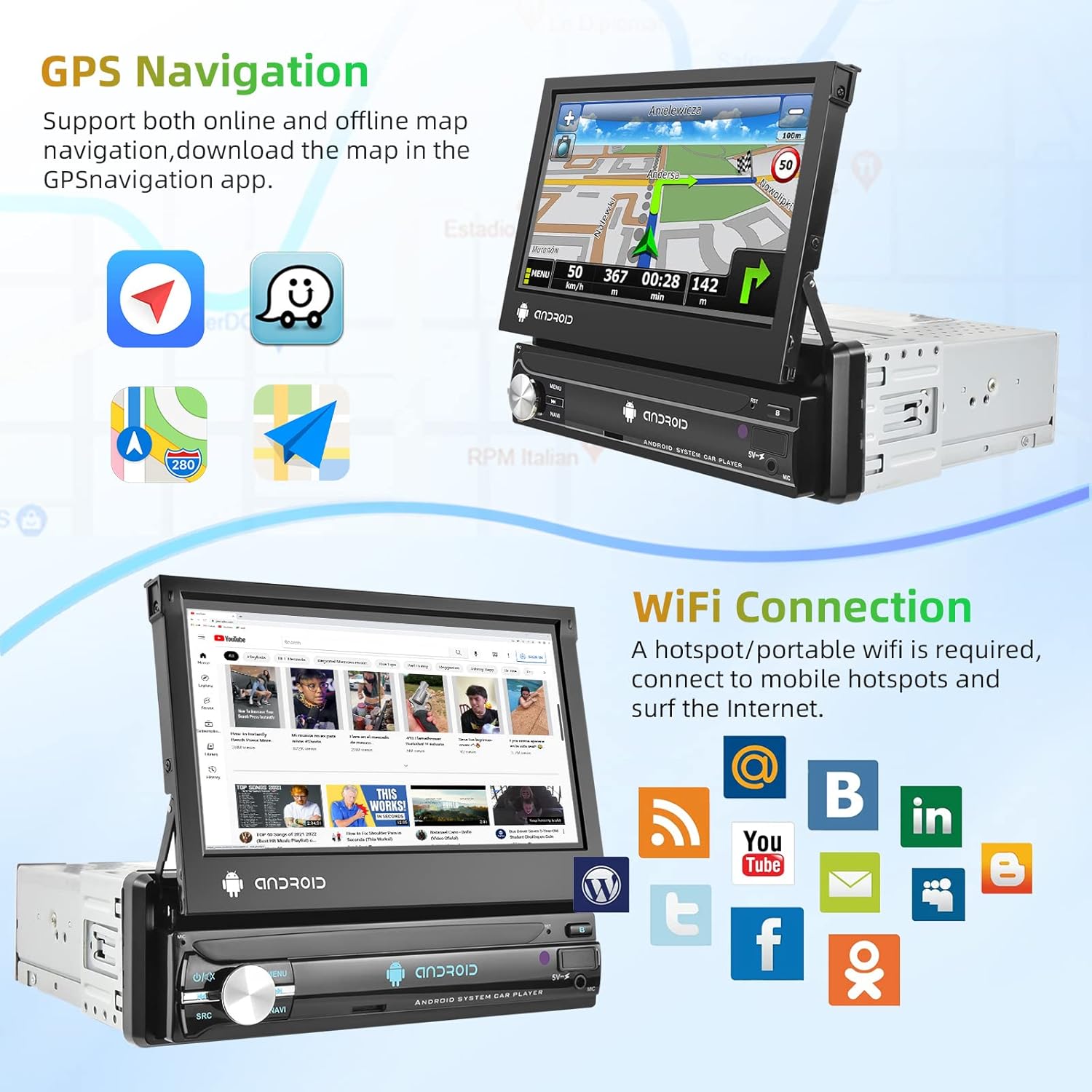
Image 5.2: GPS navigation and Wi-Fi connection features.
5.5 Wi-Fi Bağlantısı
Connect to a mobile hotspot or Wi-Fi network to access online features, download apps, and browse the internet.
- Go to "Settings" and select "Wi-Fi".
- Wi-Fi'yi açın ve istediğiniz ağı seçin.
- Gerekirse şifreyi girin.
5.6 Ayna Bağlantısı
Project your smartphone screen onto the car stereo display. Supports both Android and iOS devices via USB connection.
- Akıllı telefonunuzu bir USB kablosu kullanarak araç müzik sistemine bağlayın.
- Bağlantıyı kurmak için hem telefonunuzdaki hem de müzik sisteminizdeki ekran yönergelerini izleyin.

Image 5.3: Split screen, EQ settings, Mirror Link, and Steering Wheel Control features.
5.7 Geri Görüş Kamerası Ekranı
When the vehicle is shifted into reverse gear, the car stereo will automatically display the view Bağlı geri görüş kamerasından.
5.8 Direksiyon Kontrolü (SWC)
Configure your vehicle's steering wheel buttons to control the car stereo functions.
- Go to "Settings" and find the "Steering Wheel Control" or "SWC Learning" option.
- Follow the on-screen instructions to assign functions to each button.
5.9 EQ Setting
Adjust audio equalization for a personalized sound experience.
- "EQ" veya "Ses Ayarları" menüsüne erişin.
- Önceden ayarlanmış ekolayzır modlarından birini seçin veya frekans bantlarını manuel olarak ayarlayın.
5.10 Bölünmüş Ekran
Gelişmiş çoklu görev performansı için ekranda aynı anda iki uygulama çalıştırın.
- While an app is open, long-press the recent apps button or drag an app to one side of the screen (depending on Android version).
- Select another app to open on the other side.
6. Bakım
- Ekran Temizleme: Dokunmatik ekranı nazikçe silmek için yumuşak, tüy bırakmayan bir bez kullanın. Aşındırıcı temizleyicilerden veya çözücülerden kaçının.
- Genel Temizlik: Keep the unit free from dust and debris. Use a dry cloth for the main body.
- Yazılım Güncellemeleri: En iyi performansı sağlamak ve yeni özelliklere erişmek için sistem ayarları üzerinden düzenli olarak yazılım güncellemelerini kontrol edin.
7. Sorun Giderme
| Sorun | Olası Neden | Çözüm |
|---|---|---|
| Ünite açılmıyor. | Yanlış kablolama, sigorta atmış, güç kaynağı yok. | Check power cable connections (ACC, B+, GND). Verify vehicle fuse. Ensure vehicle battery is charged. |
| Ses yok. | Hoparlör kabloları bağlantısı kesilmiş, ses seviyesi çok düşük, yanlış ses kaynağı. | Check speaker wiring. Increase volume. Select correct audio source (FM, Bluetooth, USB, AUX). |
| GPS sinyali kayıp veya hatalı. | GPS anteni yanlış bağlanmış veya engellenmiş. | GPS anteninin güvenli bir şekilde bağlandığından ve açık bir yere (örneğin, gösterge paneline, metal bir yüzeyin altına değil) monte edildiğinden emin olun. |
| Bluetooth bağlanmıyor. | Bluetooth off on either device, incorrect pairing process. | Ensure Bluetooth is enabled on both the stereo and phone. Delete previous pairings and try pairing again. |
| Geri görüş kamerası görüntü vermiyor. | Camera not powered, video cable disconnected, reverse trigger wire not connected. | Check camera power and video connections. Ensure the reverse trigger wire is correctly connected to the vehicle's reverse light. |
8. Garanti ve Destek
8.1 Garanti Bilgileri
Bu ürün bir 2 yıllık üretici garantisiLütfen garanti talepleriniz için satın alma belgenizi saklayın. Garanti, normal kullanım koşullarında malzeme ve işçilik kusurlarını kapsar.
8.2 Müşteri Desteği
For technical assistance, troubleshooting beyond this manual, or warranty inquiries, please contact Podofo customer support through the retailer where the product was purchased or visit the official Podofo webiletişim bilgileri için site.