
VANBAR D300
VANBAR D300 Trail Camera User Manual
Model: D300
giriiş
Thank you for choosing the VANBAR D300 Trail Camera. This device is designed for capturing high-quality images and videos of wildlife and for security monitoring in outdoor environments. Please read this manual carefully to ensure proper setup and operation of your camera.

Image: The VANBAR D300 Trail Camera in an outdoor setting, showcasing its camouflage design and primary use for wildlife observation.
Ürün Bittiview
The VANBAR D300 Trail Camera is a compact and robust device featuring a 20MP camera for still images and 1080P Full HD video recording. It is equipped with a 120° wide-angle lens and a rapid 0.2-second trigger speed to capture fast-moving subjects. Its IP66 waterproof rating ensures durability in various weather conditions, making it suitable for hunting, wildlife monitoring, and property security.

Image: A hand holding the VANBAR D300 Trail Camera, illustrating its mini and portable design.
Paket İçeriği
Lütfen paketinizde tüm öğelerin mevcut olduğundan emin olun:
- VANBAR D300 Trail Camera
- Kullanıcı Kılavuzu
- Montaj Kemeri
- USB kablosu
- Base of Stand
- Body of Stand
- Altıgen anahtarı
- Vidalar ve Dübeller
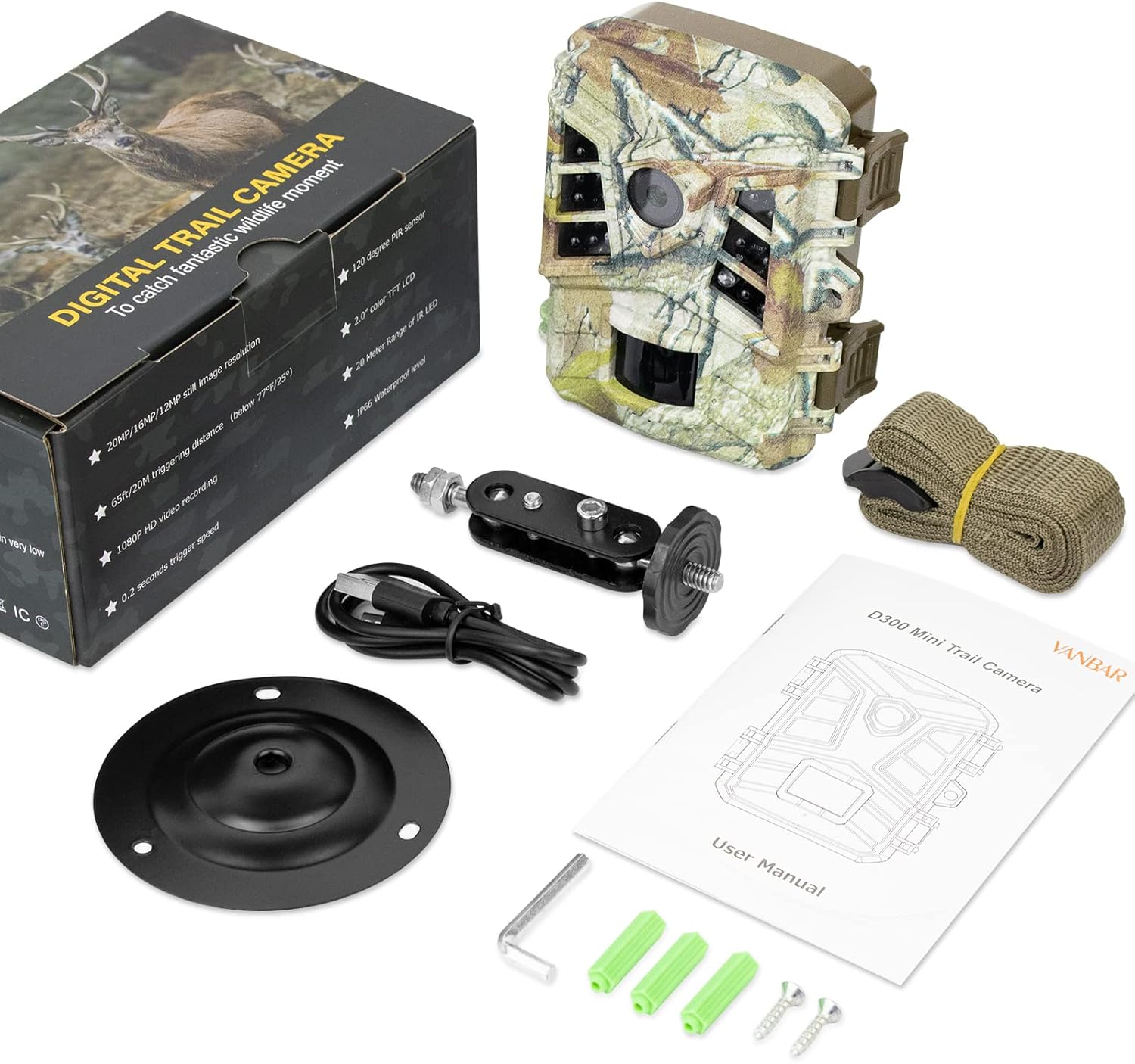
Image: All components included in the VANBAR D300 Trail Camera package, laid out for inspection.
Kurmak
1. Pil Kurulumu
- Kameranın c düğmesini açın.asinYan klipsleri açarak g harfini elde edin.
- Pil bölmesini bulun.
- Insert 4 AA batteries (not included) according to the polarity markings (+/-) inside the compartment.
- Ensure the battery compartment is securely closed to maintain the IP66 waterproof seal.
2. Micro SD Kart Kurulumu
- With the camera open, locate the Micro SD card slot.
- Insert a Micro SD card (up to 32GB, not included) into the slot until it clicks into place. Ensure the card is inserted in the correct orientation.
- Çıkarmak için, kartı hafifçe itin, kendiliğinden dışarı fırlayacaktır.

Image: A visual reminder that the Micro SD card and batteries are separate purchases.
3. Kameranın Montajı
The camera can be mounted using the provided strap or the adjustable stand and screws.
- Kayış Montajı: Thread the mounting belt through the slots on the back of the camera and secure it around a tree or pole.
- Stand Montajı: Attach the camera to the body of the stand, then secure the base of the stand to a flat surface using the screws and wall plugs. Adjust the camera angle as needed.

Image: The trail camera discreetly mounted amidst green foliage, demonstrating its camouflage and placement flexibility.
Kullanım Talimatları
1. Açma/Kapama
- To power on, slide the mode switch to the "ON" position. The camera will enter test mode or start recording based on settings.
- To power off, slide the mode switch to the "OFF" position.
2. Menü Gezinme ve Ayarlar
The camera features a multi-language menu for easy configuration. Use the navigation buttons to browse options and confirm selections.
- Mod Seçimi: Choose between Photo, Video, or Photo+Video modes.
- Fotoğraf Çözünürlüğü: Select up to 20MP for still images.
- Video Çözünürlüğü: Select 1080P Full HD for video recording.
- Tetikleme Aralığı: Algılama işlemleri arasındaki gecikmeyi ayarlayın.
- Zaman Aşımı: Configure the camera to capture images at set intervals.
- Zamanlayıcı: Set specific times for the camera to be active.
- Devamlı atış: Adjust the number of photos taken per trigger.

Image: A visual demonstration of the superior detail captured by the 20MP resolution compared to 12MP.

Image: A kingfisher in motion, demonstrating the camera's fast 0.2-second trigger speed for capturing dynamic moments.
3. Gece Görüşü
The camera utilizes low-glow infrared technology for invisible night vision, ensuring that animals are not disturbed and footage is captured clearly in low-light conditions. Nighttime images and videos will be in black and white.

Image: A deer and its fawn visible in a forest at night, captured using the camera's invisible infrared night vision feature.
Bakım
1. Su yalıtımı
The VANBAR D300 is IP66 waterproof, protecting it from rain, dust, and fog. To maintain this protection, ensure the camera casing is always securely closed and the rubber seals are free from debris before deployment.

Image: The trail camera mounted on a tree during rainfall, demonstrating its IP66 waterproof capability.
2. Temizlik
Regularly clean the camera lens and PIR sensors with a soft, dry cloth to ensure clear images and optimal motion detection. Avoid using abrasive cleaners or solvents.
3. Pil Ömrü
The camera operates on 4 AA batteries. Battery life can vary based on usage, temperature, and battery quality. Consider using high-quality alkaline or rechargeable batteries for extended operation. The camera also supports external solar panels (not included) for continuous power.
Sorun giderme
| Sorun | Olası Neden / Çözüm |
|---|---|
| Kamera açılmıyor | Check battery orientation and charge level. Ensure the mode switch is in the "ON" position. |
| Kötü görüntü/video kalitesi | Clean the camera lens. Ensure settings are configured for 20MP photos and 1080P video. Check for condensation inside the lens. |
| No night vision / Dark night images | Ensure the camera is in an area with sufficient ambient light for the IR sensors to activate. Check battery level as low power can affect IR performance. |
| Kamera tetiklenmiyor | Verify motion sensor sensitivity settings. Ensure the camera is positioned correctly to detect movement within its field of view. Check for obstructions in front of the PIR sensor. |
| Su girişi / İçeride nem | Kameranın c olduğundan emin olun.asing is fully closed and latched. Inspect the rubber seals for damage or debris. Avoid submerging the camera. |
| SD kart hatası | Ensure the Micro SD card is correctly inserted and formatted. Try a different, compatible Micro SD card. |
Özellikler
| Etkili Hareketsiz Çözünürlük | 20 MP |
| Video Yakalama Çözünürlüğü | 1080p Full HD |
| Tetik Hızı | 0.2 saniye |
| ViewAçı | 120 Derece |
| Uluslararası Koruma Derecelendirmesi | IP66 (Su geçirmez) |
| Güç Kaynağı | Battery Powered (4 AA batteries), Solar (external panel not included) |
| Düşük Işık Teknolojisi | Gece Rengi (Kızılötesi) |
| Bağlantı Teknolojisi | Wireless (Wi-Fi) - Note: Product specifications mention Wi-Fi, but feature bullets do not elaborate on direct Wi-Fi connectivity for data transfer. Refer to the product's specific Wi-Fi functionality in the user manual for details. |
| Önerilen Kullanımlar | Game & Trail, Outdoor Security |
| Ürün Ağırlığı | 13.4 ons |
| Paket Boyutları | 6.46 x 4.06 x 2.91 inç |
Garanti ve Destek
VANBAR offers a ONE-YEAR after-sale service for this product. If you encounter any issues or have questions regarding your VANBAR D300 Trail Camera, please do not hesitate to contact our customer service team.
For product support, please refer to the contact information provided in the user manual included with your product or visit the official VANBAR store: