
giriiş
Thank you for choosing the Chieftec PPS-850FC-A3 850W ATX 3.0 Power Supply Unit. This manual provides essential information for the safe and efficient installation, operation, and maintenance of your new power supply. Please read this manual thoroughly before installation and retain it for future reference.
Güvenlik Talimatları
- Always disconnect the AC power cord from the wall outlet before installing or removing the power supply.
- Güç kaynağı ünitesini açmayın.asing. Yüksek hacimtages are present inside, and there are no user-serviceable parts. Opening the casing, garantiyi geçersiz kılacaktır.
- Ensure the power supply is installed in a well-ventilated area, free from excessive heat, humidity, or dust.
- Yalnızca bu güç kaynağıyla birlikte verilen modüler kabloları kullanın. Uyumsuz kabloların kullanılması, güç kaynağına veya bağlı bileşenlere zarar verebilir.
- Ensure all connectors are securely attached before powering on the system.
- Bu ürün kişisel bilgisayar sistemlerinde kullanılmak üzere tasarlanmıştır. Başka bir amaçla kullanmayınız.
Paket İçeriği
Lütfen paketin içeriğini kontrol edin. Eksik veya hasarlı bir ürün varsa, satıcınızla iletişime geçin.
- Chieftec PPS-850FC-A3 850W ATX 3.0 Power Supply Unit
- Modular Cable Set (including PCIe Gen 5 connector)
- AC Güç Kablosu
- Montaj Vidaları
- Kullanım Kılavuzu (bu belge)
Kurulum ve Yükleme
Follow these steps to properly install your Chieftec PPS-850FC-A3 power supply unit.
1. Kurulum Öncesi Kontrol
- Ensure your computer case supports ATX form factor power supplies.
- Verify that your motherboard and other components are compatible with an 850W power supply and ATX 3.0 standard.
2. Fiziksel Kurulum
- PSU'nun montajı: Carefully slide the power supply into the designated PSU bay in your computer case. Ensure the fan is oriented correctly for optimal airflow (typically facing down if there's a bottom vent, or facing inside the case). Secure the PSU with the provided mounting screws.
- Modüler Kabloların Bağlanması: Identify the necessary modular cables for your system components (motherboard, CPU, GPU, storage drives). Connect them to the appropriate ports on the power supply.

Image: Chieftec PPS-850FC-A3 power supply shown with its retail packaging, highlighting the unit itself and a detailed view of the PCIe Gen 5 connector, which is essential for modern high-performance graphics cards.
- Connecting to Motherboard: 24 pinli ATX ana güç konektörünü anakartınıza bağlayın.
- Connecting to CPU: Connect the 4+4-pin or 8-pin EPS/CPU power connector(s) to your motherboard.
- Connecting to GPU: For graphics cards, use the appropriate PCIe power connectors. For modern GPUs, utilize the dedicated 12VHPWR (PCIe Gen 5) connector if your GPU supports it.
- Connecting to Peripherals: Connect SATA power cables to SSDs/HDDs and Molex connectors to other peripherals as needed.
- AC Güç Bağlantısı: Tüm dahili bağlantılar güvenli bir şekilde yapıldıktan sonra, AC güç kablosunu güç kaynağına ve ardından duvardaki prize bağlayın.
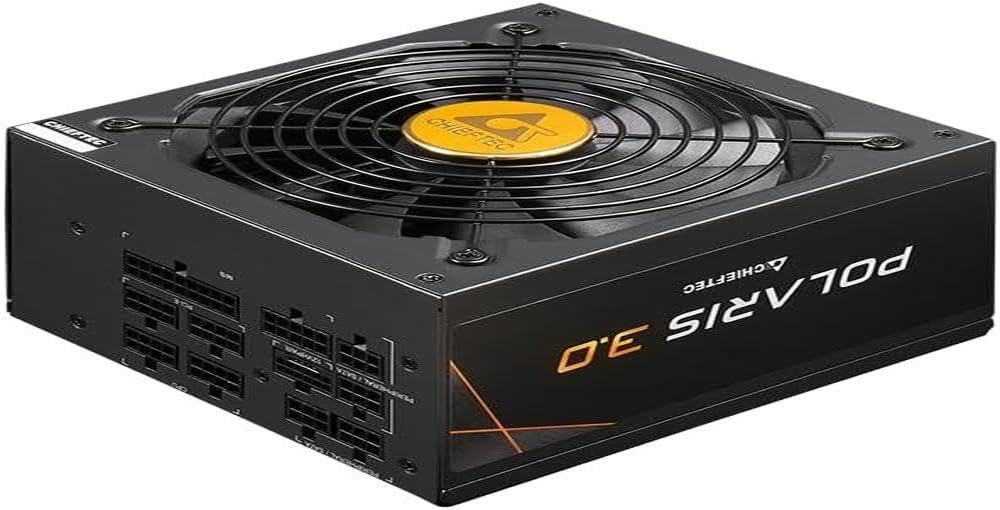
Resim: Doğrudan ön view of the Chieftec PPS-850FC-A3 power supply, showcasing its large cooling fan and the protective grille. The Chieftec logo is visible in the center of the fan.
Kullanım Talimatları
After successful installation, ensure the power switch on the back of the PSU is in the 'ON' position (usually marked 'I'). You can then power on your computer system using the case's power button. The power supply will automatically manage power delivery to your components.
Bakım
- Temizlik: Periodically clean the exterior of the power supply and its fan grille to prevent dust buildup, which can impede airflow and cooling performance. Use compressed air to gently remove dust. Ensure the system is powered off and unplugged before cleaning.
- Havalandırma: Ensure that the computer case has adequate ventilation and that the power supply's fan intake and exhaust are not obstructed.
- Kablo yönetimi: Proper cable management can improve airflow within your case, contributing to better cooling for all components, including the PSU.
Sorun giderme
Güç kaynağınızla ilgili sorunlarla karşılaşırsanız, aşağıdaki genel sorun giderme adımlarına bakın:
- Güç Yok:
- AC güç kablosunun hem güç kaynağına hem de duvar prizine sağlam bir şekilde bağlı olup olmadığını kontrol edin.
- Ensure the power switch on the PSU is in the 'ON' position ('I').
- Duvar prizinin çalışır durumda olduğunu başka bir cihaz takarak doğrulayın.
- Confirm all internal power cables (24-pin ATX, CPU, GPU) are correctly and firmly seated.
- Sistem Kararsızlığı/Rastgele Kapanmalar:
- This could indicate insufficient power or a faulty component. Ensure your system's power requirements do not exceed the PSU's 850W capacity.
- Check for overheating of components.
- Ensure the PSU fan is spinning freely and not obstructed.
- Alışılmadık Sesler:
- A rattling or grinding noise may indicate a fan issue. If the noise is persistent and loud, contact support.
- Coil whine (a high-pitched electronic noise) can occur under certain loads but is generally harmless.
If these steps do not resolve your issue, please contact Chieftec customer support or your retailer for further assistance.
Özellikler
| Özellik | Şartname |
|---|---|
| Model Adı | PPS-850FC-A3 |
| Marka | Şeftec |
| Uyumlu Cihazlar | Kişisel Bilgisayar |
| Bağlayıcı Türü | ATX |
| Çıkış Watttage | 850 Watt |
| Form Faktörü | ATX |
| Soğutma Yöntemi | Hava |
| Fan Boyutu | 120 Milimetre |
| Maksimum Giriş Hacmitage | 230 Volt |
| Kabloda Kullanılan Konnektör Tipi | ATX |
| System Bus Connector Type | 4 Pin |
| UPC | 753263078131 |
Garanti ve Destek
This Chieftec PPS-850FC-A3 power supply unit comes with a manufacturer's warranty. Please refer to the warranty card included in your package or visit the official Chieftec webAyrıntılı garanti şartları ve koşulları için siteyi ziyaret edin.
For technical support, product inquiries, or warranty claims, please contact Chieftec customer service through their official webSiteye veya satın alma işleminizle birlikte verilen iletişim bilgilerine.