
giriiş
This manual provides essential information for setting up, operating, and maintaining your GEEKOM Mini PC AS5. Please read these instructions carefully before using the device to ensure optimal performance and longevity. The GEEKOM Mini PC AS5 is a compact and powerful computing solution designed for various applications, from home entertainment to professional tasks.
Paket İçeriği
Kurulum işlemine geçmeden önce, lütfen aşağıda listelenen tüm öğelerin paketinizde bulunduğundan emin olun:
- GEEKOM Mini PC AS5
- Güç Adaptörü
- VESA Mount (with screws)
- SSD Montaj Vidaları
- HDD Montaj Vidaları
- Hızlı rehber
- Kullanım Kılavuzu (bu belge)
- USB-C'den USB-C'ye Kablo

Şekil 1: Contents of the GEEKOM Mini PC AS5 package.
Kurulum Kılavuzu
1. Çevre Birimlerini Bağlama
Connect your monitor, keyboard, and mouse to the GEEKOM Mini PC AS5. Refer to the port diagram below for correct connections.
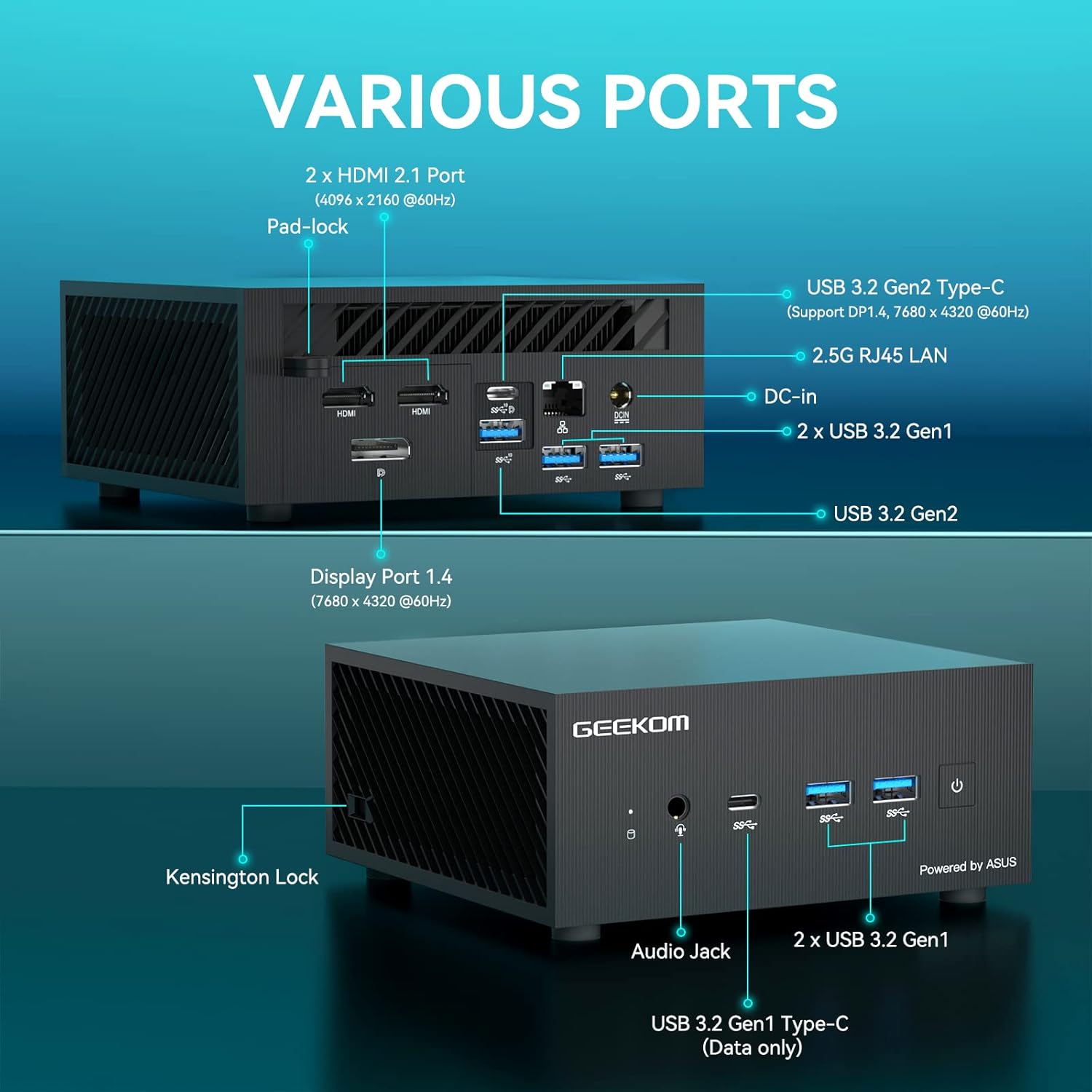
Şekil 2: Üzerindeview of available ports on the GEEKOM Mini PC AS5.
- Ekran Bağlantısı: Use an HDMI cable to connect your monitor to one of the two HDMI 2.1 ports, or a DisplayPort cable to the Display Port 1.4. The USB 3.2 Gen2 Type-C port also supports DisplayPort 1.4 for video output.
- USB Cihazları: Connect your keyboard, mouse, and other USB devices to the available USB 3.2 Gen1 and Gen2 ports.
- Ağ bağlantısı: For a wired network connection, connect an Ethernet cable to the 2.5G RJ45 LAN port. For wireless, ensure your Wi-Fi network is available.
- Ses: Connect headphones or speakers to the Audio Jack.
2. Güç Bağlantısı
Connect the power adapter to the DC-In port on the Mini PC, then plug the power adapter into a wall outlet.
3. İlk Güç Açma
Press the power button located on the front of the Mini PC. The system will boot up, and you will see the operating system loading on your connected display.
4. İşletim Sistemi Kurulumu
Follow the on-screen instructions to complete the initial setup of Windows 10 Pro, including language selection, network configuration, and user account creation.
Kullanım Talimatları
Temel İşlemler
- Güç Açma/Kapatma: Press the power button to turn the device on. To turn off, use the Windows shutdown option or press and hold the power button for 5 seconds.
- Tekrar başlat: Use the restart option within the Windows operating system.
- Uyku modu: The system will enter sleep mode after a period of inactivity. Press any key or move the mouse to wake it up.
Görüntü Yapılandırması
The GEEKOM Mini PC AS5 supports multiple displays, including up to four 4K displays or ultra-realistic 8K visuals.

Şekil 3: The GEEKOM Mini PC AS5 supports ultra-realistic 8K visuals.

Şekil 4: Multitasking across four 4K displays with the GEEKOM Mini PC AS5.
To configure multiple displays, right-click on the desktop, select "Display settings," and arrange your monitors as desired.
Network Connectivity (Wi-Fi 6E)
The Mini PC supports Wi-Fi 6E, offering enhanced wireless performance. To connect to a Wi-Fi network:

Şekil 5: GEEKOM Mini PC AS5 featuring Wi-Fi 6E support for faster, lower-latency wireless connectivity.
- Sistem tepsisindeki Wi-Fi simgesine tıklayın.
- İstediğiniz ağı listeden seçin.
- İstenirse ağ parolasını girin.
- "Bağlan"a tıklayın.
Bakım
Temizlik
- Temizlemeden önce cihazın kapalı ve fişinin çekilmiş olduğundan emin olun.
- Mini PC'nin dış yüzeyini silmek için yumuşak, kuru bir bez kullanın.
- İnatçı izler için hafifçe silinampBezi suyla yıkayın. Sert kimyasallardan veya aşındırıcı temizleyicilerden kaçının.
- Keep ventilation openings clear of dust and debris using compressed air.
Yazılım Güncellemeleri
Regularly update your Windows operating system and drivers to ensure optimal performance and security. You can check for updates via Windows Update settings.
Depolama Yönetimi
Periodically check your storage usage and remove unnecessary files to maintain system speed. The Mini PC supports additional storage expansion (SSD/HDD) if needed.
Sorun giderme
- Güç Yok:
- Güç adaptörünün hem Mini PC'ye hem de çalışan bir elektrik prizine güvenli bir şekilde bağlandığından emin olun.
- Başka bir cihazı takarak elektrik prizinin çalışır durumda olduğunu doğrulayın.
- Görüntü yok:
- Monitörün açık olduğundan ve doğru giriş kaynağının seçildiğinden emin olun.
- Ensure the HDMI or DisplayPort cable is securely connected to both the Mini PC and the monitor.
- Mümkünse farklı bir kablo veya monitör deneyin.
- İnternet bağlantısı yok:
- Kablolu bağlantılarda Ethernet kablosunun ve yönlendiricinin durumunu kontrol edin.
- For Wi-Fi, ensure Wi-Fi is enabled in Windows settings and you are connected to the correct network with the correct password.
- Yönlendiricinizi ve Mini PC'nizi yeniden başlatın.
- Sistem Yavaşlaması:
- Arka planda çalışan gereksiz uygulamaları kapatın.
- Bekleyen Windows güncelleştirmelerini kontrol edin ve yükleyin.
- Run a disk cleanup and defragmentation (for HDDs) or TRIM (for SSDs).
- Kötü amaçlı yazılım veya virüs taraması yapın.
Özellikler
| Model Adı | AS5 |
| İşlemci | AMD Ryzen™ 9 5900HX (8 Cores, 16 Threads, Max Turbo Frequency 4.60 GHz, 16MB Cache, cTDP 35W) |
| İşletim Sistemi | Windows 10 Pro |
| Veri deposu | 32 GB DDR4 SDRAM |
| Depolamak | 1 TB (PCIE x 2 interface) |
| Grafikler | AMD Radeon™ Vega 8 Graphics (supports 8K visuals) |
| Kablosuz Bağlantı | Wi-Fi 6E |
| Limanlar |
|
| Boyutlar | 13x12x5.8 cm |

Şekil 6: AMD Ryzen™ 9 5900HX Processor details.
Garanti ve Destek
Garanti Bilgileri
GEEKOM products typically come with a standard manufacturer's warranty. Please refer to the warranty card included in your package or visit the official GEEKOM webBölgenize ve satın alma tarihinize özel ayrıntılı garanti şartları ve koşulları için lütfen siteyi ziyaret edin. Garanti talepleri için satın alma belgenizi saklayın.
Müşteri Desteği
For technical assistance, troubleshooting beyond this manual, or warranty inquiries, please contact GEEKOM customer support. You can usually find contact information on the official GEEKOM website or in the quick guide provided with your product.
GEEKOM Official Webalan: www.geekompc.com


