
giriiş
This manual provides comprehensive instructions for the SENGBIRCH Keyboard Case, designed to enhance your iPad experience. Please read this manual thoroughly before using the product to ensure proper operation and longevity.
Uyumluluk
The SENGBIRCH Keyboard Case is compatible with the following iPad models:
- iPad Air 13-inch (M3 2025, M2 2024)
- iPad Pro 12.9-inch 6th Generation (2022) - Models: A2436, A2437, A2764, A2766
- iPad Pro 12.9-inch 5th Generation (2021) - Models: A2378, A2379, A2461, A2462
- iPad Pro 12.9-inch 4th Generation (2020) - Models: A2229, A2069, A2232, A2233
- iPad Pro 12.9-inch 3rd Generation (2018) - Models: A1876, A2014, A1895, A1983
Özel Hatırlatma: This keyboard case is not compatible with iPad Pro 13-inch tablets. Please verify your iPad model before use.
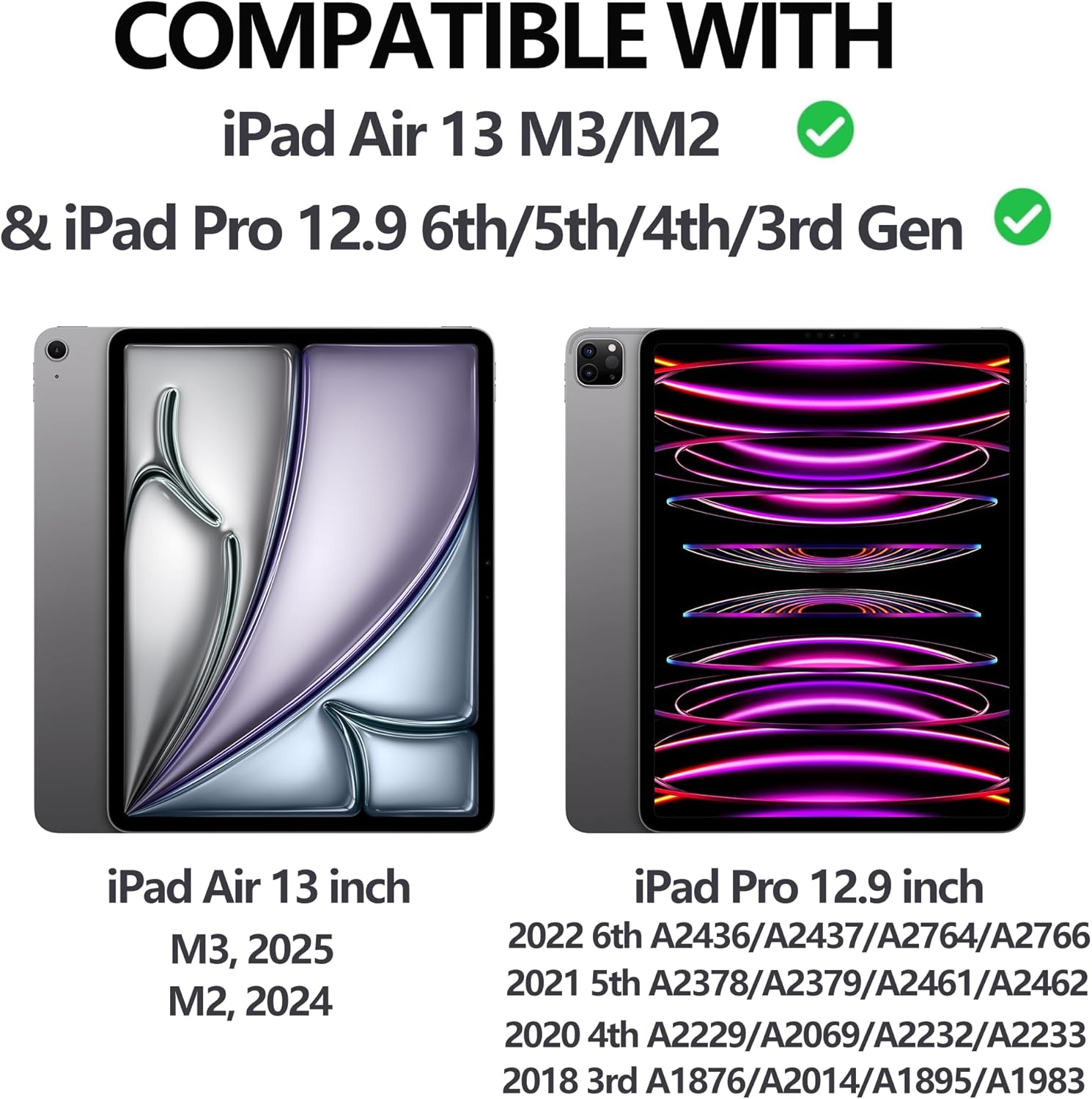
Figure 1: iPad Compatibility Chart
Kutuda Neler Var?
Paketi açtığınızda lütfen aşağıdaki tüm öğelerin mevcut olduğundan emin olun:
- 1 x Keyboard for iPad Pro 12.9 inch (3rd, 4th, 5th, 6th Generation)
- 1 x Case for iPad Pro 12.9 inch (6th, 5th, 4th, 3rd Generation)
- 1 x USB-C Şarj Kablosu
- 1 x Kullanım Kılavuzu
Not: Tablet and Apple Pencil are not included.
Kurulum Talimatları
1. iPad'inizi Kılıfa Takma
The case features a magnetic adsorption design for secure attachment of your iPad. Align the camera cutout of the case with your iPad's camera, and the iPad will magnetically snap into place.

Figure 2: Magnetic iPad Attachment and Detachable Keyboard
2. Klavyeyi Şarj Etme
Before first use, fully charge the keyboard using the provided USB-C cable. Connect the USB-C end to the keyboard's charging port and the other end to a compatible USB power adapter (not included).
- Şarj Süresi: Tam şarj için yaklaşık 2.5 saat.
- Battery Life: Up to 70 hours of continuous work on a single charge.

Figure 3: Keyboard Charging and Battery Information
3. Connecting the Keyboard via Bluetooth
Klavyenizi iPad'inizle eşleştirmek için şu adımları izleyin:
- Switch the keyboard's ON/OFF switch to the "ON" position (located on the top right of the keyboard).
- Press the "Connect" button on the keyboard.
- iPad'inizde şuraya gidin: Ayarlar > Bluetooth.
- Ensure Bluetooth is enabled and select "Bluetooth 3.0 Keyboard" from the list of available devices to pair.

Şekil 4: Bluetooth Bağlantı Adımları
Kullanım Talimatları
Ayarlama ViewAçılar
The case allows for adjustable viewing angles (115°, 120°, 130°) to suit your needs for typing, viewçizmek veya çizmek.
Ayrılabilir Klavye
The keyboard is magnetically attached to the case and can be easily detached if you prefer to use your iPad without the keyboard, offering flexibility for various tasks.
Arka Işık İşlevi
The keyboard features 7 colors of backlight and 3 levels of brightness adjustment. This allows for comfortable typing in low-light conditions.

Figure 5: 7-Color Backlit Keyboard

Figure 6: Keyboard Backlight in Use
Kalemlik
The case includes a dedicated pencil holder that supports Apple Pencil charging, ensuring your stylus is always ready and secure.

Figure 7: Pencil Holder and Key Features
Auto Wake/Sleep Function
The smart cover utilizes a magnetic switch to automatically wake your iPad when opened and put it to sleep when closed, conserving battery life.

Figure 8: Auto Wake/Sleep Smart Cover
Klavye Kısayolları
The keyboard supports various iOS shortcuts for efficient operation. Refer to your iPad's settings for a full list of available shortcuts. For example, basarak Komut + Sekme allows you to switch between open applications.
Bakım
Klavyenizin kasasının uzun ömürlü ve en iyi performansı göstermesi için aşağıdaki bakım yönergelerini izleyin:
- Temizlik: Yumuşak bir d kullanınamp Kasanın ve klavyenin dış yüzeyini silmek için bir bez kullanın. Sert kimyasallardan veya aşındırıcı malzemelerden kaçının.
- Depolamak: Kullanılmadığı zamanlarda klavye kılıfını serin, kuru ve doğrudan güneş ışığından ve aşırı sıcaklıklardan uzak bir yerde saklayın.
- Koruma: The case is made of premium PU leather and a silicone inner shell, providing all-round protection against scratches, bumps, and dents. However, avoid dropping the device from significant heights.
- Isı Dağılımı: The honeycomb grid pattern inner padding is designed to improve heat dissipation. Ensure the vents are not obstructed during use.
Sorun giderme
If you encounter any issues with your SENGBIRCH Keyboard Case, please refer to the following common solutions:
- Keyboard not connecting to iPad: If the keyboard fails to connect, press Fn + Q simultaneously to switch the keyboard to iOS system mode. Then, attempt to re-pair via Bluetooth.
- Klavye yanıt vermiyor: Ensure the keyboard is charged. If the battery is low, connect it to a power source using the USB-C cable.
- Arka ışık çalışmıyor: Check if the backlight function is enabled and adjust the brightness levels.
- iPad not waking/sleeping automatically: iPad'in kılıfa doğru şekilde yerleştirildiğinden ve kapağın tamamen kapalı olduğundan emin olun.
For further assistance, please contact SENGBIRCH customer support.
Özellikler
| Marka | SENGBİRŞESİ |
| Model Numarası | Air13 (M3/M2) & Pro 6th/5th/4th/3rd Gen |
| Ürün Boyutları | 11.34 x 9.45 x 0.59 inç |
| Ürün Ağırlığı | 2.16 pound |
| Piller | 1 Lityum Polimer pil (dahil) |
| Bağlantı Teknolojisi | Bluetooth, USB-C |
| Klavye Açıklaması | Wireless / Rechargeable / Detachable / Backlight |
| Özel Özellikler | Backlit, Ergonomic, Hotkeys and Media Keys, Lightweight, Rechargeable |
| Renk | Black (Keyboard backlighting color support: RGB) |
Garanti ve Destek
For warranty information or technical support, please contact SENGBIRCH customer service through the retailer where the product was purchased or visit the official SENGBIRCH webalan.
Herhangi bir garanti talebiniz olması durumunda satın alma belgeniz olarak satın alma fişinizi saklayın.