
1. Giriş
Thank you for choosing the TECKNET Wireless Doorbell. This manual provides detailed instructions for the installation, operation, and maintenance of your new doorbell system. Please read this manual thoroughly before use to ensure proper function and longevity of the product.
2. Paket İçeriği
Please check the package contents carefully. If any items are missing or damaged, please contact TECKNET customer support.
- 1 x Kablosuz Kapı Zili Alıcısı
- 1 x Kablosuz Kapı Zili Vericisi (Basmalı Düğme)
- Mounting Hardware (Screws, Wall Anchors, Adhesive Tape)
- 1 x Kullanım Kılavuzu (Bu belge)
3. Ürün Özellikleri
The TECKNET Wireless Doorbell offers a range of features designed for convenience and reliability:
- 60 Seçilebilir Melodi: Choose from a wide variety of chimes.
- 5 Ayarlanabilir Ses Seviyesi: Ranging from 0dB (silent with LED flash) to 90dB.
- IP65 Su Geçirmez Verici: Çeşitli dış hava koşullarına dayanıklı olarak tasarlanmıştır.
- 400M (1300ft) Operating Range: Ensures reliable signal transmission across large homes or properties.
- LED Flaş Göstergesi: Visual alert for visitors, especially useful in noisy environments or for hearing-impaired individuals.

Image: Features of the TECKNET Wireless Doorbell receiver, highlighting melody and volume options.
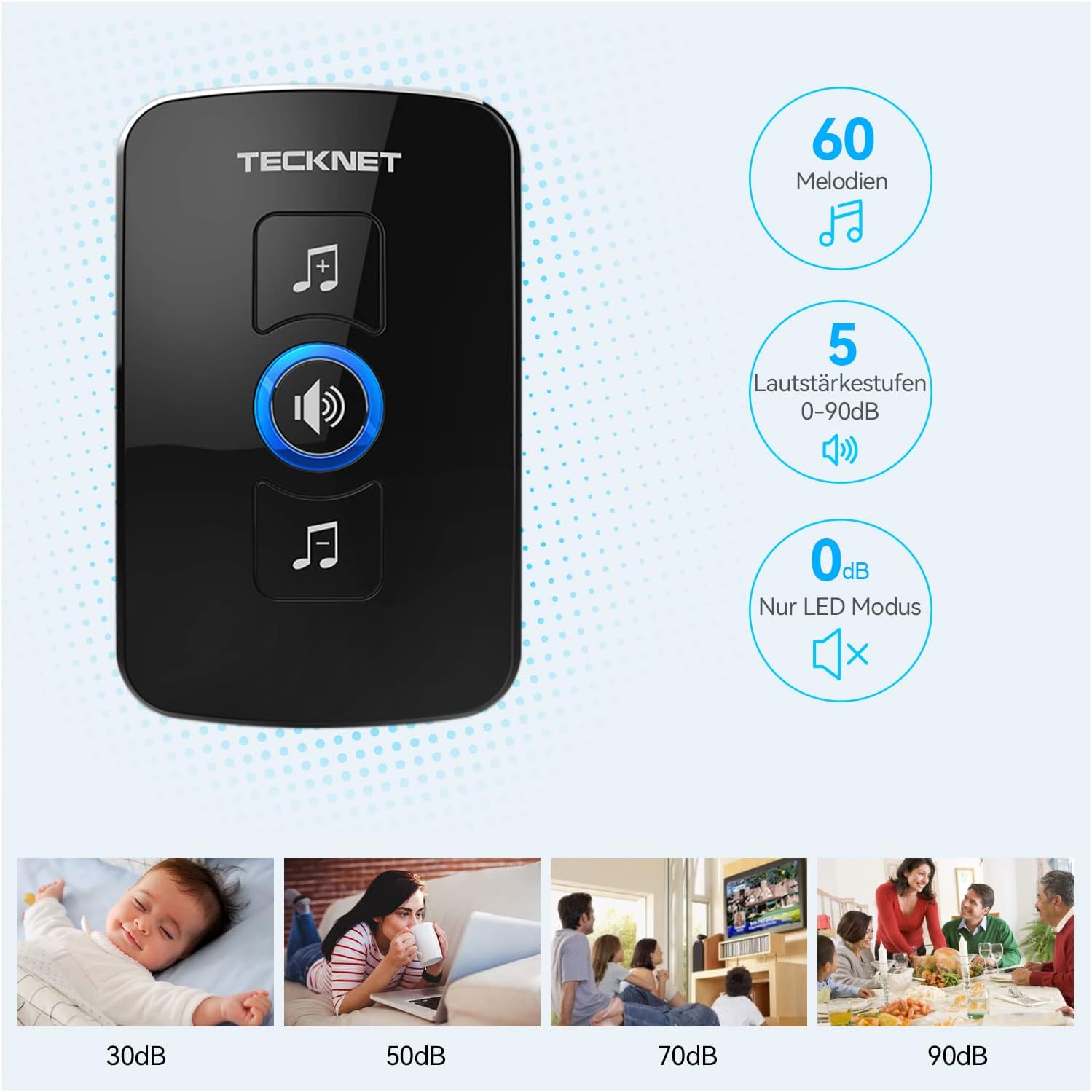
Image: The doorbell transmitter's IP65 waterproof rating and wide operating temperature range.
4. Kurulum ve Kurulum
Follow these steps to set up your TECKNET Wireless Doorbell system.
4.1 Verici Pil Kurulumu
- Locate the small notch on the side or bottom of the transmitter.
- Use a small flat-head screwdriver to gently pry open the back cover of the transmitter.
- Insert the CR2032 lithium coin cell battery (included or purchased separately) into the battery compartment, ensuring the positive (+) side faces up.
- Arka kapağı güvenli bir şekilde kapatın.
Not: The transmitter typically uses a CR2032 battery. Please refer to the packaging for specific battery requirements.
4.2 Alıcı Yerleşimi
Plug the receiver into a standard electrical outlet in a central location within your home. Ensure it is within the operating range of the transmitter and not obstructed by large metal objects or thick walls, which can reduce signal strength.
4.3 Vericinin Montajı
There are two primary methods for mounting the transmitter:

Image: Steps for battery installation and two mounting methods for the transmitter.
Yöntem 1: Vida ile Montaj
- Mark the desired mounting location on your wall or door frame.
- İşaretli noktalara iki küçük delik açın.
- Insert the wall anchors (if necessary for your surface).
- Align the transmitter's back plate with the holes and secure it with the provided screws.
- Attach the transmitter unit to the back plate.
Yöntem 2: Yapıştırıcı ile Montaj
- Clean the mounting surface thoroughly to ensure it is dry and free of dust or grease.
- Yapışkan bandın üzerindeki koruyucu filmin bir tarafını soyun.
- Attach the adhesive tape to the back of the transmitter.
- Koruyucu filmin diğer tarafını da soyun.
- Firmly press the transmitter onto the desired mounting surface for at least 30 seconds.
Tavsiye: For best results and long-term stability, screw mounting is recommended, especially for outdoor use.
5. Kullanım Talimatları
5.1 Melodilerin Değişimi
To change the melody on your receiver:
- Press the "Melody Selection" button (often indicated by a music note icon) on the receiver.
- Each press will cycle through the available 60 melodies.
- Stop pressing when you hear your desired melody. The receiver will automatically save the selection.
5.2 Sesi Ayarlama
Ses seviyesini ayarlamak için:
- Press the "Volume Control" button (often indicated by a speaker icon) on the receiver.
- Each press will cycle through the 5 available volume levels (including silent mode).
- Select the volume level that suits your preference.
5.3 Eşleştirme (Gerekirse)
Your doorbell system usually comes pre-paired. If the transmitter and receiver lose connection or if you add additional transmitters/receivers, follow these steps to pair them:
- Alıcıyı prize takın.
- Press and hold the "Volume Control" button on the receiver for approximately 5 seconds until you hear a "ding" sound or the LED indicator flashes rapidly. This indicates pairing mode.
- Vericiye (düğmeye) hemen bir kez basın.
- You should hear the selected melody, confirming successful pairing.
- If pairing fails, unplug the receiver and repeat the process.
6. Bakım
- Temizlik: Kapı zili ünitelerini yumuşak, kuru bir bezle silin. Aşındırıcı temizleyiciler veya çözücüler kullanmayın.
- Pil Değişimi: When the transmitter's LED indicator no longer lights up or the range decreases significantly, it's time to replace the CR2032 battery. Follow the battery installation steps in Section 4.1.
- Çevresel Koşullar: While the transmitter is IP65 waterproof, extreme temperatures or prolonged direct exposure to harsh weather conditions may affect its lifespan.
7. Sorun Giderme
| Sorun | Olası Neden | Çözüm |
|---|---|---|
| Kapı zili çalmıyor. |
|
|
| Kısa çalışma aralığı. |
|
|
| Alıcının LED ışığı yanıp sönüyor ancak ses gelmiyor. | Ses seviyesi 0 dB'ye ayarlanmıştır (sessiz mod). | Increase the volume using the "Volume Control" button (see Section 5.2). |
8. Özellikler
| Özellik | Detay |
|---|---|
| Marka | TECKNET |
| Model Numarası | B0BZVDJHCS |
| Üretici | TECKNET |
| Ürün Ağırlığı | 3.87 ons (yaklaşık 110 gram) |
| Ürün Boyutları | 2.36 x 2.32 x 3.62 inç (Alıcı) |
| Güç Kaynağı (Alıcı) | Kablolu Elektrik |
| Güç Kaynağı (Verici) | Battery (CR2032, typically not included as per specifications, but required for operation) |
| Su Geçirmezlik Derecesi (Verici) | IP65 |
| Çalışma Aralığı | Açık havada 400 metreye (1300 fit) kadar |
| Melodiler | 60 seçilebilir |
| Ses Seviyeleri | 5 (0dB ila 90dB) |
| Dahil Bileşenler | Manual (and doorbell units, mounting hardware) |
| İlk Mevcut Tarih | 18 Mayıs 2024 |
9. Garanti ve Destek
TECKNET products come with a standard warranty. For specific warranty details, please refer to the warranty card included with your product or visit the official TECKNET website. If you encounter any issues or have questions regarding your doorbell, please contact TECKNET customer support:
- Webalan: www.tecknet.co.uk (veya ilgili bölgesel) webSite)
- E-posta: Ürün ambalajına bakın veya webiletişim için e-posta adresi.
Please have your model number (B0BZVDJHCS) and purchase date ready when contacting support.