
Ürün Bittiview
The PSIER Wireless Earbuds are designed for an immersive audio experience with enhanced call clarity and extended playtime. Featuring Bluetooth 5.3 technology, these earbuds offer stable connectivity and superior sound quality. The ergonomic design with earhooks ensures a secure fit, making them ideal for sports and active use. The included charging case provides multiple recharges, extending your listening time significantly.

Image showing the PSIER wireless earbuds with various sizes of replaceable soft eartips and earwings (XS, S, M, L) for a customizable and secure fit. The image also displays a person wearing the earbuds, demonstrating their ergonomic design.
Paket İçeriği
- PSIER Wireless Earbuds (Left and Right)
- Şarj Kutusu
- USB-C Şarj Kablosu
- Çeşitli boyutlarda kulaklık uçları (XS, S, M, L)
- Kullanıcı Kılavuzu
Kurmak
İlk Şarj
İlk kullanımdan önce kulaklıklarınızı ve şarj kutusunu tamamen şarj edin.
- Kutuda bulunan USB-C kablosunu kılıfın üzerindeki şarj portuna ve bir güç kaynağına bağlayın.
- Alternatively, place the charging case on a compatible wireless charging pad (not included).
- The LED digital display on the case will show the charging progress. A full charge is indicated by 100% on the display.
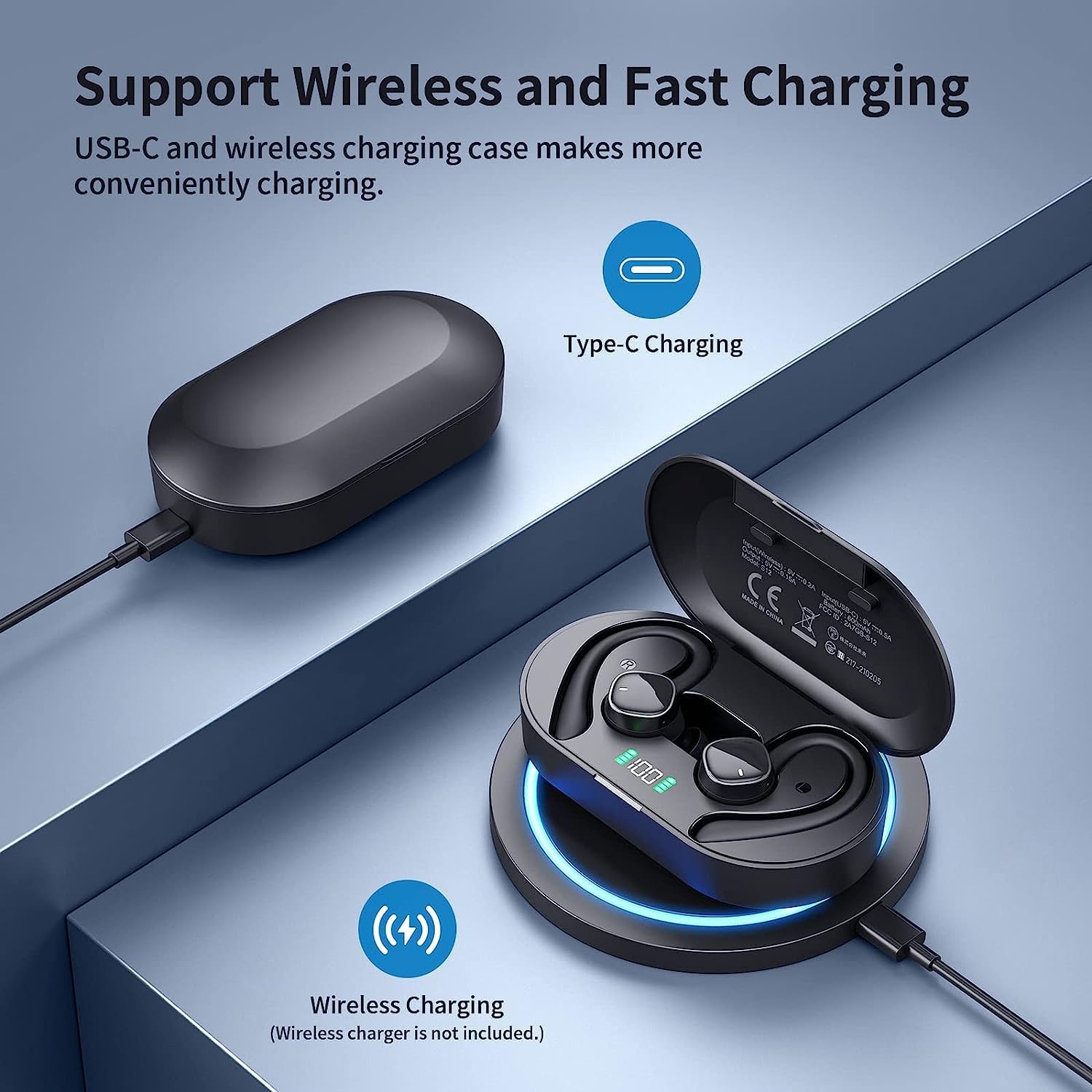
Image illustrating the two charging methods for the PSIER wireless earbuds: USB-C cable charging and wireless charging on a compatible pad. The charging case with LED display is shown.
Açma/Kapatma
- Güç Açık: Open the charging case. The earbuds will automatically power on and attempt to connect to the last paired device.
- Kapat: Kulaklıkları şarj kutusuna geri yerleştirin ve kapağı kapatın. Kulaklıklar otomatik olarak bağlantısı kesilecek ve kapanacaktır.
Bluetooth Eşleştirme
Kulaklıklar, kullanım kolaylığı için tek adımda eşleştirme özelliğine sahiptir.
- Kulaklıkların şarjlı olduğundan ve şarj kutusunun içinde olduğundan emin olun.
- Şarj kutusunu açın. Kulaklıklar otomatik olarak eşleştirme moduna girecektir.
- Cihazınızda (akıllı telefon, tablet vb.) Bluetooth'u etkinleştirin ve kullanılabilir cihazları arayın.
- Select "S12" from the list of devices to connect.
- Bağlantı kurulduktan sonra sesli bir uyarı duyacaksınız ve cihazda "Bağlandı" yazısı görünecektir.

Image demonstrating the one-step pairing process for the PSIER wireless earbuds. The charging case is open, showing the earbuds, and a smartphone screen displays 'S12 Connected' in its Bluetooth settings.
Kulaklık Takma
For optimal sound quality and comfort, choose the correct eartip size and ensure the earhooks are securely positioned.
- Select the eartips (XS, S, M, L) that provide a snug fit in your ear canal.
- Kulaklığı yavaşça kulağınıza yerleştirin.
- Adjust the earhook over your ear to secure the earbud in place.
Kullanım Talimatları
Medya Kontrolleri
The earbuds feature multi-function buttons for easy control of audio playback and calls.
| İşlev | Aksiyon |
|---|---|
| Oynat/Duraklat | Single press on either earbud |
| Sonraki Parça | Double press on the Right earbud |
| Önceki Parça | Double press on the Left earbud |
| Sesi Aç | Triple press on the Right earbud |
| Sesi Azalt | Triple press on the Left earbud |
| Cevapla/Çağrıyı Sonlandır | Single press on either earbud |
| Çağrıyı Reddet | Kulaklıklardan herhangi birini basılı tutun |
| Sesli Asistanı Etkinleştir | (Görüşme yapmıyorken) Kulaklıklardan birine basılı tutun. |
Yönetim Çağrı
Each earbud is equipped with two microphones, totaling four microphones, to ensure clear call quality by accurately picking up your voice and isolating environmental noise through advanced algorithms.

Image depicting a person using PSIER wireless earbuds in a noisy environment, with graphics illustrating how 4 microphones isolate voice from background noise for clearer calls.
LED Dijital Ekran
The charging case features an LED digital display that shows the remaining power in percentage (1%-100%). This allows you to easily monitor the battery level of the case and plan your charging accordingly. Individual indicators for left (L) and right (R) earbuds may also be present.

Resim gösterisiasing the digital LED display on the PSIER earbud charging case, indicating 100% charge. It also highlights the 60 hours total playtime, with 10 hours on a single earbud charge and 50 hours from the charging case.
Ses Kalitesi
The PSIER Wireless Earbuds are equipped with a 6mm large size speaker driver, engineered to deliver powerful deep bass and dynamic treble. This design aims to provide a 3D spatial sound experience, enhancing your music listening across a wide sound range.

Close-up image of the PSIER earbud's internal components, highlighting the 6mm large size speaker driver and Bluetooth 5.3 chip, emphasizing powerful stereo sound with dynamic treble and deep bass.
Bakım ve Özen
Temizlik
- Regularly clean the earbuds, eartips, and charging contacts with a soft, dry, lint-free cloth.
- Aşındırıcı maddeler, çözücüler veya kimyasal temizleyiciler kullanmaktan kaçının.
Suya Dayanıklılık (IPX7)
The earbuds are rated IPX7 waterproof, meaning they can withstand splashes, sweat from workouts, and rain. They are not designed for swimming or prolonged submersion in water. Ensure the earbuds are dry before placing them back in the charging case to prevent damage.
Depolamak
- Kulakiçi kulaklıkları, kullanılmadığında onları korumak ve şarjlı halde tutmak için şarj kutusunda saklayın.
- Aşırı sıcaklıklarda veya yüksek nemde saklamaktan kaçının.
Sorun giderme
- Kulaklıklar eşleşmiyor: Her iki kulaklığın da şarjlı ve kutudan çıkarılmış olduğundan emin olun. Cihazınızın Bluetooth özelliğini kapatıp açın. Sorun devam ederse, kulaklıkları sıfırlamayı deneyin (üreticinin kılavuzuna bakın). web(Belirli sıfırlama talimatları için siteye bakın).
- Ses yok: Cihazınızın ve kulaklıklarınızın ses seviyelerini kontrol edin. Kulaklıkların cihazınıza doğru şekilde bağlı olduğundan emin olun.
- Şarj sorunları: Verify the USB-C cable is securely connected or the wireless charging pad is functioning correctly. Clean the charging contacts on both the earbuds and the case.
- Kötü çağrı kalitesi: Mikrofonların önünün engellenmediğinden emin olun. Daha az arka plan gürültüsü olan bir alana geçmeyi deneyin.
Özellikler
| Özellik | Detay |
|---|---|
| Model Numarası | B0BY911HRZ |
| Marka | PSİER |
| Bağlantı Teknolojisi | Bluetooth 5.3, Kablosuz |
| Kulak Yerleşimi | Open Ear (with earhooks) |
| Form Faktörü | Kulakta |
| Renk | Siyah |
| Kontrol Türü | Medya Kontrolü |
| Mikrofonlar | 4 (2 per earbud) |
| Oyun zamanı | Up to 10 hours (single charge), 60 hours total with charging case |
| Şarj etme | USB-C, Kablosuz Şarj |
| Suya Dayanıklılık | IPX7 |
| Ürün Ağırlığı | 5.3 ons |
| Paket Boyutları | 5.24 x 3.86 x 1.46 inç |
Garanti ve Destek
For warranty information, technical support, or further assistance, please refer to the documentation included with your product or visit the official PSIER webalan. Garanti talepleri için satın alma makbuzunuzu saklayın.