
AWEI S1 Ultra
AWEI S1 Ultra Kablosuz Kulaklık Kullanım Kılavuzu
Model: S1 Ultra
Marka: AWEI
1. Kurulum Kılavuzu
1.1 Paket İçeriği
Başlamadan önce, lütfen paketinizde tüm öğelerin eksiksiz olduğundan emin olun:
- AWEI S1 Ultra Kablosuz Kulaklıklar
- Şarj Kutusu
- USB-C Şarj Kablosu
- Kullanıcı Kılavuzu
- S/M/L Kulak Uçları
1.2 İlk Şarj ve Koruyucu Filmin Çıkarılması
Upon first use, ensure the earbuds are fully charged. It is crucial to remove the blue insulation film from the charging contacts on the earbuds before placing them in the charging case. Failure to do so will prevent charging.

Remove the protective film from the earbud charging contacts before first use.
Place both earbuds into the charging case. The indicator lights on the earbuds will illuminate to confirm charging. Connect the USB-C cable to the charging case and a power source. A full charge for the earbuds takes approximately 1.5 hours, and the charging case takes 1 hour.

The charging case provides up to 24 hours of total playtime, with 6 hours on a single earbud charge.
1.3 Bluetooth Eşleştirme
The AWEI S1 Ultra earbuds utilize advanced Bluetooth 5.3 technology for stable and efficient connection.
- Kulaklıkların şarjlı olduğundan ve şarj kutusuna yerleştirildiğinden emin olun.
- Şarj kutusunun kapağını açın. Kulaklıklar otomatik olarak eşleştirme moduna girecektir.
- Cihazınızda (akıllı telefon, tablet vb.) Bluetooth ayarlarına gidin.
- Arama "AWEI S1 Ultra" in the list of available devices.
- Select "AWEI S1 Ultra" to connect. A voice prompt will confirm successful pairing.
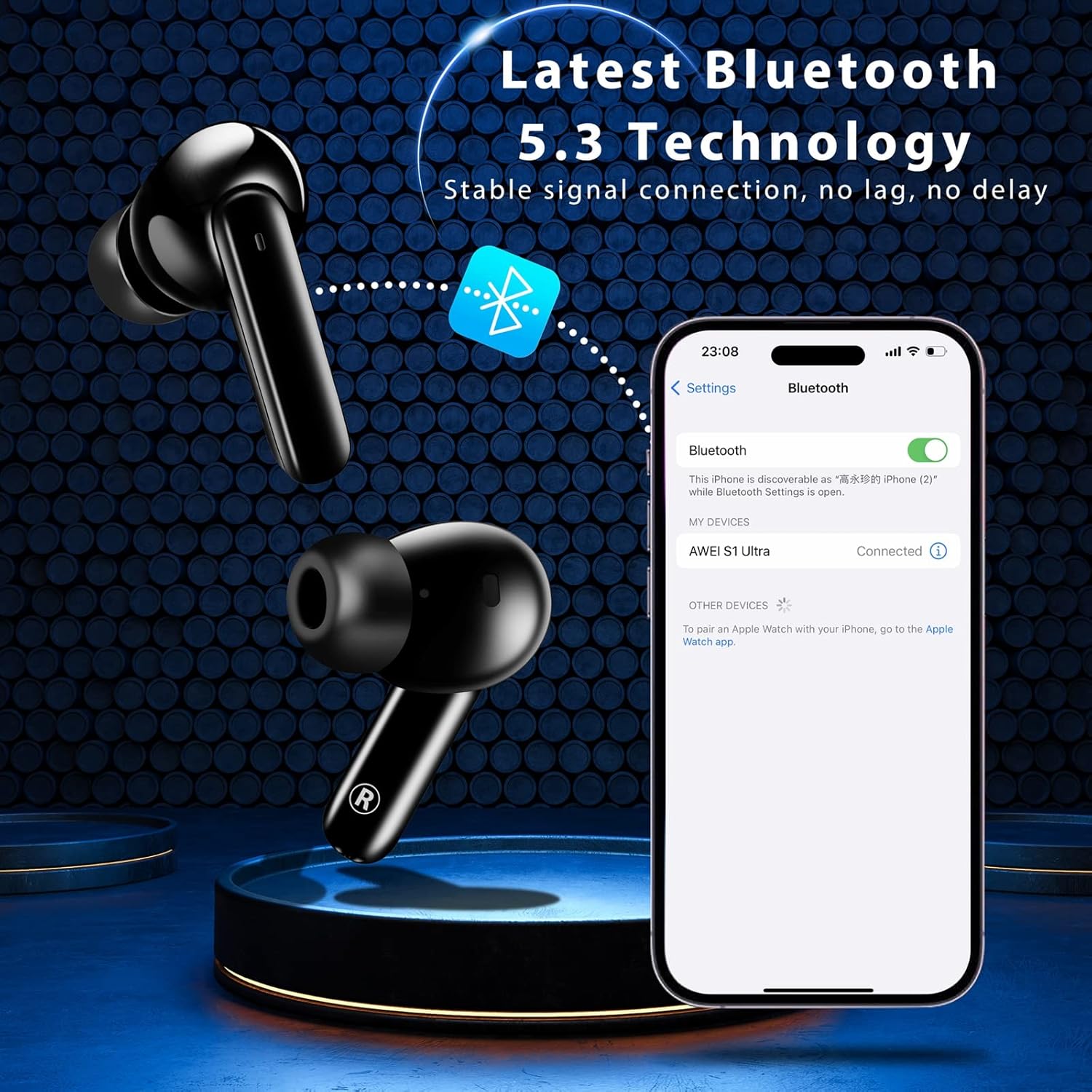
Pairing the earbuds with your device via Bluetooth 5.3.
2. Kullanım Talimatları
2.1 Akıllı Dokunmatik Kontroller
The AWEI S1 Ultra earbuds feature intuitive touch controls for managing calls, music, and voice assistant functions.
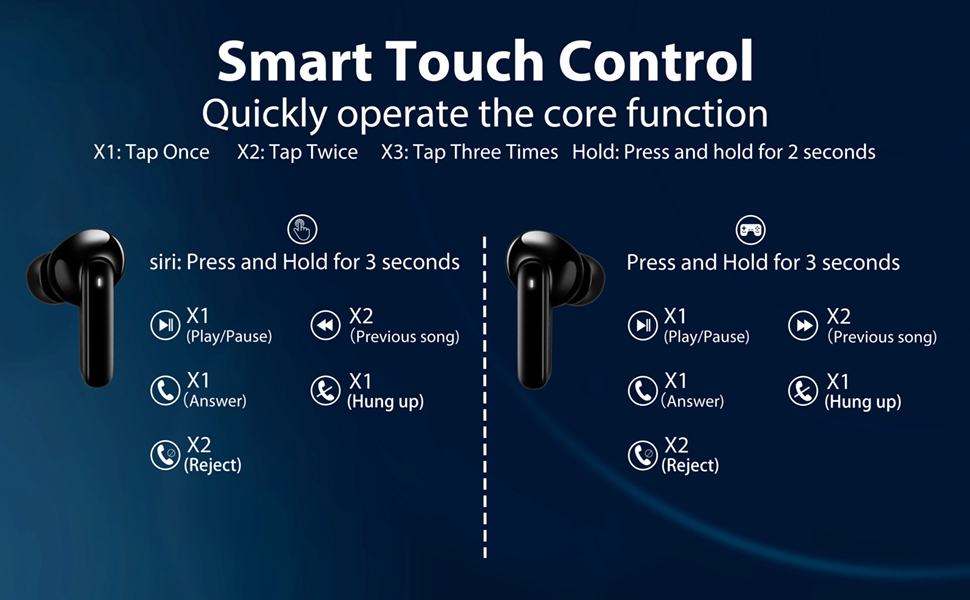
Refer to this diagram for detailed touch control commands.
- Oynat/Duraklat: Tap once (X1) on either L/R earbud.
- Önceki Şarkı: Tap twice (X2) on the Left earbud.
- Sonraki Şarkı: Tap twice (X2) on the Right earbud.
- Sesi aç: Long press the Right earbud for 2 seconds.
- Sesi kıs: Long press the Left earbud for 2 seconds.
- Sesli Asistan: Long press the Left earbud for 3 seconds.
- Oyun Modu Açık/Kapalı: Tap three times (X3) on either L/R earbud.
2.2 Çağrı Yönetimi
Manage your calls directly from the earbuds:
- Cevap Çağrısı: Tap once (X1) on either L/R earbud.
- Aramayı Kapat: Tap once (X1) on either L/R earbud during a call.
- Çağrıyı Reddet: Long press either L/R earbud for 2 seconds.
This video demonstrates how to answer, hang up, and reject calls using the earbud touch controls.
2.3 Music and Game Dual-Mode
The earbuds offer a dual-mode function to optimize your audio experience for either music or gaming. In Game Mode, the earbuds provide low latency for improved audio-video synchronization, which is beneficial for gaming where precise sound cues are important.
3. Bakım
3.1 Suya Dayanıklılık (IPX7)
The AWEI S1 Ultra earbuds feature an IPX7 waterproof nano-coating, providing protection against heavy rain and sweat. This makes them suitable for intense workouts and various weather conditions. However, they are not designed for swimming or prolonged submersion.

IPX7 rating ensures protection against sweat and splashes.
3.2 Temizlik
Regularly clean your earbuds and charging case to maintain optimal performance and hygiene. Use a soft, dry, lint-free cloth. Avoid using abrasive materials, solvents, or aerosol sprays.
3.3 Eartip Selection and Replacement
The earbuds come with S/M/L eartips to ensure a comfortable and secure fit. Experiment with different sizes to find the best seal for your ears, which is crucial for optimal sound quality and noise isolation.

Choose the eartip size that provides the best fit and comfort.
4. Sorun Giderme
4.1 Bağlantı Sorunları
If your earbuds are not connecting to your device:
- Ensure the earbuds are fully charged and the protective film has been removed from the charging contacts.
- Verify Bluetooth is enabled on your device and the earbuds are in pairing mode (open case lid).
- Try forgetting "AWEI S1 Ultra" from your device's Bluetooth list and re-pairing.
- Move closer to your device to ensure you are within the 10-meter Bluetooth range.
4.2 Şarj Sorunları
If your earbuds or charging case are not charging:
- Confirm the blue protective film has been removed from the earbud charging contacts.
- Check that the USB-C cable is securely connected to both the case and the power source.
- Farklı bir USB-C kablosu veya güç adaptörü kullanmayı deneyin.
- Kulaklıkların ve şarj kutusunun şarj temas noktalarının temiz ve tozdan arındırılmış olduğundan emin olun.
4.3 Ses Kalitesi Sorunları
If you experience intermittent sound or poor audio quality:
- Kulaklıkların kulaklarınıza düzgün bir şekilde oturduğundan ve iyi bir yalıtım için doğru kulaklık ucu boyutunu kullandığınızdan emin olun.
- Diğer kablosuz cihazlardan kaynaklanan paraziti kontrol edin.
- Kulaklıkları cihazınızla yeniden eşleştirin.
4.4 Touch Control Sensitivity
If the touch controls are too sensitive or unresponsive:
- Dokunmatik kontrolleri kullanırken parmaklarınızın temiz ve kuru olduğundan emin olun.
- Practice the touch gestures as per the diagram in Section 2.1. Some users may require a brief period to adapt to the sensitivity.
5. Özellikler
| Özellik | Detay |
|---|---|
| Model Adı | S1 Ultra Earbud |
| Bağlantı Teknolojisi | Bluetooth 5.3 |
| Ses Sürücüsü Türü | Dinamik Sürücü |
| Ses Sürücüsü Boyutu | 13 Milimetre |
| Pil Ömrü (Kulaklıklar) | 6 Saat (tek şarj) |
| Toplam Oynanma Süresi (Kılıflı) | 24 Saat |
| Şarj Süresi (Kulaklık) | 1.5 Saat |
| Şarj Süresi (Kılıf) | 1 Saat |
| Su Direnç Seviyesi | IPX7 |
| Bluetooth Menzili | 10 Metre |
| Kontrol Türü | Dokunmatik Kontrol |
| Ürün Ağırlığı | 170 Gram (6 ons) |
| Malzeme | Plastik |
| Renk | Siyah |
6. Garanti ve Destek
For warranty information, product support, or to explore other AWEI products, please visit the official AWEI store or contact their customer service directly.
İlgili Belgeler - S1 Ultra
 |
Awei Y669 Outdoor Waterproof Bluetooth Speaker Specifications Technical specifications and features for the Awei Y669 portable outdoor waterproof Bluetooth speaker, including battery life, power output, and connectivity details. |
 |
Руководство пользователя Awei T23: TWS'nin yeni sürümü Bu, Awei T23'ün TWS наушников cihazı için en iyi çözümdür. Bluetooth teknolojisi, ses aktarımı, ses aktarımı, ses teknolojisi ve diğer özellikler. |
 |
AWEI AT20 ANC+ENC Noise Cancelling Wireless Headphones User Manual User manual for the AWEI AT20 wireless headphones featuring Active Noise Cancellation (ANC) and Environmental Noise Cancellation (ENC). Includes setup, operation, specifications, safety, and warranty information. |
 |
AWEI T50 Pro True Wireless Earbuds User Manual Comprehensive user manual for AWEI T50 Pro Smart Touch True Wireless Earbuds, covering setup, usage, specifications, safety, and warranty information. |
 |
AWEI T88 True Wireless Bluetooth Kulaklık Kullanım Kılavuzu AWEI T88 True Wireless Bluetooth Kulaklıklar için kurulum, çalıştırma, özellikler, teknik özellikler, güvenlik ve garanti bilgilerini kapsayan kapsamlı kullanıcı kılavuzu. |
 |
Awei T36 TWS Kablosuz Kulaklık Kullanım Kılavuzu ve Teknik Özellikleri Awei T36 TWS kablosuz kulaklıklar için kurulum, çalıştırma, özellikler, teknik özellikler, güvenlik önlemleri, garanti ve imha talimatlarını kapsayan kapsamlı kullanıcı kılavuzu. |
Ask a question about this manual
Ask about setup, troubleshooting, compatibility, parts, safety, or missing instructions. Manuals+ will review the question and use this page’s manual context to help answer it.