
Widex signia
Widex Moment Sheer 110 İşitme Cihazı Kullanım Kılavuzu
Model: Widex Moment Sheer 110
giriiş
The Widex Moment 110 hearing aid ranks as the lowest technology level offered by Widex within the Moment family. The Moment 110 technology level delivers Mid-level performance by FitHearing standards.
Basic hearing aids will provide a few filters and programs, making these devices ideal for those with a mostly quiet lifestyle. If you primarily wish to improve your hearing in small groups, one-on-one conversation, and during routine activity within a home setting, the Widex Moment 110 may be the hearing aid for you.
Moment 110 hearing aids feature traditional Receiver-in-canal (RIC) form factor, whereby the hearing aids sit comfortably and discreetly behind your ear. These hearing aids are made-for-smartphones so you can stream calls, music, and other audio directly through your hearing aids.
Ürün Bittiview
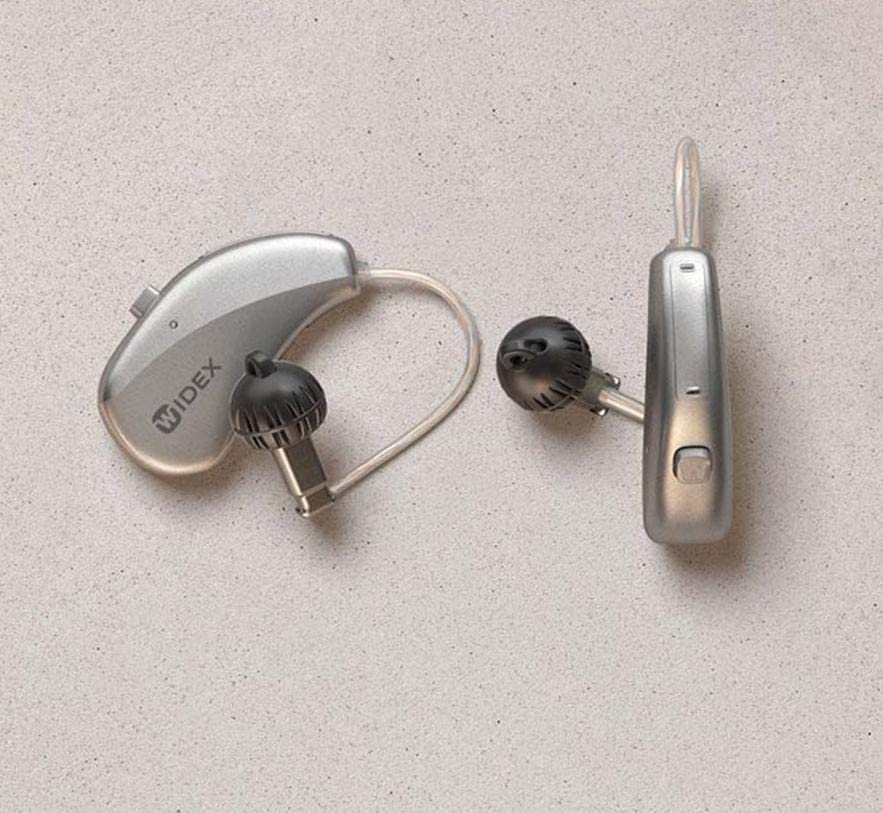
This image displays the Widex Moment Sheer 110 hearing aid, featuring its Receiver-in-canal (RIC) design. The device consists of a small, silver-colored unit that rests behind the ear, connected by a thin tube to an in-ear component with a black dome. The "WIDEX" logo is visible on the main unit. Another similar component is shown separately, indicating a pair of hearing aids.
Kutuda Neler Var?
- Widex Moment Sheer 110 Hearing Aid (Pair)
- Kablosuz Şarj Kutusu
Kurulum Kılavuzu
1. İlk Şarj
Before first use, place your Widex Moment Sheer 110 hearing aids into the provided Wireless Charging Case. Ensure the case is connected to a power source. The indicator lights on the case and hearing aids will show charging status. A full charge typically takes 3-4 hours.
2. Akıllı Telefonla Eşleştirme
- Akıllı telefonunuzun Bluetooth özelliğinin etkin olduğundan emin olun.
- Open the battery doors of your hearing aids (if applicable) or place them in and out of the charging case to put them in pairing mode.
- On your smartphone, go to Bluetooth settings and select your Widex Moment Sheer 110 from the list of available devices.
- Eşleştirme işlemini tamamlamak için ekrandaki talimatları izleyin.
3. First Fit
Gently place the hearing aid unit behind your ear. Guide the thin tube and the in-ear component into your ear canal. Ensure it sits comfortably and securely. Consult with your audiologist for proper fitting and initial programming.
Kullanım Talimatları
1. Güç Açma/Kapatma
- Açmak İçin: Remove the hearing aids from the charging case. They will automatically power on.
- Kapatmak İçin: İşitme cihazlarını şarj kutusuna geri yerleştirin. Cihazlar otomatik olarak kapanacak ve şarj olmaya başlayacaktır.
2. Ses Kontrolü
Volume adjustments can typically be made via the connected smartphone app or through a small button/rocker switch on the hearing aid itself (refer to specific model details for button functionality).
3. Program Seçimi
Your hearing aids may have multiple listening programs for different environments (e.g., quiet, noisy, music). These programs can be switched using the smartphone app or the control button on the hearing aid.
4. Streaming Audio
Once paired, you can stream audio (calls, music, podcasts) directly from your smartphone to your hearing aids. Initiate audio playback on your phone, and it will automatically route to the hearing aids.
Bakım ve Özen
1. Günlük Temizlik
Wipe your hearing aids daily with a soft, dry cloth to remove earwax and debris. Use the provided cleaning tools (if any) to clear the sound outlet and microphone ports. Do not use water or cleaning solvents.
2. Şarj Kutusu Bakımı
Keep the charging case clean and dry. Periodically wipe the charging contacts with a dry cotton swab. Ensure no debris obstructs the charging ports.
3. Depolama
When not in use, store your hearing aids in their charging case or a dry, cool place away from direct sunlight and extreme temperatures. Keep them out of reach of children and pets.
Sorun giderme
| Sorun | Olası Neden | Çözüm |
|---|---|---|
| Ses Yok | Battery depleted; Earwax blockage; Hearing aid off. | Charge the hearing aids; Clean the sound outlet; Ensure hearing aids are powered on. |
| Kötü Ses Kalitesi | Low battery; Earwax buildup; Incorrect program. | Recharge; Clean hearing aid; Switch to appropriate listening program. |
| Connectivity Issues (Smartphone) | Bluetooth off; Hearing aids out of range; Pairing lost. | Ensure Bluetooth is on; Move closer to phone; Re-pair the devices. |
| Pil Şarj Olmuyor | Charging case not powered; Poor contact with charging pins. | Check power connection to case; Clean charging contacts on both hearing aids and case. |
If problems persist, please contact customer support or your hearing care professional.
Teknik Özellikler
| Model Adı | Widex Moment Sheer 110 (Internal Model: signia) |
| Bağlantı Teknolojisi | Kablosuz |
| Kablosuz İletişim Teknolojisi | Kablosuz |
| Dahil Bileşenler | Kablosuz Şarj Kutusu |
| Yaş Aralığı (Açıklama) | Yetişkin |
| Ürünün Belirli Kullanımları | Günlük Kullanım |
| Uyumlu Cihazlar | Smartphones, Wireless Charging Cases |
| Kontrol Yöntemi | Remote (via smartphone app) |
| Öğe Sayısı | 1 (referring to the product unit, typically sold as a pair) |
| Ses Sürücüsü Türü | Dinamik Sürücü |
| Kulaklık Şekli | Kulak kıvrımı |
| Üretici | Hearing for life pvt.Ltd. |
| Ürün Boyutları | 10x4x8 cm |
| Donanım Platformu | Akıllı telefon |
| Özel Özellikler | Hızlı Şarj |
| İlk Mevcut Tarih | 10 Mart 2023 |
| Renk | kahverengi |
| Kulak Yerleşimi | Kulak Üstü |
| Form Faktörü | Kulak Üstü |
| Kulaklık Girişi | 3.5 mm Jack (Note: This specification seems unusual for a modern RIC hearing aid, typically they are wireless. User should rely on wireless connectivity for this model.) |
Garanti ve Destek
Bu ürün tarafından üretilmiştir Hearing for life pvt.Ltd. For specific warranty details, please refer to the warranty policy provided at the time of purchase or contact the manufacturer directly. General warranty information may be available via the retailer's webalan.
For technical support, troubleshooting assistance beyond this manual, or service inquiries, please contact your authorized Widex dealer or the manufacturer's customer service department.
İade Politikası: Please refer to the retailer's returns policy for information on product returns.
Ask a question about this manual
Ask about setup, troubleshooting, compatibility, parts, safety, or missing instructions. Manuals+ will review the question and use this page’s manual context to help answer it.