
1. Ürün Bittiview
This manual provides instructions for the Tecnolite YS-100/N 1-meter black track lighting rail and the YS-I/N black straight connector. These components are designed to create flexible and customizable lighting solutions for various indoor spaces, allowing you to arrange spotlights to highlight specific areas or objects.

Resim 1.1: Tam view of the Tecnolite YS-100/N 1-meter black track lighting rail, showcasinŞık tasarımıyla dikkat çekiyor.
2. Temel Özellikler
- Özelleştirilebilir Aydınlatma: The track rail system allows for creating personalized lighting layouts and extending the track to form larger circuits.
- Dayanıklı Yapı: Manufactured with high-quality materials for long-lasting performance.
- Standart Ölçüler: 1 meter (approximately 99.4 cm) in length.
- Elektrik Uyumluluğu: Operates on 100 - 240 V with a 3-wire / 1-phase system.
- Genişletilebilir Sistem: Compatible with Tecnolite Y-200 2-meter track rails and YS-I (straight) and YS-L (L-shaped) connectors for versatile configurations.
- Spotlight Compatibility: Suitable for all Tecnolite track spotlights and most standard track spotlights available in the market. (Note: Spotlights are not included with this product.)
- Kolay Kurulum: Features pre-drilled holes for simple and secure ceiling mounting.
- Estetik Tasarım: Available in black (and white for other models) to complement various interior designs, adding visual rhythm and elegance.

Image 2.1: Infographic highlighting key features such as suitability for track systems, 99.4 cm length, indoor installation, 100-240V voltage, robust construction, and 1-year warranty.
3. Paket İçeriği
Paket şunları içerir:
- 1 x Tecnolite YS-100/N Track Lighting Rail (1 meter, Black)
- 1 x Tecnolite YS-I/N Straight Connector (Black)
Note: Spotlights and additional connectors (e.g., L-shaped) are sold separately.

Image 3.1: The Tecnolite YS-I/N black straight connector, used to join two track rails.
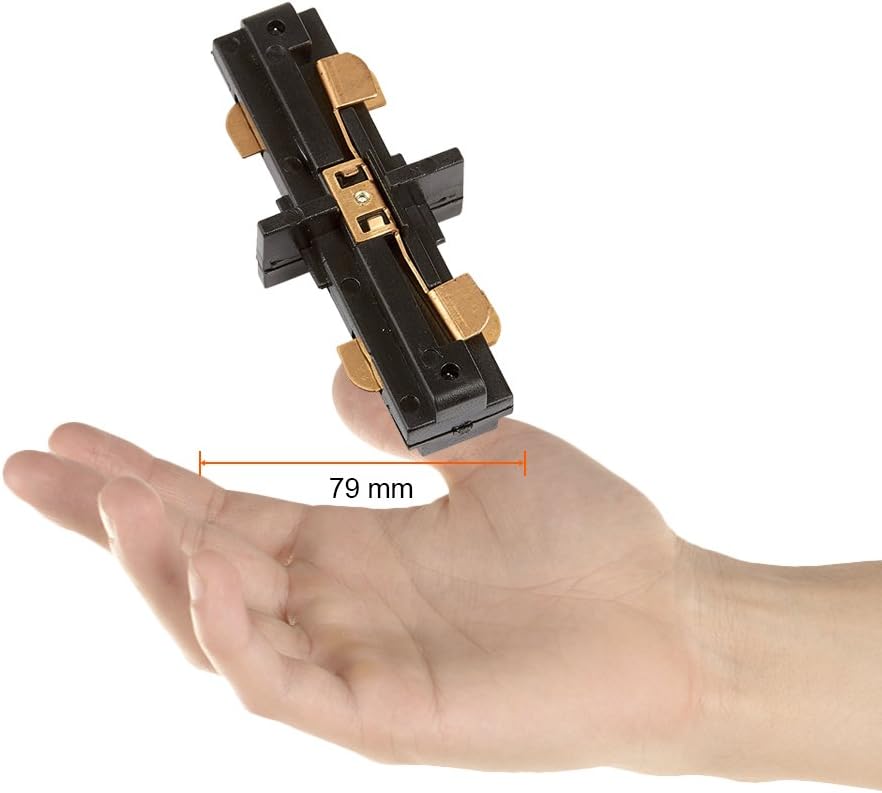
Image 3.2: A hand holding the YS-I/N straight connector, demonstrating its compact size of 79mm.

Image 3.3: Technical drawing providing precise dimensions of the YS-I/N straight connector.
4. Kurulum Kılavuzu
Önce Güvenlik: Before beginning any installation, ensure the power supply to the installation area is turned off at the circuit breaker. If you are unsure about electrical wiring, consult a qualified electrician.
4.1. Mounting the Track Rail
- Plan Düzeni: Determine the desired layout for your track lighting system on the ceiling. Mark the positions for the track rails and any connectors.
- Pozisyon Takibi: Hold the YS-100/N track rail against the ceiling at the marked position.
- Delme Noktalarını İşaretleyin: Use the pre-drilled holes on the track rail as a template to mark the drilling points on the ceiling.
- Matkap Delikleri: Drill appropriate holes in the ceiling for mounting screws. Insert wall anchors if necessary.
- Güvenli Yol: Fasten the track rail to the ceiling using suitable screws. Ensure it is securely mounted and level.
- Elektrik Bağlantısı: Connect the track rail to the main power supply. This typically involves connecting the live, neutral, and ground wires. Ensure all connections are secure and insulated.
4.2. Connecting Multiple Track Rails (Using YS-I/N Straight Connector)
If you are extending your track system or creating specific shapes, use the YS-I/N straight connector:
- Align Rails: Position two YS-100/N track rails end-to-end where they need to be joined.
- Bağlantı Parçasını Takın: Slide the YS-I/N straight connector into the ends of both track rails. Ensure the electrical contacts align properly.
- Güvenli Bağlantı: The connector should fit snugly. Some connectors may have small screws to further secure them to the track. Tighten if applicable.
- Tekrarlamak: Continue this process for all additional track segments and connectors (e.g., YS-L for L-shapes) to complete your desired layout.
4.3. Installing Spotlights (Sold Separately)
Once the track system is installed and wired, you can attach compatible track spotlights:
- Align Spotlight: Align the spotlight's adapter with the track slot.
- Yerleştir ve Çevir: Insert the adapter into the track and twist it to lock it into place. Ensure it makes proper electrical contact.
- Konumu Ayarla: Slide the spotlight along the track to its desired position and adjust its direction as needed.
Installation Video (Similar Product)
The following video demonstrates the unboxing and general installation process for a similar track lighting rail system. While the model number may differ, the principles of installation are largely the same.
Video 4.1: Unboxing and installation overview for a track lighting rail (model TL-5100), provided by Illux de México (Seller). This video illustrates how to handle and prepare a track rail for installation.
5. Operasyon
Once the track lighting system is fully installed and spotlights are attached, restore power to the circuit. The lights can then be operated via the wall switch connected to the track system. Individual spotlights can often be adjusted in direction to illuminate specific areas.
6. Bakım ve Onarım
- Temizlik: To clean the track rails and connectors, wipe them with a soft, dry cloth. Do not use abrasive cleaners or solvents, as these can damage the finish.
- Temizlemeden Önce Gücü Kapatın: Always turn off the power to the track lighting system before cleaning or performing any maintenance.
- Bağlantıları Kontrol Edin: Periodically check that all track segments and spotlights are securely connected and that mounting screws are tight.
- Ampul Değişimi: When replacing spotlights or bulbs (if applicable), ensure the power is off and use compatible replacements.
7. Sorun Giderme
| Sorun | Olası Neden | Çözüm |
|---|---|---|
| Işıklar açılmıyor. | Devreye elektrik gelmiyor. Gevşek elektrik bağlantısı. Faulty spotlight/bulb. | Devre kesiciyi kontrol edin. Tüm kablo bağlantılarının güvenli olduğundan emin olun (öncelikle gücü kapatın). Test with a known working spotlight/bulb. |
| Işıklar titriyor. | Loose connection at track or spotlight. Incompatible spotlight/bulb. | Ensure spotlights are properly seated and twisted into the track. Check electrical connections (power off first). Use recommended spotlights/bulbs. |
| Track segments do not connect properly. | Connector not fully inserted. Debris in track slot. | Ensure connector is fully pushed into both track ends. Inspect track slots for any obstructions and clear them. |
8. Ürün Özellikleri
| Bağlanmak | Detay |
|---|---|
| Marka | Tecnolite |
| Model (Track Rail) | YS-100/N |
| Model (Straight Connector) | YS-I/N |
| Renk | Siyah |
| Malzeme | Plastik |
| Bitiş Türü | Boyalı |
| Stil | Modern |
| Model | Track + Tecnolite Straight Connector |
| Şekil | Round (referring to overall system flexibility) |
| Güç Kaynağı | Kablolu Elektrik |
| Bulb Type (Compatible) | Track spotlights |
| Tak Profile | Tavan Montajı |
| Piller Dahil | HAYIR |
| İlk Mevcut | 1 Mart 2023 |
9. Garanti ve Destek
9.1. Garanti Bilgileri
This Tecnolite product comes with a 1 yıllık garanti against manufacturing defects. Please retain your proof of purchase for warranty claims. The warranty covers defects in materials and workmanship under normal use.
9.2. Müşteri Desteği
For technical assistance, troubleshooting, or warranty inquiries, please contact Tecnolite customer service through their official website or the retailer where the product was purchased. Have your product model number and purchase date ready when contacting support.