
1. Giriş
This manual provides essential instructions for the safe and efficient operation of your KECHAODA K8 Dual Sim Phone. Please read this manual thoroughly before using your device to ensure proper functionality and to understand its features. Keep this manual for future reference.
2. Paket İçeriği
Ürün ambalajında tüm öğelerin mevcut olduğunu doğrulayın:
- KECHAODA K8 Handset
- Battery (1800mAH Lithium-ion)
- Şarj cihazı
- Garanti Kartı
3. Cihaz Bittiview
Familiarize yourself with the physical components of your KECHAODA K8 phone.
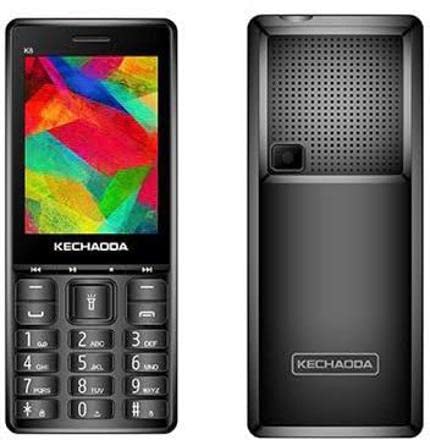
Şekil 3.1: Ön ve Arka View of KECHAODA K8 Phone
The image displays the KECHAODA K8 phone from both its front and rear perspectives. The front view shows the 2.8-inch color display at the top, with the KECHAODA brand logo below it. Below the display is a navigation cluster, followed by a standard alphanumeric keypad with call, end, and function keys. The rear view highlights the phone's back panel, featuring a prominent speaker grille at the top, a small camera lens below the grille, and the KECHAODA brand logo towards the bottom.
Ön Panel:
- Görüntülemek: 2.8-inch (7.11 cm) screen for viewbilgi.
- Klavye: Alphanumeric keys for dialing and text input, navigation keys, and function keys.
Arka panel:
- Konuşmacı: Ses çıkışı için.
- Kamera: 0.3 MP ana kamera.
- Batarya kapağı: Removable cover to access battery and SIM/memory card slots.
4. Kurulum
4.1. Pil Kurulumu
- Remove the back cover of the phone by gently prying it from the designated notch.
- Align the gold contacts of the 1800mAH lithium-ion battery with the contacts in the phone's battery compartment.
- Pili yerine iyice oturana kadar hafifçe bastırın.
- Arka kapağı yerine takın ve yerine oturduğundan emin olun.
4.2. SIM Kart Kurulumu
The KECHAODA K8 supports Dual SIM functionality.
- Pili çıkardıktan sonra SIM kart yuvalarını bulun.
- SIM kartınızı/kartlarınızı, altın renkli kontaklar aşağıya bakacak ve kesik köşe doğru hizalanacak şekilde, belirtilen yuvaya/yuvalara yerleştirin.
- Ensure the SIM card(s) are fully inserted and locked into place.
4.3. Hafıza Kartı Takma (Opsiyonel)
To expand storage, you can install a microSD card (not included).
- Locate the memory card slot, usually adjacent to the SIM card slots.
- microSD kartı altın temas noktaları aşağı bakacak şekilde yerine oturana kadar yerleştirin.
4.4. Pilin Şarj Edilmesi
- Şarj cihazını telefonunuzdaki şarj portuna bağlayın.
- Şarj cihazını elektrik prizine takın.
- Telefonu ilk kullanımdan önce tamamen şarj olmasına izin verin. Ekrandaki pil göstergesi şarj durumunu gösterecektir.
5. Kullanım Talimatları
5.1. Güç Açma/Kapatma
- Açmak İçin: Press and hold the Power/End Call key until the screen lights up.
- Kapatmak İçin: Press and hold the Power/End Call key until the power-off options appear, then select 'Power Off'.
5.2. Temel Gezinme
- Use the directional navigation keys (up, down, left, right) to move through menus.
- Seçimi onaylamak için ortadaki tuşa (Tamam/Seç) basın.
- Use the left and right soft keys (located directly below the display) for context-sensitive options.
5.3. Arama Yapma
- From the home screen, dial the desired phone number using the numeric keypad.
- Press the Call key (usually green) to initiate the call.
- To end a call, press the End Call key (usually red).
5.4. Mesaj Gönderme (SMS)
- 'Mesajlar' menüsüne gidin.
- Select 'Create New Message' or 'New SMS'.
- Alıcının telefon numarasını girin veya kişiler arasından seçim yapın.
- Tuş takımını kullanarak mesajınızı yazın.
- 'Gönder'i seçin.
5.5. Bluetooth Bağlantısı
The KECHAODA K8 supports Bluetooth for wireless communication.
- 'Ayarlar' > 'Bağlantı' > 'Bluetooth' bölümüne gidin.
- Bluetooth'u açın.
- Arama Mevcut cihazları seçin ve istediğiniz cihazla eşleştirin.
5.6. Kameranın Kullanımı
The phone features a 0.3MP primary camera.
- Ana menüden 'Kamera' uygulamasına erişin.
- Ekranı kullanarak çekiminizi çerçeveleyin.
- Press the center key or a designated camera key to capture the image.
6. Bakım
- Temizlik: Telefonun yüzeyini temizlemek için yumuşak, kuru bir bez kullanın. Sıvı temizleyicilerden kaçının.
- Çevresel Koşullar: Do not expose the phone to extreme temperatures, direct sunlight, or excessive moisture.
- Pil Bakım: Avoid overcharging the battery. If the phone will not be used for an extended period, charge it periodically.
- Depolamak: Telefonu kullanılmadığı zamanlarda serin ve kuru bir yerde saklayın.
7. Sorun Giderme
This section addresses common issues you might encounter with your KECHAODA K8 phone.
| Sorun | Olası Neden | Çözüm |
|---|---|---|
| Telefon açılmıyor | Düşük pil; Pil doğru şekilde takılmamış | Pili şarj edin; Pili doğru şekilde yeniden takın. |
| Ağ sinyali yok | SIM card not installed; Out of network coverage; SIM card issue | Ensure SIM card is correctly inserted; Move to an area with network coverage; Contact your service provider. |
| Arama yapılamıyor/alınamıyor | No network signal; SIM card not active; Call barring enabled | Check network signal; Contact service provider to activate SIM; Disable call barring in settings. |
| Pil çabuk bitiyor | Excessive usage; Old battery; Background processes | Reduce usage; Consider replacing battery if old; Close unnecessary applications. |
| Şarj cihazı çalışmıyor | Faulty charger; Damaged charging port | Try a different charger; Inspect charging port for damage. |
8. Özellikler
Detailed technical specifications for the KECHAODA K8 Dual Sim Phone:
- Modeli: K8
- Görüntülemek: 7.11 Centimetres (2.8-inch) with 240 x 320 pixels resolution
- İşletim Sistemi: Symbian 9.1
- VERİ DEPOSU: 16 MB
- Bellek Depolama Kapasitesi: 8 MB (Internal, expandable via microSD)
- Ana Kamera: 0.3MP (Arka)
- Pil: 1800mAh Lityum iyon
- Bağlantı: Bluetooth, USB, Cellular
- Özel Özellikler: Çift SIM
- Form Faktörü: Kaydırıcı
- Renk: Siyah
- Ürün Ağırlığı: 240 gr
- Paket Boyutları: 14.7x9.3x4.7 cm
- Üretici: Kechaoda India
9. Garanti ve Destek
9.1. Garanti Bilgileri
Your KECHAODA K8 phone comes with the following warranty:
- Cihaz: Satın alma tarihinden itibaren 1 yıl üretici garantisi.
- Kutu İçeriğindeki Aksesuarlar: 6 months manufacturer warranty for accessories, including batteries, from the date of purchase.
Garanti talepleriniz için lütfen satın alma fişinizi saklayınız.
9.2. Müşteri Desteği
For any technical assistance, service, or warranty-related inquiries, please refer to the contact information provided on your warranty card or visit the official KECHAODA India webDestek kaynakları için site.