
1. Giriş
Satın aldığınız için teşekkür ederizasing the LFF LDR113-EU Kitchen Radio. This manual provides essential information for the safe and efficient operation of your device. Please read it thoroughly before use and retain it for future reference.
The LFF LDR113-EU is a versatile kitchen radio featuring DAB+, FM, and Bluetooth connectivity. It includes dual alarms, a sleep timer, and 60 station presets, designed for both tabletop use and under-cabinet mounting.
2. Güvenlik Bilgileri
- Güç Kaynağı: Yalnızca kutu içeriğinde bulunan güç adaptörünü kullanın. Ses seviyesinin doğru ayarlandığından emin olun.tage yerel elektrik kaynağınıza uygundur.
- Su ve Nem: Do not expose the device to water, rain, or excessive moisture. Avoid placing liquids near the radio.
- Havalandırma: Cihazın çevresinde yeterli havalandırma olduğundan emin olun. Havalandırma açıklıklarını kapatmayın.
- Sıcaklık: Cihazı radyatörler, ısıtma petekleri, sobalar veya diğer ısı üreten cihazlar gibi ısı kaynaklarından uzak tutun.
- Temizlik: Temizlemeden önce güç bağlantısını kesin. Yumuşak, kuru bir bez kullanın. Sıvı temizleyiciler veya aerosol temizleyiciler kullanmayın.
- Servis: Bu ürüne kendiniz servis vermeye çalışmayın. Tüm servis işlemleri için kalifiye servis personeline başvurun.
- Atama: Place the radio on a stable, level surface or mount it securely according to the instructions.
3. Paket İçeriği
Lütfen paketin içindeki tüm ürünlerin eksiksiz olduğundan emin olun:
- LFF LDR113-EU Kitchen Radio
- Güç Adaptörü
- Mounting Kit (screws, spacers, mounting template)
- Kullanım Kılavuzu (bu belge)
4. Ürün Bittiview
Radyonun bileşenlerini ve kontrollerini iyice öğrenin.

Şekil 4.1: Ön view of the LFF LDR113-EU Kitchen Radio, showing the LCD display on the left, control buttons in the center, and a large rotary knob on the right. The buttons include power, mode, menu, info, preset, timer/sleep, and navigation arrows. The rotary knob is for volume and selection.

Şekil 4.2: Diagram illustrating the key features of the LFF Kitchen Radio, including DAB/DAB+ radio, FM radio, two alarms, sleep timer, Bluetooth connectivity, and 60 station presets.
4.1. Kontroller ve Ekran
- LCD Renkli Ekran: Shows current mode, station information, time, and settings.
- Güç Düğmesi: Radyoyu açar/kapatır.
- Mod Düğmesi: Switches between DAB+, FM, and Bluetooth modes.
- Menü/Bilgi Düğmesi: Accesses menu options or displays station information.
- Ön Ayar Düğmeleri (1-5): Quick access to saved stations.
- Zamanlayıcı/Uyku Düğmesi: Sets sleep timer or alarm functions.
- Gezinme Düğmeleri (Yukarı/Aşağı/Sol/Sağ): Navigates through menus and station lists.
- Rotary Knob (Volume/Enter): Adjusts volume, scrolls through options, and confirms selections.
5. Kurulum
5.1. Güç Bağlantısı
- Güç adaptörünü radyonun arkasındaki DC IN girişine bağlayın.
- Güç adaptörünü duvar prizine takın.
- Radyo açılacak veya bekleme moduna geçecektir.
5.2. Initial Scan (DAB+ and FM)
Upon first power-on, the radio will typically perform an automatic scan for DAB+ and FM stations. If not, follow these steps:
- Basın Mod button to select DAB+ or FM mode.
- For DAB+, the radio will usually initiate a full scan automatically. If not, navigate to the 'Full Scan' option in the DAB+ menu and press the rotary knob to confirm.
- For FM, navigate to the 'Auto Scan' option in the FM menu and press the rotary knob to confirm.
- The radio will search for available stations and store them.

Şekil 5.1: The LFF Kitchen Radio's LCD color screen displaying the main menu with icons for Digital Radio (DAB+), FM Radio, and Bluetooth, indicating available modes.
6. Kullanım Talimatları
6.1. Güç Açma/Kapatma
Basın Güç button to turn the radio on or off (standby mode).
6.2. Mod Seçimi
Basın Mod button repeatedly to cycle through DAB+, FM, and Bluetooth modes.
6.3. DAB+ Radyo Kullanımı
- In DAB+ mode, use the Yukarı/Aşağı navigation buttons or the rotary knob to browse available stations.
- Press the rotary knob to select a station.
- Basmak Menü/Bilgi ile view station information (e.g., program type, signal strength).
6.4. FM Radyonun Çalıştırılması
- FM modunda şunu kullanın: Yukarı/Aşağı navigation buttons to tune to stations manually.
- Basılı tutun Yukarı/Aşağı buttons for automatic station seeking.
- Basmak Menü/Bilgi ile view istasyon bilgileri.
6.5. Bluetooth Bağlantısı
Connect your smartphone or other Bluetooth-enabled device to the radio.
- Basın Mod button to select Bluetooth mode. The display will show 'Bluetooth Pairing'.
- Mobil cihazınızda Bluetooth'u etkinleştirin ve mevcut cihazları arayın.
- Select 'LFF LDR113-EU' from the list of devices.
- Once connected, the radio display will show 'Bluetooth Connected'. You can now play audio from your device through the radio.
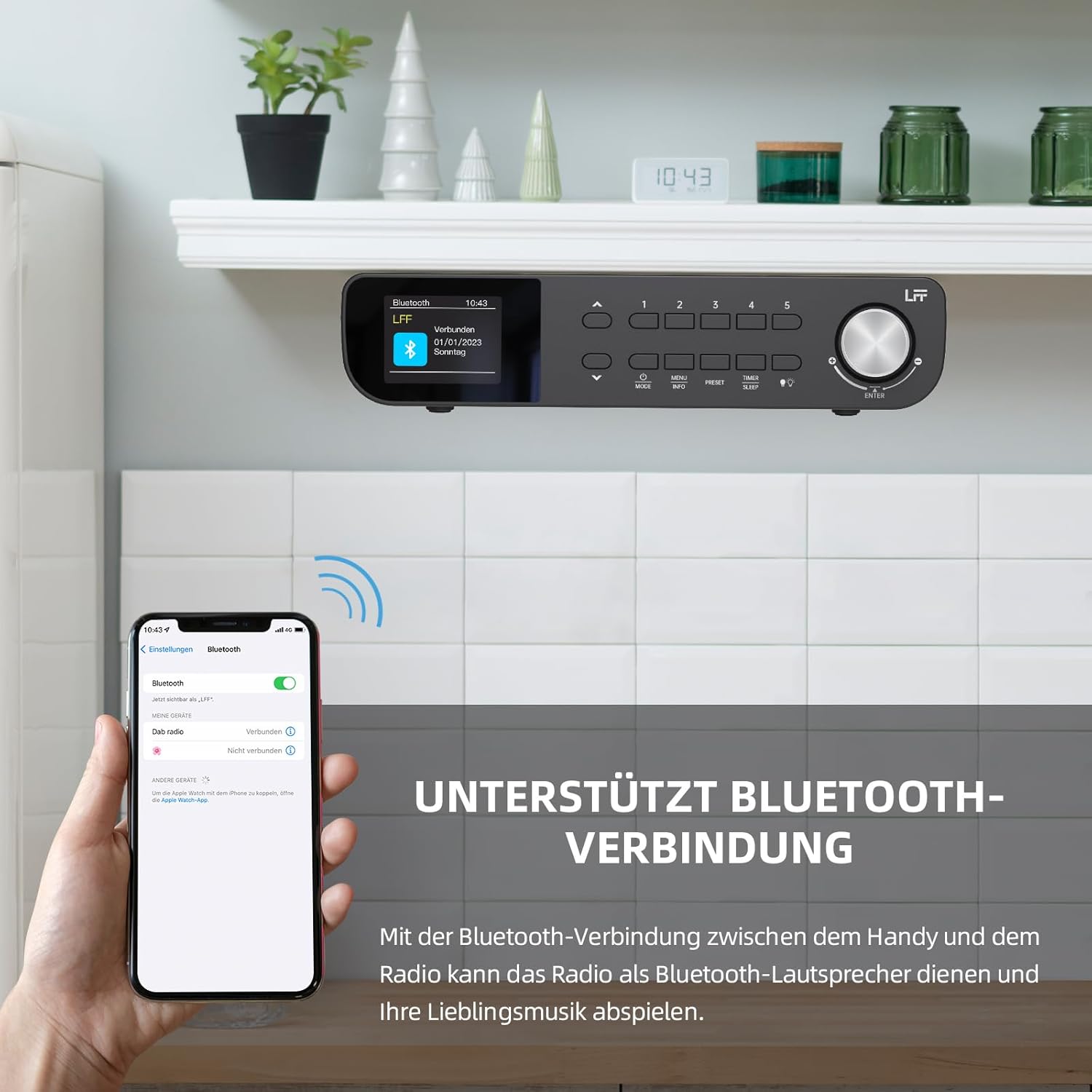
Şekil 6.1: The LFF Kitchen Radio displaying a successful Bluetooth connection, with a smartphone screen showing the radio as a connected device.

Şekil 6.2: Kapatmak view of the radio's display indicating 'LFF' and 'Connected' under the Bluetooth menu, confirming a successful pairing.
6.6. Alarmları Ayarlama
Radyoda iki bağımsız alarm özelliği bulunmaktadır.
- Basın Zamanlayıcı/Uyku button repeatedly until 'Alarm 1' or 'Alarm 2' appears.
- Use the navigation buttons and rotary knob to set the alarm time, source (DAB+, FM, or Buzzer), and frequency (daily, weekdays, weekends, once).
- Confirm settings by pressing the rotary knob.

Şekil 6.3: Close-up of the radio's display showing the current time and options to activate or deactivate Alarm 1 and Alarm 2.
6.7. Uyku Zamanlayıcısı
Uyku zamanlayıcısı, radyonun belirli bir süre sonra otomatik olarak kapanmasını sağlar.
- Basın Zamanlayıcı/Uyku button repeatedly until 'Sleep Timer' appears.
- Use the navigation buttons or rotary knob to select the desired sleep duration (e.g., 15, 30, 60 minutes).
- Döner düğmeye basarak onaylayın.

Şekil 6.4: Close-up of the radio's display showing the 'Sleep Timer' setting, with an option to set the duration, for example, to 30 minutes.
6.8. Ön ayarlar
Hızlı erişim için en fazla 60 favori istasyonu kaydedin.
- Bir Ön Ayarı Kaydetmek İçin: İstediğiniz istasyona ayarlayın. Tuşlardan birine basılı tutun. Ön ayar (1-5) buttons until 'Preset Saved' appears. For additional presets, use the 'Preset Store' option in the menu.
- Bir Ön Ayarı Geri Çağırmak İçin: Kısa süreliğine tuşlardan birine basın. Ön ayar (1-5) buttons. For other presets, navigate to 'Preset Recall' in the menu.
6.9. LED Işık
The radio includes an integrated LED light, useful for illuminating the area below if mounted under a cabinet.
- Basın Işık button (if available, or navigate through menu) to turn the LED light on or off.

Şekil 6.5: The LFF Kitchen Radio mounted under a kitchen cabinet, with its integrated LED light providing illumination to the countertop below.
6.10. Ekran Parlaklığı
Adjust the display backlight brightness to suit your environment.
- Access the 'Display' or 'Settings' menu.
- Select 'Brightness' and choose from High, Medium, or Low settings.

Şekil 6.6: A visual comparison of the LFF Kitchen Radio's display at three different backlight brightness levels: High, Medium, and Low, demonstrating the adjustable visibility.
7. Montaj Talimatları
The LFF LDR113-EU Kitchen Radio offers flexible placement options: tabletop or under-cabinet mounting.
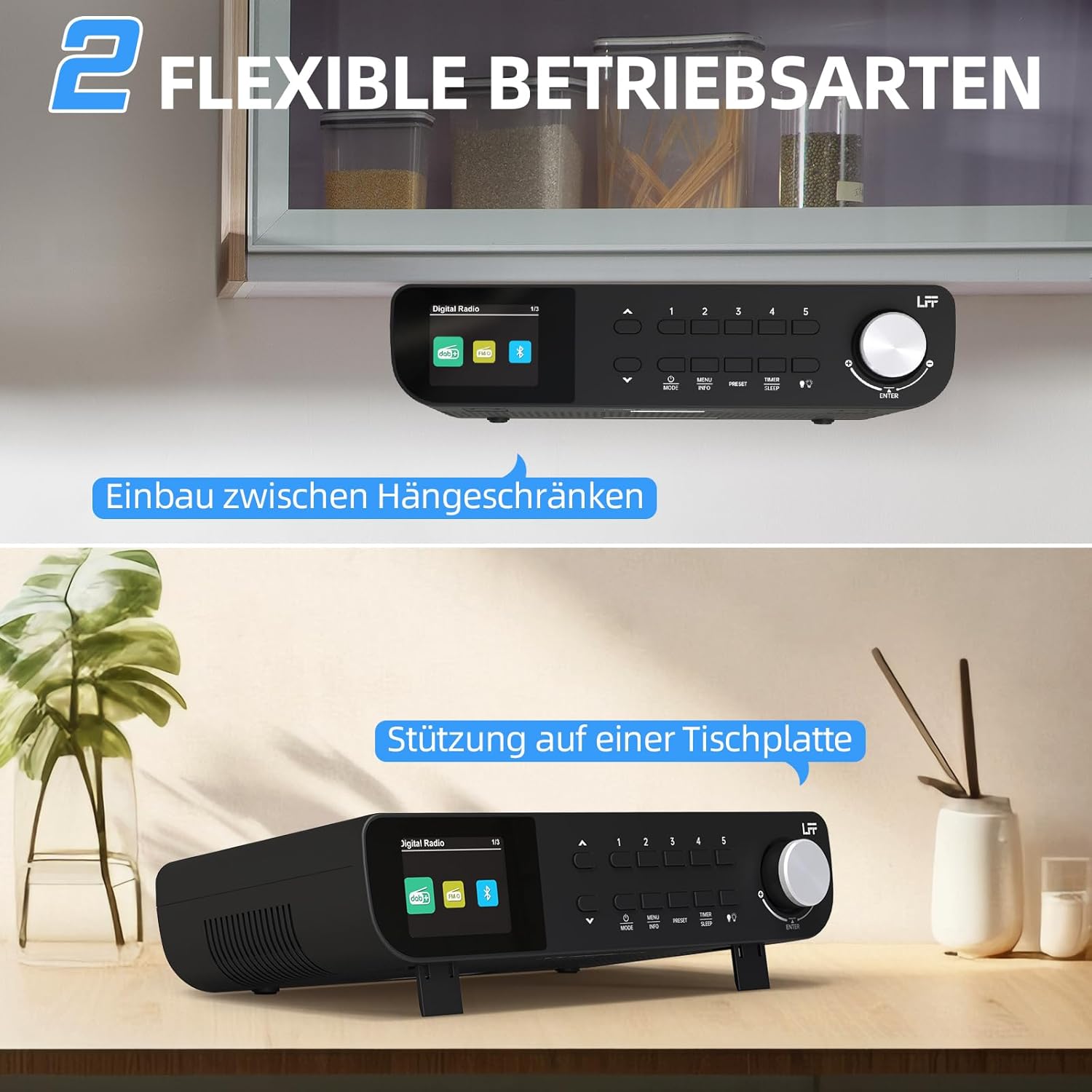
Şekil 7.1: The LFF Kitchen Radio displayed in two common installation scenarios: mounted underneath a kitchen cabinet and placed freestanding on a tabletop.
7.1. Tabletop Placement
Simply place the radio on a stable, flat surface. Ensure it is not near the edge to prevent accidental falls.
7.2. Under-Cabinet Mounting
For under-cabinet installation, use the provided mounting kit.
- Mekanı Hazırlayın: Choose a suitable location under a kitchen cabinet, ensuring there is enough space and access to a power outlet.
- Matkap Deliklerini İşaretleyin: Use the provided mounting template to mark the drill holes on the underside of the cabinet.
- Pilot Delikleri Delin: İşaretli konumlarda pilot delikler açın.
- Attach Mounting Plate (if applicable): Some models may include a separate mounting plate. Attach this to the cabinet using the screws.
- Secure the Radio: Align the radio with the mounting holes or plate and secure it using the provided screws. Ensure it is firmly attached.
- Gücü bağlayın: Güç adaptörünü takın.

Şekil 7.2: Detailed diagram showing the steps for under-cabinet mounting, including measuring distances (e.g., 58mm) and securing the radio with screws.
8. Bakım
- Temizlik: To clean the radio, disconnect it from the power supply. Use a soft, dry, lint-free cloth. Do not use abrasive cleaners, waxes, or solvents.
- Anten: Ensure the antenna is extended for optimal reception in DAB+ and FM modes. Handle it gently to avoid damage.
- Depolamak: Radyoyu uzun süre saklayacaksanız, güç kaynağından ayırın ve serin, kuru bir yerde muhafaza edin.
9. Sorun Giderme
| Sorun | Olası Neden | Çözüm |
|---|---|---|
| Güç yok | Güç adaptörü bağlı değil veya priz arızalı. | Elektrik bağlantısını kontrol edin. Farklı bir priz deneyin. |
| Zayıf DAB+/FM alımı | Anten uzatılmamış, sinyal zayıf veya parazit var. | Fully extend the antenna. Reposition the radio. Perform a full scan. |
| Bluetooth bağlanmıyor | Radyo eşleştirme modunda değil, cihaz çok uzakta veya zaten başka bir cihaza bağlı. | Ensure radio is in Bluetooth mode. Move device closer. Disconnect from other devices. |
| Ses yok | Volume too low, mute activated, or incorrect mode. | Increase volume. Check if mute is active. Ensure correct mode (DAB+, FM, Bluetooth). |
| Görüntü çalışmıyor | Brightness too low or device malfunction. | Adjust display brightness. If problem persists, contact support. |
10. Özellikler

Şekil 10.1: Diagram showing the dimensions of the LFF Kitchen Radio: 250mm length, 146mm width, and 55mm height.
| Özellik | Detay |
|---|---|
| Marka | LFF uzantısı |
| Model Numarası | LDR113-AB |
| Renk | Siyah |
| Bağlantı | Bluetooth |
| Ayarlama Teknolojisi | DAB Plus, FM |
| Güç Kaynağı | Elektrik kablosu |
| Sıklık | 108 MHz (FM max) |
| Boyutlar (U x G x Y) | 250mm x 146mm x 55mm |
| Ön Ayarlar | 60 |
| Görüntülemek | LCD Color Screen |
| Özel Özellikler | Dual Alarms, Sleep Timer, Under-cabinet mounting option, LED Light |
11. Garanti ve Destek
This product comes with a standard manufacturer's warranty. Please refer to the warranty card included in your package for specific terms and conditions. For technical support, troubleshooting assistance, or warranty claims, please contact your retailer or the LFF customer service department.