
1. Giriş
This manual provides detailed instructions for the ENDORFY Thock Wireless Mechanical Keyboard, model EY5A078. It covers setup, operation, maintenance, and troubleshooting to ensure optimal performance and longevity of your device. Please read this manual thoroughly before using the keyboard.

Image 1.1: The ENDORFY Thock Wireless Mechanical Keyboard EY5A078. This image displays the full QWERTY layout with illuminated keys, showcasing the keyboard's design and RGB capabilities.
2. Paket İçeriği
Paketin içinde tüm öğelerin mevcut olduğundan emin olun:
- ENDORFY Thock Wireless Mechanical Keyboard EY5A078
- USB-C to USB-A Cable (detachable)
- 2.4 GHz USB Alıcı
- Tuş Çektirmesi
- Anahtar Çektirme
- Kullanım Kılavuzu (bu belge)
3. Kurulum ve Bağlantı
The ENDORFY Thock Wireless Mechanical Keyboard offers three connection modes: wired, 2.4 GHz wireless, and Bluetooth.
3.1. Kablolu Bağlantı
- Locate the USB-C port on the keyboard (typically on the back or top edge).
- Kutu içeriğinde bulunan USB-C - USB-A kablosunu klavyeye bağlayın.
- Kablonun USB-A ucunu bilgisayarınızdaki uygun bir USB portuna takın.
- Klavye otomatik olarak algılanacak ve kullanıma hazır hale gelecektir.
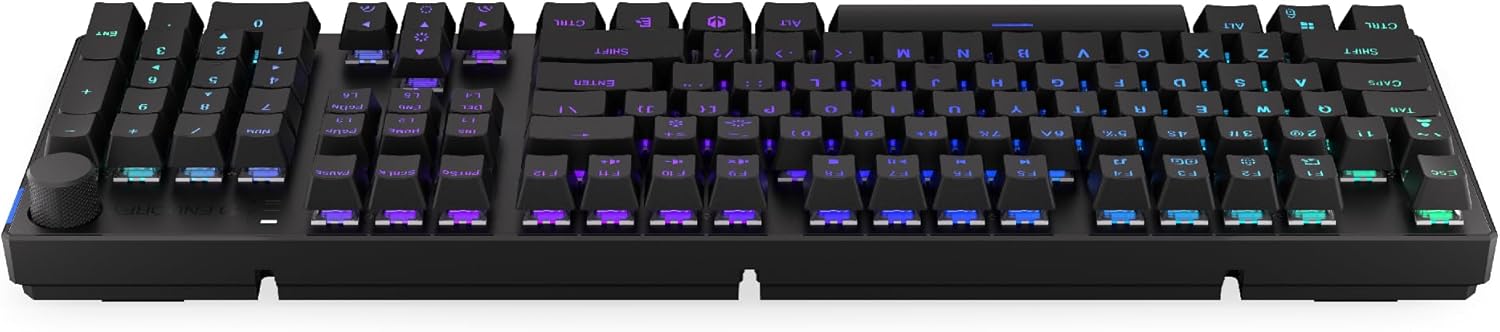
Resim 3.1: Yan view Klavyenin üzerinde, kablolu bağlantı ve şarj için USB-C bağlantı noktasını vurgulayan bir görsel yer almaktadır.
3.2. 2.4 GHz Kablosuz Bağlantı
- Locate the 2.4 GHz USB receiver. It may be stored in a compartment on the underside of the keyboard.
- Plug the 2.4 GHz USB receiver into an available USB port on your computer.
- On the keyboard, locate the mode switch (usually on the back or side) and set it to the 2.4 GHz wireless mode (often indicated by a specific icon or "2.4G").
- The keyboard should automatically connect. An indicator light may confirm the connection.

Image 3.2: Underside of the keyboard, showing the compartment for storing the 2.4 GHz USB receiver and adjustable feet.
3.3. Bluetooth Bağlantısı
- On the keyboard, set the mode switch to Bluetooth mode (often indicated by a Bluetooth icon or "BT").
- The keyboard may have multiple Bluetooth profiles (e.g., BT1, BT2, BT3). Select one by pressing Fn + 1, Fn + 2, or Fn + 3. The corresponding indicator light will flash.
- Bilgisayarınızda veya cihazınızda Bluetooth ayarlarını açın ve yeni cihazları arayın.
- Select "ENDORFY Thock Wireless" (or similar name) from the list of available devices.
- Eşleştirme işlemini tamamlamak için ekrandaki talimatları izleyin.
- Eşleştirme tamamlandığında klavyedeki gösterge ışığı yanıp sönmeyi durduracak ve sabit yanacaktır.
4. Operasyon
4.1. Key Functions and Shortcuts
The keyboard features various function key combinations (Fn + Key) for multimedia control, lighting adjustments, and other settings.
- Fn + F1-F12: Multimedia and system functions (e.g., volume control, media playback, calculator). Refer to the keycap legends for specific functions.
- Fn + Ok Tuşları: Adjust RGB lighting effects (e.g., brightness, speed, direction).
- fn + 1/2/3: Bluetooth Pro arasında geçiş yapınfiles.
- fn + 4: Switch to 2.4 GHz wireless mode.
- fn + 5: Kablolu moda geçin.
4.2. RGB Aydınlatma Kontrolü
The ENDORFY Thock keyboard features programmable RGB backlighting. Use the following combinations to customize the lighting:
- Fn + Sağ Ok: Aydınlatma efektini değiştirin.
- Fn + Sol Ok: Aydınlatma efektinin yönünü değiştirin.
- Fn + Yukarı Ok: Parlaklığı artırın.
- Fn + Aşağı Ok: Parlaklığı azaltın.
- Fn + Girişler: Renk değiştir.
- Fn + Del: Adjust effect speed.
4.3. Ses Düğmesi
The dedicated volume knob located on the top right of the keyboard allows for quick audio adjustments.
- Saat Yönünde Döndür: Sesi artırın.
- Saat yönünün tersine döndürün: Sesi azaltın.
- Aşağı bastırmak: Sesi kapat/aç.

Image 4.1: Detail of the volume knob and status indicator lights, located on the upper right side of the keyboard.
4.4. Sıcak Değiştirilebilir Anahtarlar
The ENDORFY Thock keyboard features hot-swappable switches, allowing you to change mechanical switches without soldering. This enables customization of typing feel.
- Tuş kapağını çıkarın: İstenilen tuş başlığını yavaşça çıkarmak için verilen tuş başlığı çıkarıcısını kullanın.
- Anahtarı Kaldır: Verilen anahtar sökme aletini kullanarak anahtarın üst ve alt klipslerini dikkatlice kavrayın ve düz bir şekilde yukarı doğru çekin.
- Yeni Anahtar Takın: Align the pins of the new switch with the holes on the PCB. Press the switch firmly until it clicks into place. Ensure pins are not bent.
- Tuş kapağını değiştirin: Tuş kapağını yeni anahtar gövdesine geri yerleştirin.

Resim 4.2: Yakın çekim view of the Kailh Box Brown mechanical switches, demonstrating the hot-swappable design.
5. Bakım
5.1. Klavyeyi Temizleme
Düzenli temizlik, klavyenin performansını ve görünümünü korumaya yardımcı olur.
- Temizlemeden önce klavyeyi bilgisayarınızdan ayırın.
- Tuş kapaklarını iyice temizlemek için tuş kapağı sökme aleti kullanın.
- Tuşların arasında biriken toz ve kalıntıları temizlemek için basınçlı hava kullanın.
- Tuş başlıklarını ve klavye yüzeyini yumuşak bir bezle silin.amp bez. Sert kimyasallardan kaçının.
- Klavyeyi yeniden bağlamadan önce tamamen kuru olduğundan emin olun.
5.2. Tuş Takımı ve Anahtar Değişimi
Refer to Section 4.4 for detailed instructions on replacing keycaps and switches. Use only compatible keycaps and switches to avoid damage.
6. Sorun Giderme
| Sorun | Olası Neden | Çözüm |
|---|---|---|
| Klavye yanıt vermiyor (Kablolu) | Kablo bağlantısı gevşek, USB portu arızalı. | USB-C kablosunun güvenli bir şekilde bağlı olduğundan emin olun. Farklı bir USB bağlantı noktası veya kablo deneyin. |
| Klavye yanıt vermiyor (Kablosuz) | Low battery, incorrect mode, receiver not plugged in, pairing issue. | Charge the keyboard. Ensure mode switch is set correctly (2.4G or BT). Re-pair Bluetooth or re-insert 2.4 GHz receiver. |
| RGB aydınlatma çalışmıyor | Lighting turned off, low battery, software issue. | Check lighting controls (Fn + Arrow keys). Charge the keyboard. Restart computer. |
| Tuşların çift yazılması veya algılanmaması | Dust/debris under switch, faulty switch. | Clean under keycaps with compressed air. If issue persists, replace the switch (refer to Section 4.4). |
7. Özellikler
- Modeli: EY5A078
- Marka: onayla
- Bağlantı: Wired (USB-C), 2.4 GHz Wireless, Bluetooth
- Anahtar Türü: Kailh Box Brown (Hot-swappable)
- Tuş Takımları: PBT Çift Atış
- Düzen: Full-size QWERTY
- Arka aydınlatma: Programlanabilir RGB
- İşletim Sistemleri: Linux, Mac OS X 10.12 Sierra, Windows 10
- Renk: Siyah
- Malzeme: Polibütilen tereftalat (PBT)
- Özel Özellikler: Detachable cable, Volume knob with mute, Hot-swappable switches
- Pil: Lityum iyon (dahil)
8. Garanti ve Destek
ENDORFY products are covered by a manufacturer's warranty. For detailed warranty information, please refer to the warranty card included with your product or visit the official ENDORFY website. For technical support, product inquiries, or service requests, please contact ENDORFY customer support through their official channels.
Resmi Webalan: www.endorfy.com
9. Güvenlik Bilgileri
- Klavyenizi sıvılardan ve aşırı nemden uzak tutun.
- Klavyeyi aşırı sıcaklıklara maruz bırakmaktan kaçının.
- Do not attempt to disassemble or modify the keyboard beyond hot-swapping switches and keycaps, as this may void the warranty and cause damage.
- Yalnızca kutu içeriğinde bulunan veya önerilen şarj kablosunu kullanın.
- Dispose of the battery and electronic components responsibly according to local regulations.


