
1. Giriş
Thank you for choosing the Outwell Arctic Chill 50L Portable Refrigerator. This manual provides essential information for the safe and efficient operation, maintenance, and troubleshooting of your new appliance. Please read it thoroughly before first use and keep it for future reference.
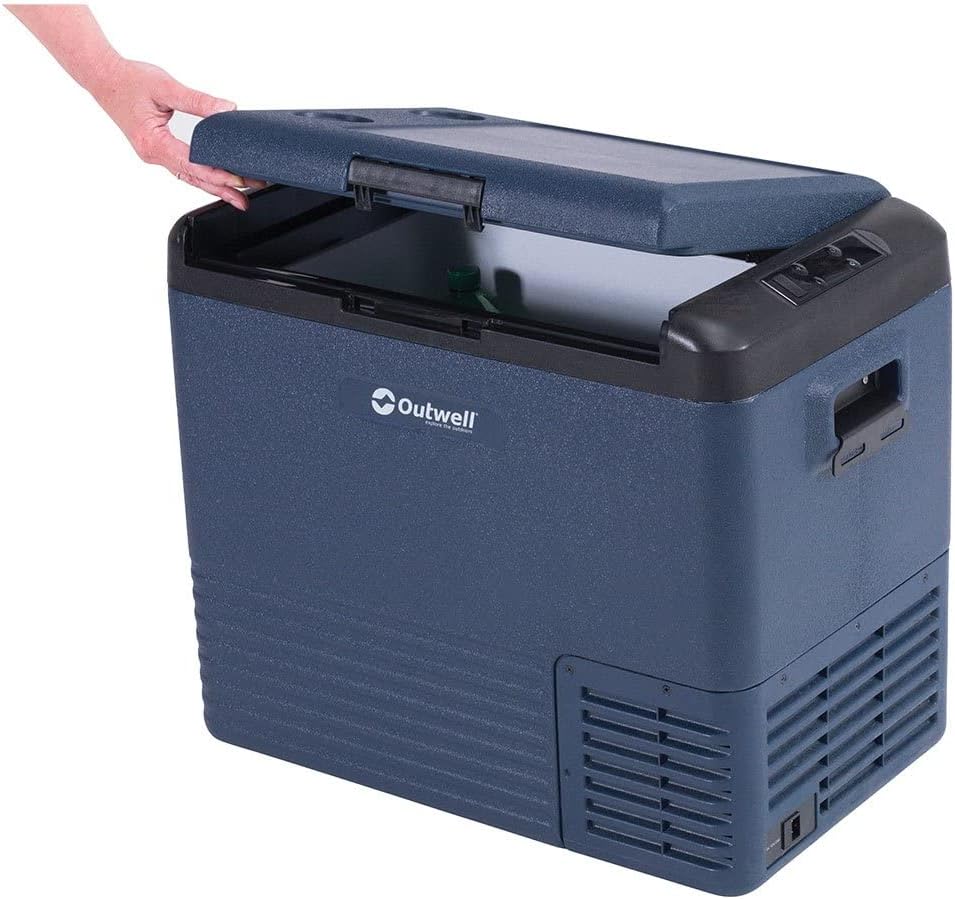
This image displays the Outwell Arctic Chill 50L portable refrigerator in a dark blue color, with its lid partially open, revealing the spacious interior suitable for storing food and beverages.
2. Güvenlik Talimatları
- Güç kaynağı hacmini sağlayıntage cihazın üzerindeki derecelendirme etiketiyle eşleşiyor.
- Do not operate the refrigerator if the power cord is damaged. Contact qualified service personnel.
- Havalandırma açıklıklarını tıkanıklıklardan uzak tutun.
- Üretici tarafından önerilen tipte olmadıkça, gıda saklama bölmelerinde elektrikli cihazlar kullanmayın.
- Buzdolabınızı doğrudan güneş ışığına veya ısı kaynaklarının yakınına yerleştirmekten kaçının.
- Bu cihaz, fiziksel, duyusal veya zihinsel yetenekleri kısıtlı olan veya deneyim ve bilgi eksikliği bulunan kişiler (çocuklar dahil) tarafından, güvenliklerinden sorumlu bir kişi tarafından cihazın kullanımıyla ilgili olarak gözetim veya talimat sağlanmadığı sürece kullanılmak üzere tasarlanmamıştır.
- Çocukların cihazla oynamamalarını sağlamak için gözetim altında tutulmaları gerekir.
3. Paket İçeriği
Lütfen tüm ürünlerin mevcut ve iyi durumda olduğundan emin olun:
- Outwell Arctic Chill 50L Portable Refrigerator Unit
- AC Power Adapter (230V)
- DC Power Cable (12V)
- Kullanıcı Kılavuzu

This image illustrates the power accessories included with the refrigerator, featuring an AC adapter for household outlets and a 12V DC cable for vehicle power sources, ensuring versatile connectivity.
4. Kurulum
4.1 Paketin açılması
- Remove all packaging materials and inspect the refrigerator for any damage.
- İç ve dış cepheyi reklamla temizleyinamp İlk kullanımdan önce bez.
- Place the refrigerator on a stable, level surface, ensuring adequate ventilation around all sides.
4.2 Güce Bağlama
The Arctic Chill 50L can be powered by either 12V DC (car/vehicle) or 230V AC (household mains).
- For 12V DC: Connect the DC power cable to the refrigerator's DC input port and then to your vehicle's 12V socket.
- For 230V AC: Connect the AC power adapter to the refrigerator's AC input port, then plug the adapter into a standard 230V wall outlet.
Ensure the power connection is secure before turning on the unit.
5. Kullanım Talimatları
5.1 Kontrol Paneli Üstüview

This close-up image highlights the digital control panel of the refrigerator, showing temperature display, battery indicator, and buttons for adjusting settings like ECO mode.
Kontrol panelinde dijital bir ekran ve çalıştırma için çeşitli düğmeler bulunmaktadır:
- Güç Düğmesi: Üniteyi açar/kapatır.
- Sıcaklık Ayar Düğmeleri (+/-): Hedef sıcaklığı artırır veya azaltır.
- Mod Düğmesi: Cycles through cooling modes (e.g., ECO, MAX).
- Görüntülemek: Shows current temperature, battery level, and selected mode.
5.2 Ayar Sıcaklığı
- Buzdolabını açmak için Güç düğmesine basın.
- Use the '+' or '-' buttons to set your desired temperature. The display will show the target temperature briefly, then revert to the current internal temperature.
5.3 Soğutma Modu
- MAX Modu: Hızlı sıcaklık düşüşü için maksimum soğutma gücü sağlar.
- EKO Modu: Optimizes power consumption for energy efficiency, suitable for maintaining temperature over longer periods.
Press the Mode button to switch between available cooling modes.
5.4 Smartphone App Connectivity
The Outwell Arctic Chill 50L may feature Bluetooth connectivity, allowing you to control and monitor the refrigerator via a dedicated smartphone app.
- Download the 'Outwell Arctic Cooler' app from your device's app store.
- Akıllı telefonunuzda Bluetooth'un etkinleştirildiğinden emin olun.
- Follow the in-app instructions to pair your refrigerator.

This image shows a user interacting with the Outwell Arctic Cooler mobile application on a smartphone, which allows for remote control and monitoring of the refrigerator's temperature and settings.
6. Bakım
6.1 Temizlik
- Temizlemeden önce daima gücü kesin.
- İç ve dış yüzeyleri ad ile temizleyinamp bez ve yumuşak deterjanla temizleyin.
- Aşındırıcı temizleyiciler veya sert kimyasallar kullanmayın.
- Gücü tekrar bağlamadan önce ünitenin tamamen kuru olduğundan emin olun.
6.2 Depolama
When not in use for extended periods, ensure the refrigerator is clean, dry, and stored in a well-ventilated area. Leave the lid slightly ajar to prevent odors and mildew.
7. Sorun Giderme
| Sorun | Olası Neden | Çözüm |
|---|---|---|
| Buzdolabı açılmıyor | No power supply; Damaged power cord; Blown fuse (vehicle) | Check power connection; Try a different outlet/socket; Inspect power cord; Check vehicle fuse. |
| Yetersiz soğutma | Ventilation blocked; Door not sealed properly; Ambient temperature too high; Overloaded with warm items | Clear vents; Ensure lid is closed tightly; Move to a cooler location; Allow time for cooling. |
| Olağandışı gürültü | Ünite düz değil; Fan tıkanıklığı | Place on a level surface; Check for debris near the fan. |
8. Özellikler
| Özellik | Detay |
|---|---|
| Marka | Dış kuyu |
| Model Adı | Arctic Chill 50L |
| Model Numarası | 590205 |
| Kapasite | 50 Litre |
| Güç Girişi | 12V DC / 230V AC |
| Renk | Gri |
| Malzeme (Dış Cephe) | Polyester |
| Yalıtım Malzemesi | Polivinil klorür |
| Ürün Ağırlığı | 2.7 Kilogram |
| Özel Özellik | Kullanımı kolay |
9. Garanti ve Destek
For warranty information and technical support, please refer to the warranty card included with your product or visit the official Outwell webSite. Satın alma belgenizi herhangi bir garanti talebi için saklayın.