
1. Giriş
This manual provides detailed instructions for the installation, configuration, and operation of your Keenetic Runner 4G N300 Mesh Router. This device combines 4G/LTE mobile internet access with N300 Wi-Fi and Mesh capabilities, featuring a 4-port smart switch for versatile network connectivity. Please read this manual thoroughly before using the device to ensure proper setup and optimal performance.
2. Güvenlik Bilgileri
- Yönlendiricinin iyi havalandırılan bir alana, doğrudan güneş ışığından, ısı kaynaklarından ve nemden uzak bir yere yerleştirildiğinden emin olun.
- Use only the power adapter supplied with the device. Using an unauthorized adapter may damage the router and void the warranty.
- Yönlendiriciyi açmayın.asing. Servis işlemleri yalnızca kalifiye personel tarafından yapılmalıdır.
- Cihazı çocuklardan ve evcil hayvanlardan uzak tutunuz.
- Yönlendiriciyi güçlü elektromanyetik alanların yakınına yerleştirmekten kaçının.
3. Paket İçeriği
Paketinizin aşağıdaki öğeleri içerdiğini doğrulayın:
- Keenetic Runner 4G N300 Mesh Router (Model: KN-2211-01-EU)
- Tip-C Güç Adaptörü
- Multilingual Installation Manual
4. Ürün Bittiview
The Keenetic Runner 4G N300 is designed for reliable internet access via 4G/LTE and Wi-Fi. It features multiple ports and indicators for easy monitoring and connectivity.
4.1 Ön View

Resim: Ön view of the Keenetic Runner 4G N300 Mesh Router, showing the Keenetic logo and indicator lights.
4.2 Taraf View ve Boyutlar

Resim: Yan view of the Keenetic Runner 4G N300 Mesh Router, illustrating its dimensions: 185 mm width, 32 mm height, and 184 mm antenna height.
4.3 Bağlantı Noktaları ve Göstergeler
- SIM Yuvası: For inserting a Nano SIM card for 4G/LTE connectivity.
- Ethernet Bağlantı Noktaları: Four LAN ports for wired connections to devices.
- Güç girişi: Connects to the Type-C power adapter.
- Harici Anten Bağlantı Noktaları: Two connectors for optional external 4G/LTE antennas to enhance signal reception.
- LED Göstergeleri: Provide status information for power, internet, Wi-Fi, and 4G/LTE signal.
5. Kurulum
5.1 Donanım Bağlantısı
- SIM Kartı Takın: Locate the Nano SIM slot on the router. Gently insert your Nano SIM card until it clicks into place. Ensure the card is oriented correctly as indicated on the device.

Resim: Yakın çekim view of the Nano SIM slot on the Keenetic Runner 4G N300 Mesh Router, showing a SIM card being inserted.
- Harici Antenleri Bağlayın (İsteğe Bağlı): If you wish to use external 4G/LTE antennas for improved signal, connect them to the two external antenna connectors on the router.
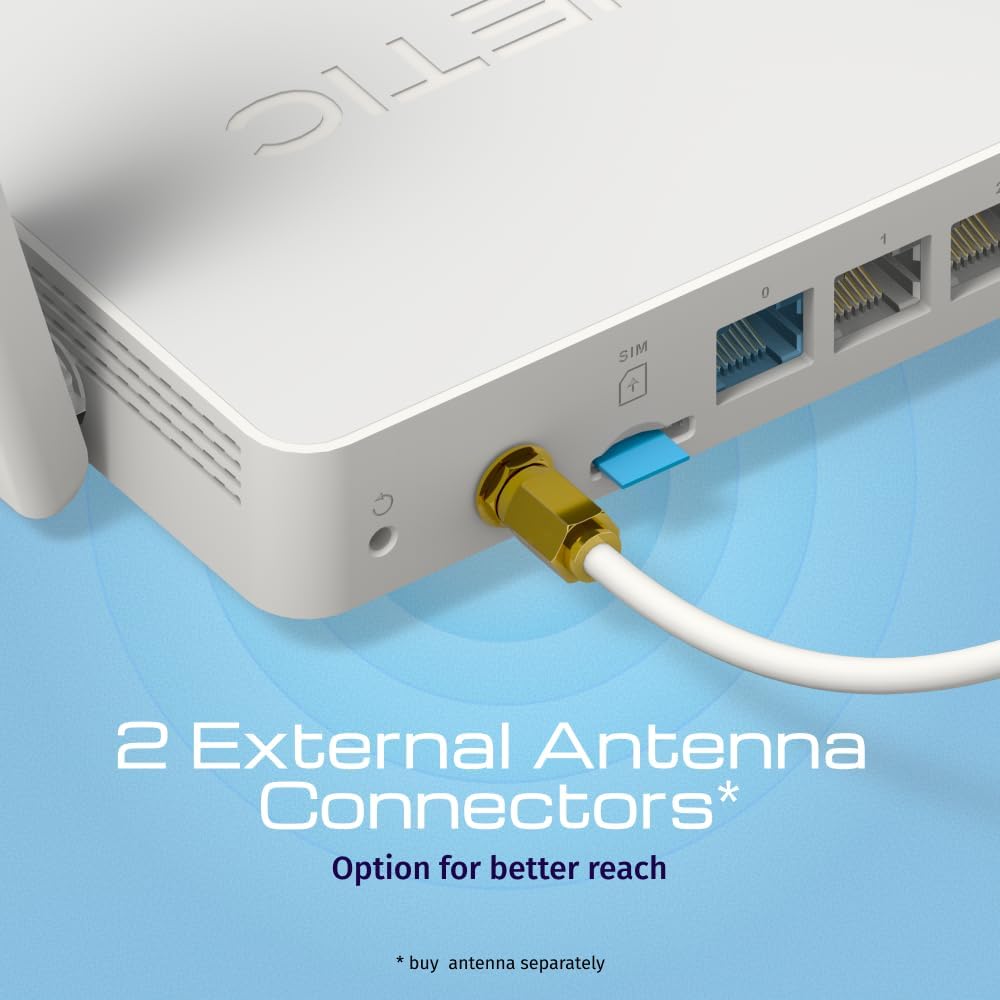
Resim: View of the two external antenna connectors on the Keenetic Runner 4G N300 Mesh Router, with an antenna cable connected to one.
- Gücü bağlayın: Plug the Type-C power adapter into the router's power port and then into a power outlet. The router will power on automatically.
- İlk Bağlantı: Connect your computer to one of the router's Ethernet LAN ports using an Ethernet cable, or connect wirelessly to the default Wi-Fi network (SSID and password usually found on a label on the router).
5.2 İlk Yapılandırma
- Erişim Web Arayüz: Bir tane aç web browser on your connected computer and enter the default IP address (e.g.,
192.168.1.1ormy.keenetic.net). - Giriş yapmak: Varsayılan kullanıcı adı ve şifreyi girin (genellikle
admin(her ikisi için de veya yönlendirici etiketinde belirtildiği gibi). - Kurulum Sihirbazını Takip Edin: The KeeneticOS web interface will guide you through the initial setup process, including setting up your internet connection (4G/LTE or Ethernet WAN), Wi-Fi network name (SSID), and password.
- Yazılımı Güncelle: It is recommended to check for and install the latest firmware updates for optimal performance and security.
6. Çalıştırma
6.1 4G/LTE Connectivity
The Keenetic Runner 4G N300 provides mobile internet access with download speeds up to 150 Mbps and upload speeds up to 50 Mbps, depending on your mobile network provider and signal strength.

Image: Graphic illustrating the mobile internet capabilities of the Keenetic Runner 4G N300, showing download speeds up to 150 Mbps and upload speeds up to 50 Mbps.
6.2 Wi-Fi Ağ Yapılandırması
You can configure your Wi-Fi network settings, including SSID, security type (WPA2/WPA3 recommended), and password, through the KeeneticOS web interface or the Keenetic mobile app.
6.3 Mesh Wi-Fi Network Setup
The Keenetic Runner supports Mesh Wi-Fi technology, allowing you to expand your network coverage by adding other Keenetic Mesh-compatible devices. Refer to the KeeneticOS documentation for detailed instructions on setting up a Mesh system.
6.4 Advanced Features (KeeneticOS)
KeeneticOS, the router's operating system, offers a range of advanced features for network management and security.
6.4.1 VPN and DNS Filters
The router supports various VPN protocols and DNS filtering services for enhanced privacy and security.

Image: Graphic showcasing KeeneticOS support for over 50 VPN features (WireGuard, OpenVPN, IPSec) and DNS filters (AdGuard, Cloudflare, OpenDNS).
6.4.2 Network Management via Keenetic App
Manage your network from anywhere using the Keenetic mobile application, providing real-time control and monitoring.

Image: Screenshot of the Keenetic App interface, demonstrating features like network overview, device list, and Quality of Service (QoS) management.
6.4.3 Smart Home & IoT Readiness
The router supports network segmentation and cybersecurity features to secure and manage your smart home and IoT devices.

Image: Diagram illustrating how the Keenetic Runner supports Smart Home and IoT devices through network segmentation and cybersecurity, showing devices connected within a home environment.
6.4.4 Advanced Parental Controls
Implement parental controls to ensure safer browsing for children, including scheduling internet access, application filtering, and DNS-based content filtering.

Image: Screenshot of the KeeneticOS parental control interface, displaying options for schedules by age group, application filters, and DNS-based filters.
6.4.5 KeeneticOS Overview
KeeneticOS is a modular operating system that powers every Keenetic router, offering continuous updates, robust security, a unified platform across devices, and extensive customization options.

Image: Graphic highlighting the core aspects of KeeneticOS: always updated and safe, a unified platform across devices, customizable and modular, and providing long-term value.
7. Bakım
7.1 Firmware Güncellemesi
Regularly check for and install firmware updates through the KeeneticOS web interface or the Keenetic App. Firmware updates provide new features, performance improvements, and security patches.
7.2 Cihazı Sıfırlama
If you encounter persistent issues, you may perform a factory reset. Locate the reset button (often a small pinhole) on the router. With the router powered on, press and hold the reset button for approximately 10 seconds until the indicators change. This will restore the router to its factory default settings.
8. Sorun Giderme
- İnternet bağlantısı yok:
- SIM kartın doğru takılıp etkinleştirildiğini kontrol edin.
- Verify 4G/LTE signal strength via the router's indicators or web arayüz.
- Ensure your internet service provider (ISP) account is active.
- Yönlendiriciyi ve bağlı cihazlarınızı yeniden başlatın.
- Yavaş Hızlar:
- Check 4G/LTE signal strength; consider using external antennas if signal is weak.
- Başka hiçbir cihazın aşırı bant genişliği tüketmediğinden emin olun.
- Sorunu doğrulamak için bir hız testi yapın.
- Wi-Fi Bağlantı Sorunları:
- Wi-Fi şifresini doğrulayın.
- Move closer to the router to improve signal.
- Diğer elektronik cihazlardan kaynaklanan paraziti kontrol edin.
- Yönlendirici yanıt vermiyor:
- Unplug the power adapter, wait 10 seconds, then plug it back in.
- If the issue persists, perform a factory reset (refer to Section 7.2).
9. Özellikler
| Özellik | Detay |
|---|---|
| Marka | Keenetik |
| Model Adı | Keenetic Runner 4G 2nd Gen (KN-2211-01-EU) |
| İşletim Sistemi | KeeneticOS |
| Bağlantı Teknolojisi | Ethernet, LTE, Wi-Fi |
| Kablosuz İletişim Standardı | 802.11b, 802.11g, 802.11n |
| Frekans Bant Sınıfı | Tek bant |
| Özel Özellikler | Mesh networking, advanced security, parental control |
| Uyumlu Cihazlar | Game console, Personal Computer, Laptop, Smartphone, Tablet |
| Ürün Ağırlığı | 500 Gram |
| Dahil Bileşenler | Router, Type-C power adapter, multilingual installation manual |
10. Garanti ve Destek
For warranty information and technical support, please refer to the official Keenetic website or contact your local Keenetic distributor. Keep your purchase receipt for warranty claims.