
giriiş
This manual provides detailed instructions for the proper use and maintenance of your Sunny CRS-300AT Android Smart LED TV Remote Control. This remote is designed for compatibility with AXEN LED TVs and features a dedicated Live TV button for convenient access to live broadcasts. Please read this manual carefully before using the remote control to ensure optimal performance and longevity.
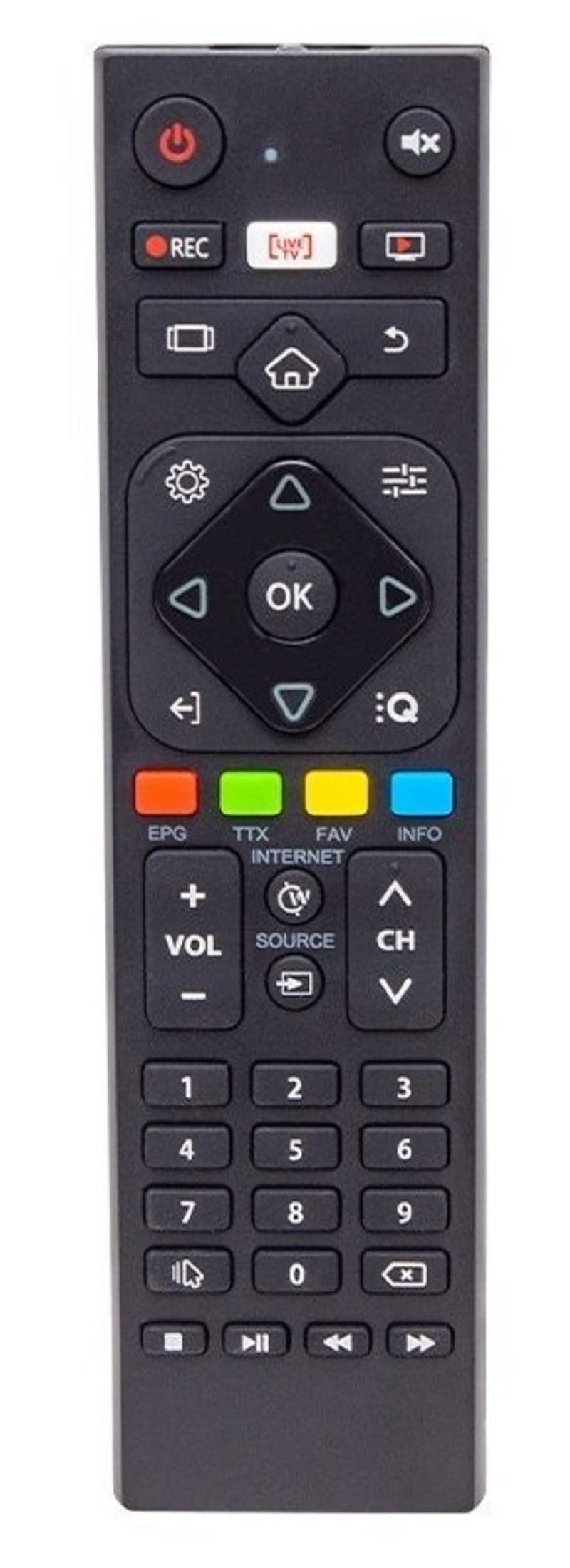
Image of the Sunny CRS-300AT remote control, showing its ergonomic design and button layout, including the dedicated Live TV button.
Kurmak
Pil Kurulumu
- Uzaktan kumandanın arkasındaki pil bölmesini bulun.
- Pil bölmesi kapağını açmak için aşağı doğru veya okla gösterilen yönde kaydırın.
- Insert two AAA batteries (not included), ensuring the positive (+) and negative (-) terminals align correctly with the markings inside the compartment. Incorrect battery orientation can prevent the remote from functioning.
- Pil bölmesi kapağını yerine oturtmak için, güvenli bir şekilde yerine oturana kadar kaydırın.
The remote control is an infrared (IR) device and does not require pairing. Once batteries are installed, it is ready for use with compatible AXEN LED TVs.
Kullanım Talimatları
Point the remote control directly at your television's IR receiver. Ensure there are no obstructions between the remote and the TV.
Temel Fonksiyonlar
- Güç düğmesi (⏻): Televizyonu açar veya kapatır.
- Sesi Artırma/Azaltma (Cilt+/-): Ses seviyesini ayarlar.
- Kanal Yukarı/Aşağı (Kanal+/-): TV kanallarını değiştirir.
- Sessiz (🔇): Televizyonun sesini kapatır veya açar.
- Sayı Düğmeleri (0-9): Directly select TV channels or input numbers.
- Yön tuşları (▲ ▼ ◀ ▶): Menüler ve seçenekler arasında gezinin.
- Tamam/Giriş Düğmesi: Menülerdeki seçimleri onaylar.
- Geri/Geri Dönüş Düğmesi: Önceki ekrana veya menüye döner.
- Ana menü tuşu (🏠): Accesses the Smart TV home screen or main menu.
- Canlı TV Butonu: Directly switches to live television broadcasting.
- Giriş/Kaynak Düğmesi: Changes the input source (e.g., HDMI 1, HDMI 2, AV).
- Menü Düğmesi: Televizyonun ana ayarlar menüsünü açar.
Specific button layouts and functions may vary slightly depending on your TV model, but the core functions remain consistent.
Bakım
Temizlik
- Uzaktan kumandayı yumuşak, kuru bir bezle silin.
- İnatçı kirler için hafifçeampen the cloth with water or a mild, non-abrasive cleaner. Do not spray liquids directly onto the remote.
- Avoid using harsh chemicals, solvents, or abrasive cleaning materials, as these can damage the remote's surface or internal components.
Pil Bakımı
- Uzaktan kumandanın tepki süresi yavaşladığında veya çalışmayı durdurduğunda pilleri değiştirin.
- Uzaktan kumanda uzun süre kullanılmayacaksa, sızıntıyı ve olası hasarı önlemek için pilleri çıkarın.
- Kullanılmış pilleri yerel düzenlemelere göre atın.
Depolamak
Uzaktan kumandayı serin, kuru ve doğrudan güneş ışığından, aşırı sıcaklıklardan ve yüksek nemden uzak bir yerde saklayın.
Sorun giderme
| Sorun | Olası Neden | Çözüm |
|---|---|---|
| Uzaktan kumanda çalışmıyor. | Piller bitmiş veya yanlış takılmış. | Pilleri yenileriyle değiştirirken doğru kutuplara (+/-) dikkat edin. |
| Uzaktan kumanda çalışmıyor. | Uzaktan kumanda ile televizyonun kızılötesi alıcısı arasında bir engel bulunuyor. | Ensure a clear line of sight between the remote and the TV. Remove any objects blocking the signal. |
| Uzaktan kumanda çalışmıyor. | Remote is too far from the TV. | Move closer to the TV. The effective range for IR remotes is typically up to 7 meters (23 feet). |
| Bazı düğmeler yanıt vermiyor. | Düğmelerin altında kir veya kalıntı var. | Uzaktan kumandayı Bakım bölümünde açıklandığı gibi temizleyin. |
| TV is not responding to any remote commands. | TV's IR receiver might be faulty or blocked. | Check your TV's user manual for troubleshooting its IR receiver. Try restarting the TV by unplugging it for a few minutes. |
Özellikler
- Modeli: Sunny CRS-300AT
- Marka: Sunny (Compatible with AXEN)
- Uyumlu Cihazlar: Televisions (specifically AXEN LED TVs)
- Bağlantı Teknolojisi: Kızılötesi (IR)
- Güç Kaynağı: 2 x AAA Piller (dahil değildir)
- ASIN: B0BW4M6SRC
Garanti Bilgileri
This product is typically covered by a manufacturer's warranty. For specific details regarding warranty duration, coverage, and claims process, please refer to the documentation provided with your purchase or contact the retailer where the product was acquired. Keep your proof of purchase for warranty purposes.
Destek
If you encounter issues that cannot be resolved using the troubleshooting guide, or if you require further assistance, please contact:
- Uzaktan kumandayı satın aldığınız perakendeci.
- The manufacturer's customer support (refer to product packaging or manufacturer's web(iletişim bilgileri için siteyi ziyaret edin).
When contacting support, please have your product model (CRS-300AT) and proof of purchase readily available.