
1. Giriş
This manual provides detailed instructions for the installation, operation, and maintenance of your TP-Link Deco X50-Outdoor AX3000 Whole Home Mesh WiFi 6 Unit. The Deco X50-Outdoor is designed to extend your mesh WiFi network to outdoor and indoor spaces, providing robust and stable wireless connectivity. Please read this manual thoroughly before using the device to ensure proper setup and optimal performance.
2. Güvenlik Bilgileri
Yangın, elektrik çarpması ve yaralanma riskini azaltmak için her zaman şu temel güvenlik önlemlerine uyun:
- Bu cihazı suya veya neme maruz bırakmayın.
- Cihazı sökmeye, onarmaya veya değiştirmeye çalışmayın.
- Yalnızca cihazla birlikte verilen güç adaptörünü kullanın.
- Ensure the device is installed in a stable location to prevent it from falling.
- Cihazı ısı kaynaklarından ve doğrudan güneş ışığından uzak tutun.
- For outdoor installation, ensure all cable connections are properly sealed to prevent water ingress.
3. Paket İçeriği
Paketinizin aşağıdaki öğeleri içerdiğini doğrulayın:
- 1 x TP-Link Deco X50-Outdoor Unit
- 1 x Güç Adaptörü
- 1 x Ethernet Kablosu
- Mounting Kit (includes mounting bracket, screws, and wall plugs)
- Hızlı Kurulum Kılavuzu

Image: The retail packaging for the TP-Link Deco X50-Outdoor unit, showing the device and its key features.
4. Ürün Bittiview
The Deco X50-Outdoor is a cylindrical, white unit designed for both outdoor and indoor use. It features an IP65 rating for waterproof and dustproof protection, making it suitable for various weather conditions.
4.1 Cihaz Düzeni

Resim: Ön view of the TP-Link Deco X50-Outdoor unit, showcasing its sleek, cylindrical design and 'deco outdoor' branding.

Image: The bottom of the Deco X50-Outdoor unit, revealing the port cover and the attachment point for the mounting bracket.
4.2 Bağlantı Noktaları ve Düğmeler
Under the protective cover at the bottom of the unit, you will find the following:
- PoE Bağlantı Noktası: Used for Power over Ethernet (PoE) connection, providing both power and data through a single Ethernet cable.
- LAN Ports (2): For connecting wired devices or for backhaul connection to other Deco units.
- Güç girişi: For connecting the included power adapter when not using PoE.
- Sıfırlama Düğmesi: A small button to reset the device to factory settings.

Resim: Yakın çekim view of the PoE and AC power supply ports located at the base of the Deco X50-Outdoor unit, with labels indicating their functions.
5. Kurulum
Follow these steps to set up your Deco X50-Outdoor unit. It is recommended to use the TP-Link Deco app for a guided setup process.
5.1 Download the Deco App
- Scan the QR code in the Quick Installation Guide or search for "TP-Link Deco" in the App Store or Google Play.
- Deco uygulamasını akıllı telefonunuza veya tabletinize indirin ve kurun.
5.2 Fiziksel Kurulum
The Deco X50-Outdoor can be mounted on a pole, wall, or placed on a tabletop.
- Bir Konum Seçin: Select a location that provides optimal WiFi coverage and is within range of your existing Deco network (if extending). For outdoor use, ensure it's protected from direct impact and accessible for power/Ethernet.
- Montaj:
- Kutup Dağı: Use the provided straps to secure the mounting bracket to a pole.
- Duvar montajı: Drill holes, insert wall plugs, and screw the mounting bracket to the wall.
- Masaüstü: Simply place the unit on a flat, stable surface.
- Gücü bağlayın:
- Güç Adaptörünü Kullanma: Connect the provided power adapter to the power port and plug it into an electrical outlet.
- PoE Kullanımı: Connect an Ethernet cable from a PoE-enabled switch or injector to the PoE port on the Deco unit.
- Connect to Existing Network (Optional): If you are using the Deco X50-Outdoor as a satellite unit, it will connect wirelessly to your main Deco unit. For a wired backhaul, connect an Ethernet cable from one of the LAN ports to your main Deco unit or network switch.

Image: The Deco X50-Outdoor unit securely mounted on an outdoor pole, demonstrating a typical installation scenario.
5.3 Uygulama Destekli Kurulum
- Open the Deco app and log in with your TP-Link ID. If you don't have one, create an account.
- Tap the "+" icon in the top right corner to add a new Deco unit.
- Select your Deco model (X50-Outdoor) and follow the on-screen instructions to complete the setup. The app will guide you through connecting the unit and integrating it into your existing Deco mesh network.
6. Çalıştırma
Once set up, your Deco X50-Outdoor unit will automatically integrate into your mesh network, providing seamless WiFi coverage. You can manage your network using the TP-Link Deco app.
6.1 Deco App Features
The Deco app allows you to:
- View connected devices and their status.
- Bir misafir ağı kurun.
- Manage parental controls.
- Prioritize devices for optimal performance (QoS).
- Access HomeShield Security features.
- Bellenimi güncelleyin.
- Monitor network health and usage.
6.2 LED Gösterge Durumu
The LED on your Deco unit indicates its status:
- Düz Yeşil: Deco is working properly.
- Yanıp sönen Yeşil: Deco başlıyor.
- Düz Kırmızı: Deco'nun bir sorunu var (örneğin, internet bağlantısı yok).
- Darbeli Kırmızı: Deco is disconnected from the main Deco unit.
- Katı mavi: Deco kuruluma hazır.
- Yanıp Sönen Mavi: Deco is pairing via Bluetooth.
7. Bakım
Regular maintenance ensures the longevity and optimal performance of your Deco X50-Outdoor unit.
7.1 Firmware Güncellemesi
Keep your Deco's firmware updated to benefit from the latest features, security enhancements, and bug fixes. You can check for and install updates via the Deco app.
7.2 Temizlik
Wipe the device with a soft, dry cloth. Do not use liquid cleaners or chemical sprays.
7.3 Çevresel Hususlar
Despite its outdoor rating, avoid placing the unit in locations where it is constantly submerged in water or exposed to extreme physical impact.
8. Sorun Giderme
If you encounter issues with your Deco X50-Outdoor, try the following solutions:
8.1 İnternet Bağlantısı Yok
- Check the LED status. If solid red, ensure your main Deco unit has an internet connection.
- Verify that the Ethernet cable (if used) is securely connected.
- Restart your modem, main Deco unit, and then the X50-Outdoor unit.
8.2 Deco X50-Outdoor Disconnected
- Ensure the unit is within range of your main Deco or another satellite Deco.
- Güç bağlantısını kontrol edin.
- Try relocating the unit to a closer position to the main Deco.
8.3 Slow WiFi Speed
- Ensure the unit is placed in an open area, free from obstructions.
- Firmware güncellemelerini kontrol edin.
- Use the Deco app to run a network optimization test.
8.4 Fabrika Ayarlarına Sıfırlama
If issues persist, you may need to perform a factory reset. With the Deco unit powered on, use a pin to press and hold the Reset button until the LED turns solid red (approximately 1 second), then release. The unit will restart with factory default settings.
9. Özellikler
Technical details for the TP-Link Deco X50-Outdoor unit:
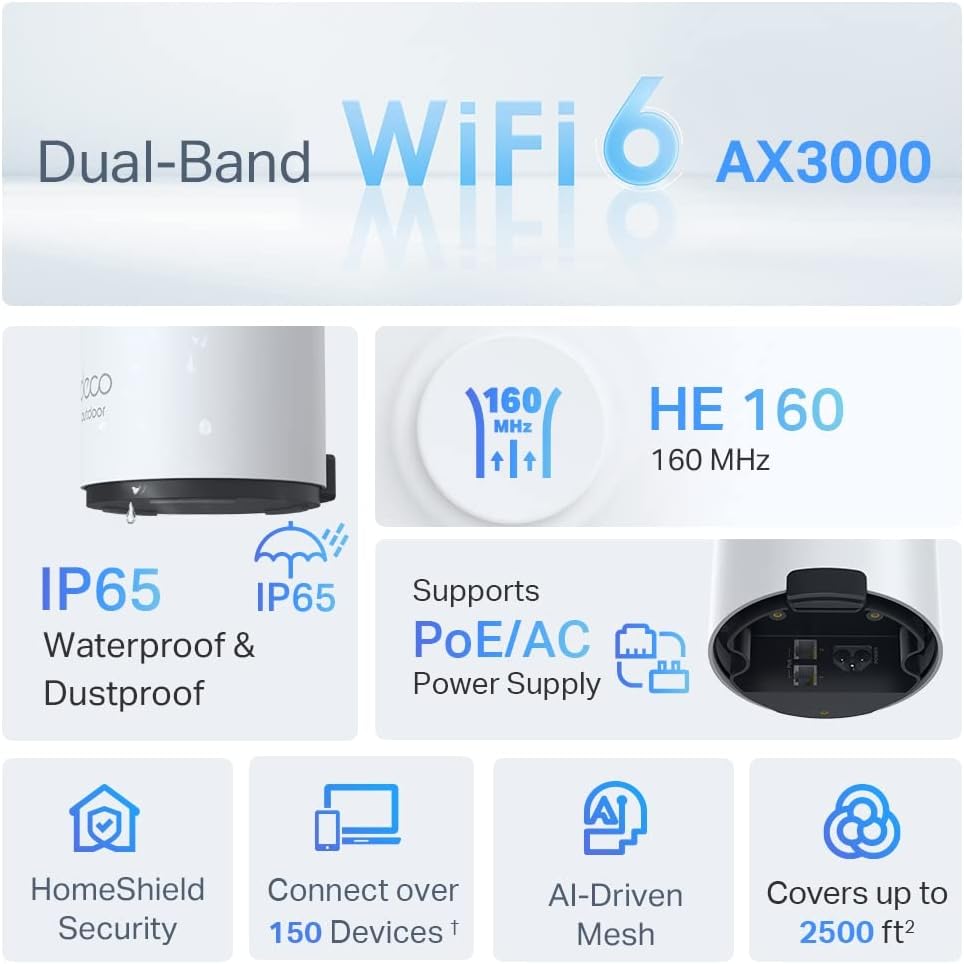
Image: An infographic highlighting key features of the Deco X50-Outdoor, including Dual-Band WiFi 6, AX3000 speeds, IP65 rating, PoE/AC power support, HomeShield Security, support for over 150 devices, AI-Driven Mesh, and up to 2500 sq ft coverage.
| Özellik | Detay |
|---|---|
| Model Adı | AX3000 Outdoor Whole Home Mesh WiFi 6 Unit |
| kablosuz standardı | Kablosuz 6 (802.11ax) |
| Frekans Bant Sınıfı | Çift Bant |
| Veri Aktarım Hızı | 2402 Mbps'ye kadar (5 GHz) + 574 Mbps'ye kadar (2.4 GHz) |
| Bağlantı Aralığı | Up to 2000 Square Feet (per unit) |
| Limanlar | 2 x Gigabit Ethernet Ports (Auto-sensing WAN/LAN) |
| Güç Kaynağı | PoE (802.3at) or AC Power Adapter (240V AC) |
| Hava Direnci | IP65 (Su Geçirmez ve Toz Geçirmez) |
| Güvenlik Protokolü | WPA, WPA2, WPA3 |
| Kontrol Yöntemi | TP-Link Deco App |
| Ürün Ağırlığı | 0.9 Kilogram |
10. Garanti ve Destek
Garanti bilgileri ve teknik destek için lütfen resmi TP-Link web sitesine başvurun. websitesine gidin veya müşteri hizmetleriyle iletişime geçin.
- TP-Link Resmi Webalan: www.tp-link.com
- Teknik Destek: Visit the support section on the TP-Link webSSS'ler, sorun giderme kılavuzları ve iletişim bilgileri için site.