1. Önemli Güvenlik Bilgileri
Please read this manual carefully before using the MBETA BT515. Keep it for future reference.
- Cihazı aşırı sıcaklıklara, doğrudan güneş ışığına veya yüksek neme maruz bırakmayın.
- Cihazı düşürmekten veya güçlü darbelere maruz bırakmaktan kaçının.
- Cihazı kendiniz sökmeyin, tamir etmeyin veya üzerinde değişiklik yapmayın. Yardım için yetkili servis personeline başvurun.
- Keep the device away from water and other liquids. While it has an IPx3 rating (splash-proof), it is not waterproof and should not be submerged.
- Yalnızca verilen şarj kablosunu veya sertifikalı bir eşdeğerini kullanın.
2. Paket İçeriği
Paketin içinde tüm öğelerin mevcut olduğundan emin olun:
- MBETA BT515 Bluetooth Speaker Multifunction Clock
- USB Şarj Kablosu
- Kullanım Kılavuzu (bu belge)

Image: The MBETA BT515 device shown alongside its retail packaging, which displays the model number 'BT515'.
3. Ürün Bittiview
The MBETA BT515 is a versatile device combining a Bluetooth speaker, a digital clock, and an alarm clock. It features an LED display, multiple playback options (Bluetooth, TF card, FM radio), and hands-free calling capabilities.

Resim: Bir ön yüz view of the MBETA BT515 Bluetooth Speaker, displaying the time and various mode indicators on its mirrored LED screen.

Resim: Yukarıdan aşağıya view of the MBETA BT515, highlighting the control buttons located on the top panel for various functions.
4. Kurulum
4.1 Cihazı Şarj Etme
Before first use, fully charge the device. Connect the provided USB charging cable to the device's USB port and the other end to a standard USB power adapter (not included) or a computer's USB port. The charging indicator will illuminate during charging and turn off when fully charged.
4.2 Açma/Kapatma
Press and hold the Power button (usually marked with a power symbol) for approximately 3 seconds to turn the device on or off. The display will light up when powered on.
4.3 Bluetooth Eşleştirme
- Ensure the device is powered on. It will automatically enter Bluetooth pairing mode, indicated by a flashing Bluetooth icon on the display.
- Mobil cihazınızda Bluetooth'u etkinleştirin ve mevcut cihazları arayın.
- Select "MBETA BT515" (or similar name) from the list of found devices.
- Once connected, the Bluetooth icon on the speaker's display will stop flashing and remain solid.
4.4 Saati Ayarlama
Refer to the specific button functions in Section 5.4. Typically, a 'SET' or 'TIME' button is used to enter time setting mode, and '+' / '-' buttons adjust hours and minutes.
4.5 Alarmları Ayarlama
The device supports dual alarm modes. Use the 'ALARM' or 'SET' button to access alarm settings. Follow the on-screen prompts to set the desired alarm time and sound.
4.6 Ekran Parlaklığının Ayarlanması
The display offers three levels of brightness adjustment. Locate the brightness control button (often labeled with a sun icon or integrated into another button) and press it repeatedly to cycle through the brightness levels.
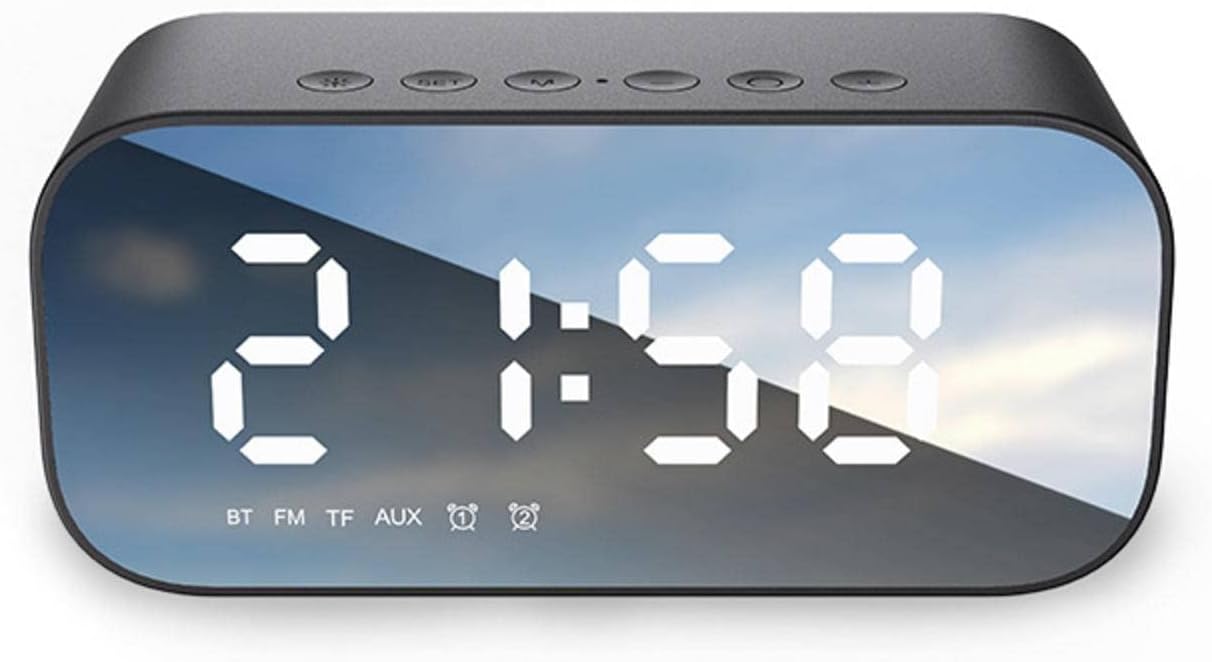
Image: The MBETA BT515 display illustrating the three-level brightness adjustment feature, providing gentle illumination at night.
5. Operasyon
5.1 Bluetooth Hoparlör Modu
After successful Bluetooth pairing (Section 4.3), audio played on your connected device will stream through the MBETA BT515. Use the volume buttons on the speaker or your connected device to adjust the sound level. The Play/Pause button on the speaker can control playback.
5.2 FM Radyo Modu
Press the 'M' (Mode) button to switch to FM Radio mode. The display will show the FM frequency. Press and hold the Play/Pause button to automatically scan and save available FM stations. Use the 'Previous' and 'Next' track buttons to navigate between saved stations.
5.3 TF Kart Oynatma
Insert a TF (MicroSD) card containing MP3, WMA, or WAV audio files into the designated TF card slot. The device will automatically switch to TF card mode and begin playing music. Use the Play/Pause, Previous, and Next buttons to control playback.
5.4 Eller Serbest Arama
When connected via Bluetooth to a smartphone, the MBETA BT515 can be used for hands-free calls. When an incoming call is received, press the Play/Pause button to answer. Press it again to end the call. Press and hold to reject an incoming call.
5.5 Düğme İşlevleriview
- Güç Düğmesi: Açmak/kapatmak için basılı tutun.
- Mod (M) Düğmesi: Short press to switch between Bluetooth, FM Radio, and TF Card modes.
- Oynat/Duraklat Düğmesi: Short press to play/pause music; answer/end calls. Long press to auto-scan FM stations; reject calls.
- Sesi Azaltma / Önceki Parça Düğmesi (-): Önceki parçaya/istasyona geçmek için kısa basın; sesi azaltmak için uzun basın.
- Sesi Aç / Sonraki Parça Düğmesi (+): Sonraki parça/istasyon için kısa basış; ses seviyesini artırmak için uzun basış.
- Ayarlama düğmesi: Zaman ve alarm ayarı modlarına giriş yapmak için kullanılır.
6. Bakım
6.1 Temizlik
Cihazı yumuşak, kuru veya hafif nemli bir bezle silin.amp cloth. Do not use abrasive cleaners, alcohol, or chemical solvents, as these may damage the plastic casing ve görüntüleme.
6.2 Pil Bakımı
To prolong the life of the built-in lithium battery:
- Pilin sık sık tamamen boşaltılmasından kaçının.
- Uzun süre kullanmasanız bile cihazınızı düzenli olarak şarj edin.
- Cihazı kullanılmadığında serin ve kuru bir yerde saklayın.

Image: The MBETA BT515 display indicating battery capacity (1200mAh) and estimated playback duration (4-6 hours).
6.3 Suya Dayanıklılık
The MBETA BT515 has an IPx3 waterproof rating, meaning it is protected against spraying water. It is suitable for use in environments where it might encounter light splashes, but it is Olumsuz designed to be submerged in water or exposed to heavy rain.
7. Sorun Giderme
If you encounter issues with your MBETA BT515, refer to the following common problems and solutions:
- Cihaz açılmıyor:
Pilinin dolu olduğundan emin olun. Cihazı USB kablosu kullanarak bir güç kaynağına bağlayın ve tekrar deneyin. - Hoparlörden ses gelmiyor:
Check the volume level on both the speaker and the connected Bluetooth device. Ensure the device is in the correct mode (Bluetooth, FM, or TF card). Re-pair the Bluetooth device if necessary. - Bluetooth bağlantısı başarısız:
Ensure the speaker is in Bluetooth pairing mode. Make sure your mobile device's Bluetooth is enabled and within range (up to 10m). Try turning both devices off and on again. Clear previous Bluetooth connections on your mobile device. - FM radyo çekimi zayıf:
Move the device to a location with better signal. Ensure no strong interference sources are nearby. - Alarm çalmıyor:
Verify that the alarm time is set correctly and the alarm function is activated. Check the alarm volume setting.
8. Özellikler
| Özellik | Şartname |
|---|---|
| Marka | MBETA |
| Örnek | BT515 |
| Bağlantı | Bluetooth 5.0, USB |
| Fonksiyonlar | Bluetooth Speaker, Alarm Clock, Digital Clock, FM Radio, TF Card Playback, Hands-Free Calling |
| Görüntü Türü | Dijital LED |
| Çıkış Gücü | 3W |
| Frekans Tepkisi | 100Hz-20KHz |
| Sinyal Gürültü Oranı | ≥85dB |
| Güç Kaynağı | Built-in Lithium Battery, USB Powered |
| Pil Kapasitesi | 1200 mAh - 2000 mAh (typical 1200mAh) |
| Oynatma Süresi | 6 saate kadar |
| Expanded Storage | Up to 32GB (TF Card) |
| Oynatma Formatları | MP3, WMA, WAV |
| Etkili Mesafe | 10m (Bluetooth) |
| İşlem Yöntemi | Basmalı Düğme |
| Kasa Malzemesi | Plastik |
| Dış Boyut | 130mm x 70mm x 65mm (approx. 5.1"W x 2.7"H x 2.5"D) |
| Ürün Ağırlığı | 0.36 Kg (approx. 12.7 ounces) |
| Su Geçirmezlik Derecesi | IPx3 (Splash-proof) |
9. Garanti Bilgileri
The MBETA BT515 Bluetooth Speaker Multifunction Clock Alarm Clock comes with a standard limited warranty against defects in materials and workmanship under normal use. The warranty period typically begins from the date of purchase. Please retain your proof of purchase for warranty claims. This warranty does not cover damage caused by misuse, accident, unauthorized modification, or external causes.
10. Müşteri Desteği
For further assistance, technical support, or warranty inquiries, please refer to the contact information provided by your retailer or the MBETA official website. When contacting support, please have your product model (BT515) and proof of purchase ready.