
1. Giriş
Thank you for choosing the MAGIC SELECT B2222 Portable 4-in-1 Air Pump and Vacuum Cleaner. This versatile device combines a cordless air compressor, a car and home vacuum cleaner, a tire pressure detection system, and an integrated SOS LED flashlight. Designed for convenience and efficiency, it is ideal for inflating car, motorcycle, and bicycle tires, as well as balls and other inflatables, and for quick cleaning tasks.
Ürünün güvenli ve en iyi şekilde çalışması için lütfen kullanmadan önce bu kılavuzu dikkatlice okuyun. Bu kılavuzu ileride başvurmak üzere saklayın.
2. Kutuda Neler Var?
- 1 x Cordless Air Compressor / Vacuum Cleaner Unit
- 1 x Inflation Tube
- 1 x LED Emergency Light (integrated)
- 1 x USB Tip-C Şarj Kablosu
- Various inflation nozzles/adapters
- Vacuum cleaner attachments (e.g., brush nozzle)

3. Ürün Özellikleri
- 4'si 1 arada İşlevsellik: Air compressor, vacuum cleaner, tire pressure detection, and SOS LED light.
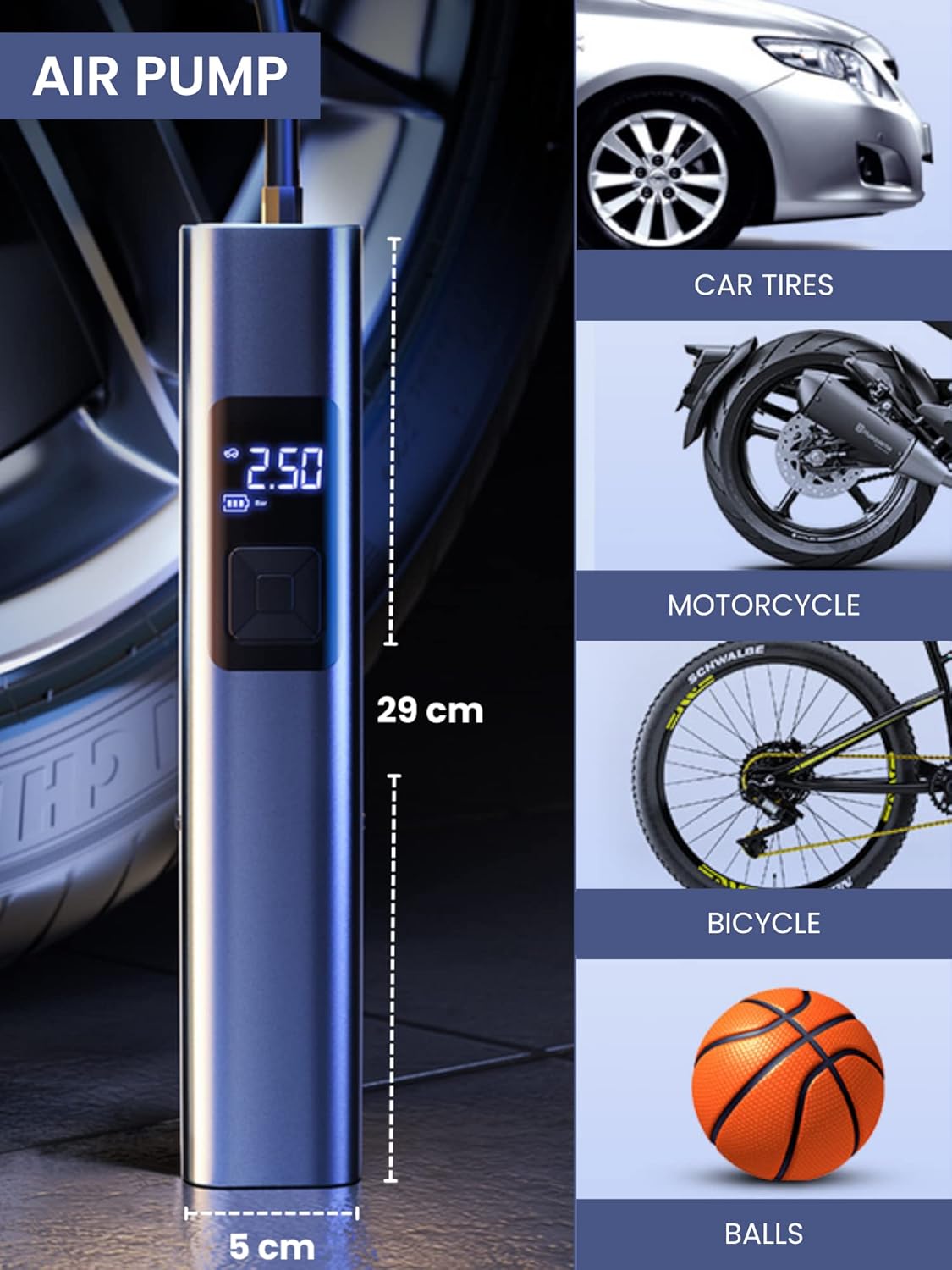
- Güçlü Enflasyon: Suitable for car, motorcycle, bicycle tires, and various balls/inflatables.
- Smart Induction Chip: Automatically stops inflation once the preset pressure is reached, ensuring safety and preventing over-inflation.
- Entegre Vakum: Efficiently cleans car interiors and small areas in the home.
- LED Acil Durum Işığı: Features 3 lighting modes: steady light, medium-speed flashing, and alternating medium/high-speed flashing for emergency situations.
- Uzun Ömürlü Pil: Equipped with a 4400mAh lithium-ion battery, rechargeable via USB Type-C.
- Dijital gösterge: Clear digital screen to monitor tire pressure and settings.
- Kompakt Tasarım: Taşınabilir ve kolay saklanabilir.


4. Kurulum
4.1 Cihazı Şarj Etme
- Locate the USB Type-C charging port on the upper side of the compressor.
- Verilen USB Type-C kablosunu cihaza bağlayın.
- USB kablosunun diğer ucunu uyumlu bir USB güç adaptörüne (dahil değildir) veya bilgisayarınızdaki bir USB bağlantı noktasına takın.
- The digital display will indicate the charging status. Ensure the device is fully charged before first use for optimal battery life.
4.2 Aksesuarların Takılması
- For Inflation: Screw the inflation tube into the designated hole at the top of the unit. Attach the appropriate nozzle for your item (car tire, bicycle valve, ball needle, etc.) to the other end of the inflation tube.
- Vakumlama için: Insert the vacuum attachment into the hole located at the bottom of the unit.

5. Kullanım Talimatları
5.1 Kontrol Paneli Üstüview
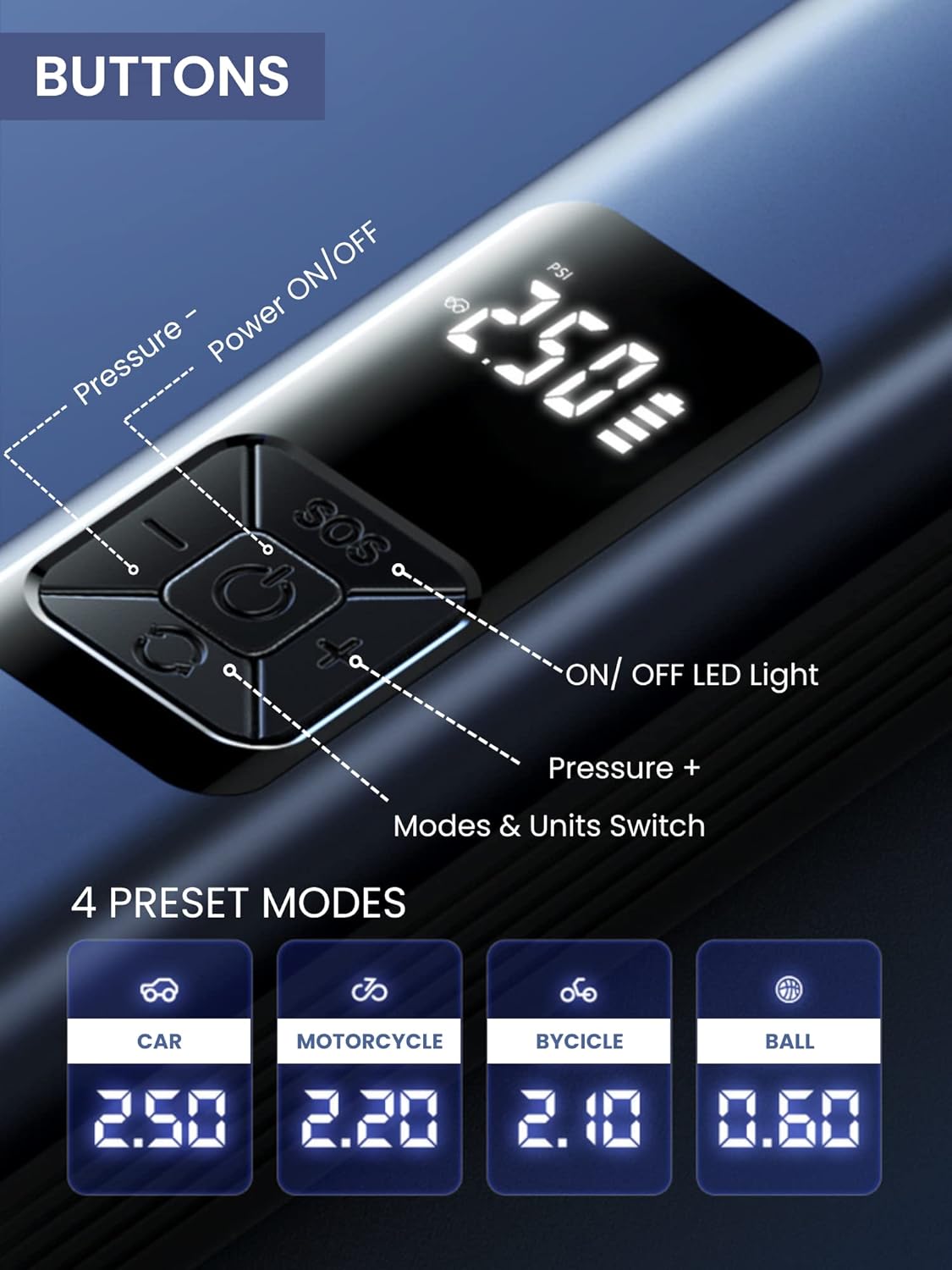
The device features a digital display and 5 control buttons:
- Güç AÇMA/KAPAMA Düğmesi: Central button to turn the device on/off and start/stop inflation or vacuuming.
- Pressure - Button: Decreases the target pressure.
- Pressure + Button: Increases the target pressure.
- LED Işık Açma/Kapama Düğmesi: Activates and cycles through LED light modes.
- Mode & Units Switch Button: Changes between preset inflation modes (Car, Motorcycle, Bicycle, Ball) and switches pressure units (e.g., PSI, Bar).
5.2 Using the Air Compressor (Inflation)
- Bağlamak: Screw the inflation tube onto the device and attach the correct nozzle to the item you wish to inflate.
- Güç Açık: Press the Power ON/OFF button to turn on the device. The digital display will show the current tire pressure.
- Mod seç: Press the Mode & Units Switch button to cycle through preset modes (Car, Motorcycle, Bicycle, Ball) or to change pressure units (PSI, Bar).
- Basıncı ayarla: Use the Pressure + and Pressure - buttons to set your desired target pressure.
- Enflasyonu Başlat: Press the Power ON/OFF button again to begin inflation. The device will automatically stop when the preset pressure is reached.
- Bağlantıyı kes: Once inflation is complete, disconnect the nozzle from the item and then unscrew the inflation tube from the device.
5.3 Elektrikli Süpürgenin Kullanımı
- Eklemek: Insert the desired vacuum attachment into the vacuum port at the bottom of the device.
- Güç Açık: Press the Power ON/OFF button to activate the vacuum function.
- Temiz: Use the device to vacuum dust, crumbs, and small debris from car interiors (seats, trunk, center console) or small areas in your home (sofas, lamp tables, windowsills, keyboards).
- Kapat: Press the Power ON/OFF button again to turn off the vacuum.

5.4 Using the LED Emergency Light
- Etkinleştir: Press the LED Light ON/OFF button to turn on the light.
- Döngü Modları: Press the LED Light ON/OFF button repeatedly to cycle through the three lighting modes:
- First press: Steady light
- Second press: Medium-speed flashing light
- Third press: Alternating medium/high-speed flashing light (SOS signal)
- Kapamak: Continue pressing the LED Light ON/OFF button until the light turns off, or hold the button for a few seconds.
6. Bakım
6.1 Cihazın Temizlenmesi
- Cihazın dış yüzeyini yumuşak bir bezle silin.amp bez. Sert kimyasallar veya aşındırıcı temizleyiciler kullanmayın.
- For the vacuum function, regularly empty the dust collection bin and clean the filter to maintain optimal suction power. The filter is washable; ensure it is completely dry before reinserting.
6.2 Depolama
- Cihazı ve aksesuarlarını serin, kuru bir yerde, doğrudan güneş ışığından ve aşırı sıcaklıklardan uzakta saklayın.
- Pil ömrünü uzatmak için uzun süreli saklamadan önce cihazın tamamen şarj olduğundan emin olun.
7. Sorun Giderme
| Sorun | Olası Neden | Çözüm |
|---|---|---|
| Cihaz açılmıyor. | Pil zayıf. | Cihazı, kutu içeriğinde bulunan USB Type-C kablosuyla şarj edin. |
| Hava kompresörü şişmiyor. | Inflation tube or nozzle not properly connected. Incorrect pressure setting. | Ensure all connections are secure. Check and adjust the target pressure. |
| Vacuum suction is weak. | Dust bin full. Filter clogged. | Toz haznesini boşaltın. Filtreyi temizleyin veya değiştirin. |
| Device stops unexpectedly during operation. | Overheat protection activated. Battery low. | Allow the device to cool down. Recharge the battery. |
8. Özellikler
| Özellik | Detay |
|---|---|
| Model Numarası | B2222 |
| Marka | SİHİRLİ SEÇİM |
| Pil Kapasitesi | 4400 mAh Lityum İyon |
| Motor Speed (Vacuum) | 30000r/dak |
| Boyutlar (U x G x Y) | 29 x 6 x 5.5 cm (yaklaşık) |
| Ağırlık | 850 gr |
| Şarj Portu | USB Tip-C |
| Özel Özellikler | LED Emergency Light, Digital Display, Automatic Shut-off (Inflation) |
9. Garanti ve Destek
For warranty information and customer support, please refer to the documentation provided with your purchase or contact MAGIC SELECT customer service directly. Keep your proof of purchase for warranty claims.
For further assistance or inquiries, please visit the official MAGIC SELECT website or contact their support team through the contact details provided on their packaging or product page.