
1. Giriş
The Wallbox Pulsar Max 7.4kW is an advanced electric vehicle (EV) charger designed for efficient and convenient home charging. This manual provides essential information for safe installation, operation, and maintenance of your charger. It is compatible with all electric and plug-in hybrid vehicles equipped with a Type 2 connector.
The Pulsar Max offers fast charging capabilities, up to 8 times faster than a standard outlet, and includes smart features like scheduled charging to optimize energy costs and usage.
2. Güvenlik Bilgileri
Before installing or using the Wallbox Pulsar Max, please read and understand all safety instructions. Failure to follow these instructions may result in electric shock, fire, or serious injury.
- Installation must be performed by a qualified electrician in accordance with local regulations and standards.
- Şarj cihazını açmaya, sökmeye veya üzerinde değişiklik yapmaya çalışmayın.
- Ensure the charging cable is not damaged before each use. Do not use if the cable or connector is frayed, broken, or exposed.
- Şarj işlemi sırasında çocukları ve evcil hayvanları şarj alanından uzak tutun.
- Avoid exposing the charger to extreme temperatures or direct water spray beyond its IP55 rating.
3. Paket İçeriği
Kutunun içindeki tüm öğelerin eksiksiz olduğundan emin olun:
- Wallbox Pulsar Max Charger Unit
- Socket Holder
- Charging Cable (5 meters, Type 2)
- Opening Card (for activation/access)
- Montaj Donanımı (vidalar, dübeller)
- Kurulum Kılavuzu

Image: Contents of the Wallbox Pulsar Max package.
4. Ürün Bittiview ve Özellikler
4.1 Temel Özellikler
- Fast and Powerful Charging: Up to 7.4kW (32A) for quick charging of EVs and PHEVs.
- Akıllı Enerji Yönetimi: Schedule charging sessions via the myWallbox app to utilize off-peak electricity rates and integrate with solar power.
- Kolay Kurulum: Simple wall-mount design with integrated PEN fault protection, eliminating the need for an additional earthing rod.
- Dayanıklı Tasarım: Weather and dust resistant (IP55 and IK10 rated) for indoor or outdoor installation, featuring a scratch-resistant matte finish.
- Bağlantı: Built-in WiFi and Bluetooth for seamless app control and updates.
4.2 Boyutlar
The Wallbox Pulsar Max has compact dimensions suitable for various installation locations.

Image: Wallbox Pulsar Max dimensions (198mm W x 201mm H x 99mm D) and 5m cable length.
4.3 LED Indicator States
The LED indicator on the charger provides visual feedback on its operational status.
| LED Renk | Durum |
|---|---|
| Yeşil | Şarj etmeye hazır |
| Mavi | araca bağlı |
| Açık Mavi | Şarj işlemi devam ediyor |
| Sarı | Locked (charger or cable) |
| Kırmızı | Hata |
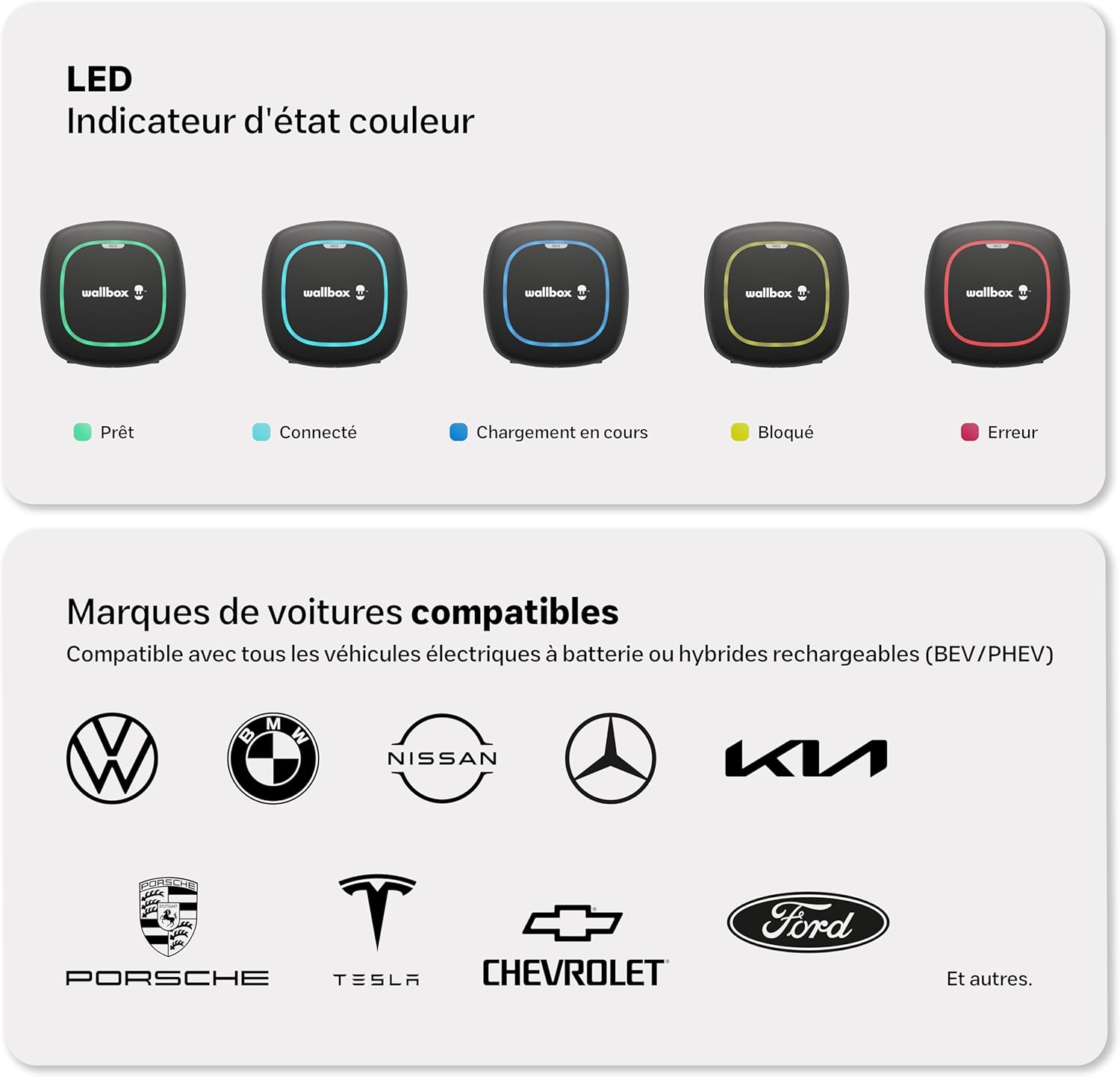
Image: Visual representation of LED indicator states and compatible vehicle brands.
5. Kurulum ve Kurulum
The Wallbox Pulsar Max is designed for straightforward installation. It features a simple wall-mounting process and integrated PEN fault protection, which simplifies electrical requirements by eliminating the need for a separate earthing rod.
Önemli: Installation must be carried out by a certified electrician to ensure compliance with all local electrical codes and safety standards. Refer to the detailed Kurulum Kılavuzu included in your package for step-by-step instructions.

Image: A technician performing the installation of the Wallbox Pulsar Max.
6. Kullanım Talimatları
Once installed and configured, operating your Wallbox Pulsar Max is simple:
- Ensure your vehicle is parked within reach of the 5-meter charging cable.
- Take the Type 2 connector from the socket holder.
- Plug the Type 2 connector into your vehicle's charging port. The charger's LED will change to blue, indicating a successful connection.
- Charging will begin automatically if no schedule is set, or according to your programmed schedule. The LED will turn light blue during active charging.
- To stop charging, unlock your vehicle (if necessary) and disconnect the cable from the car, then from the charger. Return the connector to its holder.

Image: Wallbox Pulsar Max in operation, charging an electric vehicle.
7. Wallbox App Integration
The myWallbox app allows you to fully control and monitor your charging experience. Connect your charger via WiFi or Bluetooth to access a range of smart features:
- Gerçek Zamanlı Bilgi: View live charging status and energy consumption.
- Uzaktan kumanda: Start, pause, or stop charging sessions from anywhere.
- Session Management: Set charging schedules to take advantagDüşük tarifeli elektrik tarifeleri.
- Charging Statistics: Track your charging history and energy usage.
- Financial and Energy Savings: Optimize charging times to reduce costs.
- Yoğunluk Ayarı: Control the charging current to manage power consumption.

Image: The myWallbox application interface on a smartphone.
8. Bakım
Regular maintenance ensures the longevity and optimal performance of your Wallbox Pulsar Max charger.
- Temizlik: Periodically wipe the charger's exterior with a soft, damp bezle silin. Aşındırıcı temizleyiciler veya çözücüler kullanmayın.
- Kablo Denetimi: Regularly inspect the charging cable and connector for any signs of wear, damage, or corrosion. If any damage is found, discontinue use and contact support.
- Donanım Yazılımı Güncellemeleri: Ensure your charger's firmware is up to date via the myWallbox app to benefit from the latest features and improvements.
9. Sorun Giderme
If you encounter issues with your Wallbox Pulsar Max, refer to the LED indicator states (Section 4.3) for initial diagnosis. Here are some common troubleshooting steps:
- Charger Not Responding (No LED): Check the circuit breaker for the charger. Ensure power is supplied to the unit.
- Red LED (Error): This indicates a fault. Try disconnecting and reconnecting the charger from the power supply. If the error persists, consult the myWallbox app for specific error codes or contact Wallbox support.
- Yellow LED (Locked): The charger or cable might be locked. Ensure the charging session is not paused or scheduled for a later time in the app.
- Şarj işlemi başlamıyor: Verify the cable is securely connected to both the charger and the vehicle. Check the myWallbox app for any active schedules or paused sessions. Ensure your vehicle is ready to accept a charge.
- Uygulama Bağlantı Sorunları: Ensure your charger is within WiFi or Bluetooth range. Restart the app and try reconnecting.
10. Özellikler
| Şartname | Değer |
|---|---|
| Marka | Duvar kutusu |
| Model Numarası | PLP2-0-2-2-9-002 |
| Renk | Siyah |
| Çıkış Hacmitage | 230 Volt |
| Giriş Voltage | 230 Volt |
| Güncel Derecelendirme | 32A |
| Bağlayıcı Türü | Tip 2 |
| Kablo Uzunluğu | 5 Metre |
| Uyumlu Cihazlar | All electric and hybrid vehicles with Type 2 connector |
| Port Sayısı | 1 |
| Koruma Derecesi | IP55, IK10 |
| Çalışma Sıcaklığı | -25 ila 50 °C |
| Bağlantı | Wi-Fi, Bluetooth |

Image: Wallbox Pulsar Max highlighting its durability and warranty.
11. Garanti ve Destek
The Wallbox Pulsar Max charger comes with a 3 yıllık garantiÜretim hatalarını ve normal kullanım sırasında oluşan arızaları kapsar. Garanti talepleri için lütfen satın alma belgenizi saklayın.
For technical support, warranty claims, or further assistance, please contact Wallbox customer service through their official website or the contact information provided in your product documentation. Ensure you have your model number (PLP2-0-2-2-9-002) and purchase details ready.
You can also find additional resources, FAQs, and community support on the official Wallbox webalan: duvarkutusu.com