
1. Önemli Güvenlik Bilgileri
Lütfen bu ürünü kullanmadan önce tüm güvenlik talimatlarını dikkatlice okuyun. Bu talimatlara uyulmaması yaralanmaya veya hasara neden olabilir.
- Atama: Avoid placing the camera in unstable locations or within reach of children or pets.
- Güç: Use only the provided AC adapter and power cable. Disconnect power before moving the device.
- Çevre: Keep the camera away from high humidity, dust, and extreme temperatures. This product is not waterproof.
- Bakım: Do not attempt to disassemble or repair the camera yourself. Contact customer support for any issues.

Image: General safety guidelines for camera usage.
2. Paket İçeriği
Paketinizde tüm öğelerin bulunduğunu doğrulayın:
- Galayou G2 Camera Unit
- AC Adaptörü
- Güç kablosu
- Mounting Kit (screws, anchors)
- Japanese Instruction Manual

Image: The Galayou G2 camera and a smartphone displaying its live feed.
3. Kurulum Kılavuzu
3.1 İlk Kurulum
- Güç Açık: Connect the camera to power using the provided AC adapter and cable. The indicator light will turn red.
- Uygulama İndirme: Download the dedicated 'blurams' app from the App Store (iOS) or Google Play Store (Android).
- Uygulama İzinleri: Ensure Bluetooth and Location permissions are enabled for the 'blurams' app in your smartphone settings.
- Kamerayı Sıfırla: Press and hold the reset button on the camera until you hear a beep sound. The indicator light will flash red and blue alternately, indicating it's ready for network connection.
- Uygulamaya Cihaz Ekle: Open the 'blurams' app, tap 'Add Device' or the '+' icon. Select your camera model (G2 or similar D1 model) and choose 'Wi-Fi connection via Bluetooth'.
- Wi-Fi Bağlantısı: Enter your 2.4GHz Wi-Fi network name and password. The camera only supports 2.4GHz Wi-Fi.
- QR Kod Taraması: The app will display a QR code. Hold your smartphone in front of the camera lens to scan the QR code. You will hear a beep sound from the camera upon successful scan.
- Bağlantı Onayı: The camera will announce 'Connection successful' and then 'Connecting to network'. Once connected, the indicator light will turn solid blue.
3.2 Video Guide: Bluetooth Wi-Fi Connection
Video: This video demonstrates the Bluetooth-assisted Wi-Fi connection method for the D1 camera, which is similar to the G2 model. It shows the steps from app permissions to successful network connection.
3.3 Video Guide: Camera Setup Method
Video: This video provides a general guide on how to set up a Skyworth pet camera, which can be used as a reference for the Galayou G2's setup process.
4. Kullanım Talimatları
4.1 Canlı View ve Pan/Tilt Kontrolü
Once connected, you can access the live feed through the 'blurams' app. The camera offers a 355° horizontal rotation and 52° vertical rotation for comprehensive coverage.
- Yatay/Dikey Hareket: Use the directional controls in the app to remotely adjust the camera's viewaçı.
- Dijital Yakınlaştırma: The camera supports 4x digital zoom to view detaylar.

Image: The camera's pan and tilt capabilities, offering a wide field of view.
4.2 Video Kalitesi ve Gece Görüşü
The G2 camera features 2K high-resolution video (1440p) and a 3-megapixel CMOS sensor for clear images. It also provides advanced night vision capabilities.
- 2K Çözünürlük: Net ve ayrıntılı video yemeklerinin keyfini çıkarın.tage.
- Gece Görüş Modları: The camera supports three night vision modes: Smart Night Vision (auto-switches between color and black & white based on motion), Color Night Vision (always color), and Infrared Night Vision (always black & white).
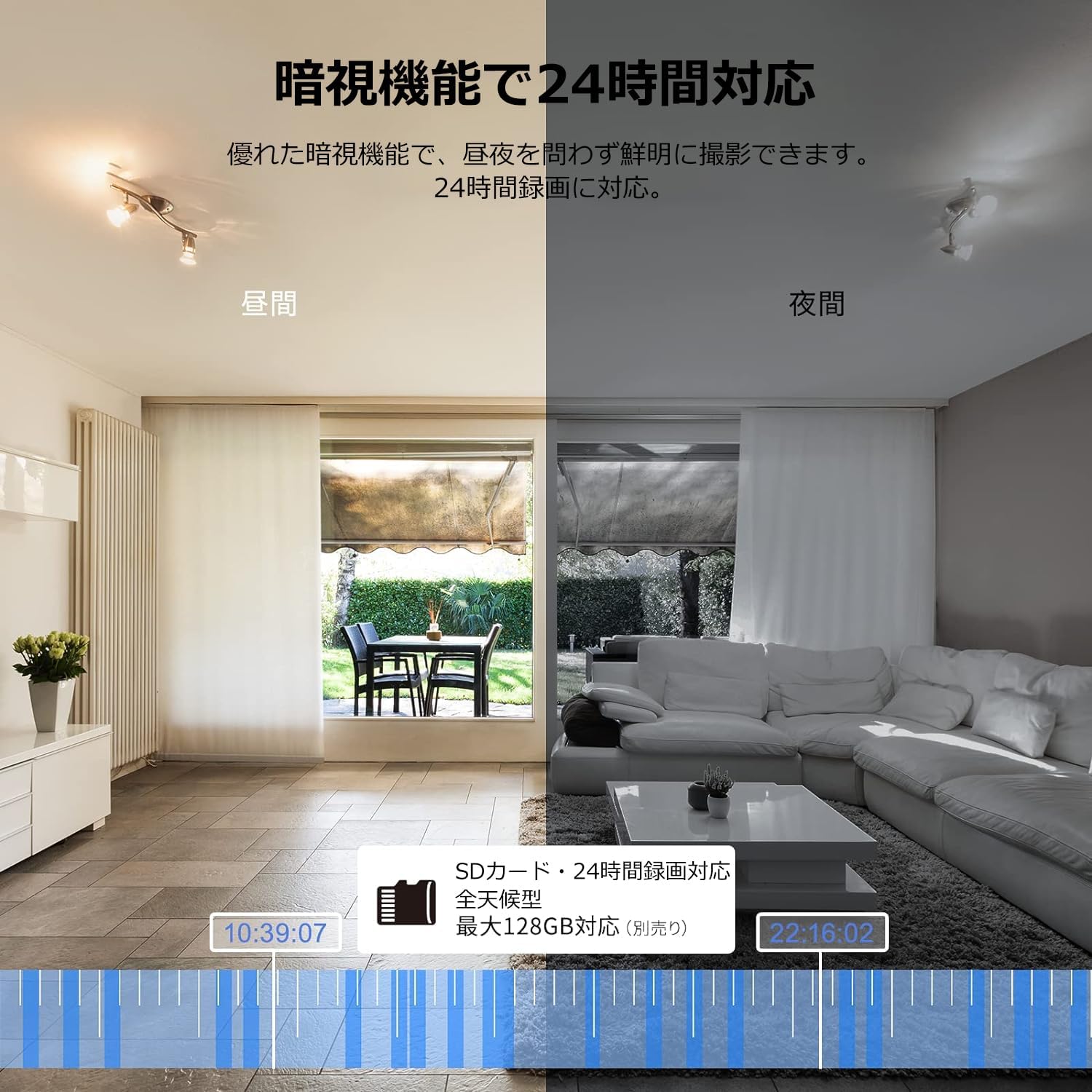
Image: Comparison of day and night vision, demonstrating the camera's ability to record clearly in low light.
4.3 İki Yönlü Ses
Equipped with a microphone and speaker, the camera allows for real-time two-way communication.
- Speak and Listen: Talk to family members or pets through the app, and hear their responses.
- Gürültü Azaltma: The two-way audio features noise reduction for clearer sound.

Image: The camera's two-way audio feature, allowing interaction with pets.
4.4 Motion Detection & Automatic Tracking
The camera can detect motion and automatically track subjects within its field of view.
- Hareket Uyarıları: Hareket algılandığında akıllı telefonunuza anında bildirim alın.
- Otomatik Takip: The camera will follow detected movement, keeping the subject in frame.
- İnsan Algılama: Advanced AI can differentiate between humans and other moving objects, reducing false alarms.
- Alarm Fonksiyonu: Trigger an alarm sound from the camera via the app to deter intruders.

Image: Motion detection and alarm features, showing alerts on a smartphone.
4.5 Kayıt ve Depolama
The camera supports both local and cloud storage options for continuous recording.
- MicroSD Kart: Supports up to 128GB microSD cards (sold separately) for 24-hour continuous recording with automatic overwriting.
- Bulut Depolama: Optional paid cloud storage service is available for extended recording and backup.
- Video Sıkıştırma: Utilizes H.264 and H.265 compression formats for efficient storage.


Images: MicroSD card recording and cloud storage options.
4.6 Gizlilik Modu
Activate privacy mode to physically cover the camera lens, ensuring your privacy when needed.
- One-Tap Activation: Easily turn off the lens via the app.
- Physical Cover: The camera physically rotates its lens downwards, blocking the view.

Image: Privacy mode icon.
4.7 Alexa Entegrasyonu
The Galayou G2 is Alexa-certified, allowing for voice control and viewing the camera feed on compatible Alexa devices.
- Sesli Komutlar: Sesli komutları kullanarak view the camera feed on an Echo Show or other Alexa-enabled screen.

Image: Alexa integration with the Galayou G2 camera.
4.8 Multi-Camera Support & Sharing
The app supports adding multiple cameras and sharing access with family members.
- Çoklu Kameralar: Monitor different areas of your home by adding several cameras to the app.
- Aile Paylaşımı: Share camera access with up to 4 family members simultaneously.

Image: Family sharing and multi-camera viewIng.
4.9 Video Guide: Product Features
Video: This video showcases various features of a Skyworth pet camera, including its monitoring capabilities, which are comparable to the Galayou G2.
4.10 Video Guide: Blurams 300万画素 見守りカメラ
Video: This video highlights the features of a Blurams 3-megapixel monitoring camera, demonstrating functionalities similar to the Galayou G2.
4.11 Video Guide: JUFLSKY 300万画素 360°PTZ機 (Preview)
Video: Kısa bir ön izlemeview video gösterisiasing a 300-megapixel 360° PTZ camera, similar in functionality to the G2.
5. Sorun Giderme
- Wi-Fi'ye Bağlanılamıyor:
- Wi-Fi ağınızın 2.4 GHz olduğundan emin olun. Kamera 5 GHz ağları desteklemiyor.
- Wi-Fi şifrenizin doğruluğunu kontrol edin.
- Kamerayı Wi-Fi yönlendiricinize daha yakın bir yere taşıyın.
- Perform a factory reset on the camera and try the setup process again.
- No Live Feed:
- İnternet bağlantınızı kontrol edin.
- Ensure the camera is powered on and the indicator light is solid blue.
- Uygulamayı ve/veya akıllı telefonunuzu yeniden başlatın.
- Hareket Algılama Çalışmıyor:
- Uygulama ayarlarında hareket algılama özelliğinin etkinleştirildiğinden emin olun.
- Hareket algılama hassasiyetini ayarlayın.
- Kameranın görüşünü engelleyen herhangi bir şey olmadığından emin olun. view.
- Kötü Video Kalitesi:
- Check your internet speed. A stable connection is required for optimal streaming.
- Kamera lensinin temiz olduğundan emin olun.
- Adjust the video quality settings in the app (e.g., from SD to 2K).
6. Özellikler
| Özellik | Şartname |
|---|---|
| Model Adı | G2 |
| Montaj Tipi | Tabletop and Ceiling Mount |
| Video Yakalama Çözünürlüğü | 1440p (2K) |
| Renk | Automatic Tracking Camera |
| Dahil Bileşenler | Camera body, AC adapter, Japanese instruction manual, mounting set, power cable |
| Kablosuz İletişim Teknolojisi | Wi-Fi (sadece 2.4 GHz) |
| Etkili Video Çözünürlüğü | 2 Megapixels (300万画素) |
| Alanı View | 95 derece |
| Gece Görüş Aralığı | 7 metre |
| Kare Hızı | 15 kare/saniye |
| Malzeme | Plastik |
| Ürün Boyutları (UxGxY) | 7.2x7.2x10.9 cm |
| Su Direnç Seviyesi | Su geçirmez değil |
| Işık kaynağı | Kızılötesi |
| Önerilen Kullanım | Kapalı Alan Güvenliği |
| İç/Dış Mekan Kullanımı | Kapalı |
| Uyumlu Cihazlar | Akıllı telefon, Tablet, Masaüstü bilgisayar, Dizüstü bilgisayar |
| Güç Kaynağı | Kablolu Elektrik |
| Denetleyici Türü | Uygulama |
7. Garanti ve Destek
The Galayou G2 camera comes with a manufacturer's warranty and customer support.
- Garanti: 1-year manufacturer's warranty.
- Teknik Destek: For any issues or questions, please contact GALAYOU customer support through the app or visit the official GALAYOU store on Amazon.