
Sharp RP-TT70
Sharp RP-TT70 Vinyl Record Player Turntable User Manual
Model: RP-TT70
1. Ürün Bittiview
The Sharp RP-TT70 is a 12-inch vinyl record player turntable designed to deliver a rich audio experience with modern convenience. It features a classic wooden cabinet and comes with stereo bookshelf speakers. This belt-drive turntable supports multiple playback speeds and offers versatile connectivity options, including dual Bluetooth functionality.

Figure 1.1: Sharp RP-TT70 Turntable and Speakers. The turntable features a stylish wooden finish and a clear dust cover, flanked by two matching stereo bookshelf speakers.
2. Neler Dahil?
Lütfen paket içeriğini kontrol ederek tüm öğelerin mevcut olduğundan emin olun:
- Sharp RP-TT70 Turntable Unit
- Stereo Bookshelf Speakers (2 units)
- Toz Kapağı
- Güç Adaptörü
- Kullanım Kılavuzu (bu belge)
3. Kurulum Talimatları
Follow these steps to set up your Sharp RP-TT70 turntable:
- Atama: Place the turntable on a stable, level surface away from direct sunlight, heat sources, and excessive dust. Ensure adequate ventilation around the unit.
- Hoparlör Bağlantısı: Connect the included stereo bookshelf speakers to the "SPEAKER OUT" terminals on the rear of the turntable. Ensure correct polarity (positive to positive, negative to negative).
- Güç Bağlantısı: Connect the power adapter to the "POWER IN DC 12V" port on the rear of the turntable, then plug the adapter into a wall outlet.
- Toz Kapağı: Toz kapağını, pikapın arkasındaki menteşelere dikkatlice takın.

Figure 3.1: Rear Panel Connections. This image highlights the AUX-IN Jack, RCL (R&L) Speaker Out, Pitch (+)(-) Speed Calibration, and Power In DC 12V ports, crucial for proper setup.
4. Kullanım Talimatları
4.1 Vinil Plak Çalmak
- Güç Açık: Turn the power knob to activate the turntable.
- Hızı Seçin: Adjust the speed selector to match the record's RPM (33 1/3, 45, or 78 RPM). For 45 RPM records, place the included 45 RPM adapter on the spindle.
- Yer Kaydı: Plakınızı dikkatlice pikap tablasına yerleştirin.
- Kolu Kaldır: Kaldırma kolunu kullanarak pikap kolunu yavaşça yukarı kaldırın.
- Position Stylus: Pikap kolunu plağın istenen başlangıç oluğunun üzerine getirin.
- Alt Kol: Kolu yavaşça aşağı indirmek için kumanda kolunu kullanın. İğne plağa temas edecek ve çalma başlayacaktır.
- Ses Ayarı: Adjust the volume using the volume knob on the turntable.
- Otomatik Durdurma Özelliği: The turntable features an auto-stop function that will automatically stop the platter rotation when the record reaches its end.
4.2 Bluetooth Bağlantısı
The Sharp RP-TT70 supports dual Bluetooth connectivity, allowing you to stream music in two ways:
- Streaming Vinyl to External Bluetooth Device:
- Döner tablanın açık olduğundan emin olun.
- Activate Bluetooth pairing mode on your external Bluetooth speaker or headphones.
- The turntable will automatically search for and connect to nearby Bluetooth devices. The Bluetooth indicator light will illuminate when connected.
- Once connected, audio from your vinyl record will play through the external Bluetooth device.
- Streaming Music from Your Phone to Turntable Speakers:
- Döner tablanın açık olduğundan emin olun.
- On your smartphone or other Bluetooth-enabled device, search for "Sharp RP-TT70" in the Bluetooth settings.
- Select the turntable to pair. The Bluetooth indicator light will illuminate when connected.
- Once connected, audio from your phone will play through the turntable's included stereo speakers.
4.3 Yardımcı Giriş (AUX-IN)
Connect external audio devices such as smartphones, tablets, or MP3 players using a 3.5mm audio cable (not included) to the AUX-IN jack on the rear of the turntable. Switch the input mode to AUX to play audio through the turntable's speakers.
4.4 Kulaklık Girişi
For private listening, connect headphones to the headphone jack located on the front panel of the turntable.
5. Bakım
Doğru bakım, pikapınızın uzun ömürlü olmasını ve en iyi performansı göstermesini sağlar:
- Toz Kapağı: Always keep the dust cover closed when the turntable is not in use to prevent dust accumulation on the platter and stylus.
- Kalemin Temizlenmesi: Gently clean the stylus regularly using a soft brush designed for turntable styli. Brush from back to front.
- Pikapın Temizlenmesi: Wipe the turntable and speakers with a soft, dry cloth. Do not use abrasive cleaners or solvents.
- Cartridge and Stylus Replacement: The RP-TT70 uses a changeable ceramic cartridge and stylus. If sound quality degrades or the stylus is damaged, replace it with a compatible Sharp replacement part.
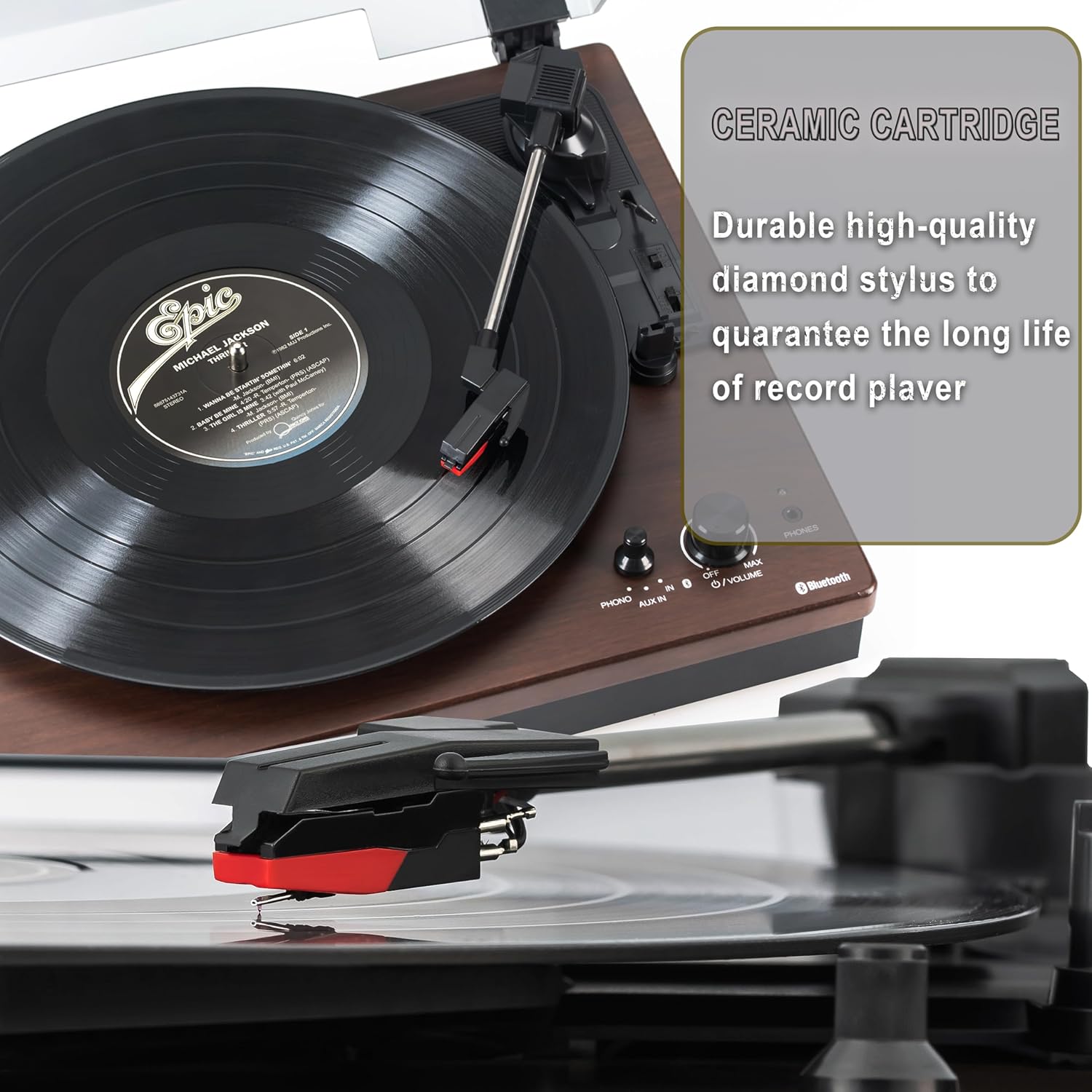
Figure 5.1: Ceramic Cartridge. The turntable is equipped with a durable high-quality diamond stylus designed for extended record playback life.
6. Sorun Giderme
If you encounter issues with your Sharp RP-TT70, refer to the following common problems and solutions:
| Sorun | Olası Neden | Çözüm |
|---|---|---|
| Güç Yok | Güç adaptörü bağlı değil veya priz aktif değil. | Ensure power adapter is securely plugged into the turntable and a working wall outlet. |
| Hoparlörlerden Ses Yok | Speakers not connected correctly; Volume too low; Incorrect input mode. | Check speaker cable connections and polarity. Increase volume. Ensure turntable is in PHONO or AUX mode as appropriate. |
| Poor Sound Quality / Skipping | Dirty or worn stylus; Dirty record; Turntable not level. | Clean the stylus and record. Ensure the turntable is on a stable, level surface. Consider replacing the stylus if worn. |
| Bluetooth Eşleştirme Sorunları | Device too far; Bluetooth not enabled on external device; Interference. | Ensure devices are within range (approx. 30 ft). Confirm Bluetooth is enabled on the external device. Try restarting both devices. |
| Platter Not Spinning | Belt dislodged; Auto-stop engaged prematurely. | Check if the drive belt is properly seated around the platter and motor pulley. If auto-stop is causing issues, ensure the record is placed correctly. |
7. Özellikler
| Özellik | Detay |
|---|---|
| Model Numarası | RP-TT70 |
| Marka | Keskin |
| Ürün Boyutları | 16.8 x 13.5 x 2.8 inç |
| Ürün Ağırlığı | 18.6 pound |
| Bağlantı Teknolojisi | Bluetooth (Bi-directional) |
| Desteklenen Hızlar | 33 1/3, 45, 78 RPM |
| Dahil Bileşenler | Turntable, Stereo Bookshelf Speakers |
| Malzeme | Plastik, Ahşap |
| Renk | Black (with wooden finish) |
| Kartuş Tipi | Changeable Ceramic Cartridge and Stylus |
| Özellikler | Belt-drive, Auto-return, Pitch control, Dust cover |
8. Garanti ve Destek
For warranty information and technical support, please refer to the official Sharp website veya doğrudan müşteri hizmetleriyle iletişime geçin. Garanti talepleri için satın alma kanıtı olarak satın alma makbuzunuzu saklayın.
Ask a question about this manual
Ask about setup, troubleshooting, compatibility, parts, safety, or missing instructions. Manuals+ will review the question and use this page’s manual context to help answer it.