
1. Giriş ve Üzeriview
This manual provides detailed instructions for the proper setup, operation, and maintenance of your Techbee TE02 Indoor Digital Electrical Outlet Timer Plug. This device is designed to automate the power supply to your electrical appliances, offering convenience, energy savings, and enhanced home security through its programmable features.
The Techbee TE02 timer plug features a large, easy-to-read display and intuitive controls, allowing for precise scheduling of up to 20 ON/OFF programs per day. It also includes advanced functions such as a countdown timer and a random ON/OFF mode for vacation security. Its built-in battery ensures that your programmed settings are retained even during power outagee.
2. Ürün Özellikleri
- Extensive Programming: Supports up to 20 weekly ON-OFF timing programs for flexible scheduling.
- Geri Sayım İşlevi: Allows for precise delay ON/OFF timing, from 1 second up to 99 hours, 59 minutes, and 59 seconds.
- Anti-theft Random Mode: Activates lights or other appliances at varying times to simulate occupancy, deterring potential intruders.
- Kullanıcı Dostu Ekran: Features a large screen for clear visibility of digits and numbers.
- Güç Kaynağıtage Koruma: Equipped with a built-in NiMH 1.2V battery to retain programmed settings for over 30 days during power interruptions.
- Versatile Time Format: Interchangeable 12-hour (AM/PM) and 24-hour formats.
- Topraklı Çıkış: Designed with a 3-prong plug and socket for safe use with a wide range of appliances.
- Sessiz Çalışma: Operates completely silently, making it suitable for home use.
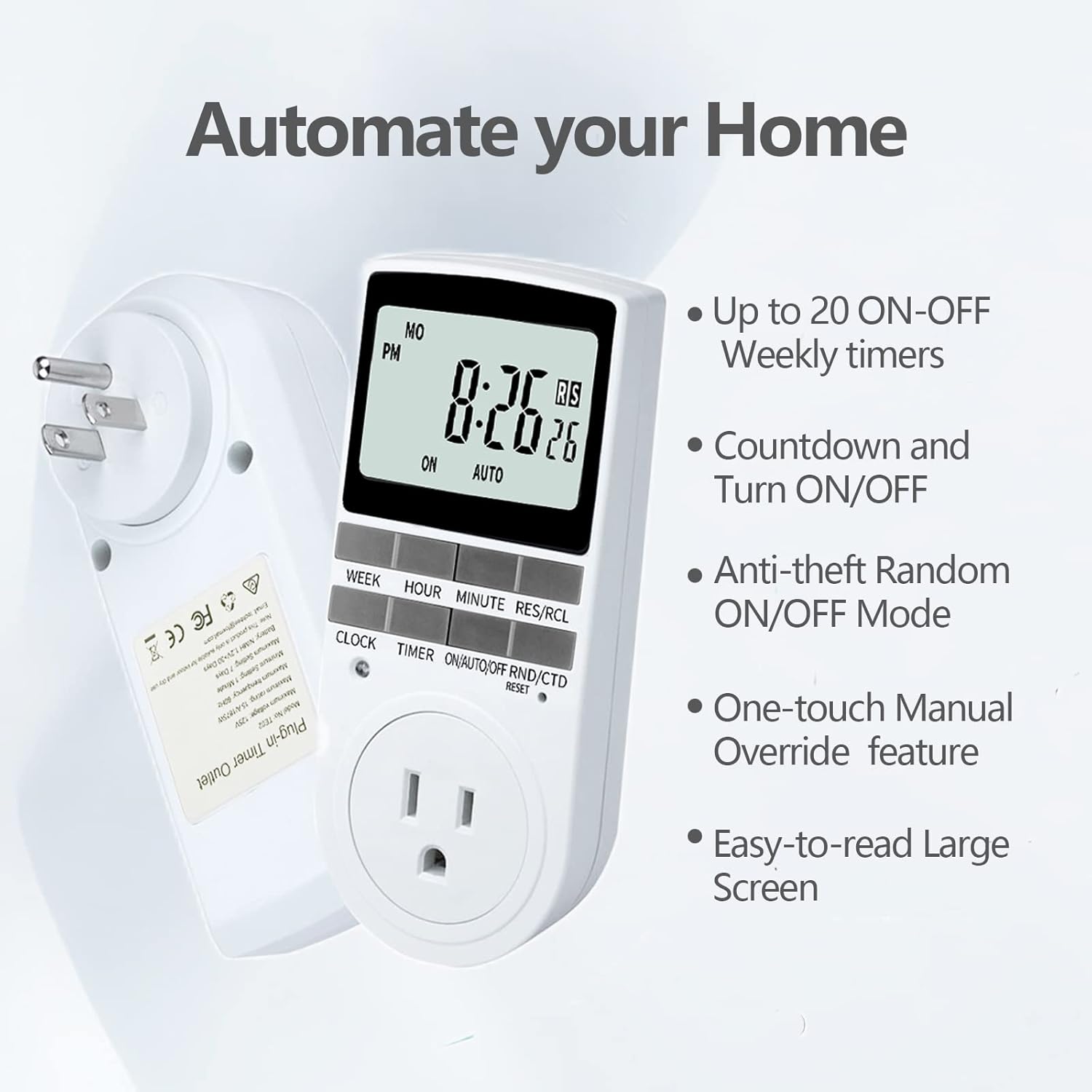
Figure 2.1: Key features of the Techbee TE02 Digital Timer Plug.
3. Özellikler
| Şartname | Değer |
|---|---|
| Model Numarası | TE02 |
| Maksimum Hacimtage | 125V |
| Maksimum Derecelendirme | 15A / 1875W |
| Maksimum Frekans | 60Hz |
| Minimum Setting Interval | 1 Minute (1 second for countdown) |
| Maximum Setting Duration | 7 Gün |
| Pil Türü | NiMH 1.2V (retains settings >30 days) |
| Ayar Sayısı | 20 ON-OFF programs |

Figure 3.1: Technical data and features as displayed on the product packaging.
4. Kurulum
Before initial use, it is recommended to plug the timer into a live outlet for at least 30 minutes to charge the internal battery. This ensures that the timer retains its settings even if unplugged or during a power outage.
- Unpack the timer plug and included instruction manual.
- Locate a standard 125V grounded electrical outlet.
- Plug the Techbee TE02 timer directly into the wall outlet. The display should illuminate.
- Basın SIFIRLAMA button (usually a small recessed button) using a non-metallic pointed object (like a pen tip) to clear all previous settings and ensure proper function.
- Proceed to set the current time and day as described in the 'Operating Instructions' section.

Figure 4.1: The Techbee TE02 Digital Timer Plug ready for setup.
Video 4.1: Bir overview of the Techbee TE02 timer plug, including unboxing and initial setup steps.
5. Kullanım Talimatları
5.1. Güncel Saat ve Günü Ayarlama
- Basın SAAT Buton. Ekranda geçerli saat gösterilecektir.
- Tutarken SAAT düğmesine basın HAFTA Geçerli günü ayarlamak için (Pzt, Sal, Çar, Per, Cum, Cmt, Paz).
- Tutarken SAAT düğmesine basın SAAT to set the current hour (12-hour or 24-hour format).
- Tutarken SAAT düğmesine basın DAKİKA Geçerli dakikayı ayarlamak için
- Serbest bırak SAAT düğmesine basarak ayarları kaydedin.
5.2. Programming ON/OFF Times (Up to 20 Programs)
- Basın ZAMANLAYICI button to enter programming mode. The display will show "1 ON".
- Basmak HAFTA to select the day(s) for this program (e.g., MO, TU, WE, TH, FR, SA, SU, or various combinations).
- Basmak SAAT İstenilen çalışma saatini ayarlamak için.
- Basmak DAKİKA İstenilen AÇIK kalma süresini ayarlamak için.
- Basmak ZAMANLAYICI Tekrar. Ekranda "1 OFF" yazısı görünecektir.
- Repeat steps 2-4 to set the desired OFF time for this program.
- Basmaya devam et ZAMANLAYICI to cycle through programs "2 ON", "2 OFF" up to "20 ON", "20 OFF", setting each as needed.
- İstediğiniz tüm programları ayarladıktan sonra, tuşuna basın. SAAT Programlama modundan çıkmak ve geçerli zaman gösterimine geri dönmek için kullanılan düğme.

Figure 5.1: Programming the timer for daily routines.
5.3. Geri Sayım Fonksiyonu
The countdown function allows the timer to turn ON or OFF after a specified duration.
- Basın ON/AUTO/OFF RND/CTD button repeatedly until "CTD" appears on the display.
- Basmak SAAT, DAKİKA, Ve RES/RCL (for seconds) to set the desired countdown duration.
- Basmak ZAMANLAYICI to start the countdown. The display will show the remaining time.
- Once the countdown reaches zero, the connected appliance will either turn ON or OFF, depending on its initial state.

Figure 5.2: Setting a countdown timer to turn an appliance ON or OFF.
5.4. Random Function (Anti-theft Mode)
The random function helps deter intruders by turning connected lights or appliances ON and OFF at irregular intervals.
- Basın ON/AUTO/OFF RND/CTD button repeatedly until "RND" appears on the display.
- The timer will now randomly turn the connected appliance ON and OFF within a set time window (typically 6 PM to 6 AM, but the Techbee TE02 offers random from any time).
- To deactivate, press the ON/AUTO/OFF RND/CTD button again until "AUTO" or "ON"/"OFF" is displayed.

Figure 5.3: Utilizing the random function for home security.
5.5. Manuel Geçersiz Kılma
You can manually switch the timer's output state without affecting the programmed settings.
- Basın ON/AUTO/OFF RND/CTD modlar arasında geçiş yapmak için düğme: ON (her zaman açık), OTOMATİK (follows programs), KAPALI (always off), Çevrim içi (random), CTD (countdown).
- Seçme ON or KAPALI for immediate control. The timer will remain in this state until manually changed or switched back to OTOMATİK.
6. Bakım
- Temizlik: Disconnect the timer from the power outlet before cleaning. Wipe the exterior with a soft, dry cloth. Do not use liquid cleaners or abrasive materials.
- Depolamak: If storing the timer for an extended period, ensure the internal battery is charged by plugging it in for a few hours every few months. Store in a cool, dry place away from direct sunlight and extreme temperatures.
- Pil: The internal NiMH battery is designed for long-term use and retains settings for over 30 days. It is not user-replaceable.
7. Sorun Giderme
- Timer Display is Blank:
- Zamanlayıcının çalışan bir elektrik prizine güvenli bir şekilde takılı olduğundan emin olun.
- The internal battery might be fully discharged. Plug the timer in for at least 30 minutes to charge it.
- Programs Not Activating:
- Saatin ve günün doğru ayarlanmış olduğundan emin olun.
- Zamanlayıcının açık olduğundan emin olun. OTOMATİK mod.
- Ensure the ON/OFF programs are set correctly and do not overlap in an unintended way.
- Confirm the connected appliance is functioning correctly and its power switch is in the ON position.
- Timer Not Responding to Buttons:
- Perform a full reset by pressing the SIFIRLAMA button with a pointed object. You will need to re-enter all settings after a reset.
- Appliance Does Not Turn ON/OFF with Countdown:
- Zamanlayıcının açık olduğundan emin olun. CTD mode and the countdown duration is set.
- Verify the connected appliance is working and its power switch is ON.
8. Garanti ve Destek
For warranty information, technical support, or any inquiries regarding your Techbee TE02 Digital Timer Plug, please refer to the official documentation provided with your product or visit the official Techbee store.
You can find additional support and product information by visiting the Techbee Store on Amazon.
A detailed PDF instruction manual is also available for download: Kullanım Talimatları (PDF).