
giriiş
Satın aldığınız için teşekkür ederizasing the Proscan PSP333 Portable Bluetooth Speaker. This manual provides important safety instructions, operational guidelines, and maintenance tips to ensure optimal performance and longevity of your device. Please read this manual thoroughly before using the product and retain it for future reference.
Güvenlik Bilgileri
- Üniteyi aşırı sıcaklıklara, doğrudan güneş ışığına veya yüksek neme maruz bırakmayın.
- Hoparlörü düşürmekten veya sert darbelere maruz bırakmaktan kaçının.
- Cihazı kendiniz sökmeyin veya tamir etmeye çalışmayın. Tüm servis işlemlerini yetkili personele yaptırın.
- Hoparlörü sudan ve diğer sıvılardan uzak tutun.
- Yalnızca belirtilen şarj kablosunu kullanın.
- Hoparlörü çalıştırırken uygun havalandırmayı sağlayın.
Paket İçeriği
Lütfen paketinizde aşağıdaki öğelerin bulunduğundan emin olun:
- Proscan PSP333 Portable Bluetooth Speaker
- USB Şarj Kablosu
- Kullanım Kılavuzu (bu belge)
Ürün Özellikleri
The Proscan PSP333 speaker offers a range of features for an enhanced audio experience:
- Wireless Bluetooth connectivity for streaming audio from compatible devices.
- Integrated LED lights for visual ambiance.
- Built-in FM radio for listening to local stations.
- Auxiliary (AUX) input for wired connection to non-Bluetooth devices.
- Adjustable Bass, Treble, and Volume controls.
- Rechargeable battery for portable use.
- Convenient carrying handles that also function as a built-in stand.
- Output Power: 2 x 3W (6-Watt-RMS total).
Kontroller ve Bağlantılar
Hoparlörünüzün kontrol panelini ve bağlantı noktalarını iyice tanıyın.

Şekil 1: Ön view of the Proscan PSP333 speaker, highlighting the speaker grilles and the central control interface.
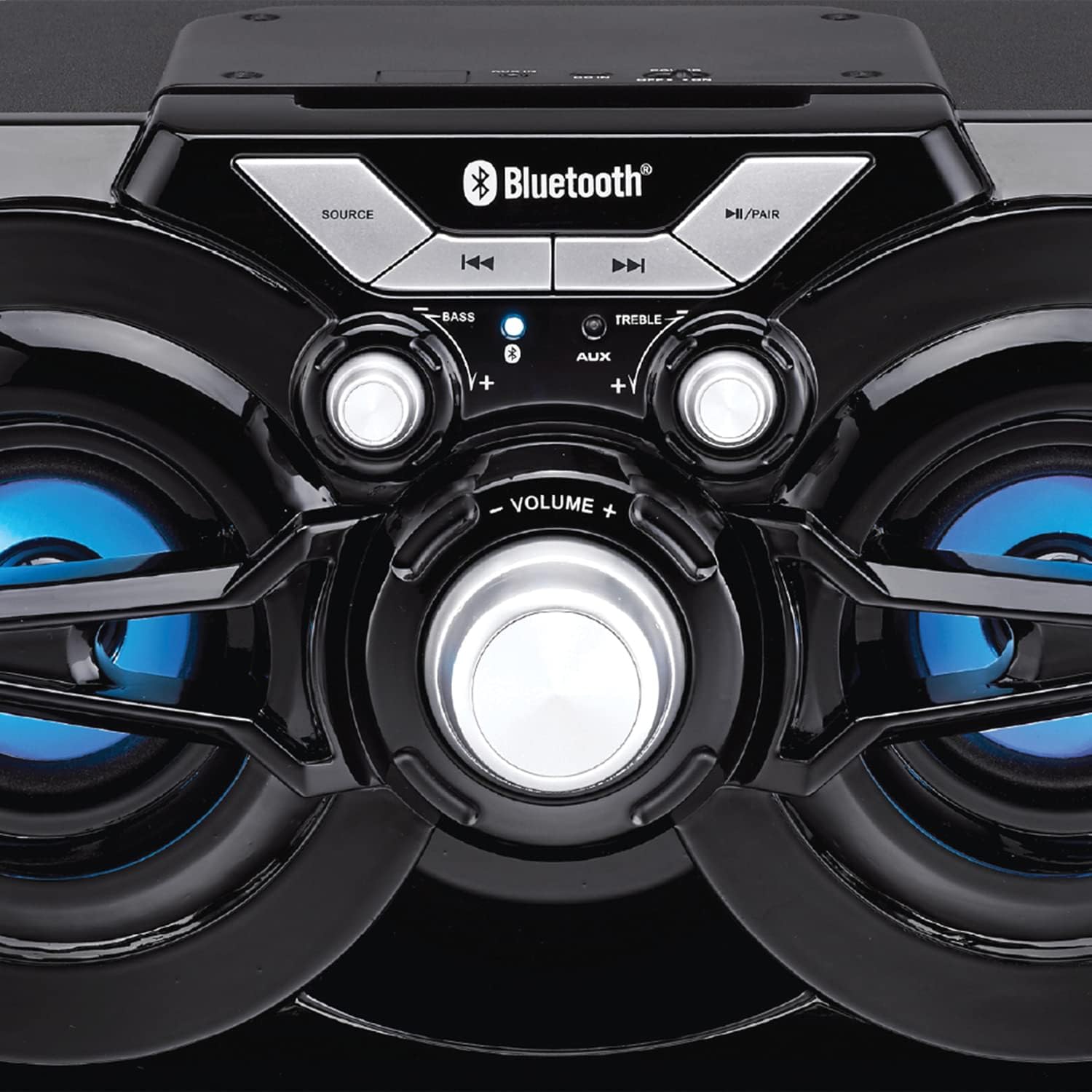
Şekil 2: Ayrıntılı view of the speaker's control panel, illustrating the various buttons and adjustment knobs.
Kontrol Paneli Fonksiyonları:
- KAYNAK Düğmesi: Bluetooth, FM Radyo ve AUX giriş modları arasında geçiş yapmak için basın.
- ◀◀ (Previous Track/Tune Down) Button: In Bluetooth mode, press to go to the previous track. In FM mode, press to tune down the frequency.
- ▶▶ (Next Track/Tune Up) Button: In Bluetooth mode, press to go to the next track. In FM mode, press to tune up the frequency.
- ►/PAIR Button: Press to Play/Pause audio. Press and hold to initiate Bluetooth pairing mode. In FM mode, press and hold to auto-scan for stations.
- BAS Düğmesi: Bas seviyesini ayarlamak için döndürün.
- TİZ Düğmesi: Tiz seviyesini ayarlamak için döndürün.
- SES Düğmesi: Rotate to adjust the overall volume output.
- AUX Girişi: 3.5mm jack for connecting external audio devices via an auxiliary cable (not included).
- Şarj Portu: USB şarj kablosunu bağlamak için.
Kurmak
İlk Şarj:
- Before first use, fully charge the speaker. Connect the small end of the included USB charging cable to the charging port on the speaker.
- USB kablosunun büyük ucunu bir USB güç adaptörüne (dahil değildir) veya bir bilgisayarın USB portuna bağlayın.
- The charging indicator light will illuminate. Once fully charged, the light may change color or turn off (refer to specific indicator behavior if detailed in product).
- Tam şarj işlemi genellikle birkaç saat sürer.
Açma/Kapatma:
- To power on the speaker, locate the power switch (usually on the back or side) and slide it to the 'ON' position.
- Cihazı kapatmak için, düğmeyi 'KAPALI' konumuna getirin.
Kullanım Talimatları
Bluetooth Modu:
- Power on the speaker. It will automatically enter Bluetooth pairing mode, indicated by a flashing LED light (e.g., blue LED).
- If the speaker is not in Bluetooth mode, press the KAYNAK button until the Bluetooth indicator light flashes.
- Mobil cihazınızda (akıllı telefon, tablet vb.) Bluetooth'u etkinleştirin ve kullanılabilir cihazları arayın.
- Select "PSP333" or "Proscan Speaker" from the list of devices.
- Once paired, the Bluetooth indicator light will stop flashing and remain solid. You can now play audio from your device through the speaker.
- Use the ◀◀, ▶▶, and ►/PAIR buttons on the speaker or your device to control playback.
AUX Giriş Modu:
- Hoparlörü açın.
- 3.5 mm ses kablosunun (dahil değildir) bir ucunu hoparlörün AUX giriş portuna bağlayın.
- Connect the other end of the 3.5mm audio cable to the headphone jack or audio output of your external device (e.g., MP3 player, computer).
- Basın KAYNAK button until the speaker is in AUX mode.
- Play audio from your external device. Volume can be controlled via the speaker's VOLUME knob and your external device.
FM Radyo Modu:
- Hoparlörü açın.
- Basın KAYNAK button until the speaker is in FM Radio mode.
- To auto-scan and save available stations, press and hold the ►/PAIR button. The speaker will scan and store stations automatically.
- Once scanning is complete, use the ◀◀ and ▶▶ buttons to navigate between the saved stations.
- For manual tuning, short press the ◀◀ or ▶▶ buttons to adjust the frequency incrementally.
LED Işıklar:
The speaker features integrated LED lights that illuminate the speaker cones. These lights typically activate automatically when the speaker is powered on. There may be a dedicated button or a combination of button presses to cycle through light modes or turn them off/on. (Note: Specific control for LED lights is not detailed in product description, assume automatic or simple toggle if present.)
Hoparlörü Şarj Etme
The Proscan PSP333 speaker is equipped with a built-in rechargeable Lithium Ion battery.
- When the battery is low, the speaker may emit an audible alert or an indicator light may flash.
- Connect the included USB charging cable to the speaker's charging port and to a suitable USB power source (e.g., 5V USB adapter, computer USB port).
- Şarj göstergesi şarj durumunu gösterecektir.
- Disconnect the charging cable once the battery is fully charged to preserve battery life.
Bakım
- Temizlik: Hoparlörün dışını temizlemek için yumuşak ve kuru bir bez kullanın. Sıvı temizleyiciler veya aşındırıcı malzemeler kullanmayın.
- Depolamak: Uzun süre kullanılmayacaksa hoparlörü serin, kuru, doğrudan güneş ışığından ve aşırı sıcaklıklardan uzak bir yerde saklayın.
- Pil Bakım: To maintain battery health, avoid fully discharging the battery frequently. Charge the speaker regularly, even if not in use, to prevent deep discharge.
Sorun giderme
| Sorun | Olası Çözüm |
|---|---|
| Hoparlör açılmıyor. | Ensure the battery is charged. Connect the speaker to a power source using the USB cable. Check the power switch is in the 'ON' position. |
| Hoparlörden ses gelmiyor. | Increase the volume on both the speaker and the connected device. Ensure the correct source mode (Bluetooth, AUX, FM) is selected. Check audio cable connection for AUX mode. |
| Bluetooth üzerinden eşleştirme yapılamıyor. | Ensure the speaker is in Bluetooth pairing mode (flashing LED). Make sure the speaker is within 30 ft (9 meters) of your device. Turn off and on Bluetooth on your device. Forget "PSP333" from your device's Bluetooth list and try pairing again. |
| FM radyo alımı zayıf. | Relocate the speaker to an area with better signal. Ensure no large metallic objects are blocking the signal. |
| Bozuk ses. | Reduce the volume on both the speaker and the connected device. Check Bass and Treble settings. Ensure the audio source is not distorted. |
Özellikler

Şekil 3: Dimensions of the Proscan PSP333 speaker, showing its length, height, and depth.
| Özellik | Detay |
|---|---|
| Model Numarası | PSP333 |
| Çıkış Gücü | 2 x 3W (6-Watt-RMS) |
| Bağlantı | Bluetooth, Auxiliary (3.5mm Jack) |
| Sürücü Boyutu | 3 inç |
| kablosuz Menzil | 30 ft'ye kadar (9 metre) |
| Güç Kaynağı | Şarj Edilebilir Lityum İyon Pil |
| Ürün Boyutları (U x G x Y) | 24.31 x 42.09 x 24.1 cm (yaklaşık 9.57 x 16.57 x 9.49 inç) |
| Ürün Ağırlığı | 2.61 kg (yaklaşık 5.75 lbs) |
| Renk | Siyah |
Garanti ve Destek
This product is covered by a limited manufacturer's warranty. For specific warranty terms and conditions, please refer to the documentation provided at the time of purchase or contact the retailer. For technical support or service inquiries, please contact the customer service department of PROSCAN or your authorized dealer.
Üretici: Curtis International
İş Yeri: Mississauga, ON L5S 2A4


