
giriiş
This manual provides detailed instructions for the setup, operation, and maintenance of your LFF Atomic Clock Model LWC204. This digital clock features a large, easy-to-read display, atomic time synchronization, and a wireless sensor for indoor and outdoor temperature readings. Please read this manual thoroughly before use to ensure proper functionality and longevity of your device.
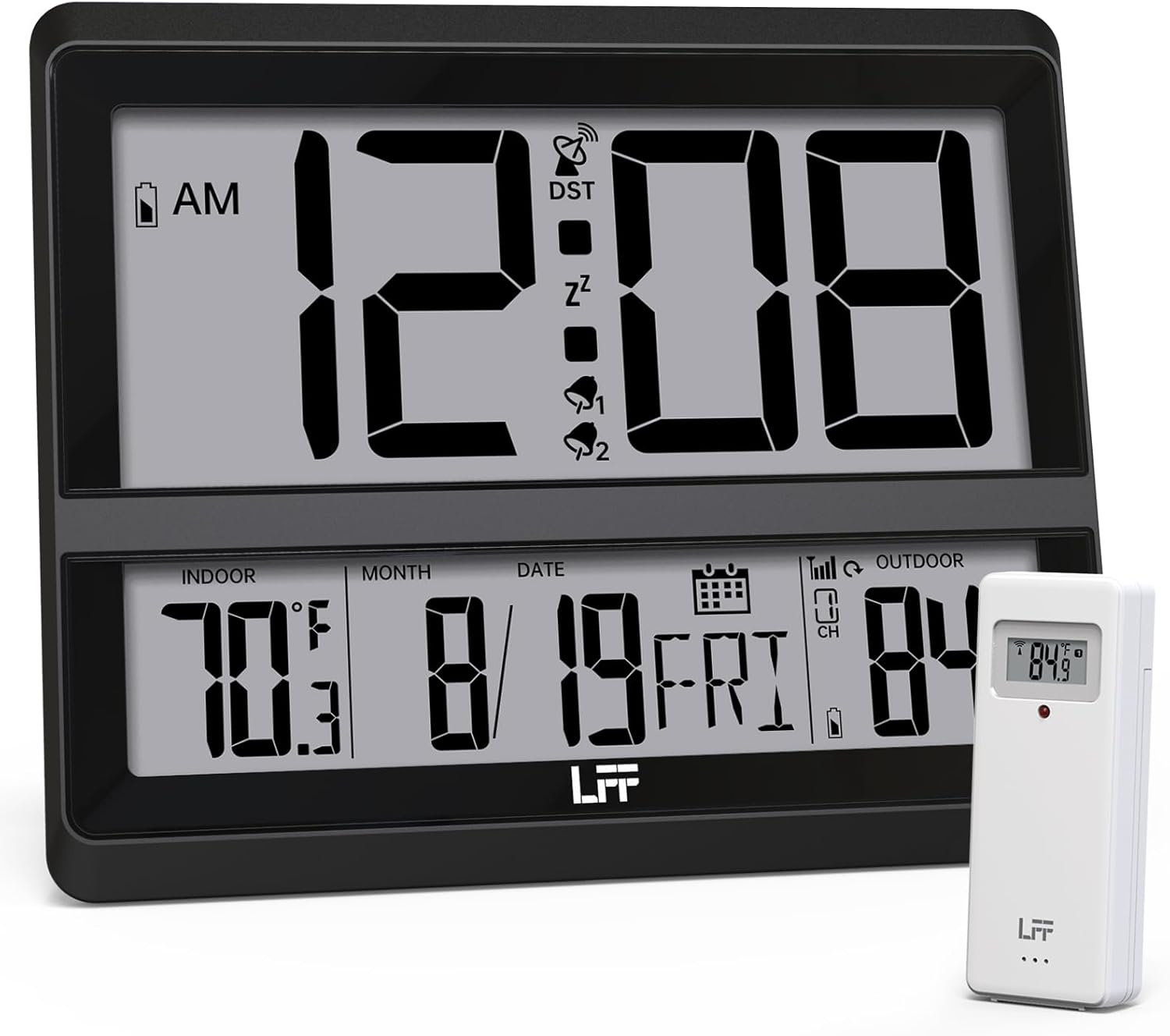
Image: The LFF Atomic Clock main unit with its wireless outdoor temperature sensor.
Paket İçeriği
- LFF Atomic Clock Main Unit
- Kablosuz Dış Mekan Sıcaklık Sensörü
- Kullanım Kılavuzu (bu belge)
- Bracket for table standing
Note: Batteries are not included. The main clock unit requires 3x AA batteries, and the outdoor sensor requires 2x AAA batteries.
Ürün Bittiview
Familiarize yourself with the main components and controls of your LFF Atomic Clock.

Image: Front display and rear button layout of the LFF Atomic Clock.
Ekran Özellikleri:
- Zaman Göstergesi: Large digits for current time (12/24 Hour format).
- AM/PM Göstergesi: For 12-hour format.
- DST Symbol: Yaz saati uygulamasının aktif olduğunu gösterir.
- RCC Reception Icon: Shows status of atomic time signal reception.
- Alarm Icons (Zz, 1, 2): Indicate active alarms and snooze function.
- İç Mekan Sıcaklığı: Current temperature inside (°C/°F).
- Dış Ortam Sıcaklığı: Current temperature from wireless sensor (°C/°F).
- Date & Weekday: Month, Day, and Day of the Week.
- Düşük Pil Göstergesi: For both main unit and outdoor sensor.
Arka Düğmeler:
- Ayarlama düğmesi: Enters setting mode.
- Alarm butonu: Alarm ayarlarını kontrol eder.
- KANAL Düğmesi: (Birden fazla sensör kullanılıyorsa) dış mekan sensör kanalları arasında geçiş yapar.
- DOWN/WAVE/°C/°F Button: Decreases values in setting mode, manually initiates atomic signal search (WAVE), or switches temperature units.
- UP/ALARM Button: Increases values in setting mode, or activates/deactivates alarm.
Kurmak
1. Pil Kurulumu
- Dış Mekan Sensörü:
- Open the battery compartment on the back of the wireless outdoor sensor.
- Insert 2x AAA batteries, observing the correct polarity (+/-).
- Pil bölmesini sıkıca kapatın.
- Note: For temperatures below -4°F (-20°C), Lithium batteries are recommended for the outdoor sensor.
- Main Clock Unit:
- Open the battery compartment on the back of the main clock unit.
- 3 adet AA pili kutuplarına dikkat ederek (+/-) takın.
- Pil bölmesini sıkıca kapatın.

Image: Battery compartments for the main clock and outdoor sensor.
2. İlk Senkronizasyon ve Ayarlar
Upon battery installation, the clock will automatically begin searching for the WWVB atomic time signal and attempt to connect with the outdoor sensor.
- The RCC Reception Icon will flash during the atomic signal search. This process may take several minutes or up to 24 hours depending on signal strength.
- The outdoor temperature should appear on the display within a few minutes after the sensor batteries are installed. If not, press the KANAL button on the main unit to cycle through channels or press the reset button on the outdoor sensor.
3. Manual Settings (if needed)
If the atomic signal is not received or you wish to adjust settings manually:
- Saat Dilimi Ayarı:
- Basılı tutun AYARLAMAK button for 3 seconds to enter time zone setting.
- Kullanın UP/ALARM or DOWN/WAVE/°C/°F buttons to select your time zone (e.g., PST, MST, CST, EST).
- Basmak AYARLAMAK onaylamak ve sonraki ayara geçmek için
- 12/24 Saat Formatı:
- After time zone, the hour format will flash. Use UP/ALARM or DOWN/WAVE/°C/°F to select 12-hour or 24-hour format.
- Basmak AYARLAMAK onaylamak için.
- Manual Time and Date Setting:
- Basmaya devam et AYARLAMAK to cycle through Year, Month, Day, Hour, Minute settings.
- Kullanmak UP/ALARM or DOWN/WAVE/°C/°F her değeri ayarlamak için.
- Basmak AYARLAMAK Her bir ayarı onaylamak için
- Yaz Saati Uygulaması (DST):
- After setting the time, the DST setting will flash. Use UP/ALARM or DOWN/WAVE/°C/°F to enable or disable DST.
- Basmak AYARLAMAK ayar modundan çıkmak için.

Image: The clock automatically corrects time daily via WWVB signal.
4. Dış Mekan Sensör Yerleşimi
- Place the wireless outdoor sensor within 330 feet (100 meters) of the main unit.
- Choose a shaded location to avoid direct sunlight, which can affect temperature accuracy.
- Ensure the sensor is protected from direct rain and snow.
- Avoid placing the sensor near large metal objects or electrical appliances that may interfere with the wireless signal.

Image: Wireless range of 330 feet for the outdoor sensor.
Kullanım Talimatları
1. Ekran Modları
- The clock continuously displays time, indoor temperature, outdoor temperature, date, and day of the week.
- Basın DOWN/WAVE/°C/°F button to switch between Celsius (°C) and Fahrenheit (°F) for temperature display.
2. Alarm Fonksiyonu
- Alarmı Ayarlama:
- Basın ALARM button once to display Alarm 1 time. Press again for Alarm 2.
- While an alarm time is displayed, press and hold the ALARM button for 3 seconds to enter alarm setting mode. The hour will flash.
- Kullanmak UP/ALARM or DOWN/WAVE/°C/°F saati ayarlamak için. Basın ALARM onaylamak için.
- Dakika göstergesi yanıp sönecek. Kullanın. UP/ALARM or DOWN/WAVE/°C/°F dakikayı ayarlamak için basmak ALARM Alarm ayarını onaylamak ve çıkmak için.
- Alarmı Etkinleştirme/Devre Dışı Bırakma:
- Basın ALARM button to display Alarm 1 or Alarm 2.
- Basın UP/ALARM button to toggle the alarm ON or OFF. The corresponding alarm icon (1 or 2) will appear/disappear on the display.
- Erteleme İşlevi:
- Alarm çaldığında, düğmesine basın. UYUKLAMA button (usually located on top or a dedicated button) to activate snooze. The alarm will sound again after approximately 5-10 minutes.
- Alarmı tamamen durdurmak için başka bir düğmeye basın (örneğin, ALARM, AYARLAMAK).
3. Manual Atomic Signal Search
If you wish to manually initiate a search for the WWVB atomic time signal, press and hold the DOWN/WAVE/°C/°F button for 3 seconds. The RCC Reception Icon will flash, indicating the search is in progress.
Bakım
- Temizlik: Wipe the clock and sensor with a soft, dry cloth. Do not use abrasive cleaners or solvents.
- Pil Değişimi: When the low battery indicator appears on the display for either the main unit or the outdoor sensor, replace the batteries promptly to ensure continuous operation and accurate readings. Refer to the "Battery Installation" section for details.
- Depolamak: Cihazı uzun süre saklayacaksanız, sızıntıyı önlemek için tüm pilleri çıkarın.
Sorun giderme
| Sorun | Olası Neden | Çözüm |
|---|---|---|
| Ana ünitede ekran yok. | Piller bitmiş veya yanlış takılmış. | Pillerin kutuplarını kontrol edin ve gerekirse yeni AA pillerle değiştirin. |
| Dış ortam sıcaklığı görüntülenmiyor veya yanlış. |
|
|
| Atomic time signal not received (RCC icon flashing or not displayed). |
|
|
| Time is incorrect after atomic synchronization. | Yanlış saat dilimi ayarı. | Adjust the time zone setting as described in the "Manual Settings" section. |
Özellikler
| Özellik | Detay |
|---|---|
| Model Numarası | LWC204 |
| Görüntü Türü | Dijital lcd |
| Güç Kaynağı (Ana Ünite) | 3x AA Pil (dahil değildir) |
| Güç Kaynağı (Dış Mekan Sensörü) | 2x AAA Pil (dahil değildir) |
| İç Sıcaklık Aralığı | 32°F ila 122°F (0°C ila 50°C) |
| Dış Sıcaklık Aralığı | -58°F ila 158°F (-50°C ila 70°C) |
| kablosuz Menzil | Açık havada 100 metreye kadar (330 fit). |
| Zaman Biçimi | 12/24 saat seçeneği mevcut |
| Boyutlar (Ana Ünite) | 7.48" W x 8.66" H (approx.) |
| Montaj Seçenekleri | Wall Mount or Tabletop (bracket included) |
Garanti ve Destek
LFF products are designed for reliability and performance. For specific warranty information, please refer to the warranty card included with your purchase or contact LFF customer support.
For technical assistance or further inquiries, please visit the official LFF webSitelerini ziyaret edebilir veya müşteri hizmetleri departmanıyla iletişime geçebilirsiniz. İletişim bilgileri genellikle ürün ambalajında veya markanın resmi çevrimiçi platformunda bulunur.