
1. Ürün Bittiview
The LENVII F510 is a versatile wired 2D barcode scanner designed for efficient data capture in various environments such as retail, warehouses, libraries, and pharmacies. It supports both 1D and 2D barcodes, including QR codes, and can read barcodes from mobile phone and PC screens. Its ergonomic design ensures comfortable operation for extended periods.

Figure 1: LENVII F510 Barcode Scanner from various perspectives.
2. Paket İçeriği
Paketi açtığınızda lütfen aşağıdaki tüm öğelerin pakette bulunduğundan emin olun:
- LENVII F510 Wired 2D Barcode Scanner
- USB Kablosu (1.8 metre)
- Kullanıcı Kılavuzu

Figure 2: Typical package contents for the LENVII F510 Barcode Scanner.
3. Kurulum
3.1 Kablolu USB Bağlantısı
The LENVII F510 scanner is designed for plug-and-play operation via its USB connection. No additional drivers are typically required for most operating systems.
- USB kablosunu tarayıcının portuna bağlayın.
- Plug the other end of the USB cable into an available USB port on your computer (PC, laptop).
- Tarayıcı açılacak ve kullanıma hazır olacaktır.

Figure 3: Connecting the LENVII F510 scanner to a computer via USB.
3.2 Sistem Uyumluluğu
The LENVII F510 barcode scanner is compatible with a wide range of operating systems, ensuring broad usability:
- Windows (7, 8, XP, 10)
- Mac işletim sistemi
- Linux
Not: Connection with Square systems is not supported.

Figure 4: The scanner supports various operating systems including Windows, Mac, and Linux.
4. Kullanım Talimatları
4.1 Temel Tarama
To scan a barcode, aim the scanner's light beam at the barcode and press the trigger button. The scanner will emit a beep and the data will be transmitted to your connected device.
4.2 Kod Çözme Yetenekleri
The LENVII F510 is capable of decoding a wide array of 1D and 2D barcode types:
- 1D Barkodlar: UPC, EAN-13, EAN-8, Codabar, Code 39, MSI, Code 93, Code 128, ISBN, ISSN, Code 39 extended, Interleaved 2 of 5 (ITF), Appendix 2 of 5, IATA Code, MSI/Plessy, Chinese Postcode, Code 32 (Italian Pharmaceutical Code), RSS 14, RSS Limited, RSS Extension.
- 2D Barkodlar: PDF417, MicroPDF417, Data Matrix, Maxicode, QR Code, Aztec.

Figure 5: The scanner supports various 1D and 2D barcode formats, including QR codes.
4.3 Ekranlardan Tarama
The scanner can read barcode information directly from mobile phone screens and computer displays, making it suitable for digital tickets or QR codes.

Figure 6: Demonstrating the scanner's ability to read barcodes from digital screens.
4.4 Tarama Modları
The scanner offers different scanning modes to suit various applications. Refer to the full manual for details on configuring specific modes, such as continuous scanning.

Figure 7: The scanner supports multiple scanning modes for flexibility.
5. Bakım
To ensure optimal performance and longevity of your LENVII F510 scanner, follow these maintenance guidelines:
- Tarayıcıyı yumuşak, kuru bir bezle silerek temiz tutun. Aşındırıcı temizleyicilerden veya çözücülerden kaçının.
- Tarama penceresini çizilmelere veya hasara karşı koruyun.
- The scanner is designed with a 1.5-meter anti-shock and anti-fall capability, providing durability against accidental drops.
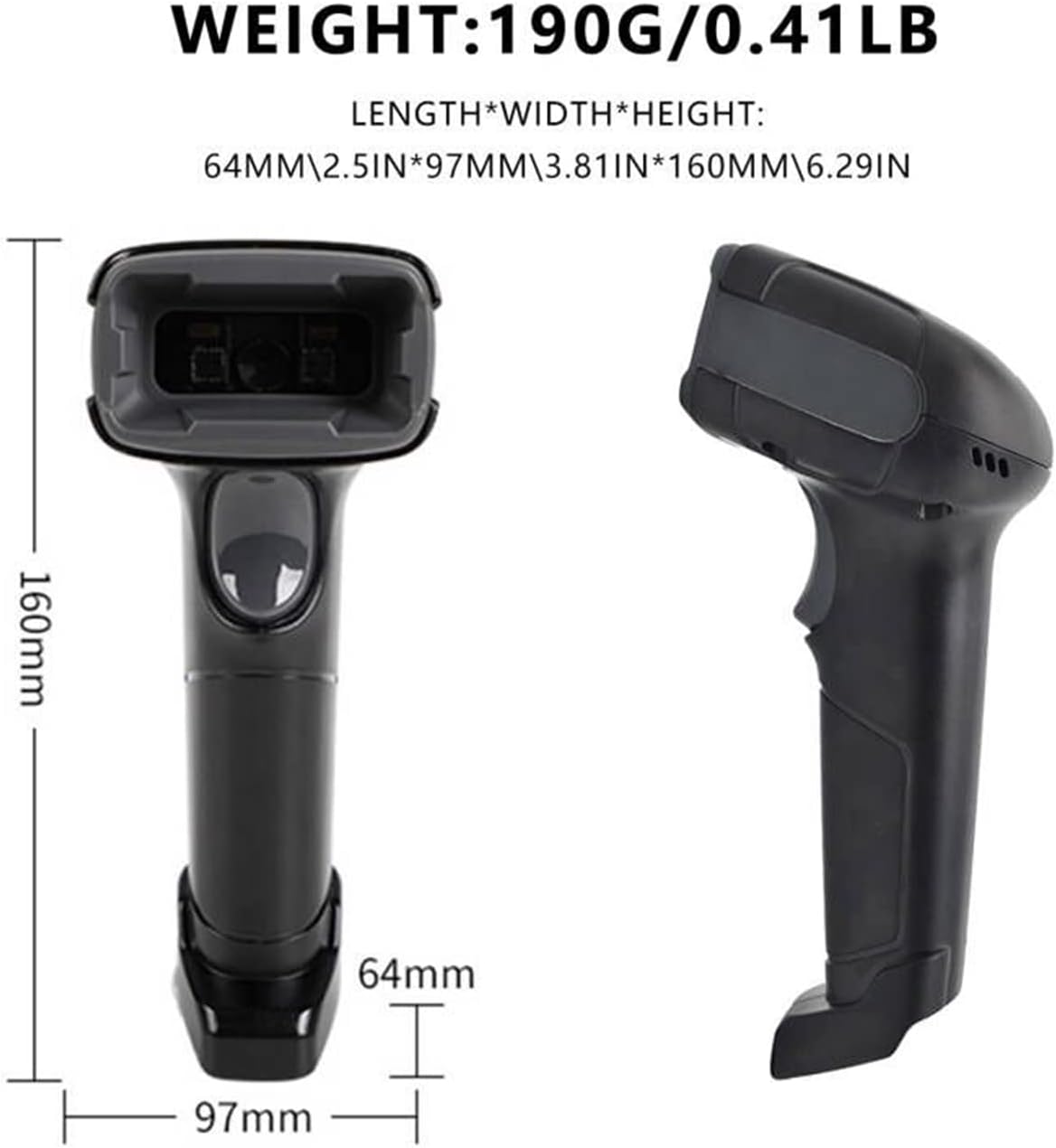
Figure 8: The scanner is built to withstand drops from up to 1.5 meters.
6. Sorun Giderme
If you encounter issues with your LENVII F510 scanner, consider the following common solutions:
- Tarama Çıktısı Yok: Ensure the USB cable is securely connected to both the scanner and the computer. Verify that the computer recognizes the device.
- Yanlış Veri Çıkışı: If the scanner outputs incorrect data, it may require configuration. Refer to the full user manual for specific configuration barcodes to adjust settings like prefix/suffix or data format.
- Tarayıcı yanıt vermiyor: Disconnect and reconnect the USB cable. If the issue persists, try connecting to a different USB port or computer to rule out port-specific problems.
7. Özellikler
| Özellik | Şartname |
|---|---|
| Model Numarası | F510 |
| Ürün Boyutları (U x G x Y) | 160 x 64 x 97 mm (6.29 x 2.5 x 3.81 inç) |
| Ağırlık | 190 gram (0.41 lb) |
| Kablo Uzunluğu | 1.8 metre |
| Işık kaynağı | Aiming: 617 nm LED; Illumination: 6500K LED |
| Image (Pixel) | 640 pixels (H) x 480 pixels (V) |
| Tarama Hızı | 200 saniyede tarar |
| Çözünürlük | Reads minimum 5mil barcode and maximum 13mil barcode |
| Çalışma Hacmitage | 5 Volts DC (VDC) |
| Maksimum Depolama Sıcaklığı | 50 Derece Santigrat |
| Drop Protection Height | 5 meters (Note: Product description states 1.5m anti-shock/anti-fall, but specifications list 5m drop protection. Please refer to product packaging for definitive information.) |
| Bağlantı Teknolojisi | USB |
8. Garanti ve Destek
For warranty information and technical support, please refer to the official LENVII webSiteden satın alabilir veya perakendecinizle iletişime geçebilirsiniz. Satın alma belgenizi satın alma belgesi olarak saklayın.