
1. Giriş
Satın aldığınız için teşekkür ederizasing the PrimeCables AlienPro StagePro G300 Bluetooth Soundbar with Subwoofer. This manual provides essential information for the safe and efficient operation of your new audio system. Please read this manual thoroughly before use and retain it for future reference.
2. Güvenlik Bilgileri
- Güç Kaynağı: Güç kaynağı hacmini sağlayıntage cihazda belirtilen gereksinimlerle eşleşiyor.
- Havalandırma: Havalandırma açıklıklarını kapatmayın. Üreticinin talimatlarına uygun şekilde kurulum yapın.
- Su ve Nem: Bu cihazı yağmur veya neme maruz bırakmayın. Üzerine vazo gibi sıvı dolu nesneler koymayın.
- Sıcaklık: Radyatörler, kalorifer ızgaraları, sobalar veya diğer cihazlar (dahil) gibi herhangi bir ısı kaynağının yakınına kurmayın. amp(ısı üreten)
- Temizlik: Sadece kuru bezle temizleyin.
- Servis: Tüm servis işlemleri için kalifiye servis personeline başvurun. Cihaz herhangi bir şekilde hasar gördüğünde servis gereklidir.
3. Paket İçeriği
Aşağıda listelenen tüm öğelerin paketinizde bulunduğunu doğrulayın:
- Ses çubuğu
- Subwoofer
- Güç kablosu
- Uzaktan kumanda
- Kullanım Kılavuzu (bu belge)
4. Ürün Bittiview
Familiarize yourself with the components of your sound system.

Şekil 4.1: Ön view of the soundbar, showcasinŞık siyah tasarımı ve hoparlör ızgarasıyla dikkat çekiyor.

Şekil 4.2: Arka view of the soundbar, showing the recessed panel containing various input ports.

Figure 4.3: The included subwoofer, a black cube-shaped unit with a front-facing port for enhanced bass.
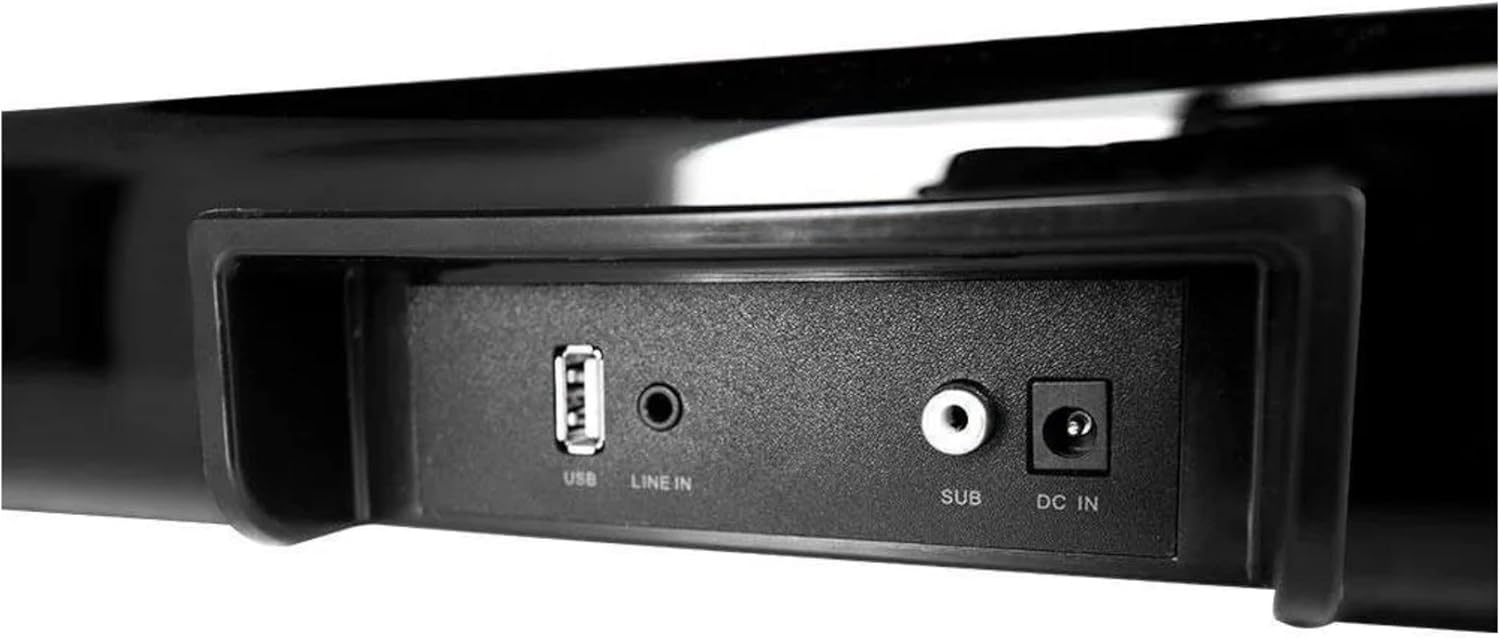
Şekil 4.4: Ayrıntılı view of the soundbar's input panel, featuring USB, Line In, Subwoofer Out, and DC In ports.

Figure 4.5: Side panel controls on the soundbar, including Power/Mode, Play/Mute, Volume Up/Next, and Volume Down/Previous buttons.

Figure 4.6: The included remote control, featuring buttons for power, mute, EQ, volume, playback, and mode selection.
5. Kurulum
5.1 Yerleştirme
- Place the soundbar on a stable, flat surface directly in front of your television or monitor.
- Position the subwoofer on the floor, ideally near the soundbar, to optimize bass response. Ensure it has adequate ventilation.
5.2 Bağlantılar
- Connect the subwoofer to the soundbar using the dedicated 'SUB' output port on the soundbar and the corresponding input on the subwoofer.
- Connect the power cable to the 'DC IN' port on the soundbar and then plug it into a wall outlet.
- Connect your audio source (TV, smartphone, etc.) to the soundbar using one of the available input methods (Bluetooth, Line In, USB). Refer to Section 7 for detailed connection instructions.
6. Kullanım Talimatları
6.1 Güç Açma/Kapatma
- Basın Güç/Mod button on the soundbar (Figure 4.5) or the Güç button on the remote control (Figure 4.6) to turn the unit on or off.
6.2 Mod Seçimi
- Basın Mod button on the soundbar or remote control repeatedly to cycle through available input modes: Bluetooth, Line In, USB.
6.3 Ses Kontrolü
- Kullanın HACİM+ Ve cilt Ses seviyesini ayarlamak için ses çubuğundaki veya uzaktan kumandadaki düğmeler kullanılır.
6.4 Sessize Alma İşlevi
- Basın Sesini kapatmak button on the remote control to temporarily silence the audio. Press it again to restore sound.
6.5 Playback Controls (Bluetooth/USB Mode)
- Oynat/Duraklat: Basın Play/Mute Soundbar'daki düğmesine veya Oynat/Duraklat Uzaktan kumandadaki düğmeye basın.
- Sonraki Parça: Basın VOL+/Sonraki Soundbar'daki düğmesine veya Sonraki Parça Uzaktan kumandadaki düğmeye basın.
- Önceki parça: Basın VOL-/Önceki Soundbar'daki düğmesine veya Önceki Parça Uzaktan kumandadaki düğmeye basın.
7. Bağlantılar
7.1 Bluetooth Eşleştirme
- Soundbar'ı açın.
- Basın Mod button until 'BT' or 'Bluetooth' is indicated (if applicable, via LED or display). The soundbar will enter pairing mode.
- Bluetooth özellikli cihazınızda (örneğin akıllı telefon, tablet) kullanılabilir Bluetooth cihazlarını arayın.
- Select 'AlienPro G300' (or similar name) from the list.
- Once paired, the soundbar will confirm the connection, and you can now play audio wirelessly.
7.2 Line In (AUX) Connection
- Connect one end of a 3.5mm audio cable (not included) to the 'LINE IN' port on the soundbar (Figure 4.4).
- Connect the other end of the 3.5mm audio cable to the headphone jack or audio output port of your external device.
- Basın Mod button on the soundbar or remote until 'LINE IN' or 'AUX' mode is selected.
7.3 USB Bağlantısı
- Ses içeren bir USB flash sürücü takın files into the 'USB' port on the soundbar (Figure 4.4).
- Basın Mod button on the soundbar or remote until 'USB' mode is selected.
- Ses çubuğu otomatik olarak ses çalmaya başlayacaktır. files from the USB drive. Use the playback controls to navigate.
8. Bakım
8.1 Temizlik
- Temizliğe başlamadan önce ses çubuğunu ve subwoofer'ı daima elektrik prizinden çıkarın.
- Ses çubuğunun ve subwoofer'ın yüzeylerini silmek için yumuşak, kuru bir bez kullanın.
- Do not use liquid cleaners, aerosol sprays, or solvents, as these may damage the finish or internal components.
8.2 Depolama
- If storing the unit for an extended period, unplug it from the power source and store it in a cool, dry place away from direct sunlight and extreme temperatures.
9. Sorun Giderme
Soundbar'ınızla ilgili sorunlarla karşılaşırsanız, aşağıdaki yaygın sorunlara ve çözümlere bakın:
| Sorun | Olası Neden | Çözüm |
|---|---|---|
| Güç yok | Güç kablosu bağlı değil; Elektrik prizi aktif değil. | Güç kablosunun ses çubuğuna ve çalışan bir elektrik prizine güvenli bir şekilde bağlı olduğundan emin olun. |
| Ses yok | Volume too low; Incorrect input mode; Audio cable not connected; Device not paired (Bluetooth) | Increase volume. Select correct input mode. Check audio cable connections. Re-pair Bluetooth device. |
| Bluetooth eşleştirme başarısız oldu | Ses çubuğu eşleştirme modunda değil; Cihaz çok uzakta; Parazit | Ensure soundbar is in Bluetooth pairing mode. Move device closer to soundbar. Avoid strong interference sources. |
| Uzaktan kumanda çalışmıyor | Piller bitmiş; uzaktan kumanda ile ses çubuğu arasında engel var. | Replace remote control batteries. Ensure clear line of sight to the soundbar's IR receiver. |
10. Özellikler
| Özellik | Şartname |
|---|---|
| Model Numarası | G300 |
| Marka | PrimeCables (AlienPro) |
| Bağlantı Teknolojisi | Bluetooth |
| Ses Çıkışı Modu | Çevrelemek |
| Hoparlör Tipi | Ses çubuğu |
| Özel Özellik | Bluetooth |
| Önerilen Kullanım | For surround sound systems |
| Çevresel Ses Kanalı Yapılandırması | 2.0 |
| Renk | Siyah |
| Ürün Boyutları | 30 x 24 x 65 cm; 3.3 kg |
| Hoparlör Boyutu | 5 İnç (Subwoofer) |
| Güç Kaynağı | Kablolu Elektrik |
| Kontrol Yöntemi | Uzak |
11. Garanti ve Destek
This product comes with a standard manufacturer's warranty. For specific warranty terms and conditions, please refer to the documentation provided at the time of purchase or contact PrimeCables customer support.
For technical assistance, troubleshooting not covered in this manual, or service inquiries, please contact PrimeCables customer support through their official website veya iletişim kanalları.