
1. Giriş
This manual provides detailed instructions for the setup, operation, and maintenance of your XTUGA U-260 Dual Channel UHF Wireless Microphone System. Please read this manual thoroughly before using the product to ensure proper functionality and to maximize its lifespan. Retain this manual for future reference.
2. Ürün Bittiview
The XTUGA U-260 is a professional-grade dual UHF wireless microphone system designed for various applications including church events, karaoke, weddings, and other live events. It features a robust design, adjustable frequencies, and convenient auto-scan and IR pairing functions.
2.1. Dahil Edilen Bileşenler
- U-260 UHF Wireless Receiver (1 unit)
- UHF Wireless Handheld Microphones (2 units)
- Antenler (2 adet)
- Güç Adaptörü (1 adet)
- Kullanım Kılavuzu (1 adet)
- Ses Kablosu (1 adet)
- Anti-skid Rings (2 units)
- Power Plugs (2 units)
- Güç Kabloları (2 adet)

Figure 2.1: All components included with the XTUGA U-260 Wireless Microphone System, including the receiver, two microphones, antennas, power adapter, cables, and anti-skid rings.
2.2. Temel Özellikler
- Dual UHF Channels: Two independent channels with 100 selectable frequencies each (Channel 1: 540.1 - 564.85 MHz; Channel 2: 568.1 - 592.85 MHz).
- Otomatik Tarama Fonksiyonu: Automatically searches for the least interference channel.
- Kızılötesi Senkronizasyon: Seamlessly pairs the receiver and microphones.
- Frekans Kilidi: Prevents accidental frequency changes.
- Long Range Operation: Up to 492ft (150 meters) operating distance.
- Dayanıklı Yapı: Microphones feature sturdy metal construction.
- Üstün Ses Kalitesi: High-quality dynamic cartridge designed to limit feedback and interference.
- Rechargeable Microphones: Built-in lithium batteries provide up to 8 hours of use on a 3-hour charge via USB-C.
- Dashboard-Inspired Display: Receiver features a unique display for AF and RF signal indication.

Figure 2.2: The receiver's display screen, featuring a dashboard-inspired design for clear signal indication.
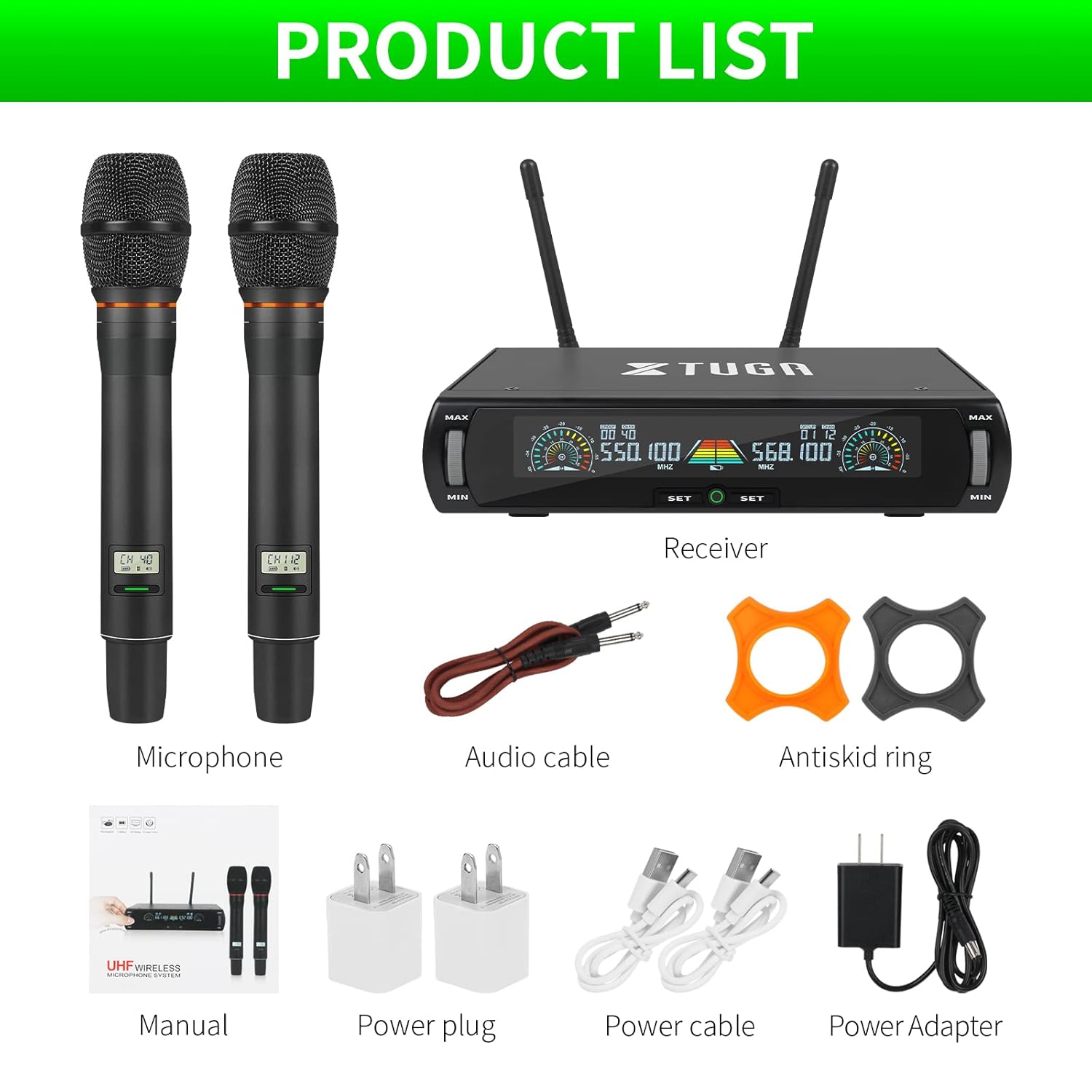
Figure 2.3: Illustration of the microphone's cardioid pickup pattern, designed to reduce noise and capture sound realistically.
2.3. Bileşen Tanımlaması

Şekil 2.4: Ayrıntılı view of the receiver and microphone components.
- Ses kontrolü
- Function settings button
- Switch (Power/Mode)
- Ekran görüntüsü
- Power socket (DC 12V)
- Anten jakı
- XLR çıkışı
- Audio output (6.35mm/1/4 inch)
- Steel meshed head (Microphone)
- Display screen (Microphone)
- Switch (Microphone Power)
- Type-C charging port (Microphone)
3. Kurulum Talimatları
- Bileşenleri Paketinden Çıkarın: Tüm ürünleri ambalajından dikkatlice çıkarın.
- Antenleri Bağlayın: Screw the two antennas into the antenna jacks on the rear of the receiver. Ensure they are securely tightened.
- Güç Bağlantısı: Connect the power adapter to the receiver's power socket (DC 12V) and plug it into a suitable power outlet.
- Ses Çıkışı:
- For balanced output, connect XLR cables from the receiver's XLR outputs to your mixer or ampcankurtaran.
- For unbalanced output, use the provided 6.35mm (1/4 inch) audio cable to connect the receiver's audio output to your mixer or ampcankurtaran.
- Alıcıyı Açın: Press the power switch on the receiver. The display screen should illuminate.
- Mikrofonları Şarj Edin: Before first use, ensure both microphones are fully charged using the provided USB-C cables and power plugs. The microphone display will show charging status.
- Mikrofonları Açın: Press and hold the power switch on each microphone until its display illuminates.

Figure 3.1: The XTUGA U-260 system ready for operation, showing the receiver with antennas and two handheld microphones.
4. Kullanım Talimatları
4.1. Frequency Selection and IR Pairing
The system features an auto-scan function to find clear frequencies and IR synchronization for easy pairing.

Figure 4.1: Diagram illustrating the IR pairing process between the microphone and receiver.
- Initiate Auto Scan: On the receiver, press the "SET" button three times quickly for the desired microphone channel (left or right). The receiver will scan for the clearest available frequency.
- Select Frequency (Optional): If you wish to manually select a frequency after the scan, rotate the volume knob corresponding to the microphone channel you are adjusting.
- IR Pairing: Once a frequency is displayed on the receiver, hold the front of the microphone (where its display is located) close to the IR sensor on the receiver. The IR sensor is located on the bottom left side of the receiver's screen.
- Eşleştirmeyi Onayla: While holding the microphone near the IR sensor, press the "SET" button on the receiver once for the corresponding microphone channel. A small indicator light on the receiver should flash, and the microphone's display will update to show the new frequency, confirming successful pairing. This process may require a couple of attempts to ensure proper alignment and timing.
4.2. Frequency Lock Function
To prevent accidental changes to the selected frequency, use the frequency lock function.

Figure 4.2: Visual representation of the frequency lock function, showing a padlock icon.
- Kilitlemek için: Press and hold the "SET" button on the receiver for the desired microphone channel until a lock icon appears on the display.
- Kilidini Açmak İçin: Press and hold the "SET" button again until the lock icon disappears.
4.3. Ses Kontrolü
Each microphone channel has an independent volume control knob on the receiver. Rotate the "MIN/MAX" knobs to adjust the output volume for each microphone.
4.4. Microphone Charging
The handheld microphones are equipped with built-in rechargeable lithium batteries.

Figure 4.3: Illustration of microphone battery life (8 hours work) and charging time (3 hours) via USB-C.
- Connect a USB-C cable to the charging port at the bottom of the microphone.
- Connect the other end of the USB-C cable to a power adapter or a USB power source.
- A dim red light on the microphone's display bar indicates charging. The light will turn off or change color when fully charged.
- Tam şarj genellikle yaklaşık 3 saat sürer ve 8 saate kadar kesintisiz kullanım sağlar.
5. Bakım
- Temizlik: Alıcıyı ve mikrofonları temizlemek için yumuşak, kuru bir bez kullanın. Sıvı temizleyiciler veya çözücüler kullanmayın.
- Depolamak: Sistemi kullanılmadığı zamanlarda serin, kuru ve doğrudan güneş ışığından ve aşırı sıcaklıklardan uzak bir yerde saklayın.
- Pil Bakım: For optimal battery life, avoid fully discharging the microphones frequently. Recharge them regularly, especially if storing for extended periods.
- Kablo yönetimi: Ensure all cables are connected securely and are not strained or kinked.
6. Sorun Giderme
| Sorun | Olası Neden | Çözüm |
|---|---|---|
| Ses çıkışı yok. |
|
|
| Parazit veya statik gürültü. |
|
|
| Microphone not pairing. |
|
|
| Microphone battery drains quickly. |
|
|
7. Özellikler
| Özellik | Detay |
|---|---|
| Örnek | U-260 |
| Marka | XTUGA |
| Mikrofon Form Faktörü | Microphone System (Handheld) |
| Bağlantı Teknolojisi | UHF Wireless, XLR |
| Kanal Sayısı | 2 (2x100 selectable frequencies) |
| Frequency Range (Channel 1) | 540.1 - 564.85 MHz |
| Frequency Range (Channel 2) | 568.1 - 592.85 MHz |
| Çalışma Aralığı | 492 ft'ye kadar (150 metre) |
| Kutup Deseni | Unidirectional (Cardioid Pickup) |
| Empedans | 600 Ohm |
| Sinyal-Gürültü Oranı | 120 dB |
| Mikrofon Güç Kaynağı | Dahili Şarj Edilebilir Lityum Pil |
| Mikrofon Pil Ömrü | 8 saate kadar |
| Microphone Charging Time | Yaklaşık 3 saat (USB-C üzerinden) |
| Alıcı Güç Kaynağı | DC 12V Güç Adaptörü |
| Malzeme | Metal (Mikrofonlar) |
| Dahil Bileşenler | Receiver, 2 Handheld Microphones, 2 Antennas, Power Adapter, User Manual, Audio Cable, Anti-skid Rings, Power Plugs, Power Cables |
| Ürün Ağırlığı | 2 kilo |
8. Garanti ve Destek
XTUGA provides a one-year free warranty period for products with authentic brand logos. For any questions, technical assistance, or warranty claims, please contact XTUGA customer support through your purchase platform or the official XTUGA webalan.
Lütfen garanti geçerliliği için satın alma belgenizi saklayın.