
1. Giriş
Welcome to your new Genmitsu LC-50 PLUS 10W Laser Engraver. This manual provides essential information for the safe and efficient operation, assembly, usage, and maintenance of your device. Please read this manual thoroughly before operating the machine to ensure proper function and safety.
2. Güvenlik Bilgileri
Operating a laser engraver involves potential hazards. Adhere strictly to the following safety guidelines to prevent injury or damage.
- Göz Koruması: Always wear appropriate laser safety goggles (OD4+ or higher) when the laser is active. Never look directly at the laser beam.
- Havalandırma: Operate the machine in a well-ventilated area to dissipate smoke and fumes produced during engraving/cutting.
- Yangın Tehlikesi: Lazer işleme, yanıcı maddeleri tutuşturabilir. Yanınızda bir yangın söndürücü bulundurun ve çalışma sırasında makineyi asla gözetimsiz bırakmayın.
- Malzeme Uyumluluğu: Only engrave or cut materials approved for laser processing. Avoid reflective, transparent, or unknown materials.
- Çocuklar ve Evcil Hayvanlar: Çocukları ve evcil hayvanları çalışma alanından uzak tutun.
- Acil durdurma: Familiarize yourself with the location and function of the Emergency Stop button.
- Laser Shield Protection: The device includes a laser shield for added safety. Ensure it is properly installed before use.

3. Ürün Bittiview
The Genmitsu LC-50 PLUS is a high-performance 10W compressed spot laser engraver and cutter, designed for precision and efficiency. Key features include:
- 10W Compressed Spot Laser Head: Provides high power and a fine laser spot for detailed engraving and efficient cutting.
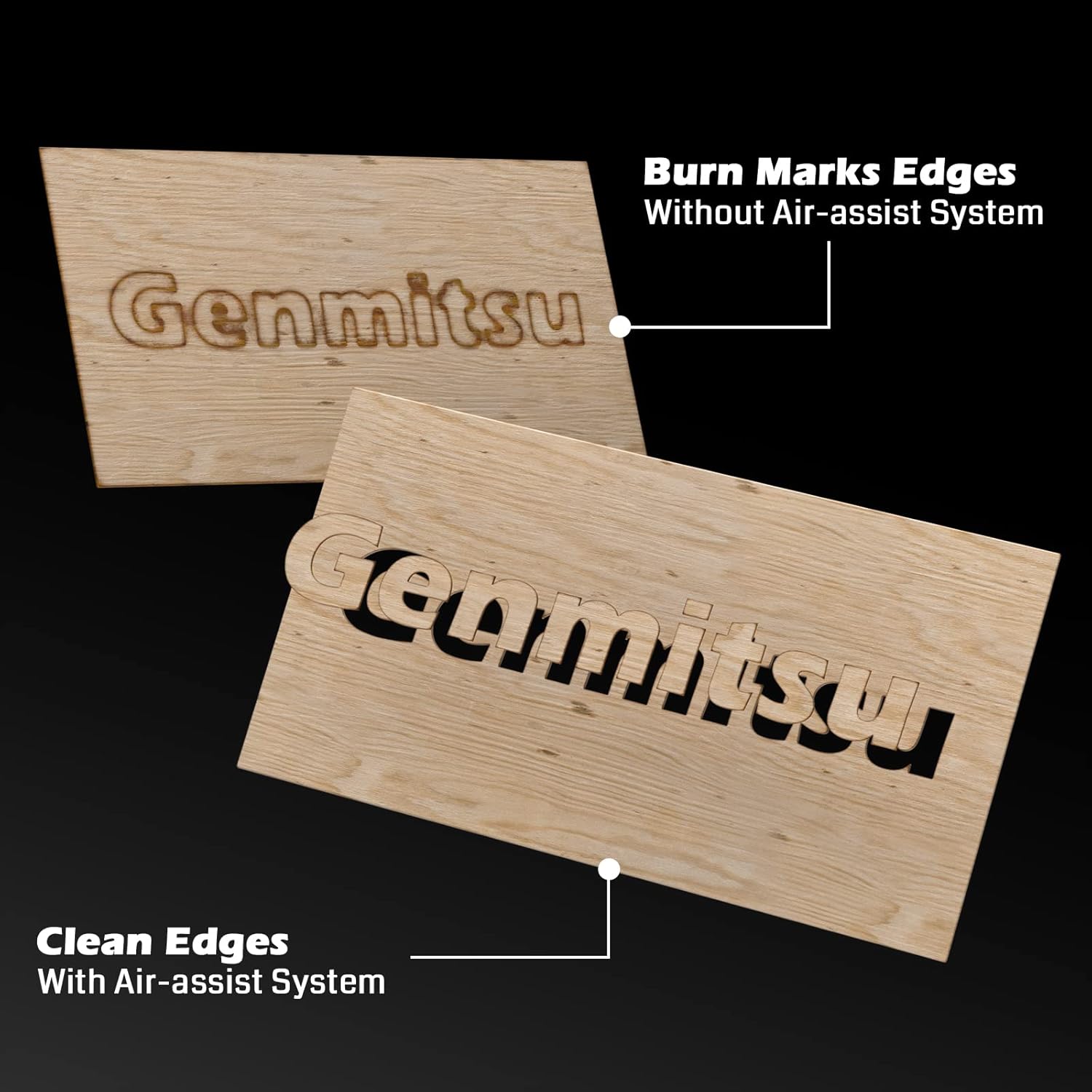
- Integrated Air Assist System: Enhances cutting performance by blowing away smoke and debris, resulting in cleaner cuts and increased efficiency.
- Lineer Raylar: Ensures higher stability and precision for consistent engraving and cutting results.
- X & Y-axis Tensioner: Allows for precise adjustment of timing belt tension, contributing to more accurate engraving.
- Sınır Anahtarları: Installed on both X and Y axes to prevent the laser module from colliding with boundaries, ensuring safe movement.
- Acil Durdurma Butonu: Provides an immediate shutdown mechanism for safety.
- Raised Footpads: Optional accessories to increase working height for larger or cylindrical objects.


4. Montaj ve Kurulum
Follow these steps to assemble and set up your Genmitsu LC-50 PLUS laser engraver.
4.1 Kutudan Çıkarma ve İlk Montaj
- Carefully unpack all components and verify against the packing list.
- Assemble the main frame according to the included quick start guide or detailed assembly instructions.
- Install the laser module onto the gantry.
- Connect all cables securely, ensuring proper orientation.
4.2 X & Y-axis Tensioner Adjustment
The X & Y-axis tensioner design allows for precise adjustment of the timing belts, which is crucial for engraving accuracy. Refer to the detailed instructions video for visual guidance.
- Locate the M5 screws on the side of the X and Y axes.
- Loosen the No.1 screw slightly.
- Adjust the No.2 screw to achieve the desired belt tension. The belt should be taut but not overly tight.
- Tighten the No.1 screw to secure the tensioner.

4.3 Installing Raised Footpads (Optional)
If you need to engrave larger or cylindrical objects, install the Z-axis raised footpads to increase the working height by 35mm. The secure locking foot design allows for stable mounting.
5. Kullanım Talimatları
Bu bölümde lazer gravür cihazınızı çalıştırmak için temel adımlar özetlenmiştir.
5.1 Software and Connection
- Install compatible laser control software (e.g., LightBurn, LaserGRBL) on your computer.
- Gravür cihazını USB kablosuyla bilgisayarınıza bağlayın.
- Ensure the necessary drivers are installed and the software recognizes the device.
5.2 Malzeme Hazırlığı ve Yerleştirme
- Place the material to be engraved or cut securely on the working surface.
- Ensure the material is flat and properly aligned.
5.3 Lazerin Odaklanması
Proper laser focus is critical for optimal engraving and cutting results. Follow the manufacturer's specific instructions for focusing the laser module.
5.4 Using the Air Assist System
The integrated Air Assist System significantly improves cutting quality by clearing smoke and debris from the laser's path. Ensure the air pump is connected and activated for cutting operations, especially on materials like wood and acrylic.
5.5 Gravür/Kesme İşlemine Başlama
- Tasarımınızı yükleyin file into the laser control software.
- Set appropriate parameters (power, speed, passes) for your material.
- Kullanın Ateş Testi feature to confirm the laser's exact position before starting the job.
- Initiate the job and monitor the process closely.
5.6 Uyumlu Malzemeler
The Genmitsu LC-50 PLUS is capable of engraving and cutting a wide range of materials, including but not limited to:
- Wood (e.g., basswood plywood up to 10mm)
- Acrylic (up to 5mm)
- Metal (for engraving/marking)
- Deri
- Kumaş
- Kağıt/Karton
- Lastik
- Cam (oyma için)

6. Bakım
Düzenli bakım, lazer gravür makinenizin uzun ömürlü olmasını ve optimum performans göstermesini sağlar.
- Lazer merceğini temizleyin: Periodically clean the laser lens with a specialized lens cleaning solution and cloth to maintain laser power and focus.
- Clean Linear Rails: Keep the linear rails free from dust and debris. Lubricate them occasionally with appropriate lubricant as recommended by the manufacturer.
- Kemerleri kontrol edin: Inspect the timing belts for wear and tear. Ensure they are properly tensioned (refer to Section 4.2).
- Enkazı Temizle: Regularly remove any accumulated debris from the working area and around the laser module.
7. Sorun Giderme
Bu bölümde karşılaşabileceğiniz yaygın sorunlar ve bunların olası çözümleri ele alınmaktadır.
| Sorun | Olası Neden | Çözüm |
|---|---|---|
| Lazer ateşlenmiyor | Loose cable connection, software settings, laser module issue | Check all connections, verify software settings (power, enable laser), inspect laser module. |
| Zayıf gravür/kesim kalitesi | Incorrect focus, wrong parameters, dirty lens, loose belts | Adjust laser focus, optimize power/speed settings, clean laser lens, check belt tension. |
| Makine hareket etmiyor veya düzensiz hareket ediyor. | Loose motor cables, software connection issue, limit switch triggered | Check motor connections, restart software/computer, ensure no obstructions are triggering limit switches. |
| Air assist not working | Air pump not connected, hose blocked, pump malfunction | Verify air pump connection and power, check air hose for kinks or blockages. |
8. Teknik Özellikler
| Özellik | Detay |
|---|---|
| Model Numarası | LC50 Plus |
| Lazer Gücü | 10W Compressed Spot Optical Power |
| Gravür Alanı | 500mm x 400mm |
| Maksimum Gravür Hızı | Dakikada 20000 mm'ye kadar |
| Cutting Capacity (Basswood Plywood) | Up to 10mm (single pass) |
| Cutting Capacity (Acrylic) | Up to 5mm (single pass) |
| Çerçeve Malzemesi | Tam Alüminyum Alaşımı |
| Hareket Sistemi | Linear Guide Design |
| Ürün Boyutları | 75x23.5x18.5 cm |
| Ürün Ağırlığı | 8.37 kilo |
9. Garanti ve Destek
Garanti bilgileri, teknik destek veya servis talepleri için lütfen resmi Genmitsu web sitesine başvurun. webSite üzerinden satın alabilir veya doğrudan müşteri hizmetleriyle iletişime geçebilirsiniz. Satın alma belgenizi saklayın.