
1. Giriş
This manual provides detailed instructions for the operation and maintenance of your LFF DAB+/FM Digital Radio, Model YT81107. Please read this manual thoroughly before using the device to ensure proper function and to maximize your listening experience.

Resim 1: Ön view of the LFF DAB+/FM Digital Radio, Model YT81107, featuring its speaker grille, color LCD display, and telescopic antenna.
2. Paket İçeriği
Lütfen paketi aşağıdaki öğeler açısından kontrol edin:
- 1 x LFF DAB Digital Radio (Model YT81107)
- 1 x AC Güç Adaptörü
- 1 x Hızlı Başlangıç Kılavuzu (bu kılavuz)
Herhangi bir öğenin eksik veya hasarlı olması durumunda lütfen derhal müşteri desteğiyle iletişime geçin.
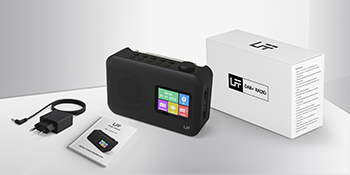
Image 2: The LFF DAB+/FM Digital Radio, AC power adapter, and quick start guide as included in the package.
3. Ürün Özellikleri
The LFF DAB+/FM Digital Radio YT81107 offers a range of features designed for versatile listening:
- DAB+ and FM Digital Radio: Supports ultra-wide signals in DAB+ (174.928 - 239.2 MHz) and FM (87.5 - 108 MHz) bands.
- İstasyon Ön Ayarları: Store up to 30 FM and 30 DAB+ stations for quick access.
- Temizle LCD Ekran: Large color LCD screen displays station information and time.
- Esnek Güç Seçenekleri: Operates with the included AC adapter or 4 x 1.5V (LR6, AA) batteries (not included).
- Geliştirilmiş Alım: Features a 39 cm extendable antenna for improved signal strength.
- Uyku Zamanlayıcısı: Programmable sleep timer (15/30/45/60/90/120 minutes).
- Çift Çalar Saat: İki bağımsız alarm ayarlayın.
- Bluetooth Bağlantısı: Functions as a Bluetooth speaker for streaming audio from compatible devices.
- Kulaklık girişi: Özel dinleme için 3.5 mm jak girişi.

Resim 3: Üzeriview of the radio's functions, including DAB+ radio, 60 presets, FM radio, sleep timer, headphone jack, Bluetooth, full-color screen, and dual alarm.

Image 4: Close-up of the radio's full-color LCD display, showing time and date.
4. Kurulum
4.1 Cihaza Güç Verme
Your radio can be powered by either the AC adapter or batteries.
- AC Gücü: Connect the included AC adapter to the DC 5V input port on the radio and plug the other end into a standard wall outlet.
- Pil Gücü: Open the battery compartment on the back of the radio. Insert 4 x 1.5V AA (LR6) batteries, ensuring correct polarity. Close the compartment securely. (Batteries are not included.)
4.2 Anten Ayarı
Extend the telescopic antenna fully and adjust its angle for optimal reception. For DAB+ and FM radio, a fully extended antenna generally provides the best signal.

Image 5: Illustration of the radio's dimensions (16.1 x 10.9 x 5.6 cm), battery requirements (4 x 1.5V AA), AC adapter (5V/1000mA), and the 360° adjustable antenna.
4.3 Initial Scan for Stations
Upon first power-on, the radio will typically perform an automatic scan for available DAB+ and FM stations. This process may take a few minutes. Once complete, the radio will store the found stations.
5. Kullanım Talimatları
5.1 Açma/Kapatma
Basın Güç button (usually located on the top or front panel) to turn the radio on or off.
5.2 Mod Seçimi
Basın Mod button to cycle through available modes: DAB+ Radio, FM Radio, and Bluetooth.
5.3 Tuning Radio Stations (DAB+/FM)
There are three primary ways to find and select radio stations:
- Otomatik Tarama: In DAB+ or FM mode, initiate an auto-scan. The radio will search for and list all available stations.
- Manuel Arama: Use the tuning knob or navigation buttons to manually adjust the frequency.
- Ön ayarlar: Store your favorite stations to preset numbers (1-30 for FM, 1-30 for DAB+). To save a station, tune to it, then press and hold a preset number button until the display confirms storage. To recall a station, simply press the corresponding preset number button.

Image 6: Visual representation of the three methods for selecting radio stations: Automatic Scan, Manual Search, and using Presets.
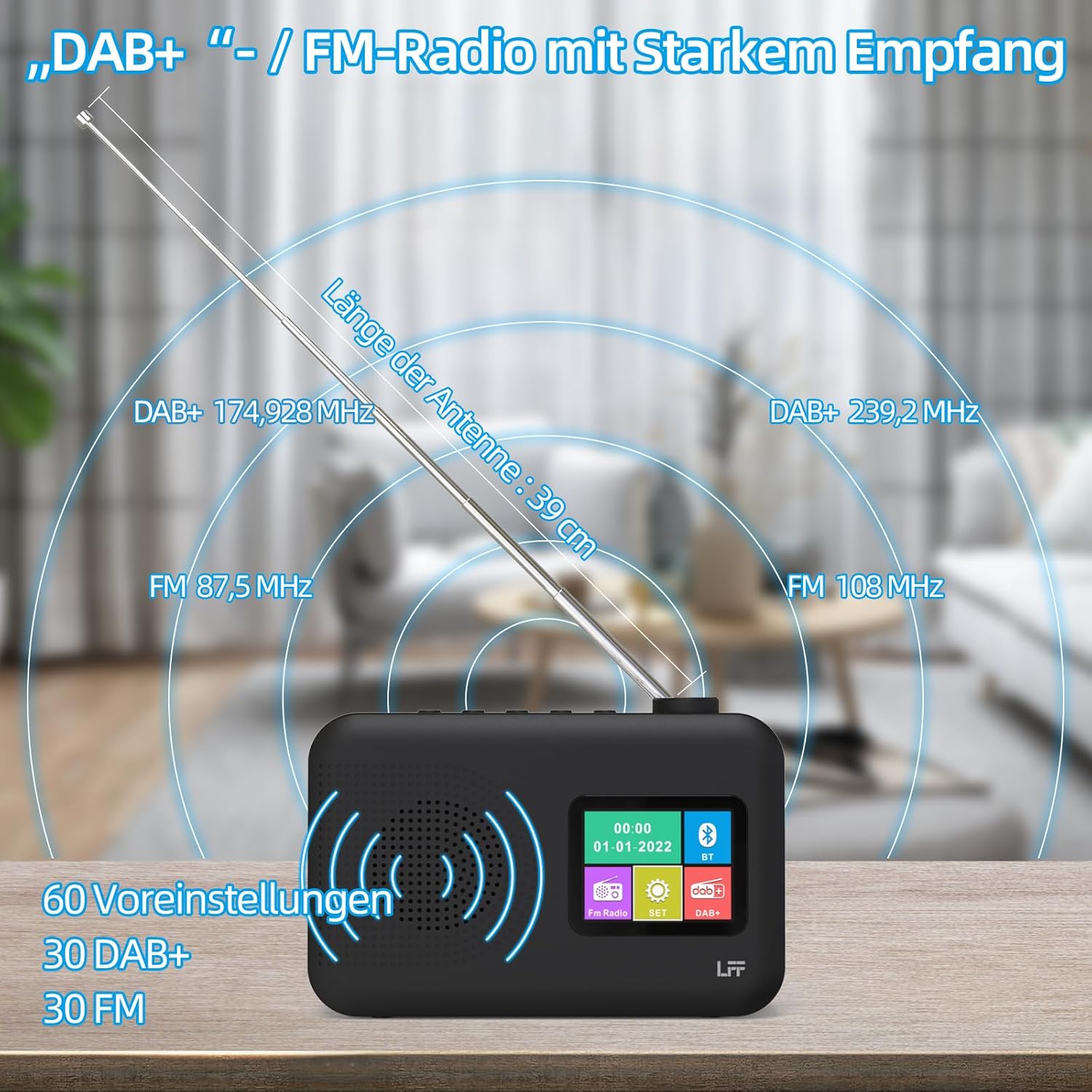
Image 7: Diagram showing the radio's reception capabilities for DAB+ (174.928 - 239.2 MHz) and FM (87.5 - 108 MHz) bands, highlighting the 39 cm antenna and 60 total presets.
5.4 Ses Kontrolü
Adjust the volume using the dedicated volume knob or buttons, typically located on the top or side of the radio. The radio features 16 adjustable volume levels.
5.5 Uyku Zamanlayıcısı
To activate the sleep timer:
- Basın Uyku Zamanlayıcısı düğme.
- Cycle through the available durations: 15, 30, 45, 60, 90, or 120 minutes.
- Radyo, seçilen süre sonunda otomatik olarak kapanacaktır.

Image 8: Visual guide to setting the sleep timer, showing options for 15, 30, 45, 60, 90, and 120 minutes.
5.6 Çift Alarm Saati
Alarmları ayarlamak için:
- Basın Alarm Alarm ayarlarına erişmek için kullanılan düğme.
- Alarm 1 veya Alarm 2'yi seçin.
- Set the desired alarm time, alarm source (e.g., buzzer, DAB+, FM), and volume.
- Ayarlarınızı onaylayın.

Image 9: Depiction of the dual alarm clock feature, allowing for two separate alarm settings (Alarm 1 and Alarm 2).
5.7 Bluetooth Bağlantısı
Cihazınızı Bluetooth aracılığıyla eşleştirmek için:
- Switch the radio to Bluetooth mode. The display will indicate it is searching for devices.
- On your smartphone or other Bluetooth-enabled device, search for available Bluetooth devices.
- Select "LFF YT81107" (or similar name) from the list to pair.
- Bağlantı kurulduktan sonra, cihazınızdan radyoya ses aktarımı yapabilirsiniz.
Note: This radio acts as a Bluetooth receiver. It cannot connect to Bluetooth headphones.

Image 10: The radio's display showing a successful Bluetooth connection, indicating the paired device name.
5.8 Kulaklık Kullanımı
Plug standard 3.5mm wired headphones into the headphone jack on the side of the radio for private listening. The internal speaker will automatically mute when headphones are connected.

Image 11: Close-up of the 3.5mm headphone jack located on the side of the radio.
6. Bakım
Radyonuzun uzun ömürlü ve optimum performans göstermesini sağlamak için aşağıdaki bakım yönergelerini izleyin:
- Temizlik: Radyonun dış yüzeyini temizlemek için yumuşak, kuru bir bez kullanın. Aşındırıcı temizleyiciler, cilalar veya çözücüler kullanmayın.
- Depolamak: When not in use for extended periods, remove batteries and store the radio in a cool, dry place.
- Çevre: Radyoyu aşırı sıcaklıklara, doğrudan güneş ışığına, yüksek neme veya tozlu ortamlara maruz bırakmaktan kaçının.
- Suya Maruz Kalma: This radio is not waterproof. Keep it away from water and liquids.
7. Sorun Giderme
Radyo cihazınızda sorun yaşıyorsanız, aşağıdaki yaygın sorunlara ve çözümlere bakın:
| Sorun | Olası Neden | Çözüm |
|---|---|---|
| Güç yok | AC adapter not connected, batteries depleted or incorrectly inserted. | Ensure AC adapter is securely plugged in. Replace batteries or check polarity. |
| Zayıf radyo alımı | Anten uzatılmamış, sinyal zayıf, parazitlenme mevcut. | Fully extend and adjust the antenna. Move the radio to a different location. Avoid placing near other electronic devices. |
| Bluetooth bağlanmıyor | Radio not in Bluetooth mode, device not discoverable, already paired with another device. | Ensure radio is in Bluetooth mode. Make sure your device's Bluetooth is on and discoverable. Disconnect from other Bluetooth devices. |
| Alarm çalmıyor | Alarm not activated, volume too low, incorrect time setting. | Verify alarm is set and enabled. Increase alarm volume. Check alarm time. |
| Hoparlörden ses gelmiyor | Ses seviyesi çok düşük, kulaklık takılı. | Sesi artırın. Kulaklıkları çıkarın. |
If the problem persists after trying these solutions, please contact LFF customer support.
8. Özellikler
| Özellik | Detay |
|---|---|
| Marka | LFF uzantısı |
| Model Numarası | YT81107 |
| Renk | Siyah |
| Boyutlar (U x G x Y) | 16.1x5.9x10.9 cm |
| Ayarlama Teknolojisi | DAB+ |
| Desteklenen Radyo Bantları | DAB+ (174.928 - 239.2 MHz), FM (87.5 - 108 MHz) |
| Bağlantı | Bluetooth, 3.5mm Headphone Jack |
| Güç Kaynağı | AC Adapter (5V/1000mA), 4 x 1.5V AA (LR6) Batteries |
| Özel Özellikler | Color LCD Display, Sleep Timer, Dual Alarm Clock, 60 Presets (30 DAB+, 30 FM) |
| Uyumlu Cihazlar | Smartphones (for Bluetooth audio), Wired Headphones |
9. Garanti ve Destek
LFF is committed to providing quality products. If you experience any quality issues or require assistance with your LFF DAB+/FM Digital Radio, please contact our customer support directly. Refer to the contact information provided in your purchase documentation or on the official LFF webalan.