
giriiş
The IMICE T97 RGB Honeycomb Gaming Mouse is designed to provide a precise and comfortable experience for gaming and general computer use. It features a high-precision 4800 DPI sensor, a durable and ergonomic design, and is compatible with various operating systems. This manual will guide you through the setup, operation, and maintenance of your new gaming mouse.
- Marka: IMICE
- Tip: Fare
- Uyumluluk: Bilgisayarlar ve Dizüstü Bilgisayarlar
- Temel Özellikler: High precision 4800 DPI, comfortable and durable design, anti-sweat design, precise positioning.
- Renk: Siyah
Kurulum Talimatları
1. Fareyi Bağlama
The IMICE T97 mouse uses a standard USB connection for plug-and-play functionality. No additional drivers are typically required for basic operation on supported operating systems.
- Bilgisayarınızda veya dizüstü bilgisayarınızda kullanılabilir bir USB bağlantı noktası bulun.
- Insert the USB connector of the IMICE T97 mouse firmly into the USB port.
- İşletim sisteminiz gerekli sürücüleri otomatik olarak algılayıp yüklemelidir. Bu işlem birkaç dakika sürebilir.
- Once installed, the mouse will be ready for use.
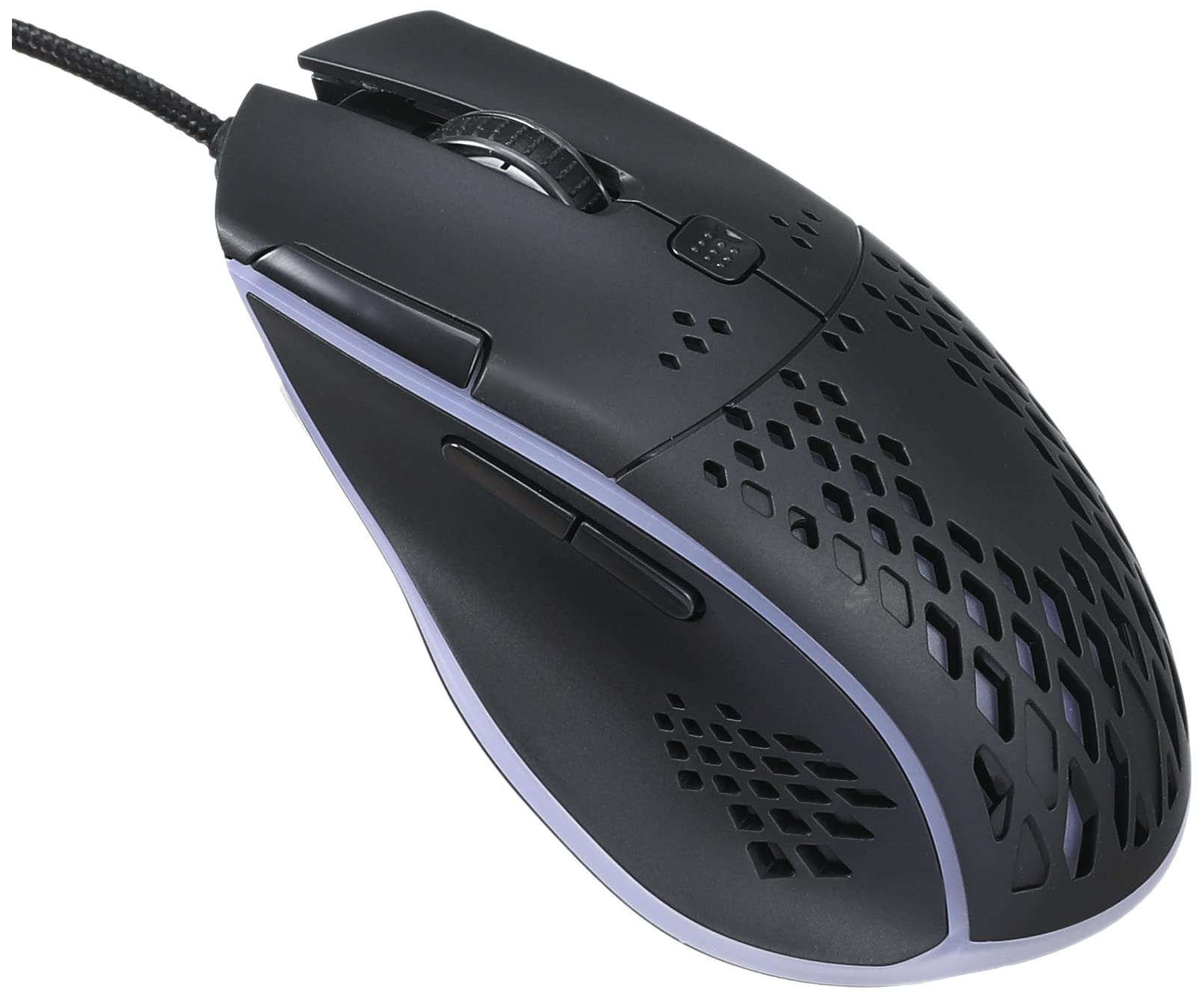
Resim: Üst ön view of the IMICE T97 RGB Honeycomb Gaming Mouse, showing its ergonomic shape and honeycomb shell design.
Fareyi Çalıştırma
Temel Fonksiyonlar
- Sol tık: Birincil eylem, seçim, aktivasyon.
- Sağ tık: Bağlam menüsü, ikincil eylemler.
- Kaydırma tekerleği: Belgeleri yukarı/aşağı kaydırın ve web Sayfalar. Orta tıklama işlevi için de tıklanabilir.
- Yan Düğmeler: (If present, typically for forward/back navigation in browsers or custom functions in games). The T97 model typically includes two side buttons.
DPI Ayarlaması
The IMICE T97 mouse features adjustable DPI (Dots Per Inch) settings, allowing you to change the cursor sensitivity. This mouse supports up to 4800 DPI. There is usually a dedicated button, often located behind the scroll wheel, to cycle through different DPI levels. Press this button to switch between sensitivity settings to find your preferred speed.
RGB Aydınlatma
The mouse features RGB lighting, which typically cycles through various colors automatically. There may not be user-configurable software for lighting control, and it operates as a default aesthetic feature.

Resim: Alt taraf view of the IMICE T97 RGB Honeycomb Gaming Mouse, showing the optical sensor, product label with model T97, and regulatory marks.
Bakım
Temizlik
- Temizlemeden önce fareyi bilgisayarınızdan ayırın.
- Fare yüzeyini silmek için yumuşak, kuru ve tüy bırakmayan bir bez kullanın.
- İnatçı kirler için hafifçeampBezi su veya hafif bir temizleme solüsyonuyla (sert kimyasallardan kaçının) silin.
- Use a cotton swab or compressed air to clean around buttons and the scroll wheel.
- Farenin iç bileşenlerine sıvı girmemesine dikkat edin.
Depolamak
Fareyi uzun süre kullanılmadığı zamanlarda serin, kuru ve doğrudan güneş ışığından ve aşırı sıcaklıklardan uzak bir yerde saklayın.
Sorun giderme
| Sorun | Çözüm |
|---|---|
| Fare yanıt vermiyor. |
|
| İmleç hareketi düzensiz veya kesik kesik. |
|
| Düğmeler veya fare tekerleği çalışmıyor. |
|
| Cannot find software for customization. | The IMICE T97 mouse is primarily designed for plug-and-play operation. Dedicated software for advanced customization (like button remapping or detailed RGB control) may not be available or easily accessible for this model. Most functions are hardware-controlled. |
Özellikler
| Marka | IMICE |
| Örnek | T97 |
| Renk | Siyah |
| Bağlantı Teknolojisi | USB |
| DPI (Maksimum) | 4800 DPI |
| Özel Özellikler | Comfortable design, RGB lighting, honeycomb shell |
| El Yönelimi | İki elini de kullanabilen |
| Önerilen Kullanımlar | Oyun |
| Uyumlu Cihazlar | Kişisel Bilgisayar, Dizüstü Bilgisayar |
| İşletim Sistemi Uyumluluğu | Linux, Windows XP (ve daha yeni sürümleri) |
| Ürün Ağırlığı | 120 gram |
| Nakliye Boyutları | 15x11x5 cm |
| Piller Dahil | No (Wired USB mouse) |
| ASIN | B0BD2DDWNQ |
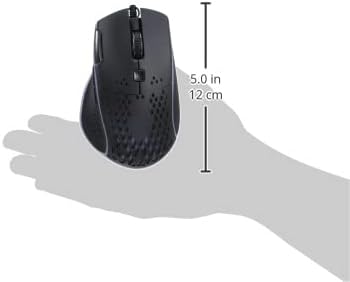
Resim: Yan view of the IMICE T97 RGB Honeycomb Gaming Mouse held in a hand, illustrating its compact size (approximately 5.0 inches or 12 cm in length).
Garanti Bilgileri
Please refer to the retailer or your purchase documentation for specific warranty terms and conditions. IMICE products typically come with a limited warranty against manufacturing defects. Keep your proof of purchase for warranty claims.
Müşteri Desteği
For technical assistance or further inquiries, please contact your retailer or visit the official IMICE website for support resources. Ensure you have your product model (T97) and purchase details ready when contacting support.