
1005003178286970
P9 Car HUD Head Up Display User Manual
Modeli: 1005003178286970
1. Giriş
The P9 Car HUD (Head Up Display) is an intelligent digital meter designed to project essential driving information directly onto your car's windshield, allowing you to monitor vehicle data without diverting your eyes from the road. This device connects to your car's OBD2 or EUOBD port to display real-time data such as speed, RPM, water temperature, voltage, fuel consumption, and more. It features automatic backlight adjustment, easy installation, and multiple display modes to enhance your driving experience.

The P9 HUD displaying vehicle speed and RPM during operation.
2. Güvenlik Bilgileri
- Always prioritize road safety. Do not attempt to adjust settings or operate the device in a way that distracts you from driving.
- Ensure the HUD is securely placed and does not obstruct your view of the road or any critical vehicle controls.
- Cihazı aşırı sıcaklıklardan, uzun süre doğrudan güneş ışığına maruz kalmaktan ve nemden uzak tutun.
- Cihazı sökmeyin veya değiştirmeyin. Tüm bakım işlemlerini yetkili personele yaptırın.
3. Paket İçeriği
Lütfen kutuyu açtığınızda paket içeriğini kontrol ederek tüm öğelerin mevcut olduğundan emin olun:
- 1 x P9 Head Up Display Unit
- 1 x OBD Kablosu
- 1 x Non-slip Mat
- 1 x İngilizce Kullanım Kılavuzu

All components included in the P9 Car HUD package.
4. Ürün Bittiview
The P9 HUD is designed for ease of use and clear data presentation. Key features include:
- Otomatik Arka Işık: Adjusts display brightness based on ambient light conditions.
- No Reflection Film Needed: Designed to project clearly without additional film on the windshield.
- Tak ve Çalıştır: Simple connection to the OBD2 port for immediate use.
- Multi-functions Display: Shows various data points simultaneously.

Key features and benefits of the P9 HUD.
Ekran Öğeleri

Breakdown of the information displayed on the P9 HUD screen.
- Unit Symbol: Indicates units for various measurements (e.g., L/100KM, V, ℃, M, KM, RPM).
- RPM Icon Display: Visual representation of engine revolutions per minute.
- Hız: Aracın mevcut hızı.
- Hız Birimi: Displays either MPH (miles per hour) or KM/H (kilometers per hour).
5. Uyumluluk
The P9 HUD is designed for vehicles equipped with an OBD II or EU OBD connector. Before installation, please verify your car's compatibility:
- Locate the OBD II connector, typically found under the dashboard on the driver's side.
- Check for a sticker or nameplate under the hood stating "OBD II compliant" or "OBD II Certified."
Note: Some vehicles may have special interfaces that are not compatible with this product.
6. Kurulum
Follow these steps to set up your P9 Car HUD:
- Atama: Choose a suitable location on your dashboard where the HUD will not obstruct your view of the road or interfere with airbags. The non-slip mat can be used to secure the device.
- OBD Kablosunu Bağlayın: Plug one end of the provided OBD cable into the P9 HUD unit.
- Araca Bağlan: Locate your car's OBD II port and firmly plug the other end of the OBD cable into it.
- Güç Açık: Start your car's engine. The HUD should power on automatically and begin displaying data.
- Konumu Ayarla: Adjust the angle and position of the HUD unit to ensure the projected display is clear and visible on your windshield.
7. Kullanım Talimatları
The P9 HUD provides various data displays and smart functions:
Görüntülenen Veriler:
- Araba Hızı
- Su Sıcaklığı
- Yağ Sıcaklığı
- Cilttage
- Yakıt Tüketimi
- RPM (Dakikada Devir)
- Tek Kilometre
- Total Cumulative Mileage
- Sürüş zamanı
- Sistem Zamanı
- Emme Basıncı
- Air-Fuel Ratio
- Pressure (if car engine has turbo function)
- Speed Up Test
- Fren testi
- Engine Faulty Number (read data stream)
Alarm Fonksiyonları:
- Aşırı Hız Alarmı
- Yüksek Su Sıcaklığı Alarmı
- Düşük HacimtagAlarm
- Engine Fault Alarm
Akıllı İşlevler:
- Arıza Kodunu Temizle
- Switching between Kilometers and Miles
- Celsius ve Fahrenheit arasında geçiş yapma
Ekran Modlarını Değiştirme:
The P9 HUD allows you to easily switch between different display combinations to suit your preference. Refer to the physical buttons on the device and the included user manual for specific navigation instructions.

Examples of various multi-function display modes available on the P9 HUD.
8. Ekran Özellikleri
The P9 HUD is designed to provide clear visibility in various lighting conditions:
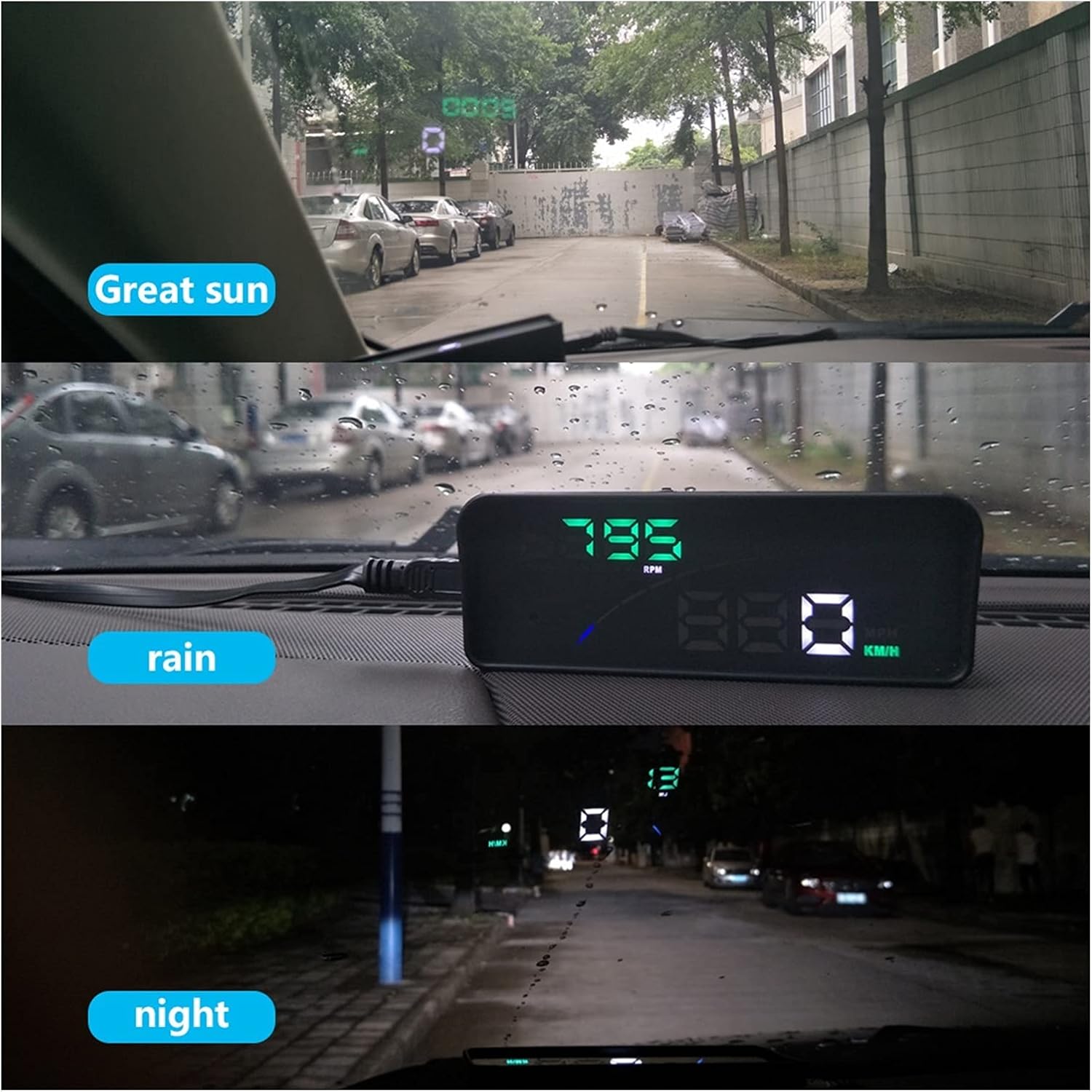
The P9 HUD maintains clear visibility in bright sunlight, rain, and at night.
- Great Sun: The display remains bright and legible even under strong sunlight.
- Yağmur: Performance is maintained during rainy conditions, ensuring data is still clear.
- Gece: The automatic backlight adjusts to provide a comfortable and non-distracting display in low-light environments.
9. Bakım
To ensure the longevity and optimal performance of your P9 Car HUD, follow these simple maintenance guidelines:
- Temizlik: Use a soft, dry cloth to wipe the display and casing. Avoid using abrasive cleaners or solvents that could damage the surface.
- Depolamak: If storing the device for an extended period, disconnect it from the OBD port and store it in a cool, dry place away from direct sunlight.
- Kablo Bakımı: Do not bend or crimp the OBD cable excessively. Ensure it is not pinched by car doors or seats.
10. Sorun Giderme
If you encounter issues with your P9 Car HUD, refer to the following common problems and solutions:
| Sorun | Olası Neden | Çözüm |
|---|---|---|
| Ekran yok/Güç yok | OBD cable not connected properly; Car's OBD port issue; Device fault. | Ensure OBD cable is firmly connected to both the HUD and the car's OBD port. Check if the car's OBD port is functional (e.g., by connecting another OBD device). Try restarting the car. |
| Inaccurate speed/data | Incorrect unit setting (KM/H vs MPH); Calibration needed; Vehicle compatibility issue. | Check and adjust the unit settings (KM/H or MPH) on the HUD. Refer to the user manual for calibration steps if available. Confirm your vehicle is fully OBD2/EUOBD compliant. |
| Alarms constantly trigger | Alarm thresholds set too low; Actual vehicle condition. | Adjust the alarm thresholds (e.g., overspeed, high water temperature) to appropriate levels via the device settings. If alarms persist, check your vehicle's actual condition (e.g., engine temperature, voltage). |
| Engine fault light on HUD | Actual engine fault detected by OBD system. | Use the HUD's "Clear fault code" function. If the fault light reappears, consult a mechanic to diagnose the underlying engine issue. |
11. Özellikler
| Özellik | Detay |
|---|---|
| Model Numarası | 1005003178286970 |
| Marka | Genel |
| Ürün Ağırlığı | 2.2 pound (yaklaşık 1000 gram) |
| Menşei ülke | Çin |
| Bağlantı | OBD2 / EUOBD |
| Görüntü Türü | Digital Projector Display |
| Üretici | Lifyn2 |
12. Garanti ve Destek
For warranty information or technical support, please refer to the contact details provided by your retailer or the manufacturer. Keep your purchase receipt as proof of purchase for any warranty claims.
Ask a question about this manual
Ask about setup, troubleshooting, compatibility, parts, safety, or missing instructions. Manuals+ will review the question and use this page’s manual context to help answer it.