
JIGUUN 647581563908
JIGUUN 2000W Pure Sine Wave Power Inverter User Manual
Modeli: 647581563908
1. Giriş
This manual provides comprehensive instructions for the safe and efficient operation of your JIGUUN 2000W Pure Sine Wave Power Inverter. This device converts 12V DC power from a battery into 110V/120V AC power, suitable for various household appliances, tools, and electronics. It is designed for use in vehicles, RVs, camping, home backup, and emergency situations.
The inverter features a continuous output of 2000W and a peak output of 4000W, offering clean and stable power comparable to grid electricity. Please read this manual thoroughly before installation and use to ensure proper function and safety.
2. Güvenlik Bilgileri
UYARI: Bu güvenlik talimatlarına uyulmaması elektrik çarpmasına, yangına, ciddi yaralanmaya veya ölüme neden olabilir.
- Elektriksel Güvenlik: Always connect the inverter to a 12V DC power source. Ensure correct polarity (red to positive, black to negative) to prevent short circuits and damage.
- Yük Kapasitesi: Do not connect equipment with a rated power higher than 2000W to avoid damaging the inverter. Be aware that inductive loads (e.g., microwave ovens, refrigerators) may have a starting power 4-6 times their working power.
- Havalandırma: Ensure adequate ventilation around the inverter. Do not block cooling fans or vents. The cooling fan activates when the internal temperature exceeds 45°C.
- Çevre: Do not expose the inverter to direct sunlight, water, moisture, or flammable materials. Operate in a dry, well-ventilated area.
- Pil Bağlantısı: It is recommended to use a 12V 240AH or above battery for power supply. Incorrect voltage üniteye zarar verir.
- Araç Kullanımı: Do not keep the inverter on when your RV, truck, or car engine is not running for extended periods, as this can drain the vehicle's battery.
- Solar Integration: This inverter cannot be directly connected to solar panels. It requires a solar charge controller and battery in a solar installation.
- Topraklama: Ensure the AC ground terminal is properly connected.
3. Paket İçeriği
Paketin içinde tüm öğelerin mevcut olduğundan emin olun:
- 1x JIGUUN DC 12V to AC 110V 2000W Pure Sine Wave Inverter
- 1x Kullanım Kılavuzu
- 2 Sets of Battery Cables (2x Red, 2x Black)
- 1x Uzaktan Kumanda
- 10x 30A Fuses (Note: Inverter has built-in fuses, these are spares)
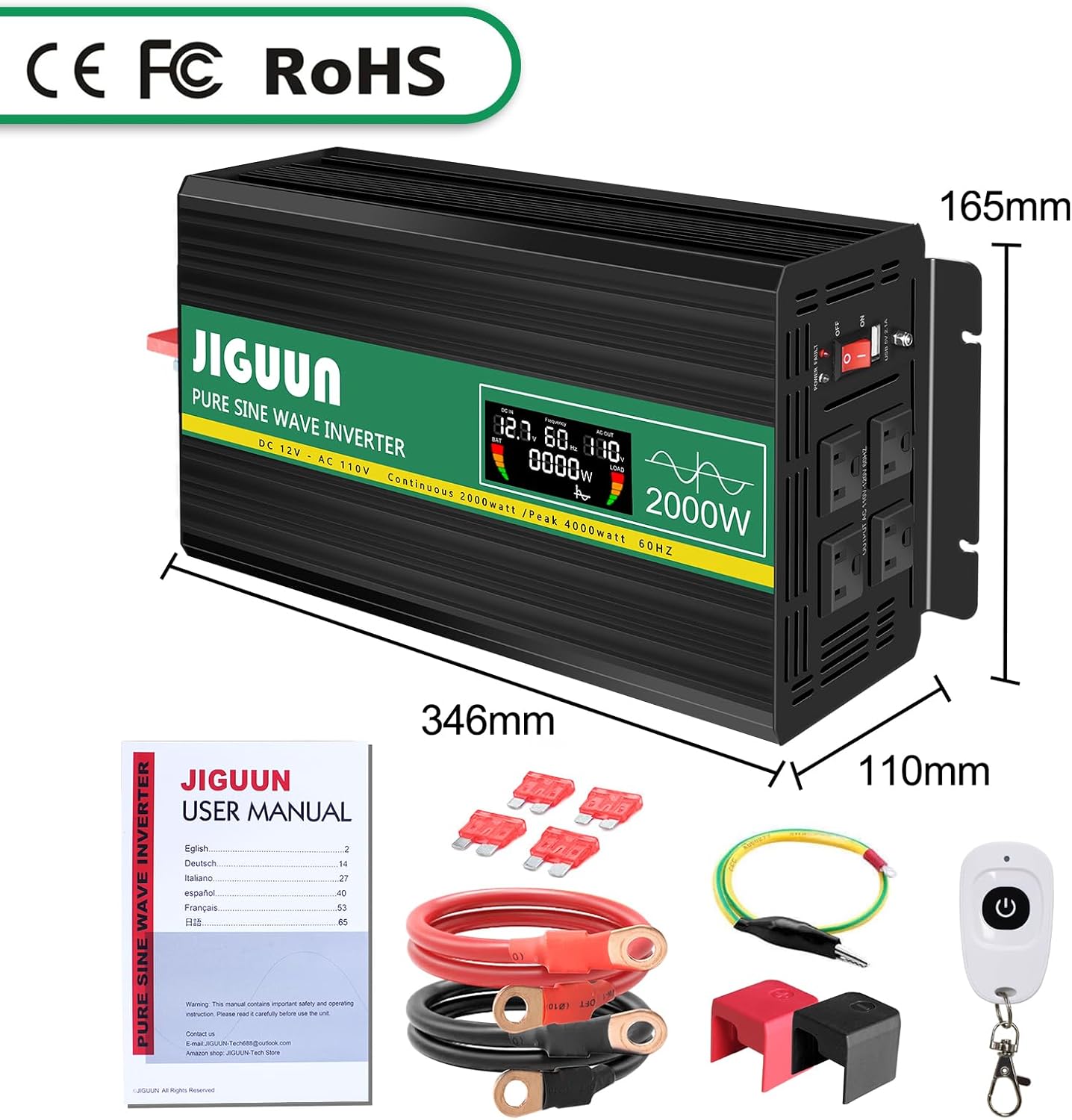
Image: Package contents of the JIGUUN 2000W Pure Sine Wave Inverter.
4. Ürün Bittiview
4.1 Temel Özellikler
- Saf Sinüs Dalgası Çıkışı: Provides clean, stable, and interference-free AC power, suitable for sensitive electronics.
- Yüksek Verimlilik: Dönüşüm verimliliği %90'ın üzerinde.
- Akıllı LCD Ekran: Gerçek zamanlı giriş ses seviyesini gösterir.tage, çıkış hacmitage, output frequency, battery level, and load power.
- Comprehensive Protection System (BMS): Includes under-voltage, aşırı hacimtage, overload, over-temperature, short-circuit, AC ground terminal, and reverse connection protection.
- Soğutma Sistemi: Equipped with two high-speed, silent fans that activate automatically when the temperature exceeds 45°C.
- Uzaktan kumanda: Wireless remote for convenient power management.
- Dayanıklı Yapı: Aluminum alloy shell for lasting protection.
4.2 Bileşen Tanımlama

Image: Front and Rear Panel Components.
- Ön Panel:
- AC Receptacles (x4)
- USB Ports (2.1A)
- AÇIK/KAPALI Anahtarı
- Güç Gösterge LED'i
- LCD Ekran
- AC Ground Terminal
- Arka panel:
- Positive DC Terminal (Red)
- Negative DC Terminal (Black)
- Cooling Fans (x2)

Image: Intelligent LCD Display Details.
LCD ekran aşağıdaki bilgileri göstermektedir:
- Pil Seviyesi Çubuğu
- Loads Level Bar
- DC Giriş Hacmitage
- AC Çıkış Hacmitage
- Çıkış Frekansı
- Load Power (Watts)
5. Kurulum Talimatları
5.1 Bir Konum Seçmek
Select a location for the inverter that is:
- Kuru ve nemden korunmuş.
- Uygun soğutmayı sağlamak için iyi havalandırılmış.
- Doğrudan güneş ışığından ve ısı kaynaklarından uzakta.
- Hareket etmesini önlemek için güvenli bir şekilde monte edilmiştir.
5.2 Aküye Bağlanma
- Ensure the inverter's ON/OFF switch is in the OFF position.
- Connect the red battery cable to the positive (+) terminal of your 12V battery.
- Connect the other end of the red cable to the positive (+) DC input terminal on the inverter.
- Connect the black battery cable to the negative (-) terminal of your 12V battery.
- Connect the other end of the black cable to the negative (-) DC input terminal on the inverter.
- Ensure all connections are tight and secure. Incorrect polarity will damage the inverter.

Image: Inverter with battery cables for connection.
5.3 Solar System Integration (Conceptual Diagram)
The inverter can be part of a solar power system but cannot be directly connected to solar panels. A typical setup involves solar panels, a charge controller, and a battery, with the inverter drawing power from the battery.

Image: Conceptual diagram of a DIY Solar System with the inverter.
6. Kullanım Talimatları
6.1 Açma ve Kapatma
- After connecting the inverter to the battery, switch the ON/OFF button on the inverter to the ON position.
- LCD ekran yanarak giriş ses seviyesini gösterecektir.tage, çıkış hacmitage ve diğer parametreler.
- To power off, switch the ON/OFF button to the OFF position.
6.2 AC Cihazlarının Bağlanması
- İnverterin açık olduğundan emin olun.
- Plug your AC devices into the AC outlets on the front panel of the inverter.
- For USB charging, connect your device to the USB port.
- Monitor the LCD display for real-time load power and battery status.

Image: Inverter powering multiple devices.
6.3 Uzaktan Kumandanın Kullanımı
The included remote control allows you to power the inverter ON or OFF wirelessly, providing convenience, especially when the inverter is installed in a less accessible location.

Image: Remote control for the inverter.
6.4 Uygulama Örn.amples

Image: Inverter applications in car, emergency, home, and work settings.
7. Bakım
- Temizlik: Keep the inverter clean and free of dust. Use a dry cloth to wipe the exterior. Do not use liquid cleaners.
- Havalandırma: Regularly check that the cooling fans and vents are clear of obstructions. The fans operate automatically when the internal temperature exceeds 45°C to prevent overheating.
- Bağlantılar: Periodically inspect battery cable connections to ensure they remain tight and free of corrosion.
- Depolamak: İnvertörü uzun süre saklayacaksanız, aküden ayırın ve serin ve kuru bir yerde saklayın.
8. Sorun Giderme
The JIGUUN inverter is equipped with a 7-point comprehensive protection system to ensure safe operation. If the inverter stops working or an error is indicated, check the following:

Image: Upgraded BMS System and Protection Features.
- No Output Power / Inverter Not Turning On:
- Check battery connections for tightness and correct polarity.
- Pil hacmini doğrulayıntage is within the 12V operating range.
- Ensure the inverter's ON/OFF switch is in the ON position.
- Check if the internal fuses have blown (replace with supplied 30A fuses if necessary).
- Düşük Çıkış Hacmitage / Inconsistent Output:
- Ensure the connected load does not exceed the inverter's continuous power rating (2000W).
- Check the battery charge level; a low battery can cause voltage düşer.
- Verify that the battery cables are of adequate gauge and length for the current draw.
- Aşırı Yük Koruması Etkinleştirildi:
- Disconnect some of the connected devices.
- İnvertörü yeniden başlatın.
- Remember that some inductive loads have high starting power.
- Over-Temperature Protection Activated:
- Ensure the inverter has adequate ventilation and cooling fans are operating.
- Sürücü üzerindeki yükü azaltın.
- Allow the inverter to cool down before restarting.
- Kısa Devre Koruması:
- Disconnect all AC loads.
- Inspect AC cables and devices for any short circuits.
- İnvertörü yeniden başlatın.
If problems persist after troubleshooting, please contact JIGUUN customer support.
9. Özellikler
| Özellik | Şartname |
|---|---|
| Model Adı | 647581563908 |
| Sürekli Vattage | 2000 Watt |
| Zirve Wattage | 4000 Watt |
| DC Giriş Hacmitage | 12V |
| AC Çıkış Hacmitage | 110V/120V |
| Çıkış Dalga Formu | Saf sinus dalgası |
| Dönüşüm Verimliliği | >%90 |
| USB Çıkışı | 2.1A |
| Ürün Boyutları | 13.62 x 6.5 x 4.33 inç |
| Ürün Ağırlığı | 11.22 pound |
| Güç Kaynağı | Güneş ve Pille Çalışan |
10. Garanti ve Destek
The JIGUUN 2000W Pure Sine Wave Power Inverter comes with a 1 yıllık garanti, including free replacement for manufacturing defects.
For any questions, technical assistance, or warranty claims, please contact the JIGUUN support team via email. Our team is dedicated to resolving any issues you may encounter.
İletişim Bilgileri: Please refer to the contact details provided on the product packaging or the official JIGUUN webalan.
İlgili belgeler647581563908

Ask a question about this manual
Ask about setup, troubleshooting, compatibility, parts, safety, or missing instructions. Manuals+ will review the question and use this page’s manual context to help answer it.