
1. Giriş
This manual provides detailed instructions for the installation, operation, and maintenance of your Fractal Design Define 7 Nano Black Solid Mini ITX PC Case. Please read this manual thoroughly before beginning assembly to ensure proper installation and to maximize the performance and longevity of your system.
The Define 7 Nano is a compact Mini ITX case designed for silent operation and flexible component support, offering a balance of size and functionality for small form factor builds.

Şekil 1: Ön taraf view of the Fractal Design Define 7 Nano Black Solid Mini ITX PC Case.
2. Güvenlik Bilgileri
Kurulum ve çalıştırma sırasında aşağıdaki güvenlik önlemlerine uyun:
- Herhangi bir bileşeni takmadan veya çıkarmadan önce daima güç kaynağını duvar prizinden çıkarın.
- Hassas bileşenlerin elektrostatik deşarj (ESD) hasarından korunması için antistatik bileklik takın.
- Fiziksel hasarı önlemek için parçaları dikkatlice taşıyın.
- Aşırı ısınmayı önlemek için bilgisayar kasasının etrafında yeterli havalandırma olduğundan emin olun.
- Kılıfı sıvılardan ve aşırı nemden uzak tutun.
- Do not attempt to modify the case structure, as this may void your warranty and pose safety risks.
3. Paket İçeriği
Paketin tüm bileşenlerinin mevcut olduğunu doğrulayın:
- Fractal Design Define 7 Nano PC Case
- Accessory Box (screws, zip ties, standoffs, cleaning cloth)
- Kullanım Kılavuzu (bu belge)
- Pre-installed fans (Dynamic X2 GP-12/GP-14, quantity may vary)

Şekil 2: Patlatılmış view showing the various removable components of the Define 7 Nano case.
4. Kurulum ve Bileşen Montajı
4.1. Hazırlık
- Kutuyu açın: Kutuyu ambalajından dikkatlice çıkarın.
- Yan Panelleri Çıkarın: The side panels are secured with captive thumbscrews. Loosen the thumbscrews and slide the panels backward to remove them.
- Remove Top Panel (Optional): The top panel can be removed for easier access during installation or for enhanced airflow. Press the release button at the rear of the top panel and lift it off.
- Remove Front Panel (Optional): The front panel can be carefully pulled off from the bottom for access to front fan mounts and dust filters.
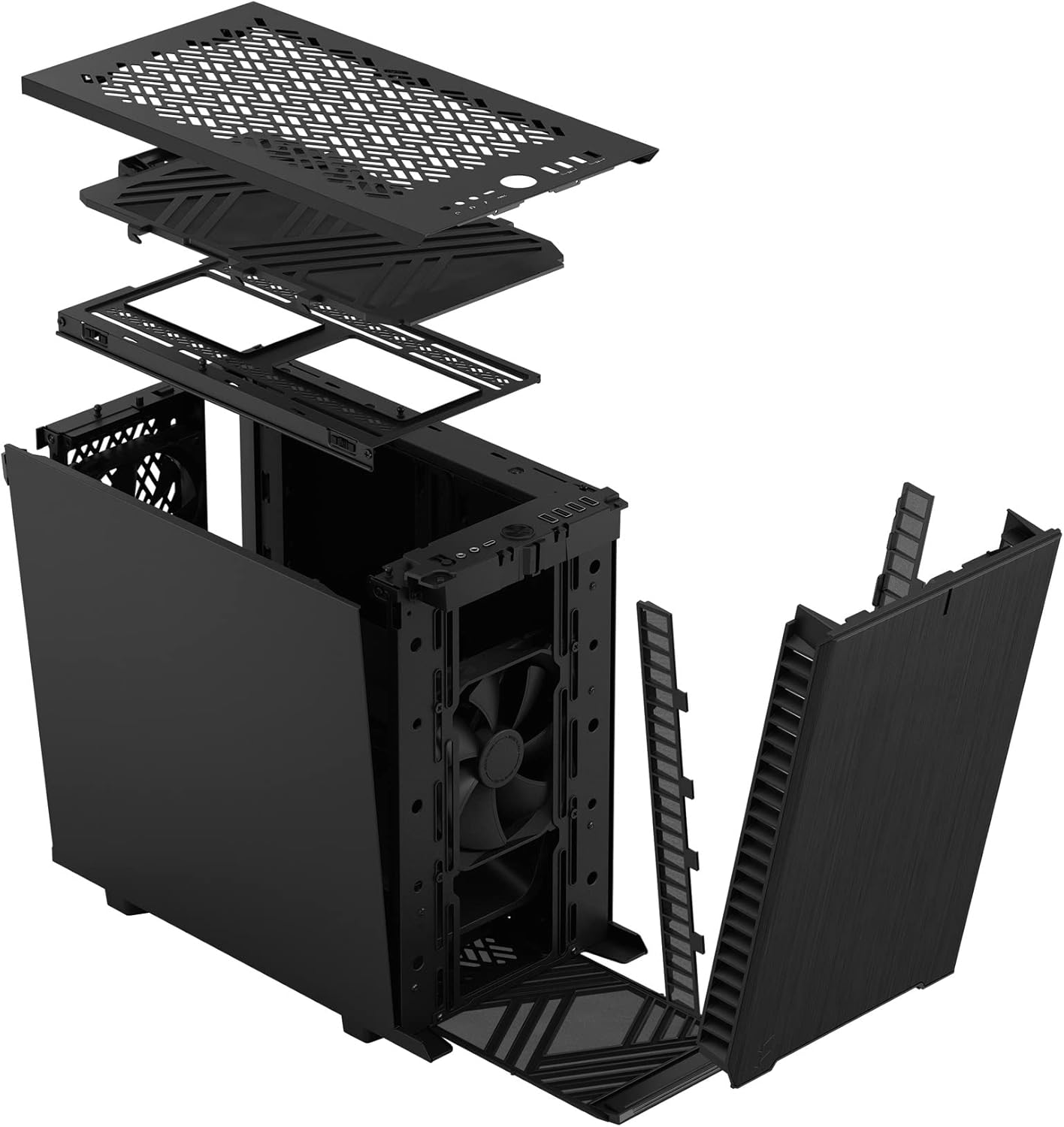
Şekil 3: Patlatılmış view illustrating the removal process for the front and top panels.
4.2. Anakart Kurulumu
The Define 7 Nano supports Mini ITX motherboards.
- G/Ç Kalkanını yükleyin: If your motherboard requires an I/O shield, install it into the rear opening of the case before mounting the motherboard.
- Anakartın Konumu: Align your Mini ITX motherboard with the pre-installed standoffs inside the case.
- Güvenli Anakart: Use the provided screws from the accessory box to secure the motherboard to the standoffs.
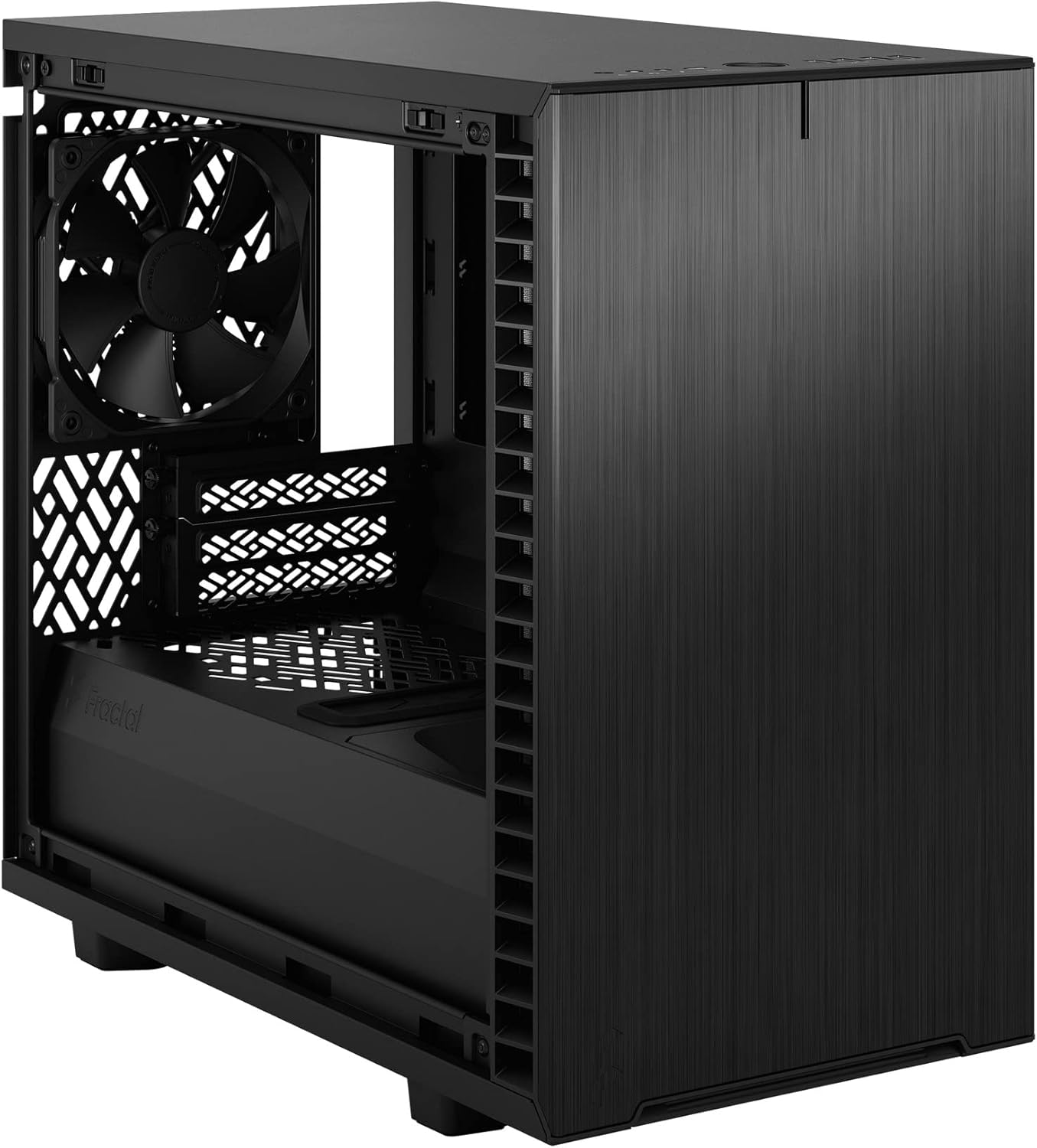
Şekil 4: İç mekan view of the case, highlighting the motherboard mounting area and fan locations.
4.3. Güç Kaynağı Ünitesi (PSU) Kurulumu
The Define 7 Nano supports ATX PSUs.
- Mount PSU Bracket: Attach the PSU mounting bracket to your power supply using the screws provided with the PSU.
- Slide PSU into Case: Slide the PSU with the attached bracket into the rear of the case.
- Güvenli Güç Kaynağı: Secure the PSU bracket to the case using the thumbscrews.
4.4. Depolama Sürücüsü Kurulumu
Bu kasa 2.5 inç SSD'leri ve 3.5 inç HDD'leri destekler.
- 2.5" Drives: Mount 2.5" drives to the dedicated SSD brackets located behind the motherboard tray or on the PSU shroud. Secure with screws.
- 3.5" Drives: Install 3.5" drives into the drive cage located beneath the PSU shroud. Secure with screws.
4.5. Grafik Kartı (GPU) Kurulumu
- PCIe Yuva Kapaklarını Çıkarın: Kasanın arkasından gerekli PCIe yuvası kapaklarını çıkarın.
- GPU'yu takın: Carefully insert your graphics card into the primary PCIe slot on the motherboard.
- Güvenli GPU: Secure the graphics card to the case using the thumbscrews or standard screws.
4.6. Cooling System Installation (Fans/Radiators)
The Define 7 Nano offers flexible cooling options.
- Ön Fanlar: Up to two 120/140mm fans or a 240/280mm radiator can be installed at the front.
- En İyi Hayranlar: Up to two 120/140mm fans or a 240mm radiator can be installed at the top (requires removing the solid top panel and installing the ventilated top panel).
- Arka Fan: One 120mm fan can be installed at the rear.
- Bottom Fan: One 120mm fan can be installed at the bottom.
Optimum hava akışı (giriş veya çıkış) için fanların doğru şekilde yönlendirildiğinden emin olun.
4.7. Kablo Yönetimi
The case features routing channels and Velcro straps behind the motherboard tray for organized cable management.
- Rota Kabloları: Pass power and data cables through the rubber grommets to the back of the motherboard tray.
- Güvenli Kablolar: Use the pre-installed Velcro straps and included zip ties to bundle and secure cables.

Şekil 5: Arka iç kısım view demonstrating the cable management system with Velcro straps.
4.8. Ön Panel Bağlantıları
Connect the front panel cables to the corresponding headers on your motherboard:
- Power Button (PWR SW)
- Reset Button (RESET SW)
- Power LED (PWR LED)
- HDD Activity LED (HDD LED)
- USB 3.0 Üstbilgisi
- USB Type-C Header (if applicable)
- HD Ses Başlığı
Refer to your motherboard manual for exact header locations.
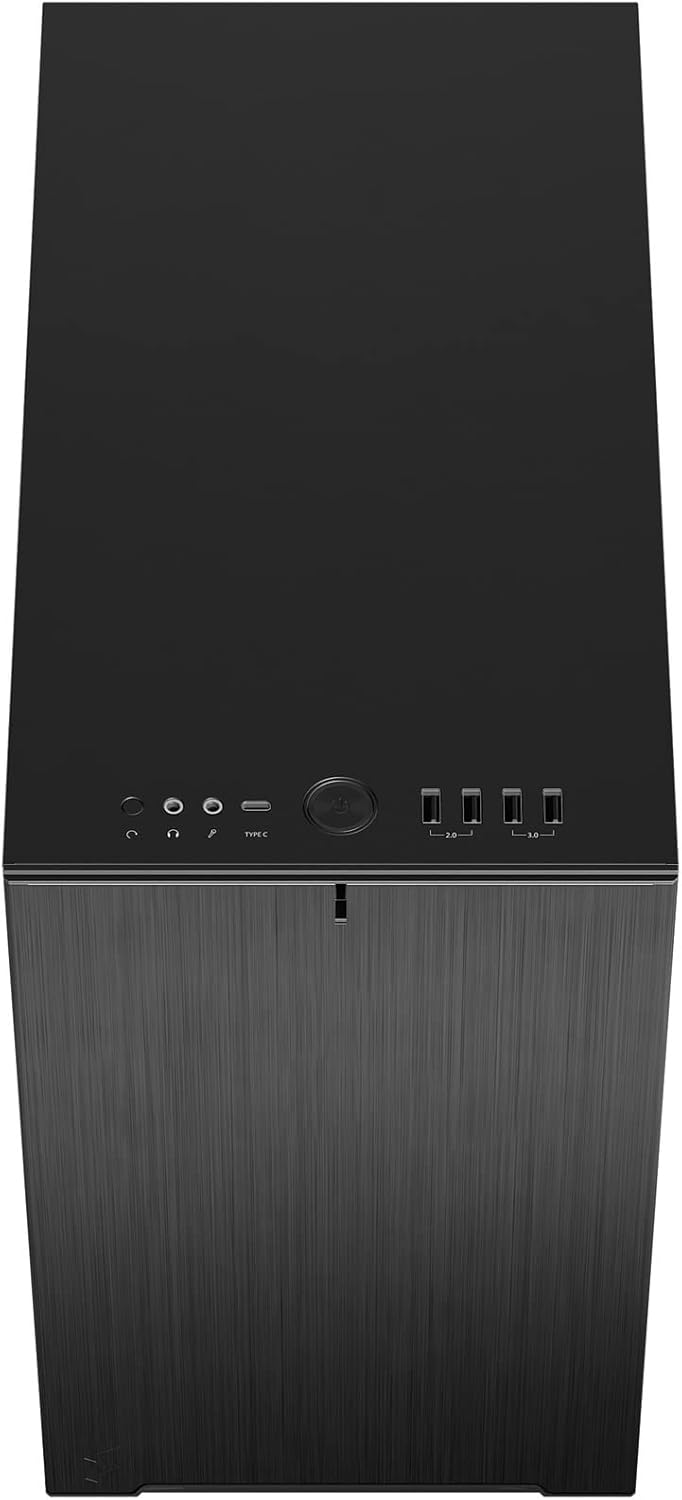
Şekil 6: Üst-ön view displaying the front I/O panel with USB ports, audio jacks, and power button.
5. Kullanım Talimatları
5.1. Açma/Kapama
- Güç Açık: Press the power button located on the front I/O panel.
- Kapat: Initiate a shutdown from your operating system. Alternatively, press and hold the power button for 5 seconds for a forced shutdown.
5.2. Using Front Panel Ports
Ön giriş/çıkış paneli aşağıdakilere kolay erişim sağlar:
- USB 3.0 Bağlantı Noktaları: Uyumlu cihazlarla yüksek hızlı veri aktarımı için.
- USB Tip-C Bağlantı Noktası: For modern devices requiring a Type-C connection.
- Ses Jakları: Kulaklık ve mikrofon bağlamak için.
6. Bakım
Düzenli bakım, PC bileşenlerinizin optimum performans ve uzun ömürlü olmasını sağlamaya yardımcı olur.
6.1. Toz Filtresi Temizliği
The Define 7 Nano is equipped with easily removable dust filters to prevent dust buildup inside the case.
- Ön Filtre: Can be accessed by removing the front panel.
- Üst Filtre: Located beneath the ventilated top panel (if installed).
- Alt Filtre: Slides out from the front of the case.
Clean filters regularly (e.g., monthly) by rinsing them with water and allowing them to dry completely, or by using a soft brush or compressed air.
6.2. Genel Temizlik
- Yumuşak bir d kullanınamp cloth to wipe down the exterior surfaces of the case.
- Cilaya zarar verebilecek sert kimyasallar veya aşındırıcı malzemeler kullanmaktan kaçının.
- For interior cleaning, use compressed air to remove dust from components. Ensure the system is powered off and unplugged.
7. Sorun Giderme
Bu bölümde karşılaşabileceğiniz yaygın sorunlar ele alınmaktadır.
7.1. No Power / System Not Starting
- Güç Bağlantılarını Kontrol Edin: Ensure the PSU is properly connected to the wall outlet and the power switch on the PSU is in the 'ON' position. Verify all internal power cables (24-pin ATX, 8-pin CPU, PCIe, SATA) are securely connected.
- Ön Panel Başlıkları: Double-check that the power button header (PWR SW) is correctly connected to the motherboard.
- Motherboard/CPU: CPU ve RAM'in doğru şekilde takıldığından emin olun.
7.2. Aşırı Gürültü
- Fan Gürültüsü: Check if any fan cables are obstructing fan blades. Ensure fans are securely mounted. Consider adjusting fan speeds in your motherboard's BIOS/UEFI or operating system.
- Titreşim: Ensure all components (PSU, drives, GPU) are securely fastened to prevent rattling.
7.3. Aşırı Isınma
- Hava akışı: Verify that fans are oriented correctly (intake/exhaust) and that there is adequate airflow.
- Toz Filtreleri: Clean dust filters regularly to prevent restricted airflow.
- Termal Macun: Ensure CPU cooler has proper thermal paste application.
8. Özellikler
| Özellik | Şartname |
|---|---|
| Model Adı | Define 7 Nano |
| Model Numarası | FD-C-DEF7N-01 |
| Dava Türü | küçük kule |
| Anakart Uyumluluğu | Mini ITX |
| Boyutlar (U x G x Y) | Yaklaşık 18.74 x 11.38 x 17.91 inç (Paket) |
| Ağırlık | Yaklaşık 18.37 pound |
| Malzeme | Alüminyum |
| Renk | Siyah katı |
| Ön G / Ç Bağlantı Noktaları | 5x USB 3.0, Audio In/Out, Power Button |
| Sürücü bölmeleri | 2.5" SSD, 3.5" HDD (specific quantities vary by configuration) |
| Soğutma Yöntemi | Hava |
| Önceden yüklenmiş Fanlar | Dynamic X2 GP-12 (rear), Dynamic X2 GP-14 (front) |
9. Garanti ve Destek
Fractal Design products are manufactured to the highest quality standards and come with a limited warranty. For detailed warranty information, please refer to the official Fractal Design webSiteyi veya ürününüzle birlikte gelen garanti belgesini inceleyin.
For technical support, troubleshooting assistance, or to inquire about replacement parts, please visit the official Fractal Design support page:
www.fractal-design.com/support/
Please have your product model number (FD-C-DEF7N-01) and proof of purchase ready when contacting support.