
1. Giriş ve Üzeriview
The BONTEC Monitor Stand is a versatile and ergonomic solution designed to enhance your workspace. This height-adjustable metal riser provides optimal viewing angles for monitors, laptops, and other devices, promoting better posture and reducing strain. Its robust construction and thoughtful features ensure a tidy and efficient desk environment.
Temel Özellikler:
- Ergonomic Height Adjustable Design: Features 3 adjustable height levels (3.9, 4.7, 5.5 inches) to position your screen at eye level, reducing neck, back, and eye strain.
- Çok Amaçlı İşlevsellik: Supports monitors, laptops, printers, and more. Includes a built-in pen holder and cable management system.
- Sağlam Metal Yapı: Made from durable white steel, capable of holding up to 44 lbs (20 kg). Equipped with non-slip rubber feet for stability.
- Yerden Tasarruf Sağlayan Tasarım: The 14.5” x 9.1” platform offers ample under-stand storage for keyboards, phones, notebooks, and office supplies.
- Easy Tool-Free Assembly: Simple setup requires no tools; just screw in the legs and adjust the height.

Figure 1: The BONTEC Monitor Stand, highlighting its clean aesthetic and perforated design.
2. Kurulum Talimatları
Follow these simple steps to assemble and set up your BONTEC Monitor Stand.
2.1. Montaj
- Unpack all components: You should find the metal platform and four adjustable legs.
- Turn the metal platform upside down.
- Screw each of the four adjustable legs into the designated threaded holes on the underside of the platform. Tighten them securely by hand until snug. No tools are required.
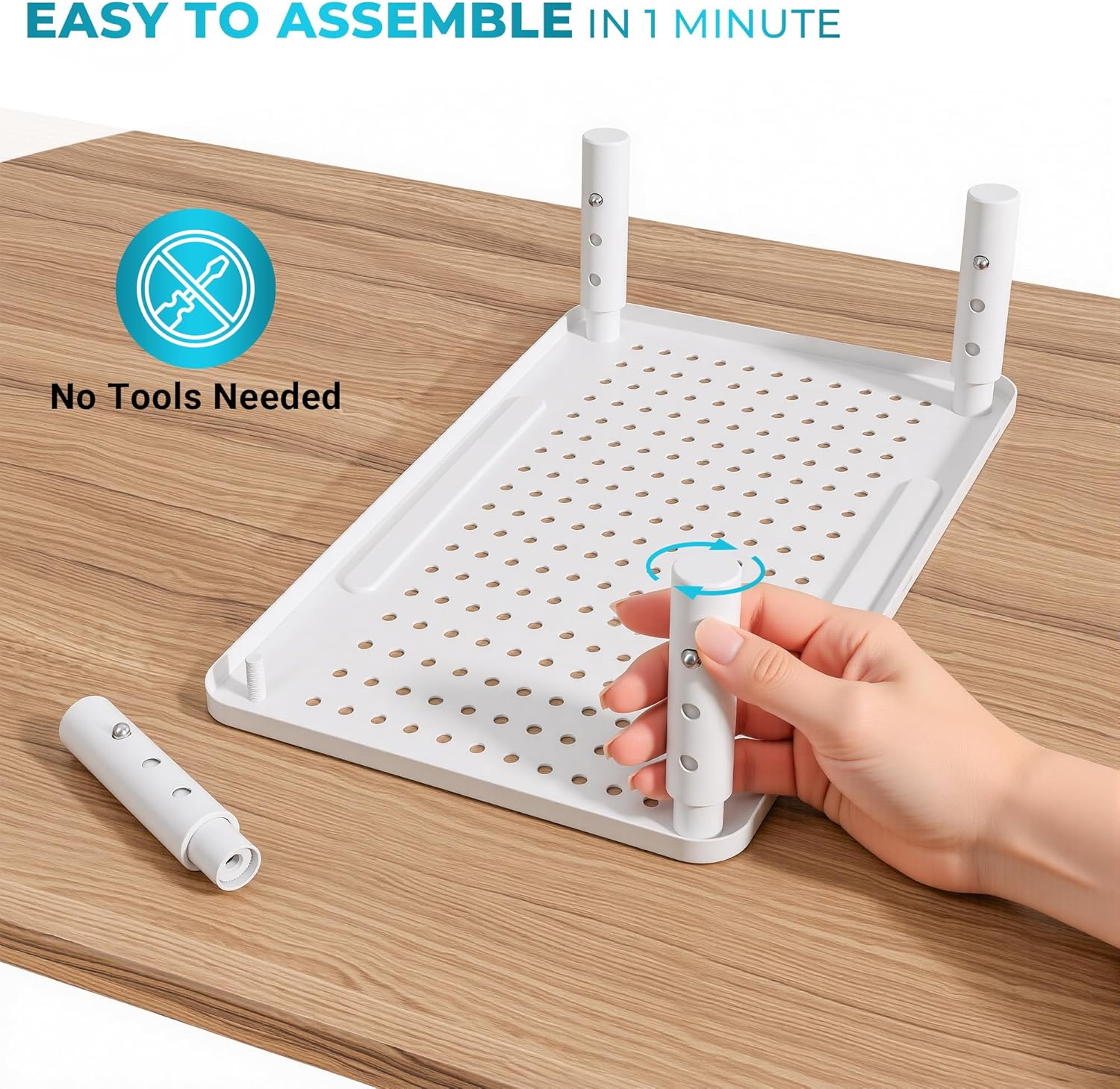
Figure 2: Tool-free assembly of the monitor stand legs.
2.2. Yükseklik Ayarı
The stand offers three height levels for optimal ergonomic positioning:
- Lowest: 3.9 inches (10 cm)
- Middle: 4.7 inches (12 cm)
- Highest: 5.5 inches (14 cm)
Yüksekliği ayarlamak için:
- Locate the small button on each leg.
- Press the button and slide the inner part of the leg up or down to your desired height.
- Ensure the button clicks into place in one of the three adjustment holes for secure positioning. Repeat for all four legs to maintain a level surface.

Figure 3: Adjusting the height of the monitor stand.
2.3. İlk Yerleştirme
Place the assembled stand on a stable, flat surface. Ensure all four feet are firmly on the desk. You can now place your monitor, laptop, or other device on the stand's platform.
Video 1: A user demonstrates the simple assembly and height adjustment of the BONTEC Monitor Stand, highlighting its sturdy build and ease of use.
3. Kullanım Talimatları
Maximize the functionality of your BONTEC Monitor Stand with these tips.
3.1. Ergonomic Use
Position your monitor or laptop so that the top of the screen is at or slightly below eye level. This helps maintain a neutral neck and spine posture, reducing discomfort during prolonged use.

Figure 4: Visual guide to ergonomic posture with a monitor stand.
3.2. Kablo Yönetimi
Utilize the integrated cable management system to keep your workspace tidy. Thread cables through the provided slots or use the included Velcro cable ties to secure them neatly along the back of the stand.

Figure 5: Effective cable management using the stand's features.
3.3. Pen Holder and Storage
The stand features a built-in pen holder slot on the front edge of the platform. The space underneath the stand can be used to store your keyboard, mouse, notebooks, or other office essentials, freeing up valuable desk space.

Figure 6: Utilizing the integrated pen holder.
3.4. Isı Dağılımı
The perforated mesh platform design allows for superior airflow, helping to dissipate heat from laptops and other devices placed on the stand. This can contribute to the longevity and performance of your electronics.

Figure 7: Breathable mesh platform for enhanced heat dissipation.
Video 2: Ayrıntılı bir incelemeview demonstrating the sturdiness and adjustable features of the monitor stand, including its ability to support various devices.
4. Bakım
To ensure the longevity and optimal performance of your BONTEC Monitor Stand, follow these simple maintenance guidelines:
- Temizlik: Sehpayı düzenli olarak yumuşak bir bezle silin.amp cloth to remove dust and smudges. Avoid using abrasive cleaners or harsh chemicals that could damage the powder-coated finish.
- Stabilite Kontrolü: Periodically check that the legs are securely screwed into the platform and that the height adjustment buttons are fully engaged.
- Ağırlık sınırı: Do not exceed the maximum load capacity of 44 lbs (20 kg) to prevent damage to the stand or your devices.
5. Sorun Giderme
If you encounter any issues with your monitor stand, refer to the following common solutions:
- Sallanma: Ensure all four legs are adjusted to the same height and are securely locked into place. Check that the stand is placed on a flat, stable surface.
- Yüksekliği ayarlamakta zorluk: Make sure the adjustment button on each leg is fully depressed before attempting to slide the leg. If it's stiff, try rotating the leg slightly while pressing the button.
- Scratches on Desk: The stand is equipped with non-slip rubber feet. Ensure these are properly attached and intact to protect your desk surface.
6. Özellikler
| Özellik | Detay |
|---|---|
| Marka | BONTEK |
| Örnek | B0B8YPJJRW |
| Malzeme | Metal |
| Renk | Beyaz |
| Ürün Boyutları (U x G x Y) | 14.5 x 9.1 x 3.94 inç (yaklaşık 36.8 x 23.1 x 10 cm) |
| Ayarlanabilir Yükseklik Seviyeleri | 3.9 inç (10 cm), 4.7 inç (12 cm), 5.5 inç (14 cm) |
| Yük Kapasitesi | 44 lbs (20 kg) |
| Ürün Ağırlığı | 1.85 lbs (0.84 kg) |
| Bitiş Türü | Toz Boyalı |
| Özel Özellik | Lightweight, Pen Holder, Cable Management, Non-slip Rubber Feet |

Şekil 8: Ürün boyutları ve taşıma kapasitesi.
7. Garanti ve Destek
For warranty information or technical support, please refer to the product packaging or contact BONTEC customer service directly. Keep your purchase receipt for any warranty claims.