
Ürün Bittiview
The ShiftCam SnapPod is a versatile accessory designed to enhance your mobile photography and videography. It functions as both a stable tripod and a dynamic video selfie stick, offering flexibility for various shooting scenarios. Its magnetic mount ensures quick and secure attachment to your smartphone, and the tiltable ball joint allows for easy angle customization. The SnapPod is also an integral part of the broader SnapGrip ecosystem, designed to work seamlessly with other ShiftCam accessories like SnapGrip and SnapLight.

Figure 1: ShiftCam SnapPod in both selfie stick and compact tripod modes.
Paket İçeriği
- ShiftCam SnapPod (Selfie Stick & Tripod)
- Manyetik Dağı
- USB Charging Cable (for SnapGrip/SnapLight, if included in kit)
- Carrying Pouch (for SnapGrip, if included in kit)
- MagSafe Compatible Sticker (for non-MagSafe phones)
Kurulum ve Temel Çalıştırma
Akıllı Telefonunuzu Bağlama
The SnapPod features an effortless magnetic attachment system. For iPhones 12 series and above, or other MagSafe-compatible phones/cases, simply align your phone with the magnetic mount on the SnapPod until it snaps securely into place.

Figure 2: MagSafe compatibility for iPhone 12 series and above, and use of MagSafe sticker for other phones.
For non-MagSafe phones, a MagSafe-compatible sticker (not included with SnapPod, but often part of the SnapGrip Creator Kit) can be applied to your phone or phone case to enable magnetic attachment.

Figure 3: Applying a MagSafe compatible sticker to a non-MagSafe phone for magnetic attachment.
Selfie Çubuğu Olarak Kullanımı
To use the SnapPod as a selfie stick, simply fold the tripod legs together to form a comfortable handle. This allows for easy handheld shooting and vlogging.

Figure 4: The SnapPod configured as a selfie stick for on-the-go video capture.
Tripod olarak kullanmak
To convert the SnapPod into a stable tripod, unfold the legs until they are fully extended and provide a stable base. The integrated ball joint mechanism allows you to customize your camera angles with ease. Simply loosen the joint, adjust to your desired perspective, and then tighten to secure.

Figure 5: The SnapPod in classic tripod mode, providing a stable base for your smartphone.
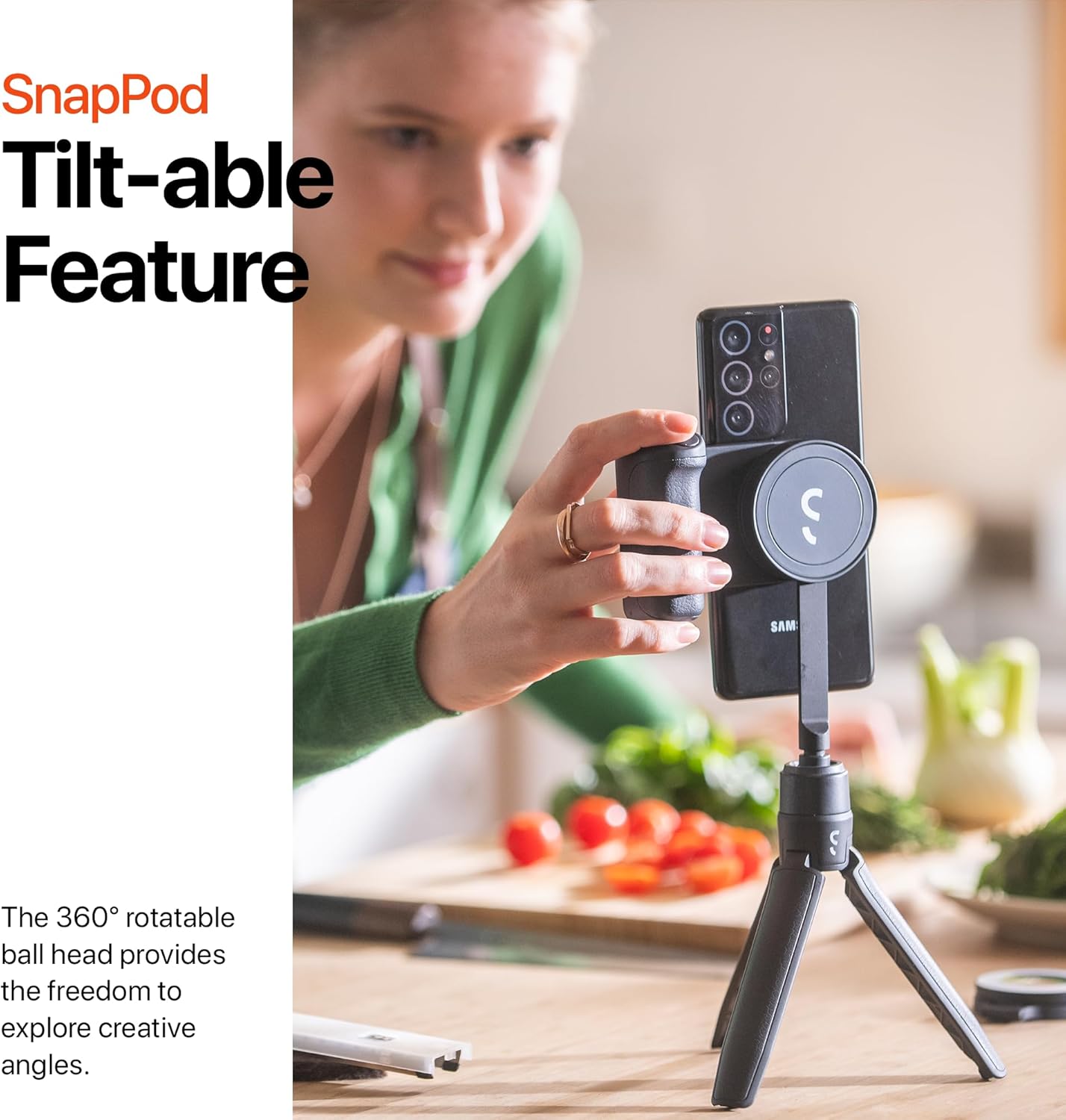
Figure 6: Demonstrating the tiltable feature of the SnapPod's ball head for flexible camera angles.
Integrated SnapGrip Ecosystem
The SnapPod is designed to integrate seamlessly with other ShiftCam SnapGrip ecosystem products, such as the SnapGrip and SnapLight. This allows for expanded creative capabilities, combining the stability of the SnapPod with the enhanced grip, power, and lighting of other accessories.
Video 1: Official product promotional video showcasing the SnapGrip ecosystem, including the SnapPod, SnapGrip, and SnapLight in various usage scenarios.
Bakım ve Onarım
To ensure the longevity and optimal performance of your ShiftCam SnapPod, follow these care guidelines:
- Temizlik: Wipe the SnapPod with a soft, damp bez. Sert kimyasallar veya aşındırıcı temizleyiciler kullanmaktan kaçının.
- Depolamak: Store the SnapPod in a cool, dry place away from direct sunlight and extreme temperatures.
- Manyetik Yüzeyler: Keep the magnetic surfaces clean and free of debris to ensure a strong and secure connection.
Sorun giderme
If you encounter any issues with your ShiftCam SnapPod, please refer to the following common solutions:
- Telefon Güvenli Bir Şekilde Bağlanmıyor: Ensure the magnetic surfaces on both the SnapPod and your phone/case are clean and free of obstructions. Verify your phone or case is MagSafe compatible, or that a MagSafe sticker is correctly applied.
- Tripod Dengesizliği: Ensure the tripod legs are fully extended and placed on a flat, stable surface. Check that the ball joint is tightened after adjusting the angle.
- Uyumluluk Sorunları: While designed for universal compatibility, ensure your smartphone's dimensions and weight are within reasonable limits for stable use.
For further assistance, please contact ShiftCam customer support.
Ürün Özellikleri
| Özellik | Şartname |
|---|---|
| Ürün Boyutları | 7.87 x 1.97 x 3.94 inç |
| Ürün Ağırlığı | 7.4 ons |
| Ürün Model Numarası | SP-IN-BJ-EF |
| Marka | ShiftCam |
| Renk | Mavi alakarga |
| Malzeme | Plastik |
| Maksimum Yükseklik | 129.6 Milimetre |
| Tripod Kafa Tipi | Top Kafaları |
Garanti ve Müşteri Desteği
ShiftCam products are designed with quality and durability in mind. For information regarding warranty coverage, product registration, or to access customer support, please visit the official ShiftCam webSite üzerinden satın alabilir veya doğrudan müşteri hizmetleri departmanıyla iletişime geçebilirsiniz. Satın alma belgenizi herhangi bir garanti talebi için saklayın.
En son destek bilgileri için lütfen şu adresi ziyaret edin: ShiftCam Official Store