
1. Giriş
Satın aldığınız için teşekkür ederizasing the Lenco SCD-341 Portable CD-Radio. This device combines a CD player, DAB+ and FM radio, and Bluetooth connectivity in a compact design. This manual provides essential information for safe and efficient use of your new audio system. Please read it thoroughly before operation and retain it for future reference.
2. Güvenlik Bilgileri
- Yangın veya elektrik çarpmasını önlemek için üniteyi yağmura veya neme maruz bırakmayın.
- Uygun havalandırmayı sağlayın. Havalandırma açıklıklarını kapatmayın.
- Yalnızca üniteyle birlikte verilen güç adaptörünü kullanın.
- C'yi açmayınasing. Tüm servis işlemlerini yetkili personele yaptırın.
- Üniteyi ısı kaynaklarının yakınına veya doğrudan güneş ışığına maruz bırakmayın.
- Üniteyi güçlü manyetik alanlardan uzak tutun.
3. Paket İçeriği
Lütfen tüm ürünlerin mevcut ve iyi durumda olduğundan emin olun:
- Lenco SCD-341 Portable CD-Radio Unit
- Güç Adaptörü
- Kullanım Kılavuzu (bu belge)
- Hızlı Başlangıç Kılavuzu
4. Ürün Bittiview
The Lenco SCD-341 features a user-friendly interface with clearly labeled buttons and an LCD display.

Şekil 1: Ön view of the Lenco SCD-341, showing the main controls, LCD display, and stereo speakers.

Figure 2: Lenco SCD-341 with its integrated handle and telescopic antenna extended for radio reception.
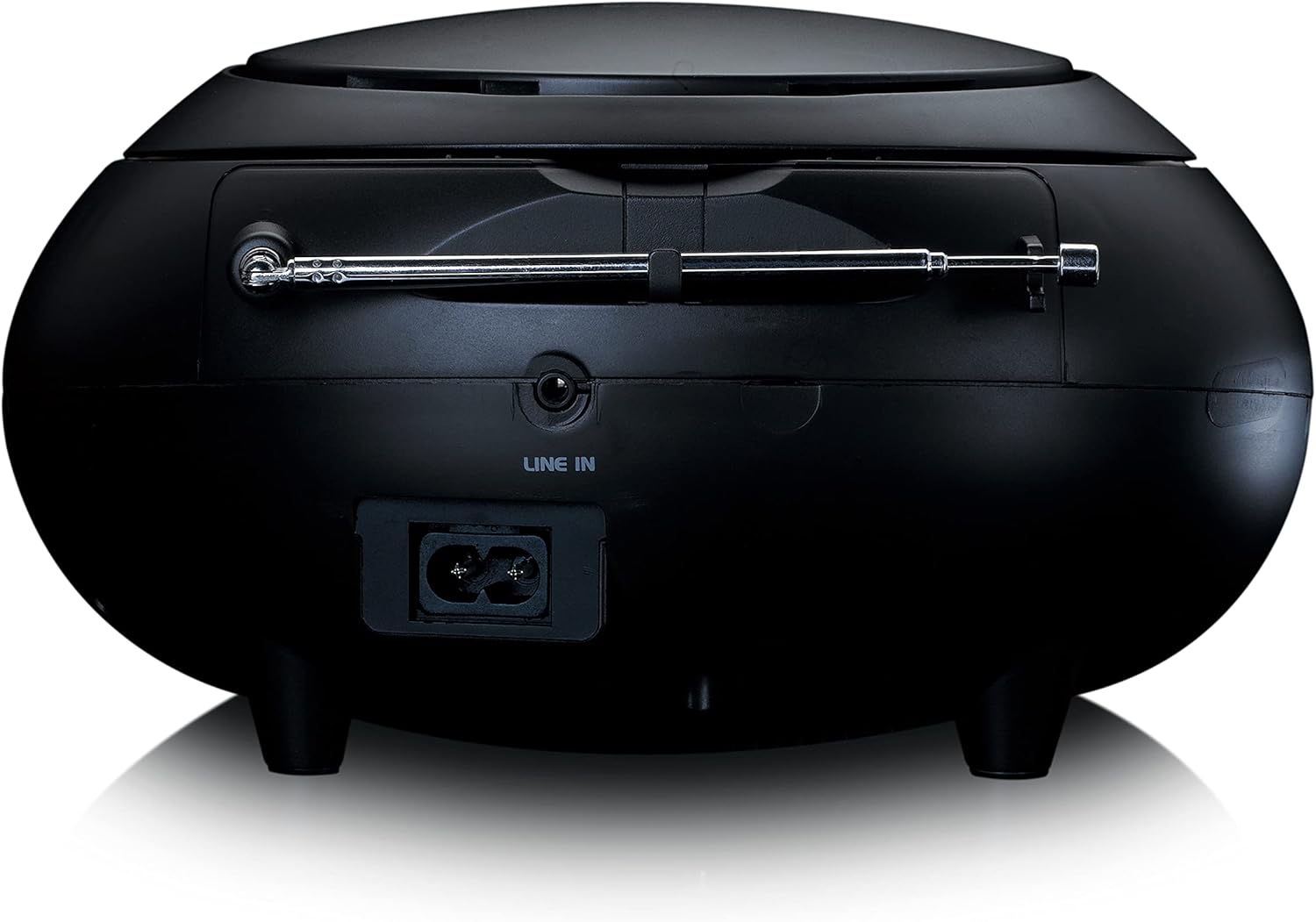
Şekil 3: Arka view of the Lenco SCD-341, highlighting the power input and LINE IN audio port.
5. Kurulum
5.1 Güç Bağlantısı
The Lenco SCD-341 can be powered by the included AC adapter or by batteries.
- AC Gücü: Connect the supplied power adapter to the AC IN socket on the rear of the unit (refer to Figure 3) and plug the other end into a standard wall outlet.
- Pil Gücü: Open the battery compartment on the bottom of the unit. Insert the required number of C-type batteries (not included), ensuring correct polarity. Close the compartment securely.
5.2 Anten Kurulumu
For optimal DAB+ and FM radio reception, fully extend the telescopic antenna located on the rear of the unit. Adjust its position for the best signal.
6. Kullanım Talimatları
6.1 Güç Açma/Kapatma
Basın GÜÇ Üniteyi açmak veya kapatmak için düğmesine basın.
6.2 CD Oynatma
- Basın KAYNAK button repeatedly until "CD" is displayed on the LCD screen.
- CD bölmesinin kapağını hafifçe kaldırarak açın.
- CD'yi etiket yüzü yukarı bakacak şekilde milin üzerine yerleştirin.
- Close the CD compartment lid. The unit will begin reading the CD.
- Kullanın OYNAT/DURDUR, DURMAK, ILERİ ATLAMAK, Ve GERİ ATLA oynatmayı kontrol etmek için düğmeler.

Şekil 4: Üst view of the Lenco SCD-341 with the CD compartment open, showing a CD being inserted.
6.3 DAB+ Radyo Çalışması
- Basın KAYNAK button repeatedly until "DAB" is displayed.
- The unit will automatically scan for available DAB+ stations. This may take a few moments.
- Tarama tamamlandıktan sonra, AYAR +/- Mevcut istasyonlar arasında gezinmek için düğmeler.
- Bir istasyonu ön ayar olarak kaydetmek için, tuşuna basılı tutun. ÖN AYAR düğmesine basın ve ardından kullanın AYAR +/- Önceden ayarlanmış bir numara seçmek ve basmak için ÖN AYAR Tekrar onaylamak için.
6.4 FM Radyo Çalışması
- Basın KAYNAK "FM" yazısı görünene kadar düğmeye art arda basın.
- Basılı tutun AYAR +/- buttons to automatically scan for the next available station. Briefly press to manually tune.
- Bir istasyonu ön ayar olarak kaydetmek için, tuşuna basılı tutun. ÖN AYAR düğmesine basın ve ardından kullanın AYAR +/- Önceden ayarlanmış bir numara seçmek ve basmak için ÖN AYAR Tekrar onaylamak için.
6.5 Bluetooth Eşleştirme
- Basın KAYNAK button repeatedly until "Bluetooth" is displayed. The unit will enter pairing mode, indicated by a flashing Bluetooth icon on the display.
- On your external device (smartphone, tablet), enable Bluetooth and search for available devices.
- Select "Lenco SCD-341" from the list of found devices.
- Once paired, the Bluetooth icon on the unit's display will stop flashing and remain solid. You can now play audio from your device through the Lenco SCD-341.
6.6 Ses Kontrolü
Kullanın HACİM +/- Ses çıkış seviyesini ayarlamak için düğmeler.
7. Bakım
- Temizlik: Cihazın dış yüzeyini temizlemek için yumuşak, kuru bir bez kullanın. Aşındırıcı temizleyiciler veya çözücüler kullanmayın.
- CD Lens Bakımı: CD çalma sorunları yaşarsanız, piyasada bulunan CD lens temizleyici diski kullanın.
- Depolamak: When not in use for extended periods, disconnect the power adapter and remove batteries. Store the unit in a cool, dry place.
8. Sorun Giderme
| Sorun | Olası Neden | Çözüm |
|---|---|---|
| Güç yok | Güç adaptörü bağlı değil; piller bitmiş veya yanlış takılmış. | Güç adaptörünün bağlantısını kontrol edin; pilleri değiştirin veya doğru kutupluluğu sağlayın. |
| Ses yok | Ses seviyesi çok düşük; yanlış kaynak seçildi; kulaklık takılı. | Increase volume; select correct source (CD, DAB, FM, Bluetooth); disconnect headphones. |
| CD çalmıyor | CD inserted incorrectly; CD dirty or scratched; CD format not supported. | Reinsert CD correctly; clean or replace CD; ensure CD is a standard audio CD. |
| Zayıf radyo alımı | Antenna not extended or positioned poorly; strong interference. | Fully extend and adjust antenna; move unit away from other electronic devices. |
| Bluetooth eşleştirme başarısız oldu | Bluetooth not enabled on external device; device too far; unit not in pairing mode. | Ensure Bluetooth is on and discoverable; move device closer; select Bluetooth source on unit. |
9. Özellikler
| Model Numarası | SCD-341 |
| Marka | Lenco |
| Boyutlar (U x G x Y) | 21.5x21x11.5 cm |
| Ağırlık | 1.09 kilo |
| Güç Kaynağı | AC (adapter included) / Battery-Powered |
| Tuner Teknolojisi | DAB+, FM |
| Bağlantı | Bluetooth |
| Ses Çıkışı Modu | Stereo |
| Görüntü Türü | LCD |
| Çıkış Gücü | 3 watt RMS |

Figure 5: Dimensions of the Lenco SCD-341 unit.
10. Garanti ve Destek
For warranty information and technical support, please refer to the warranty card included in your package or visit the official Lenco webalan.
Üretici: Lenco GmbH
Menşei ülke: Hong Kong
11. Resmi Ürün Videoları
Watch this official video for a visual guide to the Lenco SCD-341.
Video 1: A 360-degree product view of the Lenco SCD-341, showcasinTasarımı ve özellikleri her açıdan incelenebiliyor.