
1. Giriş
The Novastar TB40 is a next-generation multimedia player designed for LED displays. It integrates playback and sending functions, allowing users to manage programs and control LED screens via various terminals such as PCs, mobile phones, and tablets. The TB40 also supports cloud publishing and monitoring platforms for efficient cross-regional cluster management of LED displays. This device is engineered for safety, stability, simplicity, and intelligent control, making it suitable for a wide range of commercial LED display applications.
2. Güvenlik Bilgileri
Lütfen cihazı çalıştırmadan önce tüm güvenlik talimatlarını okuyun ve anlayın. Bu talimatlara uyulmaması elektrik çarpmasına, yangına veya ürünün hasar görmesine neden olabilir.
- Güç kaynağı hacmini sağlayıntage matches the device's requirements (100-240V, 50/60Hz).
- Cihazı suya veya aşırı neme maruz bırakmayın.
- Cihazı ısı kaynaklarının yakınına veya doğrudan güneş ışığına maruz bırakmaktan kaçının.
- Cihazı açmayınasing. Tüm servis işlemlerini yetkili personele yaptırın.
- Yalnızca üretici tarafından belirtilen aksesuarları kullanın.
- Şimşekli fırtınalar sırasında veya uzun süre kullanılmadığında elektriği kesin.
3. Paket İçeriği
Paketin içinde tüm öğelerin mevcut olduğundan emin olun:
- Novastar TB40 Multimedia Player Unit
- Güç Adaptörü
- Kullanım Kılavuzu (bu belge)

Figure 3.1: Contents of the Novastar TB40 package, showing the main unit, power adapter, and documentation.
4. Ürün Bittiview
4.1 Ön Panel
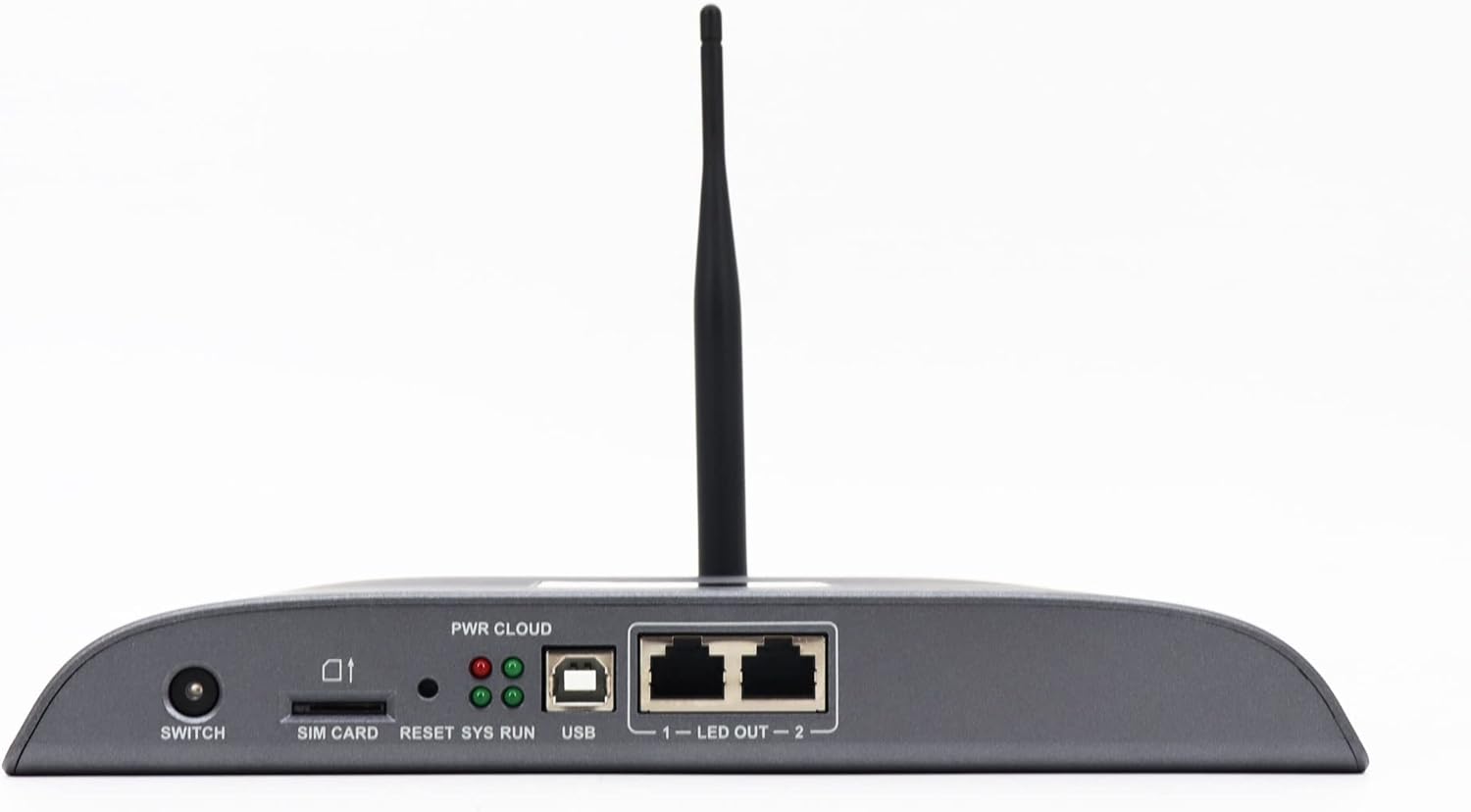
Figure 4.1: Front panel of the Novastar TB40, detailing the various ports and indicator lights.
- DEĞİŞTİRMEK: Cihazın güç düğmesi.
- SİM KART: Slot for inserting a 4G SIM card (if 4G module is installed).
- SIFIRLA: Cihazı sıfırlamak için kullanılan düğme.
- SYS RUN: System running indicator light.
- PWR CLOUD: Power and Cloud connection indicator light.
- USB BAĞLANTI: USB port for connecting external devices or for system updates.
- LED OUT 1-2: Two Gigabit Ethernet output ports for connecting to LED display receiving cards.
4.2 Arka Panel

Figure 4.2: Rear panel of the Novastar TB40, showing the power input, audio, USB, and network ports.
- 12V 2A: Güç girişi bağlantı noktası.
- SES ÇIKIŞI: 3.5mm audio output jack.
- COM 1, COM 2: Serial communication ports.
- USB 3.0: High-speed USB 3.0 port.
- ETERNET: Gigabit Ethernet input port for network connection.
- HDMI GİRİŞİ: HDMI giriş bağlantı noktası.
- HDMI ÇIKIŞI: HDMI çıkış bağlantı noktası.
- DIŞARI: Additional output ports (likely for specific control signals).
5. Kurulum
5.1 Gücün Bağlanması
- Verilen güç adaptörünü bağlayın. 12V 2A power input port on the rear panel of the TB40.
- Güç adaptörünü uygun bir elektrik prizine takın.
- Basın ANAHTAR button on the front panel to power on the device. The PWR CLOUD indicator should light up.
5.2 Ağ Bağlantısı
The TB40 supports both wired Ethernet and optional 4G connectivity.
- Kablolu Ethernet: Connect an Ethernet cable from your network router or switch to the ETHERNET arka paneldeki bağlantı noktası.
- 4G (Optional): If a 4G module is installed, insert a valid SIM card into the SIM KART slot on the front panel. Ensure the antenna is securely attached.
5.3 Connecting to LED Display
- Connect one or two Ethernet cables from the LED ÇIKIŞ 1 Ve LED ÇIKIŞ 2 ports on the front panel to the receiving cards of your LED display.
- Ensure the LED display is powered on and configured correctly to receive signals from the TB40.
5.4 Çevre Birimlerini Bağlama
- Ses: Connect speakers or an audio system to the SES ÇIKIŞI liman.
- USB Cihazları: Connect USB storage devices or other peripherals to the USB or USB 3.0 limanlar.
- HDMI Girişi: If using an external video source, connect it to the HDMI IN liman.
6. Kullanım Talimatları
The Novastar TB40 can be controlled and managed through various user terminals and cloud platforms.
6.1 İlk Yapılandırma
Upon first power-on or after a factory reset, the device may require initial network and display configuration. Refer to the Novastar software documentation (e.g., NovaLCT-Mars or ViPlex Express) for detailed steps on setting up network parameters, screen resolution, and display mapping.
6.2 Program Release and Playback
Content for your LED display can be created and scheduled using Novastar's dedicated software applications. These applications allow you to upload videos, images, text, and other media to the TB40 for playback.
- Yerel kontrol: Connect a PC to the same network as the TB40 or directly via USB for local program management and updates.
- Mobile/Tablet Control: Use the Novastar mobile application (e.g., ViPlex Handy) to manage content and settings wirelessly.
- Cloud Platform: For cross-regional management, connect the TB40 to the Novastar cloud publishing and monitoring platform. This enables remote content updates, scheduling, and device status monitoring.
The TB40 supports 1080P video hardware decoding and 4K*2 output, ensuring high-quality content delivery to your LED display.
6.3 Parlaklık Ayarı
The device includes a brightness sensor interface, supporting automatic and timed dual-mode intelligent brightness adjustment. This feature helps optimize display visibility and power consumption based on ambient light conditions or predefined schedules.
7. Bakım
- Temizlik: Cihazın dışını temizlemek için yumuşak ve kuru bir bez kullanın. Sıvı temizleyiciler veya aerosoller kullanmayın.
- Havalandırma: Cihazın aşırı ısınmasını önlemek için çevresinde yeterli havalandırma olduğundan emin olun. Havalandırma açıklıklarını kapatmayın.
- Donanım Yazılımı Güncellemeleri: Periodically check the Novastar official website for firmware updates to ensure optimal performance and access to new features. Follow the provided instructions carefully during updates.
- Depolamak: If storing the device for an extended period, disconnect power and store it in a cool, dry place away from direct sunlight.
8. Sorun Giderme
| Sorun | Olası Neden | Çözüm |
|---|---|---|
| Cihaz açılmıyor. | Güç adaptörü bağlı değil veya arızalı; elektrik prizi sorunu. | Check power adapter connection. Try a different power outlet. Ensure the power switch is ON. |
| No display on LED screen. | LED OUT cables disconnected; incorrect display configuration; LED screen not powered. | Verify Ethernet cable connections to LED display. Check display settings in Novastar software. Ensure LED screen is powered and functional. |
| Network connection drops frequently (Wi-Fi/4G). | Weak signal; interference; incorrect network settings; faulty module. | Ensure the device is within range of the Wi-Fi router or has good 4G signal. Check network settings. If using 4G, verify SIM card is active. Consider a wired Ethernet connection for stability. |
| Content not playing or updating. | Network connectivity issue; incorrect content schedule; insufficient storage. | Verify network connection. Check content schedule and upload status in the control software. Ensure sufficient storage space on the device. |
If the problem persists after attempting these solutions, please contact Novastar technical support.
9. Özellikler
| Model Adı | TB40 |
| İşlemci | 1.8GHz A55 Four-core Processor |
| Video Kod Çözme | Support for 1080P Video Hardware decoding |
| İşletim Belleği | 1 GB |
| Depolama hafızası | 16 GB |
| Çıkış Çözünürlüğü | 4K*2 output |
| Yükleme Kapasitesi | 1,300,000 pixels (max width 4096, max height 4096) |
| Ağ Bağlantı Noktaları | 2 x 1000M Ethernet output, 1 x 1000M Ethernet input |
| Bağlantı Teknolojisi | USB, Ethernet, 4G (optional module) |
| Güç Girişi | 100-240V AC, 50/60Hz |
| Maksimum Güç Tüketimi | 18W |
| Boyutlar (U*G*Y) | 274mm * 139mm * 40mm |
| Ağırlık | 1250 gr |
| Özel Özellikler | Brightness sensor interface, automatic/timed brightness adjustment, multi-screen synchronous playback |
10. Garanti ve Destek
For warranty information and technical support, please refer to the official Novastar webWeb sitesini ziyaret edin veya yetkili satıcınızla iletişime geçin. Garanti talepleri için satın alma fişinizi satın alma belgesi olarak saklayın.
Novastar Official Webalan: www.novastar.tech


