
RENAISSER Turing 520
RENAISSER Turing 520 Stylus Kalem Kullanım Kılavuzu
Model: Turing 520
giriiş
This manual provides comprehensive instructions for the RENAISSER Turing 520 Stylus Pen, designed for use with compatible Apple iPad models. It covers setup, operation, maintenance, and troubleshooting to ensure optimal performance and longevity of your device.
The RENAISSER Turing 520 Stylus Pen features an Epson CPU, motion-activated power, smart power management, and is designed to perfectly match original iPad colors. It offers palm rejection and magnetic attachment for convenience.
Ürün Bittiview

Şekil 1: The RENAISSER Turing 520 Stylus Pen, showcasing its sleek design and Starlight color. This pen is engineered for precision and comfort during extended use.

Şekil 2: An illustration highlighting the Japanese Epson processor chip inside the RENAISSER Turing 520, emphasizing its advanced internal components for reliable performance.

Şekil 3: The RENAISSER Turing 520 Stylus Pen available in colors such as Silver, Starlight, and Space Grey, designed to perfectly complement the aesthetic of various iPad models.
Uyumluluk
The RENAISSER Turing 520 Stylus Pen is compatible with specific Apple iPad models released from 2018 onwards. Please verify your iPad model number to ensure compatibility.
- iPad (6th, 7th, 8th, 9th Gen): A1893, A1954, A2197, A2198, A2200, A2270, A2428, A2429, A2430, A2602, A2604, A2603, A2605
- iPad Air (3rd, 4th, 5th Gen): A2152, A2123, A2153, A2154, A2316, A2324, A2325, A2072, A2588, A2589, A2591
- iPad Pro 11-inch (2018-2022): A1980, A2013, A1934, A1979, A2228, A2068, A2030, A2231, A2377, A2459, A2301, A2460
- iPad Pro 12.9-inch (2018-2022): A1876, A2014, A1895, A1983, A2229, A2233, A2069, A2232, A2378, A2461, A2379, A2462
- iPad Mini (5th, 6th Gen): A2133, A2124, A2126, A2125, A2567, A2568, A2569
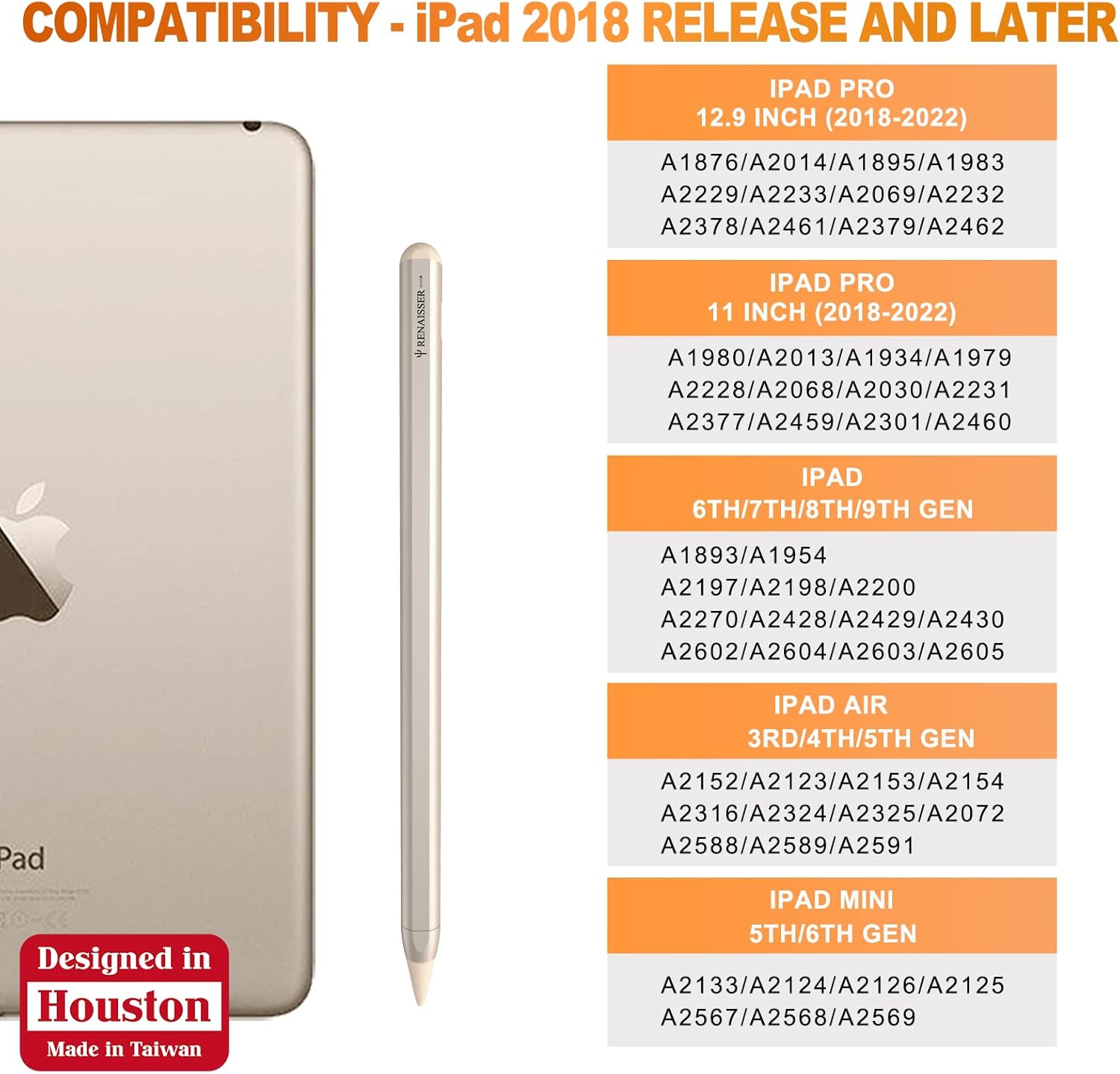
Şekil 4: A detailed compatibility chart showing the supported iPad models and their corresponding model numbers for the RENAISSER Turing 520 Stylus Pen.
Kurulum ve İlk Kullanım
- Kutudan Çıkarma: Carefully remove the stylus pen from its packaging. Ensure all components, including any extra tips, are present.
- Başlangıç ücreti: Although the pen has smart power management, it is recommended to fully charge the pen before first use. Connect the stylus to a USB-C power source using a compatible cable. A 20-minute charge provides over 40 hours of use.
- Güç Açık: The RENAISSER Turing 520 features motion-activated power. Simply pick up the pen, and it will automatically turn on. There is no power button to press.
- Eşleştirme: The stylus does not require Bluetooth pairing. It is ready to use immediately upon activation with compatible iPad models.
- Manyetik Bağlantı: For convenient storage and charging, attach the stylus magnetically to the side of your compatible iPad. The built-in magnets ensure a strong hold, and the charging port remains accessible while attached.

Şekil 5: The RENAISSER Turing 520 Stylus Pen automatically powers on when motion is detected, eliminating the need for a manual power button.

Şekil 6: The stylus magnetically attaches to the iPad, allowing for convenient charging even while attached, thanks to its accessible USB-C port.
Kullanım Talimatları
Yazma ve Çizim
The RENAISSER Turing 520 Stylus Pen provides a natural writing and drawing experience. Simply touch the pen tip to your iPad screen to begin. The pen is designed with a balanced weight for comfortable extended use.
Avuç içi reddi
The stylus supports palm rejection, allowing you to rest your hand naturally on the iPad screen while writing or drawing without interfering with the input. This feature enhances comfort and precision.
Akıllı Güç Yönetimi
To conserve battery life, the stylus will automatically turn off after 10 minutes of non-use. To reactivate, simply pick up the pen again.
Şarj etme
The stylus charges via a USB-C port. A quick 4-minute charge provides approximately 60 minutes of use, while a 20-minute charge can provide over 40 hours of usage. The charging port is designed to be accessible even when the pen is magnetically attached to the iPad.

Şekil 7: This diagram illustrates the efficient charging capabilities of the stylus, showing that a short charge provides significant usage time.
Bakım
- Temizlik: Use a soft, dry, lint-free cloth to clean the stylus body. Do not use abrasive cleaners or solvents.
- Uç Değiştirme: If the pen tip becomes worn or damaged, replace it with an official RENAISSER replacement tip. Gently pull the old tip out and push the new one in until it clicks into place.
- Depolamak: When not in use, store the stylus in a safe place, ideally magnetically attached to your iPad or in a protective case, to prevent damage.
- Pil Bakım: Avoid fully discharging the battery frequently. For long-term storage, charge the pen to about 50% and store it in a cool, dry place.
Sorun giderme
| Sorun | Olası Neden | Çözüm |
|---|---|---|
| Kalem yanıt vermiyor | Low battery; Incompatible iPad model; iPad settings interference. | Charge the stylus for at least 4 minutes. Verify your iPad model against the compatibility list. Ensure "Apple Pencil" is disconnected or turned off in iPad Bluetooth settings if applicable. |
| Pen turns off unexpectedly | Idle for 10 minutes; Low battery. | This is normal behavior due to smart power management. Pick up the pen to reactivate. If it turns off quickly after use, charge the battery. |
| Yanlış veya tutarsız girdi | Worn tip; Screen protector interference; iPad screen dirty. | Inspect and replace the pen tip if worn. Some thick screen protectors may affect performance; try removing it temporarily to test. Clean your iPad screen. |
| Manyetik bağlantı zayıf | Incorrect attachment position; iPad case interference. | Ensure the stylus is aligned correctly with the magnetic strip on your iPad. Some thick cases may reduce magnetic strength; try attaching without the case. |
Özellikler
- Modeli: Turing 520
- Boyutlar: 7.52 x 2.2 x 0.67 inç (Paket)
- Ağırlık: 0.494 ons (14 Gram)
- Pil: 1 Lityum İyon pil (dahil)
- Şarj Portu: USB-C
- Pen Tube Material: Alüminyum Alaşımı
- Renk: Starlight (other colors available)
- İşlemci: Japanese EPSON processor chip
- Menşei: Designed in Houston, Made in Taiwan
Garanti ve Destek
RENAISSER products are built with quality and reliability in mind. For warranty information and technical support, please refer to the official RENAISSER website veya doğrudan müşteri hizmetleriyle iletişime geçin. Garanti talepleri için satın alma kanıtı olarak satın alma makbuzunuzu saklayın.
For further assistance, visit the official RENAISSER store: RENAISSER Store on Amazon
Ask a question about this manual
Ask about setup, troubleshooting, compatibility, parts, safety, or missing instructions. Manuals+ will review the question and use this page’s manual context to help answer it.