
MONODEAL AS60
MONODEAL Wireless Headphones User Manual
Model: AS60 (CTFAS60)
giriiş
Thank you for choosing the MONODEAL Wireless Headphones. This manual provides essential information for setting up, operating, and maintaining your headphones to ensure optimal performance and longevity. These headphones are designed for TV watching, offering a clear, wireless audio experience with a wide range and multiple audio modes.
Güvenlik Bilgileri
- Cihazı aşırı sıcaklıklara, neme veya sıvılara maruz bırakmayın.
- Avoid dropping or subjecting the headphones and transmitter to strong impacts.
- Yalnızca sağlanan güç adaptörünü ve kabloları kullanın.
- Cihazı kendiniz sökmeye veya onarmaya çalışmayın. Yetkili servis personeline başvurun.
- Çocukların erişemeyeceği yerde saklayınız.
- Uzun süre yüksek seste dinlemek işitme kaybına yol açabilir. Ses seviyesini rahat bir seviyeye ayarlayın.
- Ensure proper ventilation around the charging dock.
Paket İçeriği
Paketinizde tüm öğelerin mevcut olduğundan emin olun:
- MD60 Wireless Headphones (x1)
- Wireless Transmitter & Charging Base (x1)
- AC Micro USB Adapter (x1)
- RCA to 3.5mm Cable (x1)
- Optical Cable (x1)
Ürün Bittiview
Kulaklıklar
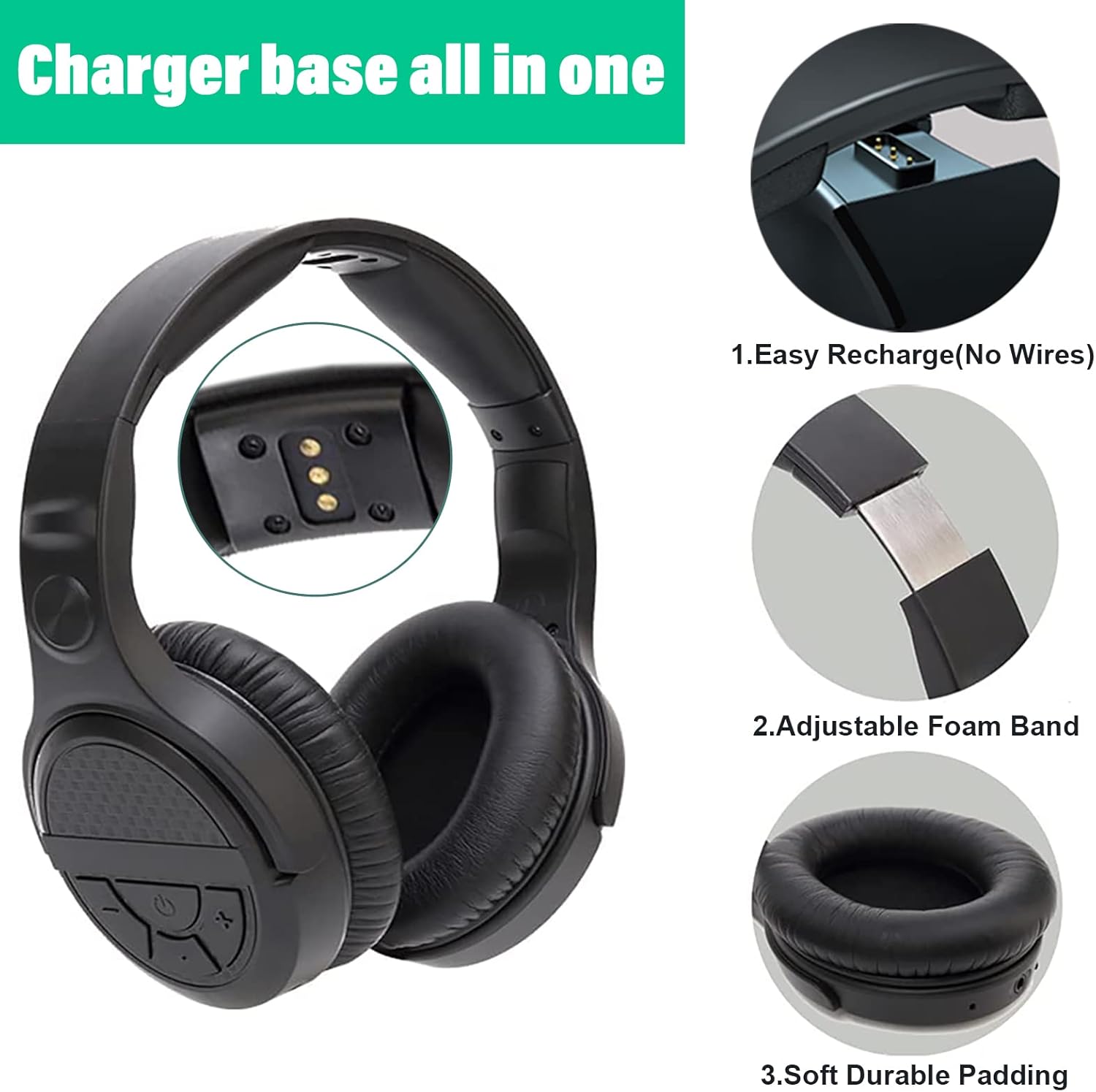
The headphones feature intuitive controls on the earcup, charging contacts for easy docking, an adjustable foam band for comfort, and soft, durable padding on the earcups.
- Kontrol Düğmeleri: Located on the right earcup for volume, power, and audio mode selection.
- Ayarlanabilir Kafa Bandı: Allows for a comfortable fit for various head sizes.
- Yumuşak Kulak Yastıkları: Designed for extended wear comfort and to seal in audio.
- Şarj Kişileri: Located on the underside of the headband for charging on the dock.
Transmitter & Charging Dock

The base serves as both the wireless transmitter and the charging station for the headphones.
- Güç düğmesi: Located on the back of the base.
- Ses Giriş Portları: Includes AUX/3.5mm, RCA, and Optical for wide compatibility.
- AC Güç Girişi: Güç adaptörünü bağlamak için.
- Şarj Pimleri: Located on the upright stand to connect with headphone charging contacts.
Kurmak
1. Vericiye Güç Verme
- Connect the provided AC Micro USB adapter to the "AC" port on the back of the transmitter base.
- AC adaptörünü bir duvar prizine takın.
- Flip the power switch on the back of the transmitter base to the "ON" position.
2. Connecting to Your Audio Source (TV/Audio Device)
The MONODEAL headphones offer multiple connection options. Choose the one that best suits your TV or audio device.
Optical Audio Connection (Recommended for Digital Audio)

Use the optical cable for digital audio output from your TV or audio device.
- Connect one end of the optical cable to the "Optical" port on the transmitter base.
- Connect the other end to the Optical Audio Out port on your TV or audio device.
- Önemli: On your TV's audio settings, set the Digital Audio Output format to "PCM" or "Stereo". Dolby/DTS formats are not supported.
RCA Audio Connection (Analog Audio)

Use the RCA to 3.5mm cable for analog audio output.
- Connect the 3.5mm end of the RCA to 3.5mm cable to the "AUX/3.5mm" port on the transmitter base.
- Connect the red and white RCA plugs to the corresponding "Audio Out" ports (usually red and white) on your TV or audio device.
- Not: Not compatible with RCA outputs on the back of AV receivers/ampcankurtaranlar
3.5mm AUX Audio Connection (Analog Audio)

For devices with a 3.5mm audio output jack (e.g., headphone jack on TV, smartphone, computer).
- Connect a 3.5mm audio cable (not included) from your device's 3.5mm audio output to the "AUX/3.5mm" port on the transmitter base.
3. Pairing Headphones with Transmitter (Automatic)
The headphones and transmitter are designed for automatic pairing. Once both are powered on and connected, they should connect quickly.
- Ensure the transmitter is powered on and connected to an audio source.
- Press and hold the power button on the headphones until they turn on.
- The headphones will automatically connect to the transmitter. No manual pairing is required.
Kullanım Talimatları
Açma/Kapatma
- To turn on the headphones: Press and hold the power button on the right earcup until the indicator light illuminates.
- To turn off the headphones: Press and hold the power button until the indicator light turns off.
Ses Kontrolü
- Use the volume up (+) and volume down (-) buttons on the right earcup to adjust the listening volume.
Ses Modları

The headphones feature three distinct audio modes to enhance your listening experience. Press the "Mode" button on the right earcup to cycle through them:
- Normal Mod: Dengeli ses profesyonelifile Genel dinleme için.
- Müzik Modu: Enhanced audio for musical content, often with richer bass and clearer highs.
- Film Modu: Optimized for cinematic experiences, providing a more immersive soundstage and enhanced dialogue clarity.
Kulaklıkları Şarj Etme

The transmitter base also functions as a charging dock.
- Place the headphones onto the charging pins of the transmitter base. Ensure the charging contacts on the headphones align with the pins on the dock.
- A red indicator light on the base will illuminate, indicating that the headphones are charging.
- The light will turn off when the headphones are fully charged (approximately 3 hours for a full charge).
- A full charge provides up to 10 hours of audio playtime.
Wireless Range and Performance

The MONODEAL headphones utilize 2.4GHz RF wireless technology, offering a stable connection with minimal static and interference.
- The wireless range is up to 197 feet (60 meters), even through walls.
- This technology ensures audio and image synchronization without noticeable delay.
Bakım
- Temizlik: Use a soft, dry cloth to clean the headphones and transmitter base. Do not use abrasive cleaners or solvents.
- Depolamak: When not in use for extended periods, store the headphones on the charging dock in a cool, dry place away from direct sunlight.
- Pil Bakım: Pil ömrünü uzatmak için kulaklıkların pilini sık sık tamamen boşaltmaktan kaçının. Düzenli olarak şarj edin.
Sorun giderme
| Sorun | Olası Neden | Çözüm |
|---|---|---|
| Kulaklıktan ses gelmiyor. |
|
|
| Static or intermittent audio. |
|
|
| Kulaklık şarj olmuyor. |
|
|
| TV internal speakers muted. |
|
|
Özellikler
| Model Adı | AS60 |
| Ürün Model Numarası | CTFAS60 |
| Bağlantı Teknolojisi | Wireless (2.4GHz RF) |
| kablosuz Menzil | 197 feet'e (60 metre) kadar |
| Ses Giriş Bağlantı Noktaları | Optical, RCA, 3.5mm AUX |
| Pil Ömrü | 10 saate kadar |
| Şarj Süresi | Yaklaşık 3 saat |
| Frekans Aralığı | 20 Hz ila 20,000 Hz |
| Ağırlık | 6 oz (headphones), 1.41 pounds (package weight) |
| Malzeme | Plastik |
Garanti ve Destek
MONODEAL products come with a standard warranty. For specific warranty terms and conditions, please refer to the warranty card included in your package or visit the official MONODEAL webalan.
If you encounter any issues or have questions not covered in this manual, please contact MONODEAL customer support:
- Çevrimiçi destek: Ziyaret edin MONODEAL Store on Amazon Sıkça sorulan sorular ve iletişim bilgileri için.
- E-posta Desteği: Refer to your product packaging or warranty card for the dedicated support email address.
Please have your product model (AS60) and purchase details ready when contacting support.
Resmi Ürün Videosu
This video demonstrates the key features and setup process of the MONODEAL Wireless Headphones, including connecting to a TV and using the charging dock.
Ask a question about this manual
Ask about setup, troubleshooting, compatibility, parts, safety, or missing instructions. Manuals+ will review the question and use this page’s manual context to help answer it.