
1. Giriş
This user manual provides essential information for the safe and efficient operation of your JIGUUN 1500W Pure Sine Wave Power Inverter. Please read this manual thoroughly before installation and use. Retain this manual for future reference.
2. Ürün Bittiview
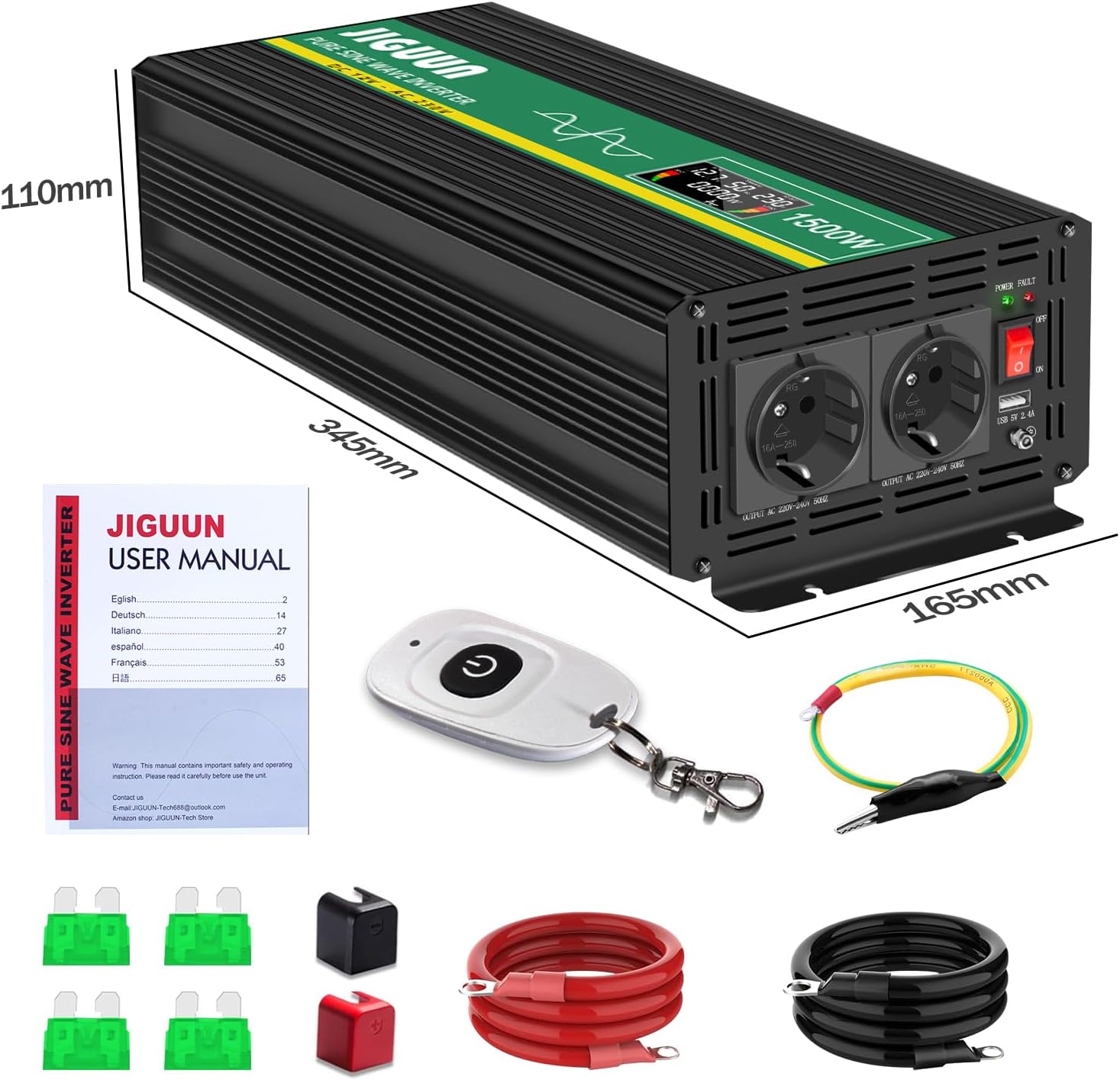
2.1 Paket İçeriği
- 1 x JIGUUN 1500W Pure Sine Wave Inverter
- 1 x Kullanım Kılavuzu
- 1 x Set of Battery Cables (1 Red, 1 Black)
- 1 x Kablosuz Uzaktan Kumanda
- Additional Fuses
2.2 Temel Özellikler
- Saf Sinüs Dalgası Çıkışı: Provides stable and clean power, suitable for sensitive electronics.
- Yüksek Güç Çıkışı: 1500W sürekli güç, 3000W tepe güç.
- Kablosuz Uzaktan Kumanda: Uzaktan rahat kullanım imkânı sağlar.
- Akıllı LCD Ekran: Gerçek zamanlı giriş ses seviyesini gösterir.tage, çıkış hacmitage, output power, and battery level.
- Kapsamlı Koruma: Includes overload, overvoltage, düşük hacimtage, short circuit, and overheat protection.
- Verimli Soğutma: Integrated silent high-speed fan activates automatically above 45°C.
- Dayanıklı Yapı: Made from high-quality aluminum alloy for resistance to bending, heat, and corrosion.
2.3 Bileşen Tanımlama
Refer to the diagram below for identification of the inverter's components.
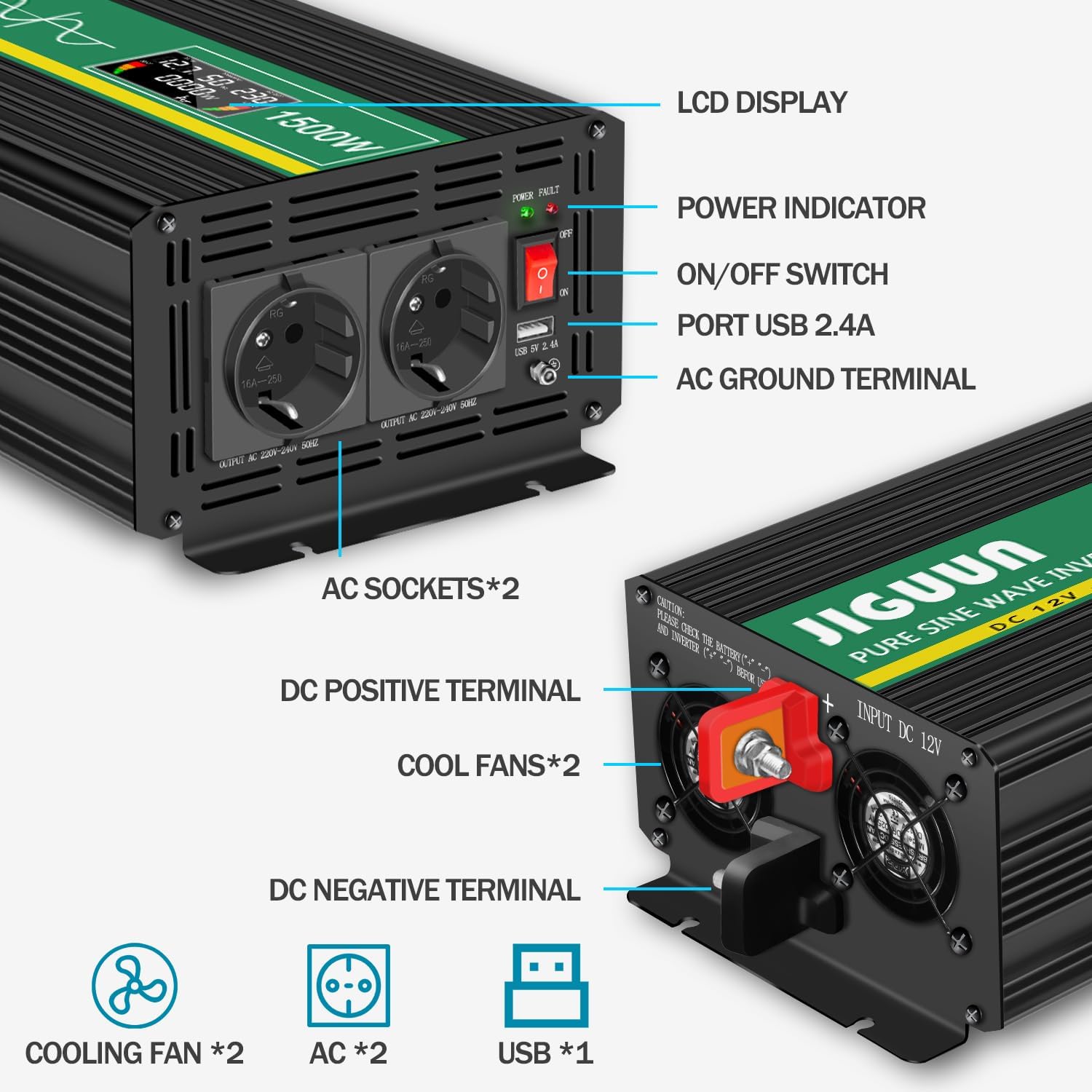
- LCD Ekran: Shows operational status and values.
- Güç Göstergesi: Illuminates when the inverter is active.
- Açma / kapama düğmesi: Controls the inverter's power.
- USB 2.4A Port: USB ile çalışan cihazları şarj etmek için.
- AC Ground Terminal: Emniyet topraklaması için.
- AC Sockets (x2): For connecting 220V/230V AC appliances.
- DC Positive Terminal: Connects to the positive (+) terminal of the 12V battery.
- DC Negative Terminal: Connects to the negative (-) terminal of the 12V battery.
- Soğutma Fanları (2 adet): Dissipate heat during operation.
3. Güvenlik Talimatları
Yaralanmaları ve invertöre veya bağlı cihazlara zarar gelmesini önlemek için aşağıdaki güvenlik önlemlerine uyun:
- İnverterin yalnızca 12V DC güç kaynağına bağlı olduğundan emin olun.
- Do not connect the inverter to an AC power source.
- AC yükleri bağlamadan önce daima invertörü aküye bağlayın.
- Aşırı ısınmayı önlemek için invertörün etrafında uygun havalandırma olduğundan emin olun.
- İnvertörü suya, yağmura veya aşırı neme maruz bırakmayın.
- Avoid operating the inverter in environments with flammable fumes or gases.
- İnverter çalışırken çocukları cihazdan uzak tutun.
- Always disconnect the battery before performing any maintenance or troubleshooting.
- Ensure the total power consumption of connected devices does not exceed 1500W continuously.
- Properly ground the inverter using the AC ground terminal.
4. Kurulum
4.1 Yerleştirme
Place the inverter in a dry, well-ventilated area, away from direct sunlight, heat sources, and moisture. Ensure there is sufficient space around the cooling fans for proper airflow.
4.2 Akü Bağlantısı
- Ensure the inverter's ON/OFF switch is in the 'OFF' position.
- Connect the red battery cable to the inverter's DC Positive Terminal (+).
- Connect the other end of the red battery cable to the positive (+) terminal of your 12V battery.
- Connect the black battery cable to the inverter's DC Negative Terminal (-).
- Connect the other end of the black battery cable to the negative (-) terminal of your 12V battery.
- Gevşek bağlantıları ve kıvılcım oluşumunu önlemek için tüm bağlantıların sıkı ve güvenli olduğundan emin olun.
4.3 Topraklama
For safety, connect the inverter's AC Ground Terminal to a reliable earth ground. This can be the chassis of a vehicle or a dedicated grounding rod, depending on your application.

5. Kullanım Talimatları
5.1 Açma/Kapatma
- After ensuring all connections are secure, press the ON/OFF switch on the inverter to the 'ON' position. The LCD display will illuminate, and the power indicator will light up.
- To turn off the inverter, press the ON/OFF switch to the 'OFF' position.
5.2 AC Prizleri ve USB Bağlantı Noktasının Kullanımı
- Plug your 220V/230V AC appliances into the AC sockets on the inverter.
- Connect your USB-powered devices to the USB 2.4A port for charging.
- Ensure the total power draw of all connected devices does not exceed the inverter's continuous power rating of 1500W.

5.3 LCD Display Readings
Akıllı LCD ekran gerçek zamanlı bilgi sağlar:
- DC IN: Giriş DC voltajını görüntüler.tage aküden.
- Sıklık: Shows the output AC frequency (typically 50Hz).
- AC ÇIKIŞI: Displays the output AC voltage (typically 220V/230V).
- LOAD (W): Indicates the current power consumption of connected devices in Watts.
- YARASA: Battery level bar graph.
- YÜK: Output load level bar graph.

5.4 Kablosuz Uzaktan Kumanda
The wireless remote control allows you to turn the inverter ON or OFF from a distance, which is useful when the inverter is installed in an inaccessible location.

6. Bakım
6.1 Temizlik
Regularly clean the exterior of the inverter with a dry cloth. Ensure the cooling vents are free from dust and debris to maintain optimal airflow.
6.2 Fanın Çalıştırılması
The internal cooling fan operates automatically when the inverter's internal temperature exceeds 45°C. This is normal operation. If the fan runs continuously at high speed without significant load, check for obstructions or excessive ambient temperature.
6.3 Sigorta Değişimi
The inverter contains internal replaceable fuses for protection. If the inverter stops functioning and troubleshooting steps do not resolve the issue, the fuses may need replacement. Consult a qualified technician or contact JIGUUN customer support for assistance with fuse replacement.
7. Sorun Giderme
If you encounter issues with your JIGUUN inverter, refer to the table below for common problems and solutions.
| Sorun | Olası Neden | Çözüm |
|---|---|---|
| No power output / Inverter does not turn on | Gevşek pil bağlantıları Düşük pil hacmitage Sigorta atmış İnverter anahtarı KAPALI konumda. | Check and tighten battery cables Pili şarj edin veya değiştirin Check and replace fuses (if applicable, by qualified personnel) Ensure ON/OFF switch is in 'ON' position |
| Overload alarm / Inverter shuts down | Connected load exceeds 1500W High surge current from appliance | Reduce the total load by disconnecting some appliances Ensure appliance starting current is within inverter's peak capacity (3000W) |
| Overheat alarm / Inverter shuts down | Kötü havalandırma Bloke edilmiş soğutma fanı Aşırı ortam sıcaklığı | İnverter çevresinde yeterli hava akışı olduğundan emin olun. Clean cooling vents and fan Move inverter to a cooler environment |
| Düşük hacimtage alarm / Inverter shuts down | pil hacmitage çok düşük | Recharge the battery immediately |
| Uzaktan kumanda çalışmıyor | Uzaktan kumandadaki pil bitmiş Aralık dışı | Uzaktan kumanda pilini değiştirin Move closer to the inverter |
8. Özellikler
| Özellik | Şartname |
|---|---|
| Örnek | 1500W12V |
| Sürekli Güç | 1500 Watt |
| Tepe Güç | 3000 Watt |
| Giriş DC Hacmitage | 12 Volt Doğru Akım |
| Çıkış AC Hacmitage | 220-230 Volt AC |
| Çıkış Frekansı | 50 Hz |
| Çıkış Dalga Formu | Saf sinus dalgası |
| AC Çıkışları | 2 x EU Standard Sockets |
| USB Çıkışı | 1 x 5V 2.4A Port |
| Boyutlar (U x G x Y) | 34.5 cm x 16.5 cm x 11 cm |
| Ağırlık | 4.1 kilo |
| Önerilen Kullanımlar | Emergency situations, camping, road trips, RVs, boats |
9. Garanti ve Destek
9.1 Garanti Bilgileri
JIGUUN offers a one-year free replacement warranty for this product. This warranty covers manufacturing defects and malfunctions under normal use conditions.
9.2 Müşteri Desteği
If you have any questions regarding the JIGUUN 1500W Pure Sine Wave Power Inverter, its operation, or require technical assistance, please do not hesitate to contact the JIGUUN customer support team. They are available to resolve any issues you may encounter.
Contact information can typically be found on the product packaging or the official JIGUUN webalan.
