
giriiş
This manual provides comprehensive instructions for the setup, operation, maintenance, and troubleshooting of your T-WOLF X9 Bluetooth Mouse. Please read this manual carefully before using the product to ensure optimal performance and longevity.
Paket İçeriği
- 1 x T-WOLF X9 Bluetooth Mouse
- 1 x AA Pil
- 1 x Kullanım Kılavuzu (bu belge)
Ürün Bittiview

Resim 1: Tepe view of the T-WOLF X9 Bluetooth Mouse, showing the left and right click buttons, scroll wheel, and DPI switch button. The T-WOLF logo and Bluetooth icon are visible.
The T-WOLF X9 is a portable Bluetooth mouse designed for convenience and performance. It features a sleek design, Bluetooth 5.2 connectivity, and a 10-meter operating range. The mouse includes four buttons: left-click, right-click, scroll wheel (which also functions as a button), and a dedicated DPI switch button for adjusting cursor sensitivity.
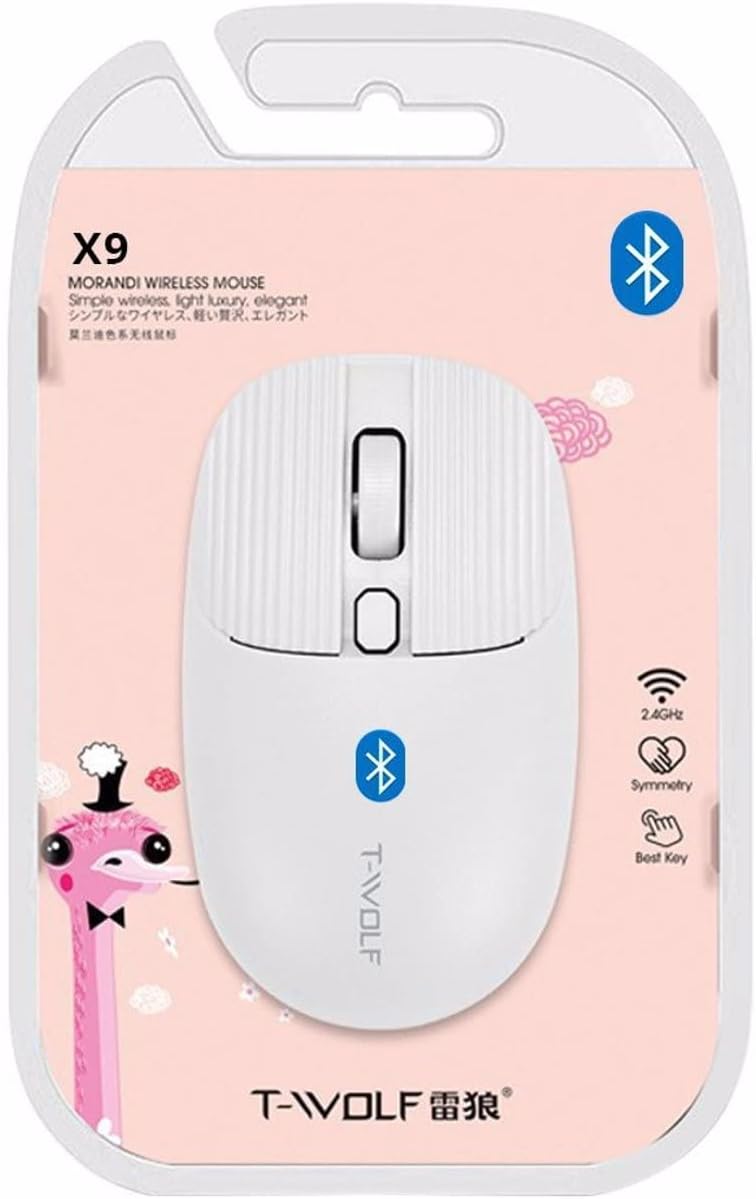
Resim 2: Packaging of the T-WOLF X9 Bluetooth Mouse, highlighting key features such as 2.4GHz (though product is Bluetooth, this might be a generic packaging element), symmetry, and "Best Key".

Resim 3: Taraf view of the T-WOLF X9 Bluetooth Mouse, illustrating its ergonomic profile and non-slip roller design.
Kurmak
1. Pil Kurulumu
- Farenin alt tarafındaki pil bölmesini bulun.
- Pil bölmesinin kapağını açın.
- Kutudan çıkan AA pili, doğru kutuplara (+/-) dikkat ederek takın.
- Pil bölmesi kapağını sıkıca kapatın.
2. Bluetooth Eşleştirme
- Ensure the mouse is powered on. There may be a power switch on the underside.
- Bilgisayarınızda veya cihazınızda Bluetooth ayarlarına gidin.
- Bluetooth'u etkinleştirin ve yeni cihazları arayın.
- The mouse should appear as "T-WOLF X9" or similar. Select it to initiate pairing.
- Eşleştirme işlemi tamamlandıktan sonra fare kullanıma hazırdır.
Kullanım Talimatları
1. DPI Switching
The T-WOLF X9 mouse features 3-gear DPI switching. Press the dedicated DPI button (located behind the scroll wheel) to cycle through the available DPI settings. Each press will change the cursor sensitivity, allowing you to adjust it to your preference for different tasks.
2. Düğme Fonksiyonları
- Sol Tıklama Düğmesi: Birincil seçim ve etkileşim.
- Sağ Tıklama Düğmesi: Bağlamsal menüleri açar.
- Kaydırma tekerleği: İçeriği dikey olarak kaydırır. Ayrıca orta tıklama işlevi için basılabilir.
- DPI Değiştirme Düğmesi: İmleç hassasiyetini (DPI) ayarlar.
Bakım
- Temizlik: Fareyi temizlemek için yumuşak ve kuru bir bez kullanın. İnatçı kirler için hafifçe silin.ampBezi suyla yıkayın. Sert kimyasallar veya aşındırıcı malzemeler kullanmaktan kaçının.
- Pil Değişimi: Farenin performansı düştüğünde veya yanıt vermeyi durdurduğunda AA pili değiştirin.
- Depolamak: Uzun süre kullanılmayacaksa fareyi serin ve kuru bir yerde saklayın.
Sorun giderme
| Sorun | Çözüm |
|---|---|
| Fare yanıt vermiyor |
|
| İmleç hareketi düzensiz veya yavaş |
|
| Cannot pair the mouse |
|
Özellikler
| Özellik | Detay |
|---|---|
| Örnek | X9 |
| Bağlantı | Bluetooth 5.2 |
| Çalışma Aralığı | 10 metreye kadar |
| Düğmeler | 4 (Left, Right, Scroll Wheel/Middle, DPI Switch) |
| DPI Ayarları | 3-Gear Switching |
| Güç Kaynağı | 1 x AA Pil |
| El Yönelimi | İki elini de kullanabilen |
| Uyumlu Cihazlar | Dizüstü Bilgisayar, Kişisel Bilgisayar |
| İşletim Sistemleri | Linux, Windows 7, Windows XP (and newer OS with Bluetooth support) |
| Boyutlar | 20 x 13 x 7.5 cm (Paket) |
| Ağırlık | 150 g (Paket) |
Garanti ve Destek
This product is covered by a standard manufacturer's warranty. For specific warranty details, please refer to the documentation provided at the time of purchase or contact your retailer. For technical support or further assistance, please reach out to the seller or manufacturer's customer service.