
1. Giriş
Welcome to the user manual for your new Avtex W195TS Smart TV. This television is specifically designed for mobile living, offering versatile power options (12V, 24V, and 240V) and a range of smart features, including Wi-Fi, Bluetooth, and an integrated Freesat satellite decoder. This manual provides essential information for setting up, operating, maintaining, and troubleshooting your device to ensure optimal performance and enjoyment.
2. Güvenlik Bilgileri
Televizyonu kullanmadan önce lütfen tüm güvenlik talimatlarını dikkatlice okuyun. Bu kılavuzu ileride başvurmak üzere saklayın.
- Güç Kaynağı: Doğru hacmi sağlayıntage is used (12V, 24V DC or 240V AC). Do not overload power outlets.
- Havalandırma: Havalandırma açıklıklarını kapatmayın. Televizyonun etrafında yeterli hava akışı için yeterli alan bırakın.
- Su ve Nem: Televizyonunuzu yağmura veya neme maruz bırakmayın. Televizyonun üzerine sıvı dolu nesneler koymayın.
- Temizlik: Temizlemeden önce televizyonun fişini çekin. Yumuşak ve kuru bir bez kullanın. Sıvı veya aerosol temizleyiciler kullanmayın.
- Atama: Place the TV on a stable, flat surface or mount securely to a wall/bracket. Avoid direct sunlight or heat sources.
- Servis: Bu ürüne kendiniz servis vermeye çalışmayın. Tüm servis işlemleri için kalifiye servis personeline başvurun.
3. Paket İçeriği
Before setup, please check that all items are present in the box:
- Avtex W195TS Akıllı TV
- Pilli Uzaktan Kumanda
- 12V/24V DC Güç Kablosu
- 240V AC Güç Adaptörü
- Masa Sehpası (varsa)
- Kullanım Kılavuzu (bu belge)
4. Ürün Bittiview
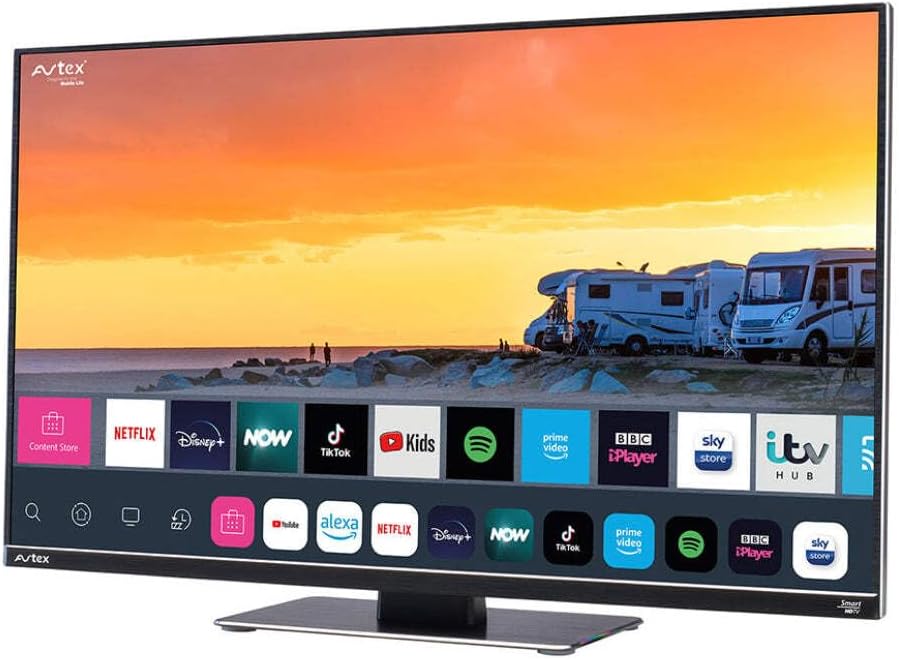
Figure 4.1: Avtex W195TS Smart TV Front View
This image shows the Avtex W195TS Smart TV from a slight angle, highlighting its slim design and the vibrant display. The screen shows a user interface with icons for popular streaming services like Netflix, Disney+, Now, TikTok, Kids, Spotify, Prime Video, BBC iPlayer, Sky Store, and ITV Hub. The background on the screen depicts a scenic view of motorhomes parked near a beach at sunset. The Avtex logo is visible on the top left and bottom left of the TV frame.
4.1. Bağlantı Noktaları ve Bağlantılar
- HDMI Bağlantı Noktaları: Blu-ray oynatıcılar, oyun konsolları veya set üstü kutular gibi harici cihazları bağlamak için kullanılır.
- USB Bağlantı Noktaları (2): USB sürücülerden medya oynatmak veya USB aksesuarları bağlamak için.
- Anten Girişi: For connecting a terrestrial TV antenna.
- Uydu Girişi: For connecting a satellite dish for Freesat or other satellite services.
- DC Güç Girişi: For 12V/24V DC power connection.
- AC Güç Girişi: For 240V AC power connection via adapter.
- Ethernet Bağlantı Noktası: Kablolu ağ bağlantısı için.
- Ses Çıkışı: Harici ses sistemlerini veya kulaklıkları bağlamak için.
5. Kurulum
5.1. Installing the Stand (Optional)
- Ekran hasarını önlemek için televizyonu dikkatlice, yüzü aşağıya gelecek şekilde yumuşak ve temiz bir yüzeye yerleştirin.
- Sehpayı televizyonun altındaki montaj delikleriyle hizalayın.
- Verilen vidaları kullanarak standı sabitleyin.
5.2. Güç Bağlantısı
The Avtex W195TS supports multiple power inputs:
- 12V/24V DC: Connect the supplied 12V/24V DC power cable to the DC input on the TV and to your vehicle's 12V or 24V power outlet.
- 240VAC: Connect the supplied 240V AC power adapter to the AC input on the TV, then plug the adapter into a standard 240V AC wall socket.
Not: Do not connect both DC and AC power simultaneously.
5.3. Anten/Uydu Bağlantısı
- Terrestrial TV: Connect your aerial cable to the 'ANTENNA IN' port.
- Satellite TV (Freesat): Connect your satellite dish cable to the 'SATELLITE IN' port.
5.4. İlk Açılış ve İlk Kurulum
- Connect the TV to power and press the power button on the remote control or TV.
- The First-Time Setup Wizard will appear. Follow the on-screen prompts to select your language, country, and time zone.
- Perform an automatic channel scan for both terrestrial and satellite channels.
- Ağ adınızı seçip şifrenizi girerek Wi-Fi ağınıza bağlanın.
6. Çalıştırma
6.1. Uzaktan Kumanda İşlevleri
Televizyonunuzun özelliklerini kolayca kullanabilmek ve kontrol edebilmek için uzaktan kumanda düğmelerini iyice öğrenin.
- Güç Düğmesi: TV'yi açar/kapatır.
- Kaynak Düğmesi: Selects input sources (HDMI, USB, TV, Satellite).
- Hacim +/-: Ses seviyesini ayarlar.
- Kanal +/-: TV kanallarını değiştirir.
- Gezinme Düğmeleri (Yukarı/Aşağı/Sol/Sağ/Tamam): Menüde gezinme ve seçim için.
- Smart Hub/Home Button: Akıllı TV arayüzüne erişim sağlar.
- Uygulama Düğmeleri: Popüler yayın uygulamaları için özel düğmeler (varsa).
6.2. Akıllı TV Özellikleri
Your Avtex W195TS is equipped with smart TV capabilities:
- Uygulama Mağazası: Download and install various applications for streaming, news, and entertainment.
- Yayın Hizmetleri: Access pre-installed or downloaded apps like Netflix, Disney+, Prime Video, BBC iPlayer, etc. (subscription may be required).
- Web Tarayıcı: Televizyonunuzdan doğrudan internette gezinin.
- Ekran yansıtma: Connect your smartphone or tablet to display content on the TV screen (compatibility may vary).
6.3. Bluetooth Bağlantısı
Pair Bluetooth devices such as headphones or external speakers for enhanced audio experience.
- Televizyonun ayarlar menüsüne gidin.
- Select 'Bluetooth' or 'Connected Devices'.
- Enable Bluetooth and put your device into pairing mode.
- Eşleştirmek istediğiniz cihazı listeden seçin.
6.4. USB Üzerinden Medya Oynatma
Insert a USB drive into one of the USB ports to view Fotoğraflara bakın, videolar izleyin veya müzik dinleyin.
- The TV will usually prompt you to open the media player.
- Gezinmenizi sağlayın fileUzaktan kumandayı kullanarak.
7. Bakım
7.1. Televizyonun Temizlenmesi
- Ekran: Ekranı yumuşak, tiftiksiz bir bezle nazikçe silin. İnatçı lekeler için hafifçe silin.ampBezi su veya ekrana özel bir temizleme solüsyonuyla yıkayın (ekrana doğrudan sıkmayın).
- Casing: Televizyonu silmek için yumuşak, kuru bir bez kullanın.asing. Aşındırıcı temizleyicilerden veya çözücülerden kaçının.
7.2. Yazılım Güncellemeleri
Periodically check for software updates to ensure your TV has the latest features and bug fixes. Updates can usually be found in the TV's settings menu under 'System' or 'Software Update'.
8. Sorun Giderme
If you encounter issues with your Avtex W195TS, refer to the following common problems and solutions:
| Sorun | Olası Neden | Çözüm |
|---|---|---|
| Güç Yok | Power cable not connected; no power from outlet. | Check power cable connection; test outlet with another device; ensure correct voltage (12V/24V/240V). |
| Görüntü yok, ancak ses var. | Yanlış giriş kaynağı seçildi; kablo arızalı. | Press the 'Source' button on the remote to select the correct input; check HDMI/antenna cables. |
| Ses yok, ancak görüntü mevcut. | Ses seviyesi çok düşük veya tamamen kapalı; harici ses sistemi sorunu. | Unmute volume or increase level; check connections to external audio devices. |
| Wi-Fi'ye bağlanılamıyor | Yanlış şifre; yönlendirici sorunu; TV yönlendiriciden çok uzakta. | Re-enter Wi-Fi password; restart router; move TV closer to router or use an extender. |
| Uzaktan Kumanda Çalışmıyor | Pil bitmiş; engellenmiş; eşleştirme sorunu. | Pilleri değiştirin; engelleri kaldırın; Bluetooth kumanda ise yeniden eşleştirin. |
9. Özellikler
| Özellik | Şartname |
|---|---|
| Marka | avteks |
| Model Numarası | AVTEX W195TS |
| Ekran Boyutu | 19.5 inç |
| Çözünürlük | 1080p (Tam HD) |
| En Boy Oranı | 16:9 |
| Bağlantı Teknolojisi | Bluetooth, HDMI, Wi-Fi |
| Toplam USB Bağlantı Noktaları | 2 |
| Cilttage | 12 Volt, 24 Volt, 240 Volt |
| Ürün Ağırlığı | 2.5 Kilogram |
| Model Yılı | 2018 |
10. Garanti ve Destek
Your Avtex W195TS Smart TV comes with a manufacturer's warranty. Please refer to the warranty card included in your product packaging for specific terms and conditions, including warranty period and coverage details. Keep your proof of purchase for warranty claims.
For technical support, troubleshooting assistance beyond this manual, or warranty inquiries, please contact Avtex customer service through their official website or the contact information provided with your product. When contacting support, please have your model number (AVTEX W195TS) and serial number ready.