
giriiş
This manual provides detailed instructions for the setup, operation, maintenance, and troubleshooting of your Keychron V5 Wired Custom Mechanical Keyboard. The Keychron V5 is a 96% layout keyboard featuring QMK/VIA programmability, hot-swappable switches, double-shot PBT keycaps, and compatibility with macOS, Windows, and Linux systems.
Paket İçeriği
Lütfen paketinizde tüm öğelerin mevcut olduğundan emin olun:
- Keychron V5 Kablolu Özel Mekanik Klavye
- USB-C'den USB-C'ye Kablo
- USB-A - USB-C Adaptörü
- Tuş Çektirmesi
- Anahtar Çektirme
- Additional Keycaps for Windows/macOS
Kurmak
Klavyeyi Bağlama
To connect your Keychron V5 keyboard:
- Klavyenin arka tarafında bulunan USB-C bağlantı noktasını bulun.
- Connect one end of the provided USB-C to USB-C cable to the keyboard.
- Connect the other end of the cable to a USB-C port on your computer. If your computer only has USB-A ports, use the provided USB-A to USB-C adapter.
- Klavyeniz işletim sisteminiz tarafından otomatik olarak tanınacaktır.
System Toggle (Mac/Windows)
The Keychron V5 includes a system toggle switch to ensure full compatibility with both macOS and Windows operating systems. This switch is typically located on the back or side of the keyboard.
İşletim sistemleri arasında geçiş yapmak için:
- Locate the 'Win/Mac' toggle switch.
- Slide the switch to the 'Mac' position for macOS or 'Win' position for Windows.
- The keyboard will adjust its key mappings accordingly.

Resim: Yan view of the Keychron V5 keyboard, highlighting the system toggle switch and USB-C port for system compatibility.
Ergonomic Angle Adjustment
The keyboard features adjustable feet to customize the typing angle for improved ergonomics.
To adjust the typing angle:
- Klavyeyi ters çevirerek alt kısımdaki ayaklara ulaşabilirsiniz.
- Gently pull out the feet to extend them to your desired angle. There are usually two levels of adjustment.

Image: The Keychron V5 keyboard with its adjustable feet extended, demonstrating the ergonomic angle design.
Kullanım Talimatları
Temel Fonksiyonlar ve Yerleşim Planı
The Keychron V5 features a 96% layout with 97 keys, efficiently retaining function keys and a num pad while saving desk space. The keyboard comes with pre-installed double-shot PBT keycaps in an OSA profile, designed for a comfortable fingertip feel and excellent oil resistance.
Resim: Tam bir view of the Keychron V5 keyboard, showcasing its 96% layout and keycap design.
QMK/VIA Özelleştirme
The Keychron V5 supports QMK/VIA firmware, allowing for comprehensive customization of key mappings, macros, and backlight effects. VIA is a graphical user interface that simplifies the programming process.
Klavyenizi özelleştirmek için:
- VIA yazılımını Keychron'un resmi sitesinden indirin. webSite veya VIA GitHub deposu.
- Connect your keyboard to your computer.
- Launch the VIA software. The software should automatically detect your Keychron V5.
- Use the intuitive interface to remap keys, create macros, and adjust lighting settings across multiple layers.
For detailed instructions on using QMK/VIA, refer to the official Keychron documentation or community guides.

Image: A visual representation of the VIA software interface, demonstrating how users can customize key layouts and macros for the Keychron V5.
Programmable Knob
The Keychron V5 features a programmable rotary knob, which can be customized via QMK/VIA to control various functions such as volume, zoom, or scrolling.
To customize the knob's function:
- Open the VIA software.
- Navigate to the knob customization section.
- Assign desired functions for clockwise rotation, counter-clockwise rotation, and pressing the knob.

Resim: Yakın çekim view of the programmable rotary knob on the Keychron V5 keyboard, highlighting its textured surface.
Çalışırken Değiştirilebilir Anahtarlar
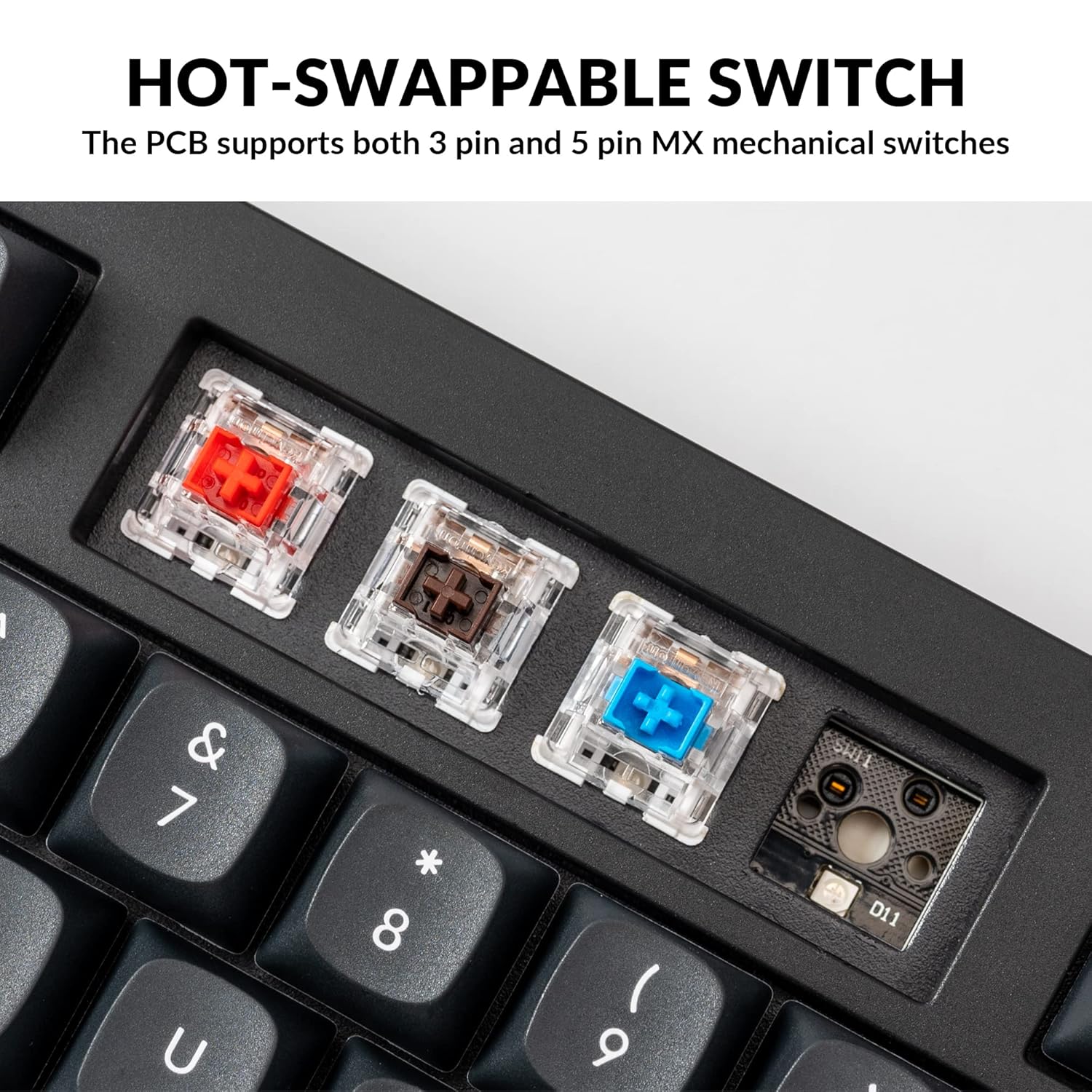
The Keychron V5 is equipped with hot-swappable sockets, allowing you to change mechanical switches without soldering. It supports most 3-pin and 5-pin MX mechanical switches (e.g., Cherry, Gateron, Kailh, Panda).
The keyboard comes with pre-lubed K Pro Red linear switches, offering a smooth and responsive typing experience with a lifespan of up to 50 million keystrokes.
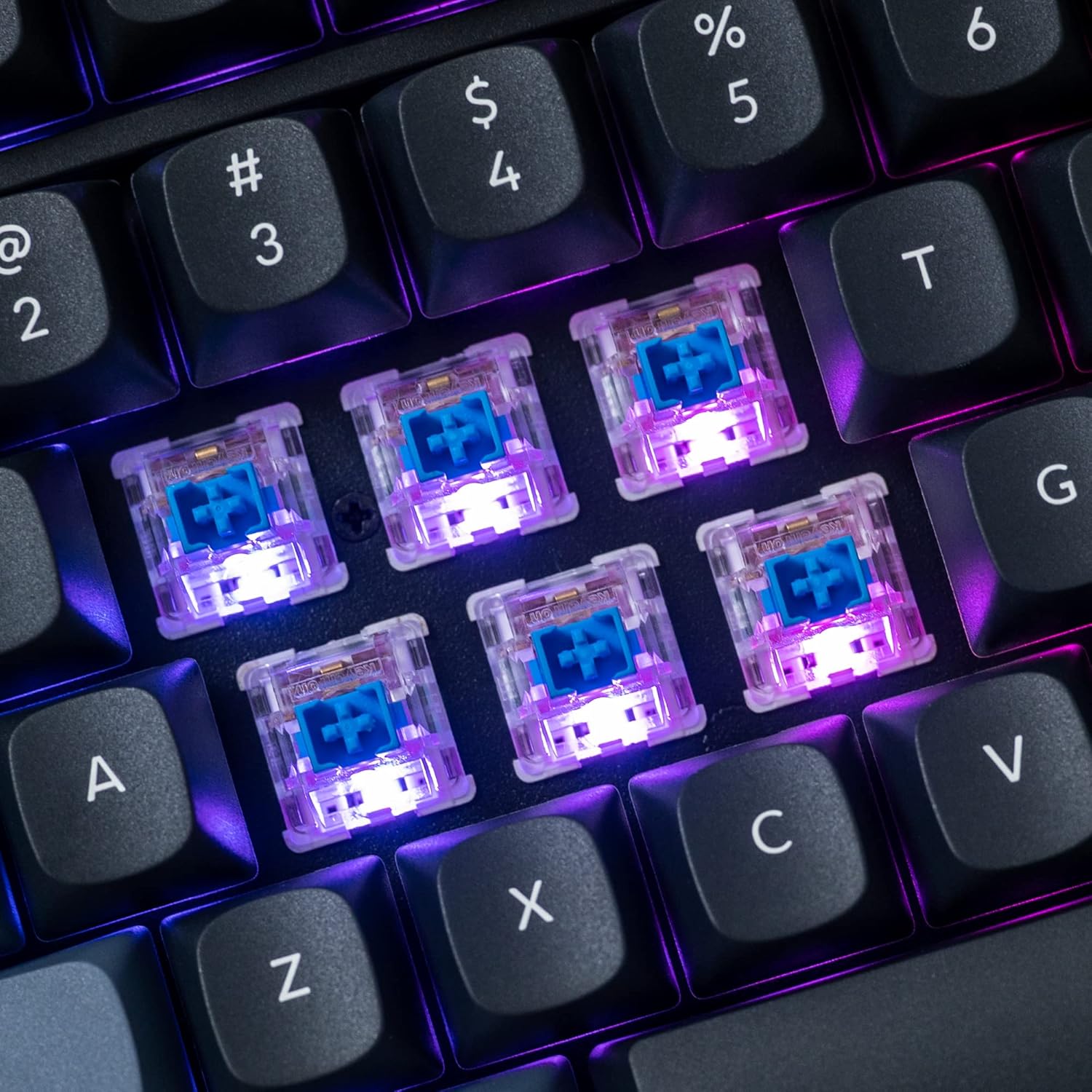
Resim: Ayrıntılı view of the hot-swappable mechanical switches on the Keychron V5 keyboard, illuminated by RGB backlighting.
Arka aydınlatma
The V5 features south-facing RGB backlighting, designed to better illuminate the keyboard from the typist's angle and prevent interference when using Cherry-profile keycaps. You can customize the backlight effects and colors using the VIA software.

Image: A close-up of the double-shot PBT keycaps on the Keychron V5 keyboard, showcasing their texture and legends.
Bakım
Temizlik
To maintain the cleanliness and longevity of your keyboard:
- Tuş Takımları: Tuş kapaklarını çıkarmak için tuş kapağı sökme aleti kullanın. Tuş kapaklarını hafif bir sabunlu su ve yumuşak bir bezle temizleyin, ardından iyice durulayın ve tekrar takmadan önce kurulayın.
- Klavye Gövdesi: Klavyenin gövdesini yumuşak bir bezle silin.amp bez. Sert kimyasallar veya aşındırıcı malzemeler kullanmaktan kaçının.
- Toz: Tuş başlıkları ve anahtarlar arasındaki toz ve kalıntıları temizlemek için basınçlı hava kullanın.
Anahtar Değiştirme
Bir anahtarı değiştirmek için:
- Birlikte verilen tuş kapağı sökme aletini kullanarak, değiştirmek istediğiniz tuştan tuş kapağını dikkatlice çıkarın.
- Insert the switch puller tool around the top and bottom clips of the switch.
- Gently squeeze the clips and pull the switch straight up to remove it from the PCB.
- Yeni anahtarın pinlerini PCB üzerindeki deliklerle hizalayın. Pinlerin düz olduğundan emin olun.
- Press the new switch firmly into place until it clicks. Ensure it is seated properly and not bent.
- Tuş kapağını tekrar takın.
Tuş kapağı değişimi
To replace keycaps:
- Use the keycap puller to gently remove the existing keycap by hooking it onto the keycap and pulling upwards.
- Align the new keycap with the cross-shaped stem of the switch.
- Press the new keycap firmly down until it is fully seated.
Sorun giderme
- Klavye Yanıt Vermiyor:
Ensure the USB cable is securely connected to both the keyboard and the computer. Try a different USB port or cable. Verify the system toggle switch is set correctly for your operating system. - Tuşlar Kayıt Olmuyor:
If specific keys are not working, the switch might be faulty or not fully seated. Try removing and re-inserting the switch. If the issue persists, replace the switch. - Arka Aydınlatma Sorunları:
Check VIA software settings to ensure backlighting is enabled and configured correctly. If only certain LEDs are not working, it might indicate a faulty LED or switch. - QMK/VIA Software Not Detecting Keyboard:
Ensure the keyboard is connected via USB. Close and reopen the VIA software. Make sure you have the correct firmware loaded if you have flashed custom firmware. - Keycaps Feel Loose:
Ensure keycaps are fully pressed onto the switch stems. If a keycap consistently feels loose, the switch stem might be damaged, or the keycap's cross-mount might be worn.
Özellikler
| Özellik | Şartname |
|---|---|
| Marka | Anahtarkron |
| Örnek | V5 |
| Klavye Açıklaması | Mekanik |
| Klavye Düzeni | QWERTY, 96% Layout (97 Keys) |
| Bağlantı Teknolojisi | Kablolu (USB-C) |
| Uyumlu Cihazlar | PC (macOS, Windows, Linux) |
| Anahtar Türü | Linear (K Pro Red) |
| Hot-swappable Support | Yes (3-pin and 5-pin MX mechanical switches) |
| keycaps | Double-shot PBT, OSA Profile |
| Arka ışık | Güneye bakan RGB |
| Muhafaza Malzemesi | Polybutylene Terephthalate, Silicone |
| Ek Özellikler | QMK/VIA Programmable, Programmable Knob, Screw-in Stabilizers |
Garanti ve Destek
Keychron products are typically covered by a limited warranty. For specific warranty terms, duration, and conditions, please refer to the warranty information provided with your product packaging or visit the official Keychron webalan.
For technical support, troubleshooting assistance, or to inquire about replacement parts, please contact Keychron customer service through their official website's support portal. When contacting support, please have your product model (Keychron V5) and purchase details ready.