
1. Ürün Bittiview
The Kuephom Portable CD Player (Model PM11-Black) is a versatile audio device designed for personal and multi-user listening. It features a built-in speaker, rechargeable battery, and anti-skip protection, making it suitable for various environments including home, car, and travel. The player supports multiple audio formats and offers adjustable playback speed for learning purposes.

Image 1.1: Kuephom Portable CD Player and accessories.
Temel Özellikler:
- Şarj Edilebilir Pil: Integrated 1500mAh battery provides up to 8 hours of playback with earphones or 5 hours with the built-in speaker on a 4-hour charge.
- Dahili Hoparlör: Allows direct listening without external headphones or speakers.
- Atlama Önleyici Koruma: Ensures uninterrupted audio playback during movement or light shocks.
- Memory Playing: Resumes playback from the last played track when the device is turned on again.
- Geniş Uyumluluk: Supports CD, CD-R, CD-RW, MP3, and WMA formats.
- Çoklu Bağlantı Seçenekleri: Includes 3.5mm AUX input/output, USB port, and headphone jack.
- Adjustable Playback Speed: Useful for language learning or musical practice.
2. Kurulum Kılavuzu
2.1 Cihazı Şarj Etme
Before initial use, fully charge the CD player. The device features a built-in rechargeable battery, eliminating the need for disposable AA batteries.
- Locate the charging port on the side of the CD player.
- Connect the provided USB charging cable to the player and a compatible USB power source (e.g., wall charger, power bank, car charger, computer USB port).
- Şarj gösterge ışığı yanacaktır. Tam şarj genellikle yaklaşık 4 saat sürer.

Image 2.1: Charging options for the CD player.
2.2 CD Yükleme
The CD player supports standard CD, CD-R, CD-RW, MP3, and WMA disc formats.
- Locate the 'OPEN' switch on the side of the player.
- Slide the switch to the 'OPEN' position to release the lid.
- Gently place the CD onto the central spindle with the label side facing up. Ensure the CD is securely seated.
- Kapağı yerine oturana kadar sıkıca kapatın.
Video 2.2: Demonstrates the basic functions and usage scenarios of the Kuephom Portable CD Player, including loading a CD and identifying ports.
2.3 Harici Cihazların Bağlanması
- Kulaklıklar: Plug the included earbuds or your preferred 3.5mm headphones into the headphone jack (blue port).
- AUX Bağlantısı: Use the provided 3.5mm audio cable to connect the player's AUX port (green port) to external speakers or a car's AUX input.
- USB Oynatma: Insert a USB flash drive into the USB port to play compatible audio file(MP3, WMA).

Image 2.3: Connecting the CD player to a car's audio system.
3. Kullanım Talimatları
3.1 Güç Açma/Kapatma
Locate the power switch on the side of the player. Slide it to the 'ON' position to power on the device. Slide it to 'OFF' to power off.
3.2 Temel Oynatma Kontrolleri
The control panel on the top of the player features intuitive buttons:
- Play/Pause (►▮): Oynatmayı başlatmak veya duraklatmak için basın.
- Önceki Parça (◀◀): Press once to go to the beginning of the current track. Press twice to go to the previous track.
- Next Track (►►): Bir sonraki parçaya geçmek için basın.
- Sesi Aç (+): Sesi yükseltir.
- Sesi kıs (-): Sesi azaltır.
3.3 Gelişmiş Oynatma Fonksiyonları
- Repeat (REP): Cycles through repeat modes (e.g., repeat one, repeat all, random).
- Mod (MOD): Switches between different playback modes (e.g., CD, USB, AUX).
- A-B Repeat (A-B): Allows repeating a specific segment of audio.
- Program (PROG): Enables programming a custom playback order for tracks.
- Speed Adjustment (SPEED +/-): Adjusts the playback speed, useful for language learning or transcribing audio.

Image 3.1: The adjustable playback speed feature is beneficial for learning.
3.4 Anti-Skip and Memory Functions
- Atlama Önleyici Koruma: This function is automatically activated when the player is turned on, providing a buffer against minor shocks and vibrations to ensure continuous playback.
- Memory Playing: The device remembers the last played track and position, resuming from that point when powered on again.
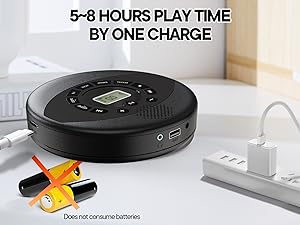
Image 3.2: Anti-shock protection for active use.
4. Bakım
4.1 Cleaning the CD Player
- Oynatıcının dış yüzeyini temizlemek için yumuşak, kuru bir bez kullanın.
- For the lens, use a specialized CD lens cleaning kit. Do not touch the lens directly.
- Aşındırıcı temizleyiciler veya solventler kullanmaktan kaçının.
4.2 Pil Bakımı
- Pil ömrünü uzatmak için pili sık sık tamamen boşaltmaktan kaçının.
- Uzun süre kullanılmayacaksa cihazı serin ve kuru bir yerde saklayın.
- Charge the device at least once every three months if unused to prevent deep discharge.
4.3 CD Bakımı
- Parmak izi ve çizik oluşmasını önlemek için CD'leri kenarlarından tutun.
- CD'leri yumuşak, tüy bırakmayan bir bezle, merkezden dışa doğru silerek temizleyin.
- CD'lerinizi tozdan ve hasardan korumak için kutularında saklayın.
5. Sorun Giderme
| Sorun | Olası Neden | Çözüm |
|---|---|---|
| Oynatıcı açılmıyor. | Pil boşalmış. Güç düğmesi kapalı. | Charge the battery. Ensure the power switch is in the 'ON' position. |
| Ses yok. | Volume is too low. Headphones/AUX cable not connected properly. CD/USB not playing. | Increase volume. Check connections. Ensure CD/USB is playing and not paused. |
| CD atlıyor veya çalmıyor. | CD is dirty or scratched. CD is not properly seated. Incorrect CD format. | Clean the CD. Re-seat the CD. Ensure the CD format (CD, CD-R, CD-RW, MP3, WMA) is supported. |
| USB üzerinden oynatma çalışmıyor. | USB drive not properly inserted. Incompatible file Biçim. | Ensure USB drive is fully inserted. Check if files are MP3 or WMA format. |
6. Ürün Özellikleri
| Özellik | Detay |
|---|---|
| Model Numarası | PM11-Black |
| Ürün Boyutları | 5.7 x 5.7 x 1.2 inç |
| Ürün Ağırlığı | 1.01 pound |
| Pil Türü | 1 Lityum Polimer pil (dahil) |
| Bağlantı | Yardımcı, USB |
| Özel Özellikler | Anti-Skip Protection, Portable, Programmable Memory, Rechargeable |
| Dahil Bileşenler | CD player X 1, Earbuds X 1, Audio cable X 1, Charging cable X 1, Pouch X 1 |
| Desteklenen Formatlar | CD, CD-R, CD-RW, MP3, WMA |
7. Garanti ve Destek
For warranty information and customer support, please contact Kuephom directly. Details regarding product warranty periods and service procedures are typically provided with your purchase documentation or can be found on the official Kuephom webalan.
If you encounter any issues not covered in this manual, please reach out to Kuephom customer service for assistance.