
giriiş
Thank you for choosing the Byron Wireless Doorbell Kit DBY-22321NP. This kit provides a reliable and convenient solution for your home or office, featuring a wireless range of up to 150 meters, 16 selectable melodies, and adjustable volume control. This manual will guide you through the installation, operation, and maintenance of your new doorbell system to ensure optimal performance and longevity.
Güvenlik Bilgileri
- Kurulum ve kullanımdan önce tüm talimatları dikkatlice okuyun.
- Do not expose the units to extreme temperatures, direct sunlight, or excessive moisture.
- Use only the specified battery types. Ensure correct polarity when inserting batteries.
- Pilleri çocukların erişemeyeceği yerlerde saklayın. Yutulması halinde derhal tıbbi yardım alın.
- Cihazları kendiniz açmaya veya onarmaya çalışmayın. Tüm servis işlemlerini yetkili personele yaptırın.
- Dispose of old batteries and electronic waste responsibly according to local regulations.
Paket İçeriği
Lütfen paket içeriğini kontrol ederek tüm öğelerin mevcut olduğundan emin olun:
- 1x Wireless Doorbell Chime Unit (Receiver)
- 1x Wireless Push Button (Transmitter)
- Montaj donanımı (vidalar, dübeller, yapışkan ped)
- Batteries (for push button, and possibly for chime if battery-operated)
- Kullanım Kılavuzu (bu belge)

Figure 1: Main components of the Byron Wireless Doorbell Kit.
Kurulum ve Yükleme
1. Pillerin Takılması
For the Push Button (Transmitter):
- Gently pry open the back cover of the push button unit.
- Insert the supplied battery (e.g., CR2032 lithium battery) into the battery compartment, ensuring correct polarity (+/-).
- Arka kapağı güvenli bir şekilde kapatın.
For the Chime Unit (Receiver):
The chime unit may be battery-operated or plug-in. If battery-operated, open the battery compartment on the back and insert the required batteries (e.g., 3x AA batteries), observing polarity. If plug-in, simply plug it into a standard wall outlet.
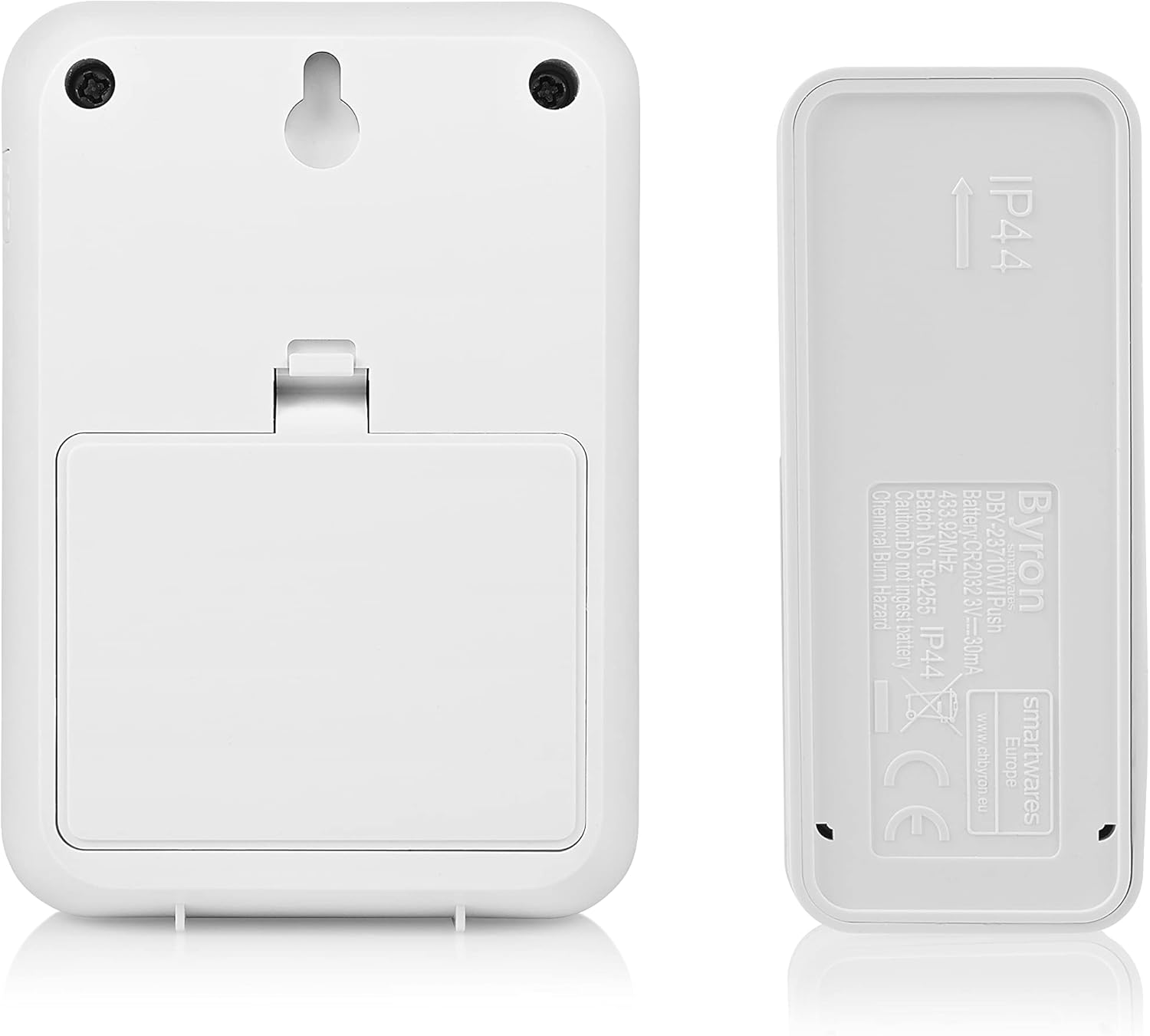
Şekil 2: Arka view of the chime unit and push button, illustrating battery compartments and mounting options.
2. Basmalı Düğmenin Montajı
Choose a suitable location near your entrance, away from direct metal surfaces which can interfere with the wireless signal. The push button is typically weather-resistant (IP44 rated).
- Vidaların Kullanımı: Mark the desired mounting holes, drill pilot holes if necessary, and secure the push button using the provided screws and wall plugs.
- Using Adhesive Pad: Clean the mounting surface thoroughly. Peel off the protective film from the adhesive pad and firmly press the push button onto the surface for at least 30 seconds.
3. Zil Ünitesinin Konumlandırılması
Place the chime unit in a central location within your home where the sound can be easily heard. Consider the maximum wireless range of 150 meters. Avoid placing it near large metal objects or other electronic devices that might cause interference.

Figure 3: Close-up of the push button, showing the clear nameplate cover.
4. Eşleştirme (gerekirse)
Most Byron doorbell kits come pre-paired. If your chime does not ring when the push button is pressed, you may need to pair them:
- On the chime unit, locate the pairing button (often a small button inside the battery compartment or on the side).
- Press and hold the pairing button for a few seconds until an indicator light flashes or a sound is heard.
- Within 10 seconds, press the push button. The chime unit should ring, indicating successful pairing.
- Eşleştirme başarısız olursa işlemi tekrarlayın.
Kullanım Talimatları
1. Değişen Melodiler
Your doorbell kit offers 16 different melodies. To change the melody:
- Locate the melody selection button on the chime unit. This is often a small button on the side or front.
- Mevcut melodiler arasında geçiş yapmak için düğmeye art arda basın. Seçtiğiniz her melodi zil sesiyle çalacaktır.
- Stop pressing when you hear your desired melody. It will be saved automatically.

Şekil 4: Yan view of the chime unit, indicating the location of control buttons.
2. Sesi Ayarlama
To adjust the volume level of the chime unit:
- Locate the volume control button on the chime unit. This might be a dedicated button or integrated with the melody selection.
- Press the button to cycle through different volume levels (e.g., High, Medium, Low, Mute).
- Select the volume level that best suits your needs.
Bakım
- Temizlik: Cihazları yumuşak, kuru bir bezle silin. Aşındırıcı temizleyiciler veya çözücüler kullanmayın.
- Pil Değişimi:
- If the push button stops working or its range decreases, replace the battery (e.g., CR2032).
- If the chime unit's sound becomes weak or it stops ringing (and it's battery-operated), replace its batteries (e.g., AA).
- Always replace all batteries at the same time and ensure correct polarity.
- Çevre Koruma: Elektrikli aletleri ayrıştırılmamış belediye atıklarıyla birlikte atmayın. Ayrı toplama tesisleri kullanın. Mevcut toplama sistemleriyle ilgili bilgi için yerel yönetiminizle iletişime geçin.
Sorun giderme
| Sorun | Olası Neden | Çözüm |
|---|---|---|
| Chime does not ring when push button is pressed. |
|
|
| Chime rings intermittently or has reduced range. |
|
|
| Chime volume is too low or too high. | Ses ayarının ayarlanması gerekiyor. | Adjust the volume using the volume control button on the chime unit. |
Özellikler
| Özellik | Detay |
|---|---|
| Model Numarası | DBY-22321NP |
| Boyutlar (U x G x Y) | 2.91 x 7 x 10.05 cm (Chime Unit); (Push Button dimensions not specified, but implied to be smaller) |
| Ağırlık | 104 grams (total kit) |
| kablosuz Menzil | 150 metreye kadar (açık alan) |
| Melodiler | 16 seçilebilir melodi |
| Ses Seviyeleri | Ayarlanabilir |
| Power Supply (Push Button) | Battery (e.g., CR2032, included) |
| Power Supply (Chime Unit) | Battery (e.g., 3x AA, required) or Plug-in (model dependent) |
| Cilttage | 4.5 Volts (for battery-operated chime) |
| IP Rating (Push Button) | IP44 (hava koşullarına dayanıklı) |
Garanti ve Destek
Byron products are manufactured to high quality standards. This product is covered by a standard manufacturer's warranty against defects in materials and workmanship. Please refer to the warranty card included in your package or visit the official Byron webAyrıntılı garanti şartları ve koşulları için siteyi ziyaret edin.
For technical support, troubleshooting assistance, or to inquire about spare parts, please contact Byron customer service through their official website or the contact information provided with your purchase. When contacting support, please have your product model number (DBY-22321NP) and purchase details ready.
Daha fazla bilgi ve destek için şu adresi ziyaret edebilirsiniz: www.byron.com