
giriiş
The Autel PowerScan PS100 is a versatile diagnostic tool designed for testing electrical systems in 6 to 30 volt vehicles. It provides a comprehensive solution for various electrical tests, including voltage and polarity testing, continuity testing, signal circuit testing, component activation, and short circuit location. This manual provides instructions for the proper use and maintenance of your PowerScan PS100.
Paket İçeriği
Verify that all items are present in your PowerScan PS100 kit:
- Autel PowerScan PS100 Unit
- 20ft Uzatma Kablosu
- Pil Klipsi Seti
- Araç Güç Adaptörü
- Kullanıcı Kılavuzu
- Koruyucu Kılıf

Image: Contents of the Autel PowerScan PS100 kit.
Ürün Bittiview (Bileşenler)
Familiarize yourself with the main components of the PowerScan PS100:
- Prob İpucu: Used for making contact with circuits.
- Head Lights: Çalışma alanını aydınlatır.
- Red/Green Polarity Indicator: LEDs indicating positive (red) or negative (green) circuits.
- LCD Ekran: Hacmi gösterirtage, resistance, and other test results.
- Devre Kesicinin Sıfırlanması: Resets the internal circuit breaker after an overload.
- Güç düğmesi: Controls power to the probe tip for component activation.
- Mod Düğmesi: Cycles through different testing modes.
- Konuşmacı: Provides audible tones for certain test results.
- Adaptör: Connects the main unit to the power source.
- Auxiliary Ground Lead: Provides an additional ground connection for testing.

Image: Labeled components of the PowerScan PS100.
Güvenlik Bilgileri
Always observe the following safety precautions when using the PowerScan PS100:
- Uygun göz koruması kullanın.
- Do not use the tool if the cable or unit is damaged.
- Ensure proper ventilation when working on vehicles.
- Hareketli motor parçalarıyla temastan kaçının.
- Do not connect the tool to voltages exceeding 30 volts.
- The tool is equipped with a circuit breaker for overload protection. If the circuit breaker trips, reset it before continuing.
Kurulum ve Bağlantı
To begin using the PowerScan PS100:
- Connect the red battery clip to the positive (+) terminal of the vehicle's battery.
- Connect the black battery clip to the negative (-) terminal of the vehicle's battery or a good chassis ground.
- The tool will power on automatically once connected.
- Before testing any circuit or component, perform a quick self-check by flipping the power switch forward and backward. The LED lights and tone should respond, indicating proper operation.

Image: Performing a quick self-test on the PowerScan PS100.
Çalışma Modları
The PowerScan PS100 features four primary operating modes, accessible by pressing the Mod Düğmesi:
- DC Hacmitage: DC voltajını gösterir.tage with a resolution of 0.1 volts.
- AC Hacmitage: Maksimum hacmi gösterirtage, minimum hacimtage, and duty cycle of an AC signal.
- Rezistans: Measures the resistance between the probe tip and the auxiliary ground lead.
- Tone On/Off: Activates or deactivates an audible tone for test results. This is useful in dark environments.

Image: Display modes for DC Voltage, AC Hacmitage, Resistance, and Tone On/Off.
Video: An introduction to the functions of the Autel PowerScan PS100 Circuit Tester, demonstrating various operating modes.
Bileşen Etkinleştirme
The PowerScan PS100 can activate components by supplying positive or negative voltage directly to them. This allows for testing components like lights, motors, wipers, radiator fans, and relays both on and off the vehicle.
- To activate a component, connect the probe tip to the component's terminal.
- Basın Güç Anahtarı pozitif volatilite için ileriye dönüktage or backward for negative voltage.
- Observe the component's operation to determine its condition.
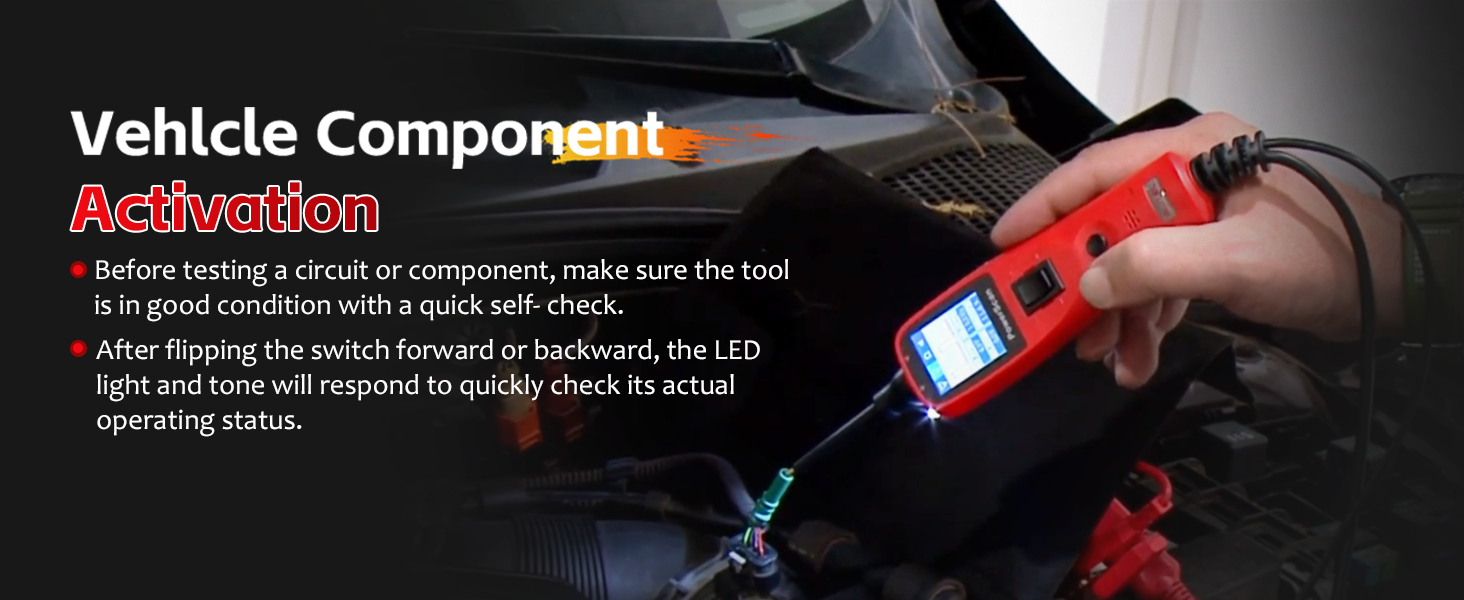
Image: Activating a vehicle component using the PowerScan PS100.
Polarity and Circuit Indication
The tool provides visual and audible indications for circuit polarity:
- When the probe tip contacts a positive circuit, kırmızı LED illuminates, and a high-pitched tone sounds.
- When the probe tip contacts a negative circuit (ground), the yeşil LED illuminates, and a low-pitched tone sounds.
- If the circuit is açık, neither LED will light.

Image: Red and Green Polarity LEDs indicating circuit status.
Short Circuit Detection and Protection
The PowerScan PS100 is designed to help locate short circuits and includes built-in protection:
- When a short circuit is detected, the tool's internal circuit breaker will trip to protect the device and the vehicle's electrical system.
- To reset the circuit breaker, press the Devre Kesici Sıfırlama düğme.
- Use the tool to trace the short circuit by following the change in voltage readings or LED indications.
Video: Demonstrating the circuit breaker reset function on the Autel PowerScan PS100.
Uzatma kablosu
The included 20-foot (6-meter) extension cable provides extended reach, allowing you to test circuits across various parts of the vehicle without needing to reposition the power source connection.

Image: The 20-foot extension cable for enhanced accessibility.
Uygulamalar
The Autel PowerScan PS100 is compatible with 6 to 30 volt electrical systems, making it suitable for a wide range of vehicles and applications, including:
- Arabalar
- SUV'lar
- Motosikletler
- Kamyonlar
- Otobüsler
- Steamships (with compatible voltage sistemleri)

Image: Wide application range of the PowerScan PS100.
Bakım
To ensure the longevity and proper functioning of your PowerScan PS100:
- Üniteyi yumuşak, damp bezle silin. Aşındırıcı temizleyiciler veya çözücüler kullanmayın.
- Store the tool in its protective case when not in use to prevent damage.
- Prob ucunu temiz ve kalıntılardan arındırılmış halde tutun.
- Aleti aşırı sıcaklıklara veya neme maruz bırakmaktan kaçının.
Sorun giderme
If you encounter issues with your PowerScan PS100, consider the following:
- Güç Yok: Ensure the battery clips are securely connected to the vehicle's battery terminals and that the battery has sufficient charge (6-30V).
- Okuma Yok: Check that the probe tip is making good contact with the circuit. Verify the tool is in the correct operating mode.
- Devre kesici sık sık atıyor: This indicates a short circuit or an overload. Identify and resolve the underlying electrical issue before continuing to test. Reset the circuit breaker after each trip.
- Yanlış Okumalar: Ensure all connections are clean and secure. The vehicle's battery voltage should be stable.
Özellikler
| Özellik | Şartname |
|---|---|
| Marka | Autel |
| Örnek | Autel PowerScan PS100 |
| Güç Kaynağı | Battery Powered (from vehicle) |
| Çalışma Hacmitage | 6 - 30 Volt DC'ye |
| Ölçüm Türü | Voltmetre |
| Ürün Ağırlığı | 1 Pound |
| Minimum Çalışma Hacmitage | 6 Volt |
| Üst Sıcaklık Derecesi | 60 Derece Santigrat |
| Uyumlu Cihazlar | Vehicles with 6 to 30 volt electrical systems |
| Ürün Boyutları | 14 x 8 x 10 inç |
Destek ve Garanti
For technical assistance, product inquiries, or warranty information, please refer to the official Autel website or contact Autel customer support directly. Details can typically be found on the product packaging or within the included documentation.