
GALAYOU G2
GALAYOU İç Mekan Güvenlik Kamerası 2K (Model G2) - Kullanım Kılavuzu
Your comprehensive guide to setting up and using your GALAYOU G2 camera.
1. Giriş
The GALAYOU Indoor Security Camera 2K, Model G2, is designed to provide comprehensive home surveillance with advanced features for monitoring pets, babies, elders, or general home security. It offers 2K super HD live streaming, 360-degree coverage, intelligent motion detection, enhanced night vision, and two-way audio communication. This manual will guide you through the setup, operation, and maintenance of your G2 camera.
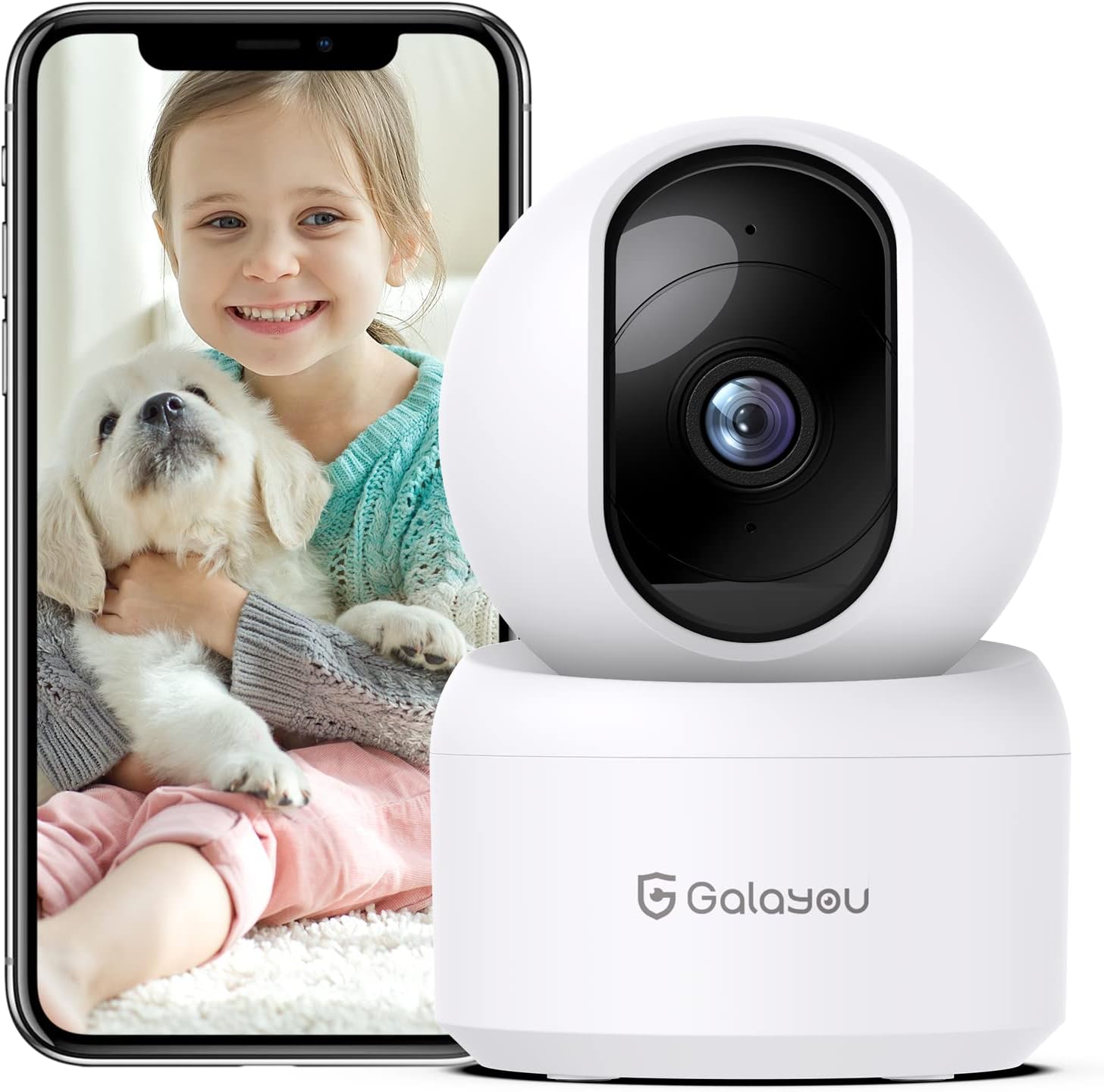
Image: The GALAYOU G2 Indoor Security Camera, a white dome-shaped device, shown next to a smartphone displaying a live feed of a child holding a puppy, illustrating its use for pet and baby monitoring.
2. Paket İçeriği
Lütfen paketinizde tüm öğelerin mevcut olduğundan emin olun:
- Camera body (GALAYOU G2)
- Type-C Cable + USB Adapter
- Montaj Vidaları
- Kurulum Kılavuzu
3. Ürün Bittiview
The GALAYOU G2 camera features a compact design with advanced functionalities for indoor security.
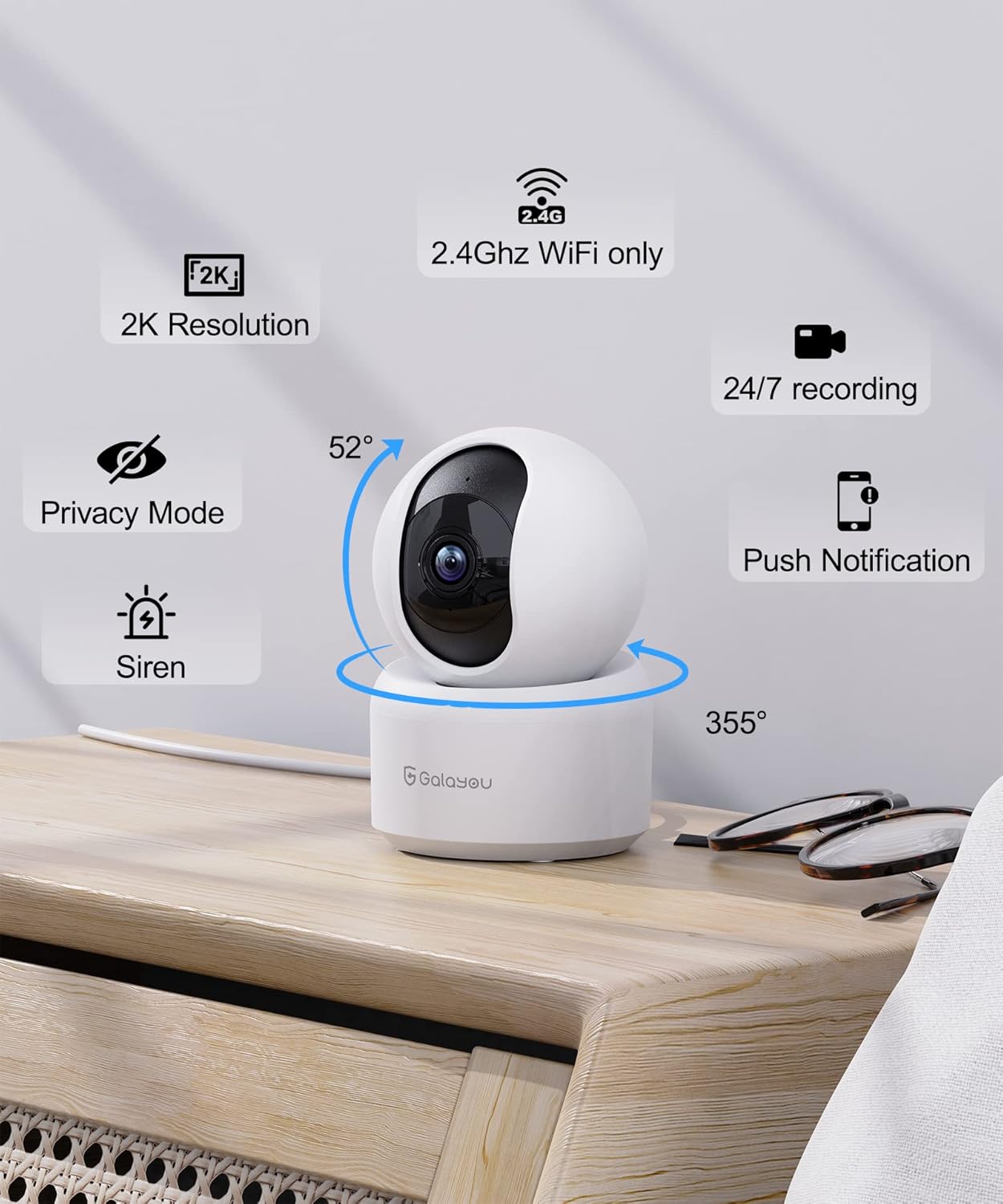
Resim: Ayrıntılı view of the GALAYOU G2 camera on a wooden surface, with icons illustrating its key features: 2K Resolution, 2.4GHz WiFi compatibility, 24/7 recording, Privacy Mode, Siren, Push Notifications, and its 355° horizontal and 52° vertical rotation capabilities.
Temel Özellikler:
- 2K Çözünürlük ve 360° Kapsama Alanı: Provides super HD live stream with 355° horizontal and 52° vertical rotation for full room coverage.
- Intelligent Motion Detection & Siren Alarm: Sends instant alerts and records 10-second video clips upon motion detection, with an optional siren to deter intruders.
- Enhanced Night Vision & Two-Way Audio: Equipped with 4pcs 940nm infrared lights for clear night vision up to 32ft, and a built-in microphone and speaker for two-way communication.
- Optional Cloud & 24/7 SD Card Storage: Supports local storage via SD card (up to 128GB, not included) and a 30-day trial cloud storage for continuous recording and data safety.
- Çoklu cihaz ViewPaylaşım ve İçerik: Allows adding multiple cameras to the app and viewing up to 4 live feeds simultaneously. Share access with up to 3 other devices.
- Sesli Asistan Entegrasyonu: Amazon Alexa ve Google Assistant ile uyumlu olup, rahat sesli kontrol imkanı sunar.
4. Özellikler
| Özellik | Detay |
|---|---|
| Model Adı | G2 |
| İç/Dış Mekan Kullanımı | Kapalı |
| Güç Kaynağı | Kablolu Elektrikli (5 Volt, 2.5 watt) |
| Bağlantı Protokolü | Wi-Fi (sadece 2.4 GHz) |
| Denetleyici Türü | Amazon Alexa/Google Asistan |
| Montaj Tipi | Duvara Montaj |
| Video Yakalama Çözünürlüğü | 1296p (2K) |
| Renk | Beyaz |
| Boyutlar (U x G x Y) | 2.83 x 2.83 x 4.29 inç |
| Ürün Ağırlığı | 10.8 ons (0.31 Kilogram) |
| Viewing Angle (Lens) | 95 Derece |
| Alanı View (Pan/Tilt) | 360 Derece |
| Gece Görüş Aralığı | 10 Metre (32ft) |
| Kare Hızı | 15 fps/s |
| Su Direnç Seviyesi | Suya dayanıklı değil |
| Fotoğraf Sensörü Teknolojisi | CMOS |
| Video Yakalama Formatı | MPEG-4 |
| Kontrol Yöntemi | Uygulama |
| Özel Özellik | Siren |
5. Kurulum Kılavuzu
Follow these steps to set up your GALAYOU G2 camera and connect it to your Wi-Fi network.
5.1 Download the Wansview Bulut Uygulaması
- Scan the QR code provided in the Quick Installation Guide or search for "Wansview Cloud" in the Google Play Store (for Android) or Apple App Store (for iOS).
- "Wans" uygulamasını indirin ve kurun.view Cloud" application on your smartphone.

Image: A visual guide demonstrating the steps for quick installation, including downloading the Wansview Cloud app, registering an account, plugging in the camera, and completing Wi-Fi configuration.
5.2 Register and Log In to Your Account
- Wans'ı açview Bulut uygulaması.
- Tap on "Sign up" to create a new account.
- Enter your email address and create a strong password (8-16 characters, including digits, uppercase letters, lowercase letters, and special characters).
- You will receive a verification code via email. Enter this code into the app to complete registration.
- Once registered, log in to your new Wansview bulut hesabı.
Video: A tutorial demonstrating how to download the Wansview Cloud App, register an account, and log in. This video guides users through the initial setup process for the camera's accompanying application.
5.3 Wi-Fi'ye Bağlan
- Plug in your GALAYOU G2 camera using the provided Type-C cable and USB adapter. The camera will power on.
- Ensure your smartphone is connected to a 2.4GHz Wi-Fi network. The G2 camera does not support 5GHz Wi-Fi.
- Wans'taview Cloud app, tap the "+" icon to add a new device.
- Follow the on-screen instructions in the app to complete the Wi-Fi configuration. This typically involves scanning a QR code displayed on your phone with the camera lens.
6. Kullanım Talimatları
Once your camera is set up, you can utilize its various features through the Wansview Bulut uygulaması.
6.1 Canlı View ve Pan/Tilt Kontrolü
- Wans'ı açview Cloud app and select your G2 camera from the device list to access the live view.
- Use the directional controls within the app to remotely pan (355° horizontal) and tilt (52° vertical) the camera lens, allowing you to view Odanızın farklı alanları.
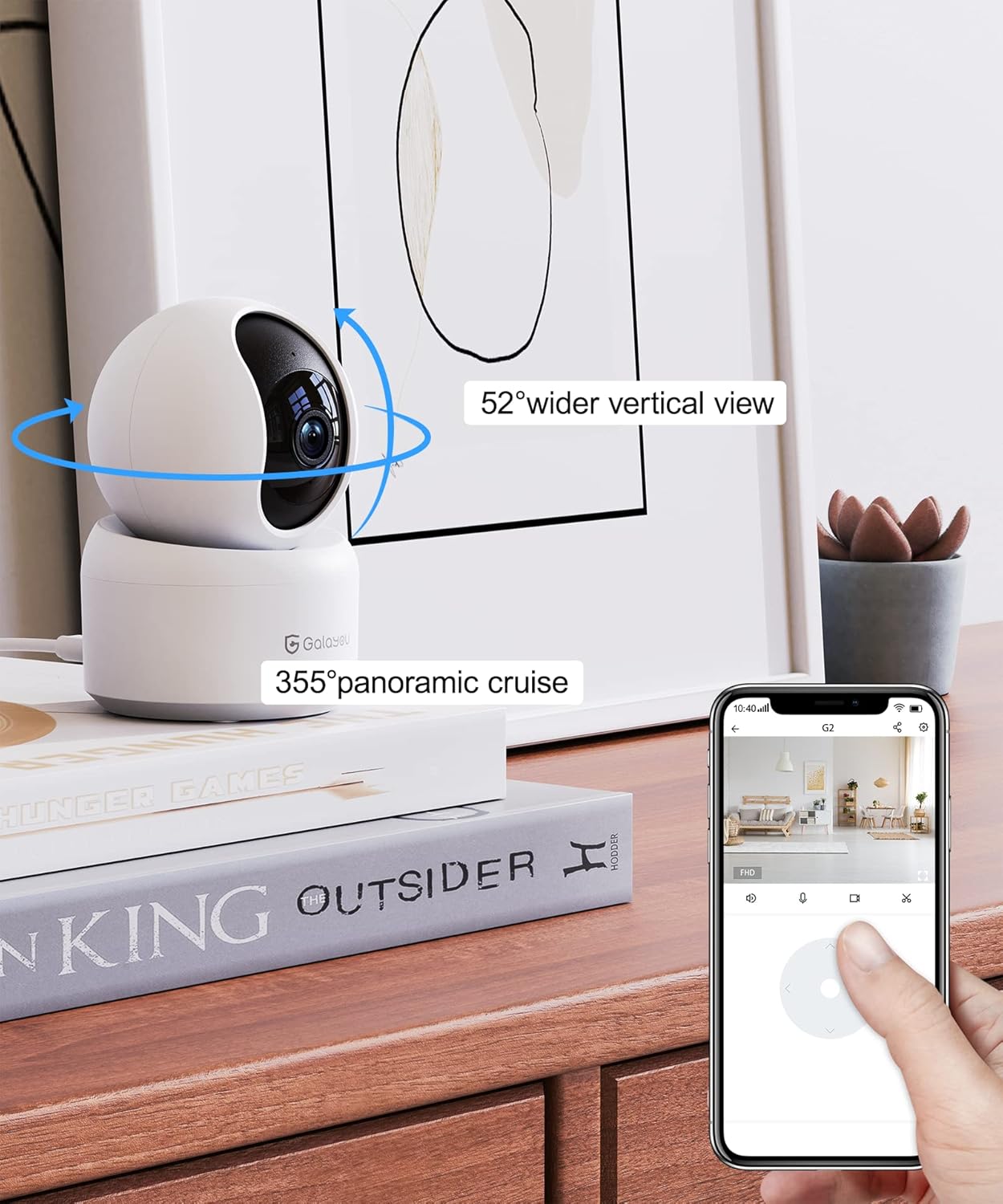
Image: A smartphone screen displaying the Wansview Cloud app's controls for the GALAYOU G2 camera, demonstrating its 355° panoramic cruise and 52° wider vertical view Yetenekler.
Görüntü: Panoramik bir view of a modern living space, illustrating the extensive coverage provided by the GALAYOU G2 camera's 355° pan and 52° tilt viewyetenekleri geliştirme.
6.2 Motion Detection and Siren Alarm
- Enable motion detection in the app settings to receive instant alert notifications on your phone when movement is detected.
- The camera will automatically record 10-second video clips of detected motion and save them to the app.
- Activate the siren feature through the app to emit an audible alarm when motion is detected, serving as a deterrent.

Image: A smartphone screen displaying a "Motion alarm" notification from the Wansview Cloud app, overlaid on a scene of a child in a crib, indicating real-time alerts for motion in customized areas.

Image: An illustration of the camera's siren feature, showing an intruder being startled by the camera's alarm, highlighting its deterrent capability.
6.3 Gelişmiş Gece Görüşü
- The camera automatically switches to night vision mode in low-light conditions, providing clear black and white images up to 32 feet (10 meters).

Image: A dark room scene with a child sleeping, demonstrating the camera's enhanced night vision capabilities and two-way audio feature, allowing communication even in low light.
Image: A clear, black and white image of a baby sleeping in a crib at night, demonstrating the camera's ability to provide clear visuals in low-light conditions.
6.4 İki Yönlü Ses
- Use the built-in microphone and speaker to communicate with family members or pets through the camera from anywhere.

Image: A scene depicting a puppy in a living room, with speech bubbles indicating two-way audio communication between a user and the pet via the camera.
6.5 Depolama Seçenekleri
- SD Kart Depolama: Insert a Micro SD card (up to 128GB, not included) into the camera's slot for 24/7 continuous recording.
- Bulut Depolama: Utilize the 30-day trial cloud storage service to securely save alert videos and access them anytime, anywhere.

Image: The GALAYOU G2 camera positioned with a hand inserting an SD card, illustrating local storage. Above, a cloud icon with an arrow points upwards, representing the encrypted 30-day trial cloud storage option.

Image: A graphic illustrating the flow of video data from the camera to both local SD card storage (up to 128GB) and cloud storage, emphasizing the 30-day trial experience.
6.6 Çoklu Cihaz ViewPaylaşım ve Ödünç Verme
- Add multiple GALAYOU cameras to your Wansview Cloud app to monitor different areas simultaneously. The app supports displaying up to 4 live video feeds at once.
- Share access to your camera's live feed and recordings with up to 3 other devices, allowing family members to view.
Image: A smartphone screen showing the Wansview Cloud app interface with multiple camera feeds displayed simultaneously, demonstrating the multi-device viewyeteneği.

Image: A visual representation of the device sharing feature within the Wansview Cloud app, showing how users can invite others to view the camera feed, enabling shared monitoring.
6.7 Sesli Asistan Entegrasyonu
- Connect your GALAYOU G2 camera with Amazon Alexa or Google Assistant for hands-free control.
- Use voice commands such as "Alexa, show me the living room camera" to view Uyumlu akıllı ekranlarda canlı yayın.

Image: The GALAYOU G2 camera positioned next to an Amazon Echo Show, demonstrating its compatibility with Alexa. A speech bubble shows a user asking Alexa to display the living room camera.

Image: A woman in a kitchen interacting with an Amazon Echo Show, which displays the camera feed, illustrating the convenience of voice control with Alexa for monitoring.
7. Bakım
- Temizlik: Fotoğraf makinesinin objektifini ve gövdesini yumuşak, kuru bir bezle nazikçe silin. Sıvı temizleyiciler veya aşındırıcı malzemeler kullanmaktan kaçının.
- Donanım Yazılımı Güncellemeleri: Wans'ı düzenli olarak kontrol edin.view Cloud app for available firmware updates to ensure optimal performance and security.
- Atama: Kameranın sabit, kuru bir iç ortamda, doğrudan güneş ışığından, ısı kaynaklarından ve güçlü elektromanyetik alanlardan uzakta yerleştirildiğinden emin olun.
- Güç Kaynağı: Kameraya zarar vermemek için lütfen yalnızca birlikte verilen güç adaptörünü kullanın.
8. Sorun Giderme
Yaygın Sorunlar ve Çözümleri:
- Kamera Çevrimdışı:
- Kameranın açık olduğundan ve güç adaptörünün güvenli bir şekilde bağlı olduğundan emin olun.
- Ensure your Wi-Fi router is working correctly and the camera is within range.
- Wi-Fi ağınızın 2.4 GHz olduğunu doğrulayın. Kamera 5 GHz ağları desteklemiyor.
- Kamerayı ve yönlendiricinizi yeniden başlatın.
- Wi-Fi'ye bağlanılamıyor:
- Confirm you are connecting to a 2.4GHz Wi-Fi network.
- Uygulamaya girdiğiniz Wi-Fi şifresinin doğru olduğundan emin olun.
- Place the camera closer to the router during initial setup.
- Reset the camera (refer to the Installation Guide for reset instructions) and try the setup process again.
- Kötü Video Kalitesi:
- İnternet bağlantı hızınızı kontrol edin. 2K yayın için istikrarlı ve hızlı bir bağlantı gereklidir.
- Kamera lensinin temiz ve toz veya lekelerden arınmış olduğundan emin olun.
- Işık koşullarını en iyi hale getirmek için kameranın konumunu ayarlayın.
- Hareket Algılama Çalışmıyor:
- Verify that motion detection is enabled in the Wansview Bulut uygulaması ayarları.
- Adjust the motion detection sensitivity settings.
- Kameranın görüşünü engelleyen herhangi bir şey olmadığından emin olun. view in the detection zone.
9. Garanti ve Destek
GALAYOU products typically come with a manufacturer's warranty. Please refer to the original packaging or the official GALAYOU webBelirli garanti şartları ve koşulları için siteyi ziyaret edin.
For technical support, troubleshooting assistance, or any inquiries regarding your GALAYOU G2 camera, please contact GALAYOU customer service through their official channels. You may find contact information on the product packaging, the Wansview Cloud app, or the GALAYOU brand webalan.
Üretici: GALAYOU
Marka Webalan: Visit the GALAYOU Store on Amazon
Ask a question about this manual
Ask about setup, troubleshooting, compatibility, parts, safety, or missing instructions. Manuals+ will review the question and use this page’s manual context to help answer it.