
1. Giriş
The UMLIFE STC-1000 is a versatile digital temperature controller designed for precise temperature management in various applications. This device features a clear LED display, NTC 10K thermistor sensor, and dual relay outputs for both heating and cooling control. This manual provides detailed instructions for installation, operation, and maintenance to ensure optimal performance and longevity of your temperature controller.
2. Ürün Bittiview
2.1 Temel Özellikler
- Digital LED display for clear temperature readings.
- Wide temperature measurement and control range: -50°C to 99°C.
- High control accuracy of 0.1°C.
- Dual relay output for simultaneous heating and cooling control.
- Waterproof NTC 10K thermistor sensor for reliable measurements in various environments.
- Sıcaklık kalibrasyon fonksiyonu.
- Delay start protection for cooling control.
- ABS flame-retardant shell for enhanced safety.
2.2 Bileşenler ve Ekran
Familiarize yourself with the main components and display interface of the STC-1000 controller.

Şekil 1: Front panel of the STC-1000 controller showing the digital display, power switch, UP button, Setting button, and DOWN button.
- Digital Display Window: Shows current temperature and parameter settings.
- Güç düğmesi: Cihazı açar veya kapatır.
- Yukarı Düğmesi (▲): Değerleri artırır veya menülerde gezinmeyi sağlar.
- AŞAĞI Düğmesi (▼): Değerleri azaltır veya menülerde gezinir.
- Setting Button (S): Parametre ayarlama moduna girer.
- Cool Indicator: Illuminates when cooling relay is active.
- Isı Göstergesi: Illuminates when heating relay is active.

Şekil 2: Physical dimensions of the STC-1000 controller and the included 1-meter NTC 10K waterproof sensor probe.
3. Özellikler
| Parametre | Değer |
|---|---|
| Örnek | STC-1000 |
| Sıcaklık Ölçüm Aralığı | -50°C ila 99°C |
| Sıcaklık Kontrol Aralığı | -50°C ila 110°C |
| Ölçüm Doğruluğu | ±0.2°C |
| Çözünürlük | 0.1°C |
| Kontrol Doğruluğu | ±0.1°C |
| Sensör | NTC 10K L=1M waterproof probe |
| Güç Kaynağı | Doğru Akım 12V |
| Güç Tüketimi | <3W |
| Röle Kontak Kapasitesi | Cool (10A/220VAC), Heat (10A/220VAC) |
| Ortam Sıcaklığı | 0°C ila 60°C |
| Depolama Sıcaklığı | -30°C ila 75°C |
| Bağıl nem | 20-84% |
| Montaj Ölçüsü | 71mm x 29mm |
| Ürün Boyutları | 75mm x 34.5mm x 85mm |
| Ürün Ağırlığı | 7 ons (yaklaşık 198g) |
| Malzeme | Akrilonitril Bütadien Stiren (ABS) |
4. Kurulum ve Kurulum
Önemli Güvenlik Bildirimi: Installation should be performed by qualified personnel. Ensure power is disconnected before wiring to prevent electric shock. Strictly distinguish between power supply, sensor, and relay interfaces. Maintain proper distance between sensor down-lead and power wires to avoid interference.
4.1 Kablolama Şeması
Refer to the following diagram for correct wiring connections. This model operates on DC 12V power supply.
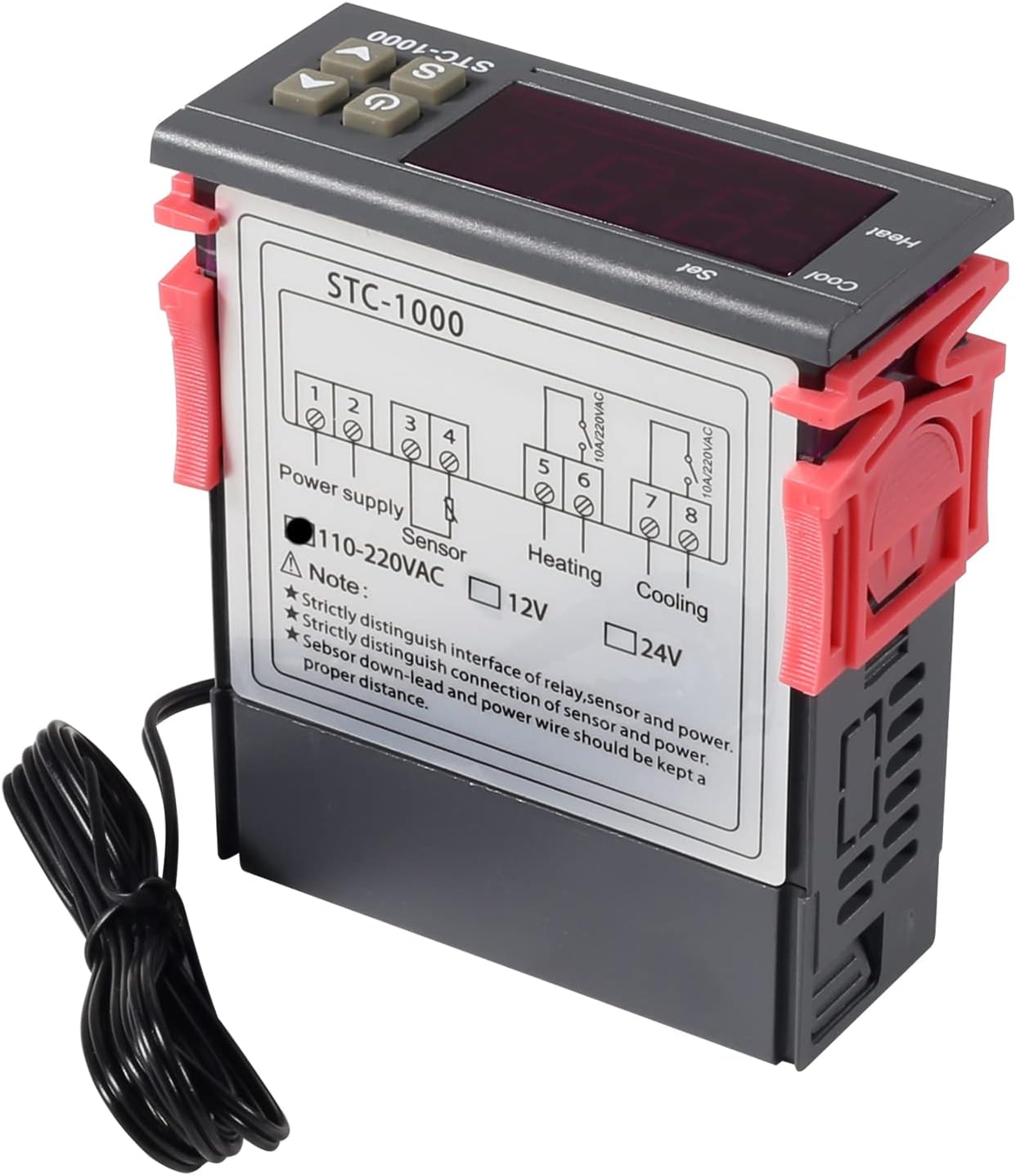
Şekil 3: Wiring diagram for the STC-1000 12V temperature controller. Connections are for power supply, NTC sensor, heating relay, and cooling relay.
- Terminal 1 ve 2: Power Supply (DC 12V).
- Terminal 3 ve 4: NTC Sensor connection.
- Terminal 5 ve 6: Heating Relay Output (Connect to heating device).
- Terminal 7 ve 8: Cooling Relay Output (Connect to cooling device).
Ensure all connections are secure and insulated. Verify the power supply voltage matches the controller's requirement (DC 12V for this model).
4.2 Montaj
The STC-1000 is designed for panel mounting. Cut an opening of 71mm x 29mm in your panel. Insert the controller and secure it using the provided clips or mounting brackets.
5. Kullanım Talimatları
The STC-1000 operates in Celsius only. It cannot be switched to Fahrenheit.
5.1 Güç Açma/Kapatma
- Basın Güç Anahtarı button (marked with ⏻) to turn the controller on or off.
5.2 Sıcaklık Parametrelerinin Ayarlanması
The controller has two main temperature settings: the Set Temperature (ST) ve Difference Temperature (DT), also known as hysteresis.
- İle view the Set Temperature (ST): Kısaca basın Setting (S) Düğmeye basın. Ekran, ayarlanmış mevcut sıcaklığı gösterecektir.
- To modify the Set Temperature (ST):
- Basılı tutun Setting (S) button for approximately 3 seconds until the display flashes.
- Kullanın YUKARI (▲) or AŞAĞI (▼) buttons to adjust the desired set temperature.
- Basın Güç Anahtarı button to save the setting and exit, or wait for 10 seconds for it to save automatically.
5.3 Advanced Parameter Settings (F1-F4)
Gelişmiş parametrelere erişmek ve bunları değiştirmek için:
- Basılı tutun Setting (S) button for approximately 3 seconds until the display flashes.
- Ekran yanıp sönerken, tuşuna basın. Setting (S) button again (do not hold) to cycle through parameters F1, F2, F3, F4.
- Kullanın YUKARI (▲) or AŞAĞI (▼) Seçilen parametrenin değerini ayarlamak için düğmeler.
- Basın Güç Anahtarı button to save the setting and exit, or wait for 10 seconds for it to save automatically.
| Parametre | Tanım | Menzil | Varsayılan |
|---|---|---|---|
| F1 | Difference Temperature (Hysteresis): The difference between the set temperature and the temperature at which the relay switches off. | 0.3°C ila 10°C | 2.0°C |
| F2 | Highest Set Point Limit: Limits the maximum adjustable set temperature. | Set Temp to 110°C | 110°C |
| F3 | Lowest Set Point Limit: Limits the minimum adjustable set temperature. | -50°C to Set Temp | -50°C |
| F4 | Sıcaklık Kalibrasyonu: Adjusts the temperature reading to match a known accurate thermometer. | -10°C ila 10°C | 0.0°C |
5.4 Heating and Cooling Modes
The STC-1000 automatically switches between heating and cooling based on the set temperature (ST) and difference temperature (DT).
- Soğutma Modu: If the current temperature is higher than (ST + DT), the cooling relay activates. It deactivates when the temperature drops to ST.
- Isıtma Modu: If the current temperature is lower than (ST - DT), the heating relay activates. It deactivates when the temperature rises to ST.
6. Bakım
- Temizlik: Wipe the controller's surface with a soft, dry cloth. Do not use abrasive cleaners or solvents.
- Sensör Bakımı: Ensure the NTC sensor probe is clean and free from debris. While waterproof, avoid unnecessary physical damage to the probe or cable.
- Bağlantılar: Periodically check wiring connections for tightness and signs of corrosion.
- Çevre: Operate the controller within the specified ambient temperature and humidity ranges to ensure optimal performance and lifespan.
7. Sorun Giderme
| Sorun | Olası Neden | Çözüm |
|---|---|---|
| Display shows "EE" | Sensor error or open circuit. | Check sensor connection. Replace sensor if damaged. |
| Display shows "HHH" | Temperature exceeds upper limit of measurement range. | Ensure the environment temperature is within the sensor's range (-50°C to 99°C). |
| Display shows "LLL" | Temperature falls below lower limit of measurement range. | Ensure the environment temperature is within the sensor's range (-50°C to 99°C). |
| Denetleyici açılmıyor | Güç kaynağı yok veya yanlış voltajtage. | Check power connections and ensure DC 12V is supplied. |
| Heating/Cooling not activating | Incorrect temperature settings (ST, DT), wiring error, or device malfunction. | Verify ST and DT settings. Check heating/cooling device wiring. Ensure the device is within operating parameters. |
8. Garanti ve Destek
UMLIFE products are manufactured to high-quality standards. For warranty information or technical support, please contact UMLIFE customer service through your purchase platform or visit the official UMLIFE website. Please have your product model (STC-1000 12V) and purchase details ready when contacting support.
Daha fazla yardım için ayrıca şuraya da başvurabilirsiniz: UMLIFE Store on Amazon.