
1. Giriş
This manual provides essential information for the safe and efficient use of your Konka 32 Inch HD Standard TV, model KE32MS314. Please read these instructions thoroughly before operating the television and retain them for future reference.
2. Güvenlik Bilgileri
- Güç Kaynağı: Televizyonun 100-240V, 50/60Hz AC güç kaynağına bağlı olduğundan emin olun.
- Havalandırma: Havalandırma açıklıklarını kapatmayın. Televizyonun etrafında yeterli hava akışı için yeterli alan bırakın.
- Su ve Nem: Televizyonunuzu yağmura veya neme maruz bırakmayın. Vazo gibi sıvı dolu nesneleri televizyonun üzerine koymayın.
- Isı Kaynakları: Televizyonu radyatörler, ısıtma petekleri, sobalar veya diğer cihazlar (dahil olmak üzere) gibi ısı kaynaklarından uzak tutun. amp(ısı üreten)
- Temizlik: Temizlemeden önce televizyonu prizden çıkarın. Yumuşak, kuru bir bez kullanın. Sıvı temizleyiciler veya aerosol temizleyiciler kullanmayın.
- Yıldırım: Yıldırımlı havalarda veya uzun süre kullanılmayacaksa televizyonun fişini çekin.
- Servis: Bu ürüne kendiniz servis vermeye çalışmayın. Tüm servis işlemleri için kalifiye servis personeline başvurun.
3. Paket İçeriği
Paketin içinde tüm öğelerin mevcut olduğundan emin olun:
- Konka KE32MS314 32-Inch HD LED TV
- Uzaktan kumanda
- Güç Kablosu
- Kullanım Kılavuzu (bu belge)
- Desktop Stand (if included)
4. Kurulum
4.1 Paketin açılması
Carefully remove the TV and all accessories from the packaging. Keep the packaging materials for future transport or storage.
4.2 Stand Kurulumu (İsteğe Bağlı)
If you are using the desktop stand, attach it securely to the bottom of the TV using the provided screws. Ensure the stand is stable before placing the TV on a flat surface.
4.3 Duvara Montaj (Opsiyonel)
If you plan to wall-mount the TV, refer to the instructions provided with your wall-mount bracket. Ensure the bracket is compatible with the TV's VESA mounting pattern and is installed by qualified personnel.
4.4 Cihazları Bağlama
The TV offers various connection ports for external devices. Refer to the image below for port identification and connect your devices accordingly.
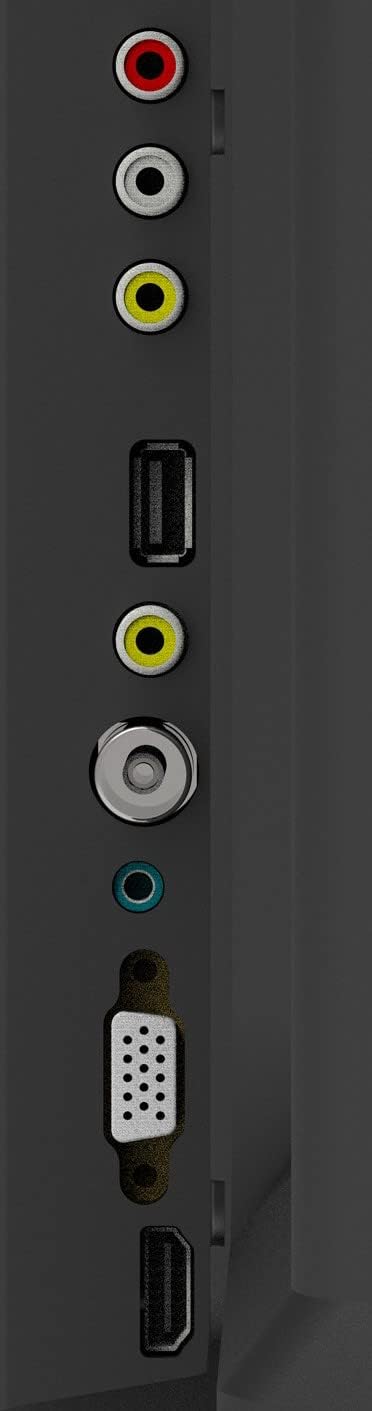
Şekil 1: TV Bağlantı Noktaları
- Anten Girişi: Connect your aerial or cable TV signal to this port.
- HDMI Girişleri (2): Connect devices such as Blu-ray players, game consoles, or set-top boxes. One HDMI input supports Audio Return Channel (ARC).
- VGA Girişi: Bilgisayarı monitör olarak kullanmak üzere bağlayın.
- Mini Component / AV Input: Connect older devices using component (YPbPr) or composite (AV) cables.
- USB Inputs (2): Medya oynatmak için USB depolama aygıtlarını bağlayın.
- Kulaklık girişi: Özel dinleme için kulaklıkları bağlayın.
5. Çalıştırma
5.1 Uzaktan Kumanda
The included remote control allows you to operate all functions of your TV. Insert two AAA batteries (not included) into the battery compartment, ensuring correct polarity.

Şekil 2: Uzaktan Kumanda Düzeni
- GÜÇ: Televizyonu açar veya kapatır.
- GİRİŞ: Selects the input source (HDMI, AV, VGA, etc.).
- Sayı Düğmeleri (0-9): Kanalları doğrudan seçin.
- SES +/-: Ses seviyesini ayarlar.
- PROG +/-: Kanalları değiştirir.
- MENÜ: Ana menüye erişir.
- Gezinme Düğmeleri (Yukarı/Aşağı/Sol/Sağ): Menü seçenekleri arasında gezinin.
- GİRİŞ: Seçimleri onaylar.
- ÇIKIŞ: Geçerli menüden veya işlevden çıkar.
- BİLGİ: Displays channel information.
- SESSİZ: Sesi kapatır veya açar.
5.2 İlk Kurulum
Upon first power-on, the TV will guide you through an initial setup process. This typically includes selecting your language, country, and performing an automatic channel scan for available broadcasts.
5.3 Temel Fonksiyonlar
- Güç Açma/Kapatma: Uzaktan kumandadaki veya televizyonun kontrol panelindeki GÜÇ düğmesine basın.
- Giriş Kaynağı Seçimi: Press the INPUT button repeatedly to cycle through available input sources, or use the menu to select.
- Ses Ayarı: VOL +/- düğmelerini kullanın.
- Kanal Seçimi: Use the PROG +/- buttons or the number buttons.
5.4 Menü Navigasyonu
Press the MENU button to access the main menu. Use the navigation buttons to move between options and ENTER to select. Adjust settings such as picture mode, sound mode, and channel settings. Press EXIT to close the menu.
5.5 Ses Modu
The TV features 5 audio modes to optimize sound for different content types:
- Standart
- Müzik
- Film
- Spor
- User (customizable settings)
6. Bakım
6.1 Ekranı Temizleme
Ekranı yumuşak, tiftiksiz bir bezle nazikçe silin. İnatçı lekeler için hafifçe silin.ampen the cloth with water or a specialized screen cleaner (ensure it's safe for LED screens) and wipe gently. Do not apply pressure or use abrasive materials.
6.2 Kabinin Temizlenmesi
Wipe the TV cabinet with a soft, dry cloth. Avoid using strong detergents or solvents, as they may damage the finish.
7. Sorun Giderme
Televizyonunuzda sorunlarla karşılaşırsanız, aşağıdaki yaygın sorunlara ve çözümlere bakın:
| Sorun | Olası Çözüm |
|---|---|
| Güç yok | Güç kablosunun televizyona ve duvar prizine sağlam bir şekilde takılı olduğundan emin olun. Prizin çalışır durumda olduğundan emin olun. |
| Görüntü yok, ancak ses mevcut | Doğru giriş kaynağının seçildiğinden emin olun. Harici cihazlara olan kablo bağlantılarını kontrol edin. |
| Ses yok ama görüntü var | Check the volume level and ensure the TV is not muted. Verify audio settings in the menu. |
| Uzaktan kumanda çalışmıyor | Pilleri değiştirin. Uzaktan kumanda ile TV'nin kızılötesi sensörü arasında herhangi bir engel olmadığından emin olun. |
| Kötü görüntü kalitesi | Check antenna connection or source device cables. Adjust picture settings in the TV menu. |
8. Özellikler
Detailed specifications for the Konka KE32MS314 TV:
| Özellik | Detay |
|---|---|
| Model Numarası | KE32MS314 |
| Ekran Boyutu | 32 inç |
| Ekran Teknolojisi | NEDEN OLMUŞ |
| Çözünürlük | 720p (HD) |
| Yenileme Hızı | 60 Hz |
| ViewAçı | 178 Derece |
| Ses Sistemi | 2 x 8W Stereophonic |
| Ses Modları | Standard, Music, Movie, Sport, User |
| Bağlantı | 2 HDMI (including ARC), 2 USB, VGA, Mini Component/AV, Antenna Input, Headphone Jack, Ethernet |
| Özel Özellikler | Flat Display, D3 Image Noise Reduction, Automatic Volume Level Maintenance |
| Desteklenen İnternet Hizmetleri | YouTube |
| Ürün Boyutları (standlı) | 73.2W x 20.7D x 47.9H cm (approx.) |
| Ürün Ağırlığı | 4.5 kilo |
9. Garanti ve Destek
For warranty information and technical support, please refer to the warranty card included with your product or contact Konka customer service. Keep your purchase receipt as proof of purchase for warranty claims.